Motor := 1; inside an IF with no ELSE is an OTL, and the Logix Structured Text manual’s own first example uses [:=] and a separate branch to avoid exactly that. Structured text for ladder people usually starts as a translation of a rung, and the rung’s OTE — which writes its bit false on every scan the rung is false — is the one thing a plain IF does not do.
That is the whole difficulty with ST for someone who thinks in rungs, and it is a single habit rather than a language. The six constructs below are the ones a working routine actually uses: assignment, IF, CASE, FOR, the timer call and the one-shot. Four of them are spelt the same on a ControlLogix and an S7-1500. The two that differ are the timer and the one-shot, and the section on each says which way.
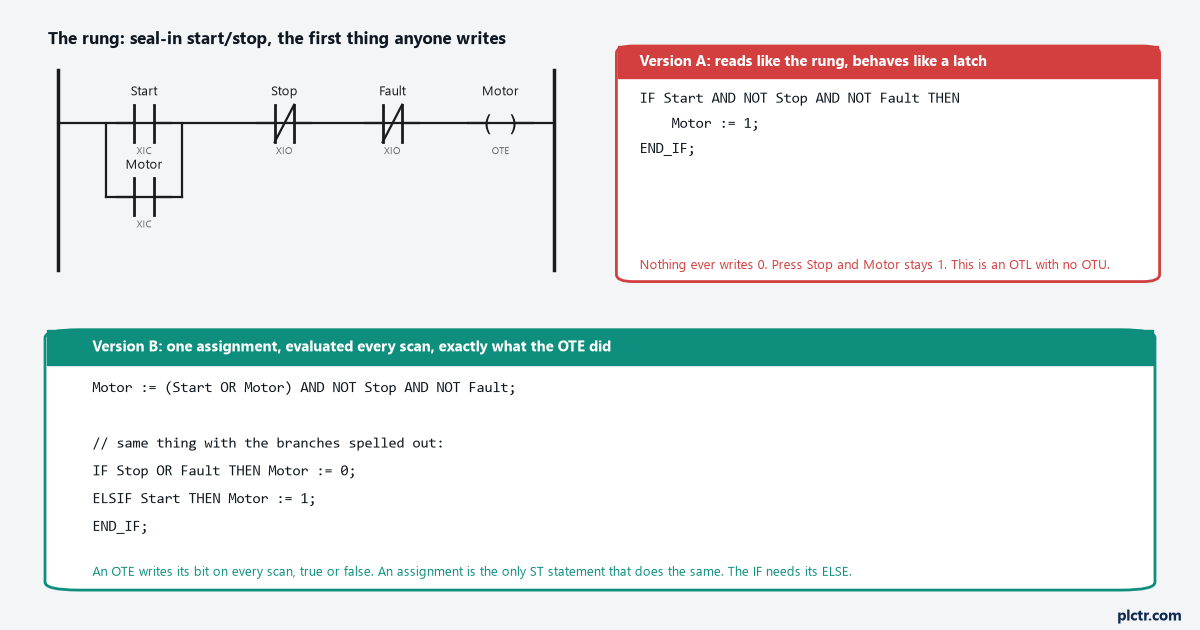
Version A compiles, runs and looks right until somebody presses Stop. Version B is one line and does what the coil did. The difference is not syntax; it is that an assignment happens whether or not anything is true.
Assignment: the OTE you have to write yourself
tag := expression; is the statement. The Logix manual’s definition of it is short — use an assignment to change the value stored within a tag — and the part to hold onto is what it does not say: nothing about conditions. An assignment executes every scan the line is reached. That is the OTE’s behaviour, and it is why the seal-in rung translates into one line, Motor := (Start OR Motor) AND NOT Stop AND NOT Fault;, which sets Motor when the expression is true and clears it when it is false, every scan, forever. The manual also has a second assignment operator that ladder has no equivalent for, and it is worth knowing before you need it. tag [:=] expression; is the non-retentive assignment. The tag is reset to zero each time the controller enters Run mode, and each time an SFC leaves the step if the SFC is configured for automatic reset. The manual uses it in its own IF...ELSE example to clear a light in the ELSE branch, so that a routine that stops being scanned does not leave the light on. On a machine that is power-cycled between shifts it is the difference between an output that comes up off and one that comes up wherever it was. Two things trip people on the first day, and both are punctuation. = is comparison and := is assignment, and IF Motor = 1 THEN is correct while IF Motor := 1 THEN is not. And every statement ends in a semicolon, including the last one before END_IF;.
Siemens SCL uses the same := and the same semicolons. Block-local tags carry a #, global ones sit in double quotes, and that is the visible difference.
IF: the rung condition, with the ELSE that ladder gave you for free
IF condition THEN statements END_IF; with optional ELSIF condition THEN branches and one optional ELSE. The S7-1200 manual states the rule that applies on both platforms: the first sequence of statements whose logical expression is true is executed, the remaining sequences are not, and if none is true the ELSE
ELSE.Read that last clause again as a ladder programmer, because it is the whole trap.
Nothing runs. Not “the output goes false”. Nothing at all, and the tag keeps its value.
An OTE on a false rung is still executed; it writes a 0. An IF whose condition is false skips its contents and leaves every tag they mention exactly as it was. So the translation of a rung with a coil is not IF condition THEN coil := 1; END_IF;. It is either the single assignment in the previous section, or an IF with an ELSE that writes the 0. The Logix manual’s own example 4 is the shape to copy: three branches, IF tank.temp > 200, ELSIF tank.temp > 100, ELSE, and every one of the three writes all three pump bits. Nothing is left to keep its old value by accident. The manual’s Siemens page adds one performance note that is also a correctness note. Using ELSIF branches means the expressions after a true one are no longer evaluated, unlike a sequence of separate IF statements. A chain of separate IFs where two conditions can both be true executes both, and the last writer wins. The ELSIF chain executes one.
One IF, one ELSE, every output written in every branch. That is the rule.
CASE: the sequencer without the SQO
CASE expression OF followed by selectors, an optional ELSE, and END_CASE;. The selectors take single values, comma-separated lists and ranges with two dots, and the Logix manual’s example is a recipe selector: 2,3: opens one pair of outlets, 4..7: another, 8,11..13: a third, and the ELSE closes all of them with [:=]. The S7-1200 manual’s form is identical down to the range syntax, 3, 5..7, 9: Statement_C;, and it allows a CASE inside an ELSE. This is where a step sequence belongs. A DINT called Step, one selector per step, the transition written as Step := 20; at the bottom of the selector that earns it. It reads top to bottom the way an SFC does and it replaces a page of EQU rungs. Two rules from the manuals. The Logix one warns against using a REAL as the selector, because a REAL value is more likely to be within a range of values than an exact match of one specific value — use a range if you must, or use an integer. And on both platforms, only one selector’s statements run per scan, so a step that needs to do something on entry does it in the previous step’s transition or with a one-shot, not by assuming two selectors will both fire.
FOR: a loop that does not spread over scans
FOR count := initial TO final BY increment DO statements END_FOR; — the same on Logix ST and SCL, and the BY clause is optional on both with an increment of 1 when omitted. The Logix manual’s example is the one everyone writes first, FOR subscript := 0 TO 31 BY 1 DO array[subscript] := 0; END_FOR;, which zeroes 32 elements in one statement. What a ladder programmer does not expect is where the time goes.
It goes nowhere else. The loop has the scan until it is done.
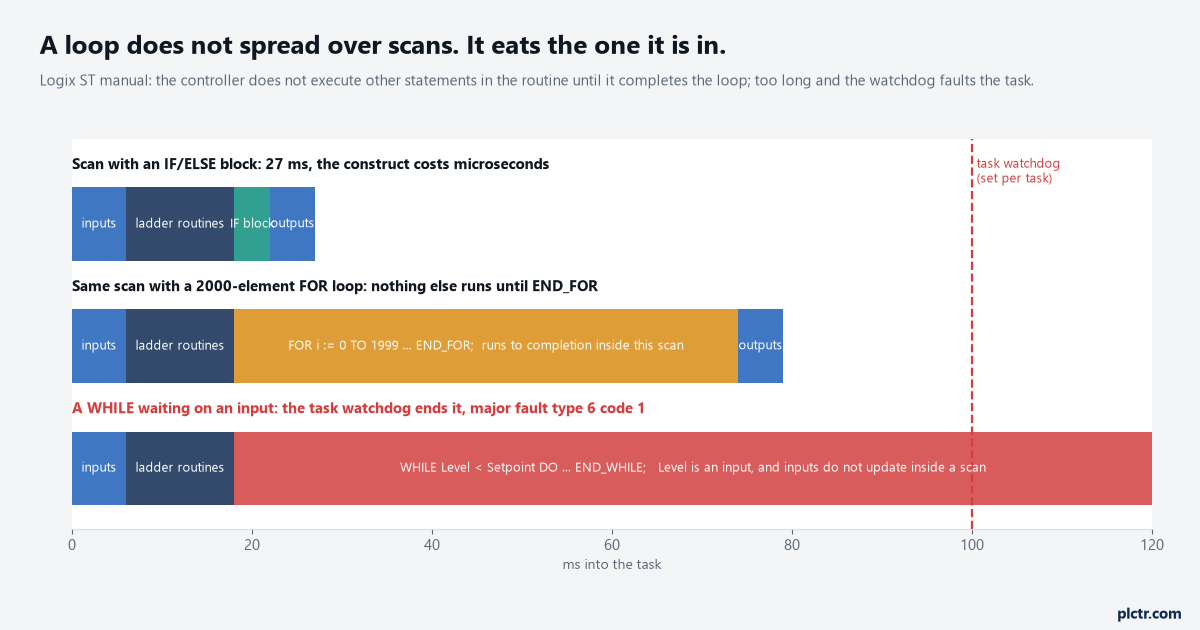
A loop runs to its end inside the scan it started in. The manual says it in one sentence: the controller does not execute other statements in the routine until it completes the loop.
A rung executes once per scan. A FOR executes all its iterations in the scan it is reached in, and the Logix manual spells out the consequence: the controller does not execute other statements in the routine until it completes the loop, and a major fault occurs when completing the loop takes longer than the watchdog timer for the task. The fault it names is type 6 code 1. So a loop over 2000 recipe elements is 2000 iterations of work in one scan, every scan the routine is called, and the scan time you measured last week just moved. The same page carries the manual’s advice for the case that catches ladder people hardest: consider using a different construct, such as IF...THEN. What that means at the keyboard is that a FOR that walks one element per scan — IF i < 2000 THEN work on element i; i := i + 1; ELSE i := 0; END_IF; — spreads the same job over 2000 scans and costs nothing you can measure. Use the real loop when the whole array genuinely has to be consistent within one scan, like the zeroing above. Use the IF counter when it does not. WHILE...DO and REPEAT...UNTIL exist on both platforms and get the same watchdog warning in the Logix manual. They are also the dead end of this whole article. WHILE Level < Setpoint DO ... END_WHILE; looks like “wait until the tank is full”, and it is not, because inputs do not update inside a scan. Level holds one value for the entire loop, the loop never exits, and the task watchdog ends the story with the controller in fault. A WHILE is for something that changes inside the loop, like a search index. Waiting for the process is an IF, once per scan, the way it always was on a rung.
The timer: which instruction you are allowed to call
Here is where the two platforms part, and where the Logix side surprises everyone who reads the reference for the first time.
TON, TOF and RTO are not available in structured text on a Logix controller, and neither are CTU, CTD or RES. The General Instructions reference marks each of them with the line “this instruction is not available in structured text”. What ST has instead is TONR, TOFR and RTOR, which the same reference marks as not available in ladder. They are the function-block timers, and they take a single FBD_TIMER structure rather than a rung condition:
Delay.TimerEnable := Start;
Delay.PRE := 5000;
TONR(Delay);
IF Delay.DN THEN ... END_IF;
The reset that RES did is the structure’s own .Reset input, and there is no RES. And the ST manual’s general rule about instructions is the one to remember every time you type one: a structured text instruction executes each time it is scanned, there is no rung-condition, and it executes as if EnableIn is always set. The timer is not inside an IF; the enable goes into the structure and the call is unconditional.
On an S7-1200 or S7-1500 the timers in SCL are the same IEC timers as in LAD. The S7-1200 manual gives the call directly, with the instance DB in quotes: "IEC_Timer_0_DB".TON(IN:=_bool_in_, PT:=_time_in_, Q=>_bool_out_, ET=>_time_out_); and the same shape for TOF, TONR and TP. The instance holds the state, the call is one line, and the manual notes that many other SCL instructions, such as timers and counters, match the LAD and FBD instructions. The Siemens side is the easier one to carry over, by a distance.
The one-shot: the ONS you cannot leave out
Ladder programmers use ONS so often it stops being visible. In ST it becomes visible again, because the manual’s ABL example is exactly the mistake: IF tag_xic THEN ABL(0, serial_control); END_IF; executes the ABL on every scan that tag_xic is set, not just when it transitions, because there is no rung-condition-in and nothing in ST is transitional. The fix in the manual is the OSRI instruction with its own structure:
Trig.InputBit := tag_xic;
OSRI(Trig);
IF Trig.OutputBit THEN ABL(0, serial_control); END_IF;
Anything that increments a counter, appends to a log, sends a message or bumps Step needs one.
No rung condition means no edge. Every edge is now yours to write. On the Siemens side the instruction is R_TRIG, called on its instance DB as "R_TRIG_DB"(CLK:=_in_, Q=>_out_);, and F_TRIG for the falling edge. Same job, same reason, and the same silence from the compiler if you forget it.
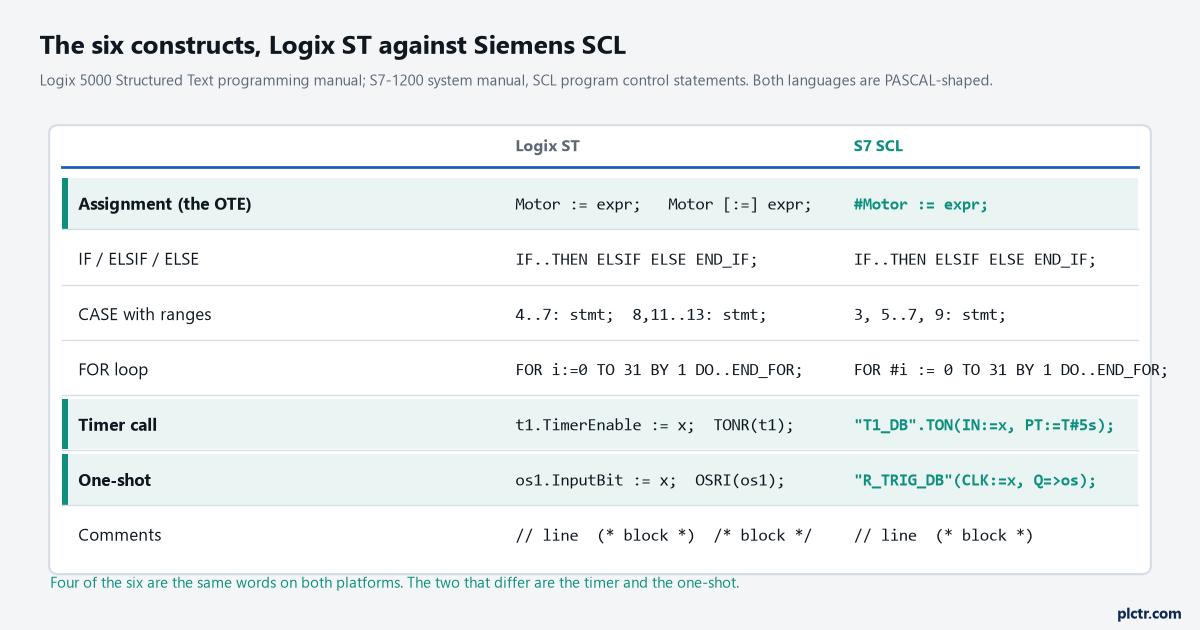
Four rows are the same words on both platforms. The two highlighted rows are the timer and the one-shot, where the instruction name and the call shape differ.
Structured text for ladder: what to write first
Take one rung you know is right — the seal-in motor start in the first figure is the standard one — and write it as the single assignment. Go online, press Stop, and watch Motor go to 0. Then write it as an IF without an ELSE, press Stop, and watch it not. That ten-minute experiment teaches the whole article, and it teaches it in the controller’s memory rather than yours. When it comes to timers, timing a motor start with TON and RTO covers what the timer structure holds through a power cycle, which is the same structure TONR uses. If the project is Siemens, the scaling articles are written in the language you are about to leave and the one you are going to, scaling an analogue input in FBD and in STL, and reading the same job in both is the fastest way to see what SCL saves you. And when the step sequence outgrows a CASE, sequential function chart programming is the next construct, not the seventh one here.