A transition written as Tank_LevelPV >= Recipe.FillSetpoint OR Step_Fill.T > 180000 is the difference between a batch sequence that tells you it is stuck and one that stands in the fill step all night saying nothing. Studio 5000 hands you that step timer, along with .AlarmEn and .LimitHigh on every step, the moment the sequence is written as an SFC instead of a page of ladder latches nobody wants to touch. This walkthrough builds a three-step batch sequence in Studio 5000 v33, then covers the settings that decide what your machine does after a power cut.
The Siemens equivalent is S7-GRAPH in TIA Portal V18 on an S7-1500. Different editor, same ideas, and the differences that matter are listed further down.
What you need
| Item | Notes |
|---|---|
| Studio 5000 Logix Designer v21 or newer | SFC has been in the product since RSLogix 5000 v11, and the editor has not changed much |
| A controller that allows SFC | ControlLogix 5580 and CompactLogix 5380 both do. GuardLogix safety tasks do not |
| Studio 5000 licence with SFC enabled | SFC and ST are separate line items on some licences. Check before you plan the job |
| TIA Portal V18 with S7-GRAPH | Only if you are doing this on an S7-1500 |
| A process that is genuinely sequential | Interlocks and device control stay in ladder. SFC is for order of operations |
Step 1: Create the routine and set it as the program main
- In the Controller Organizer, right-click the program folder and pick Add → New Routine.
- Name it
Batch_Seq, set Type to Sequential Function Chart, click OK. - Right-click the program, choose Properties, Configuration tab, and set Main Routine to
Batch_Seq.
A new SFC opens with one step called Step_000 and one transition. The initial step has a double border. Whatever that step does is what your machine does when the chart starts.
Step 2: Lay out steps and transitions
Drag elements from the toolbar: Step, Transition, Simultaneous Branch, Selection Branch, Stop.
- Rename
Step_000toStep_Idleby clicking the name and typing over it. - Add
Step_Fill,Step_Mix,Step_Drainin a chain, each with a transition between. - Wire the last transition back to
Step_Idleso the chart loops. - Use a selection branch where the sequence can go two ways, for example straight to drain when the recipe skips mixing.
- Use a simultaneous branch where two things must run in parallel and both must finish before the sequence continues. Both legs converge on a single transition.
Every step you create gets a tag of type SFC_STEP. The members you will use daily:
| Member | Meaning |
|---|---|
.X | Step is active. Use this bit on the HMI and in interlocks |
.FS | True for the first scan of the step. Where you put one-shot setup |
.LS | True on the last scan of the step, if last scan is enabled |
.T | Elapsed time in the step, in milliseconds |
.PRE | Preset used by .DN |
.AlarmEn, .LimitHigh and .AlarmHigh | Overdue alarm. Turn on .AlarmEn, set .LimitHigh in milliseconds, watch .AlarmHigh for a stuck transition |
Step 3: Write the actions and the transitions
Double-click a step to open its action list. Each action carries a qualifier that decides when and how long it runs.
| Qualifier | Behaviour | Where I use it |
|---|---|---|
| N | Runs every scan while the step is active | Valve and pump commands |
| P1 | One pulse on step entry | Reset a counter, log a start timestamp |
| P0 | One pulse on step exit | Log the finish, capture a total |
| L | Runs for a set time after entry, then stops | Purge blast, lubrication shot |
| S and R | Stored, runs until another action resets it | State that has to survive step changes |
(* Action A_Fill on Step_Fill, qualifier N, Structured Text *)
FillValve_Open := 1;
FeedPump_Run   := 1;
Batch_Volume   := Tank_LevelPV - Batch_StartLevel;

(* Action A_FillStart on Step_Fill, qualifier P1 *)
Batch_StartLevel := Tank_LevelPV;
Fill_Retry_Count := 0;

(* Transition Tran_FillDone, BOOL expression *)
Tank_LevelPV >= Recipe.FillSetpoint OR Step_Fill.T > 180000
That transition has a second condition on purpose. A level that never arrives because a valve stuck shut would otherwise park the chart in Step_Fill forever with no alarm. The step timer gives you a way out, and Step_Fill.AlarmHigh gives the operator a message once .AlarmEn is turned on and .LimitHigh is set below that 180-second ceiling.
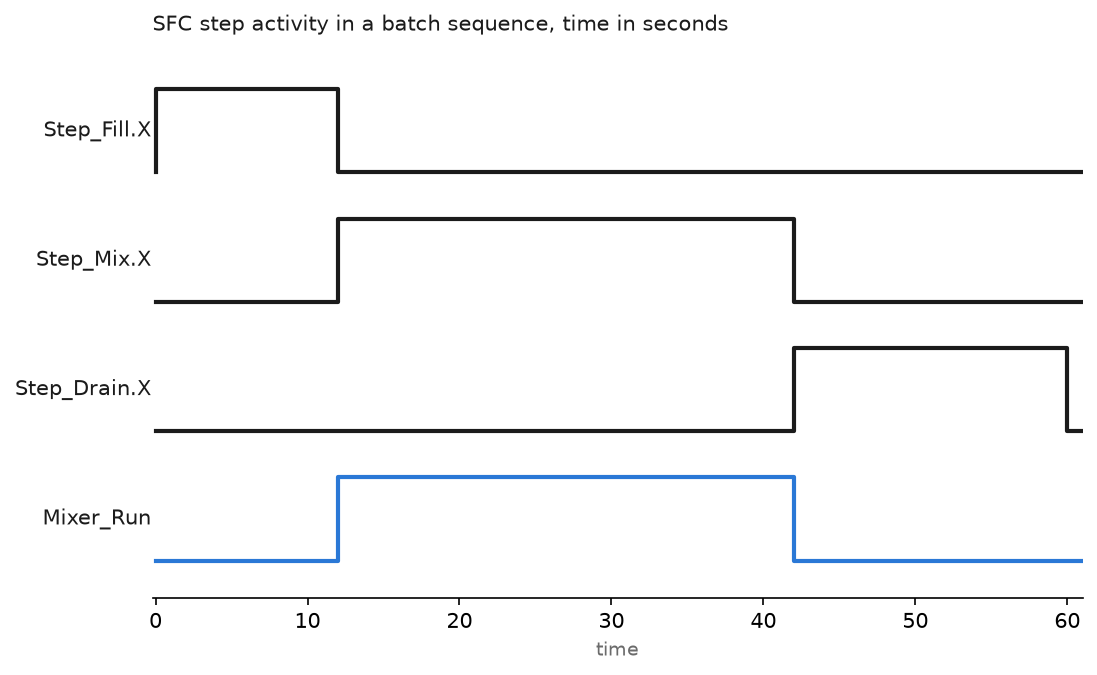
Only one step in a chain is active at a time. The chart above shows why the mixer output follows Step_Mix.X exactly: it is an N action, so it drops the moment the transition goes true.
Step 4: Set the SFC execution behaviour
This is the part people skip, and it is the part that costs a batch. Open Controller Properties, then the SFC Execution tab.
Restart Position decides what happens after the controller goes from Program to Run. Restart at initial step throws the chart back to Step_Idle. Restart at most recently executed step picks up where it stopped. A CIP tank that was half full when the power blipped does not want to start filling from zero, so on batch equipment I use the second option and add an operator confirmation before the chart resumes.
Last Scan of Active Step decides whether the step gets one more scan on the way out. Automatic reset clears non-retentive outputs of that step. Programmatic reset sets .LS so your code can clean up. Don’t scan leaves everything exactly as it was.
Set Output Instructions to False on Last Scan does what the name says, and it is the setting that stops valves staying open when the chart jumps.
Step 5: Keep ladder where ladder belongs
SFC calls ladder, not the other way round. Inside an action, use a JSR to a ladder routine that runs a device, or call an Add-On Instruction. Motor seal-ins, e-stop logic and anything with an interlock stay in ladder where a maintenance technician can follow power flow. If the sequence itself is simple and repetitive, a sequencer table is lighter than an SFC; the pattern is in PLC sequencer programming.
For the ladder side of the same machine, the conventions in PLC ladder diagram and the timing behaviour in timer and counter instructions are the pieces an SFC leans on.
The Siemens version in S7-GRAPH
On an S7-1500 you create a GRAPH block, which is always an FB with an instance DB. Steps are S1, S2, S3, transitions are T1, T2, T3. Two things have no direct Logix equivalent and both are useful:
- Interlock (C) holds the step actions off while a condition is false without leaving the step.
- Supervision (V) raises an error on the step without stopping the sequence, which is the S7-GRAPH version of the overdue timer above.
Step timers are S1.T and the block exposes a full status interface for the HMI. Getting around the editor is covered in Siemens TIA Portal.
Field notes: what actually goes wrong
The valve that stayed open. A rinse skid on a dairy line kept flooding the floor after an operator hit stop mid-cycle. The chart had Don't scan set for the last scan of the active step, and the drain valve was driven by an OTE inside an N action. When the chart moved on, that OTE never got its final false scan and the output stayed latched. Changing Last Scan to Programmatic reset and clearing the outputs in an .LS
Restart at initial step on a half-finished batch. A 20-minute power dip on a mixer. When the controller came back the chart restarted at Step_Idle, opened the feed valve and overfilled the vessel because the level was already at setpoint minus a hair. The transition logic was right; the restart setting was wrong for that machine. Now the chart restarts at the last step and holds in a pause state until the operator acknowledges.
Chart parked with no alarm. A transition waited on a proximity switch that had drifted out of range. No fault, no alarm, the line just stood there while the shift supervisor called it a PLC failure. Every step in that chart now has .AlarmEn turned on and .LimitHigh set, and .AlarmHigh drives a message with the step name. Stuck step alarms are cheap to add and they are the first thing the night shift looks at.
Online edits restarting the chart. Adding a step to a running chart put it into pending edits, and the accept turned into a chart restart on the next transition. Structural SFC changes belong in a planned stop, not in a running batch.
Frequently asked questions
Is SFC standard across brands?
The concept is in IEC 61131-3 and the elements look alike, but the tags and settings do not port. A Logix SFC does not import into TIA Portal, and S7-GRAPH has interlock and supervision features Logix has no equivalent for.
Can I use SFC in a safety task?
No. GuardLogix safety routines are ladder only. Sequence the standard side in SFC and keep the safety logic in the safety task where it belongs.
How do I pause or reset a chart from the HMI?
Use the SFP instruction to pause and SFR to reset to the initial step. Both take the routine name as the operand. Drive them from operator bits, not from logic that can chatter.
Does an SFC scan more slowly than ladder?
Slightly, because the chart evaluates the active step and its transition every scan. It is measured in microseconds on a 5580. The readability is worth it, and the overhead does not scale with the number of inactive steps.
Can two steps be active at once?
Yes, inside a simultaneous branch. Both legs run every scan until both reach the converging transition. That is the only way a Logix SFC runs steps in parallel.
Next step
Put the device control your SFC calls into reusable blocks so every valve behaves the same way. Add-On Instructions in Studio 5000 is the pattern, and PLC function block diagram covers the language most people pair with SFC for analog control.