The Monitor tab on a 1756-L83E’s Shut_Down task reads Task Overlap Count 63. The task has executed 12 times since the last download, and three programs between them asked for it 75 times. Nothing faulted, nothing latched, and the numbers add up exactly: 12 plus 63 is 75.
That is the whole of the EVENT instruction in one arithmetic line.
EVENT(Task_Name) triggers one execution of an event task, and 1756-RM018A is blunt about what happens when you ask for a second one too early: if you execute an EVENT instruction while the event task is already executing, the controller increments the overlap counter, but it does not trigger the event task. The trigger is not queued. It is not deferred to the end of the current pass. It is thrown away, and the only trace is a counter on a properties tab that nobody opens and a minor fault bit that nobody reads.
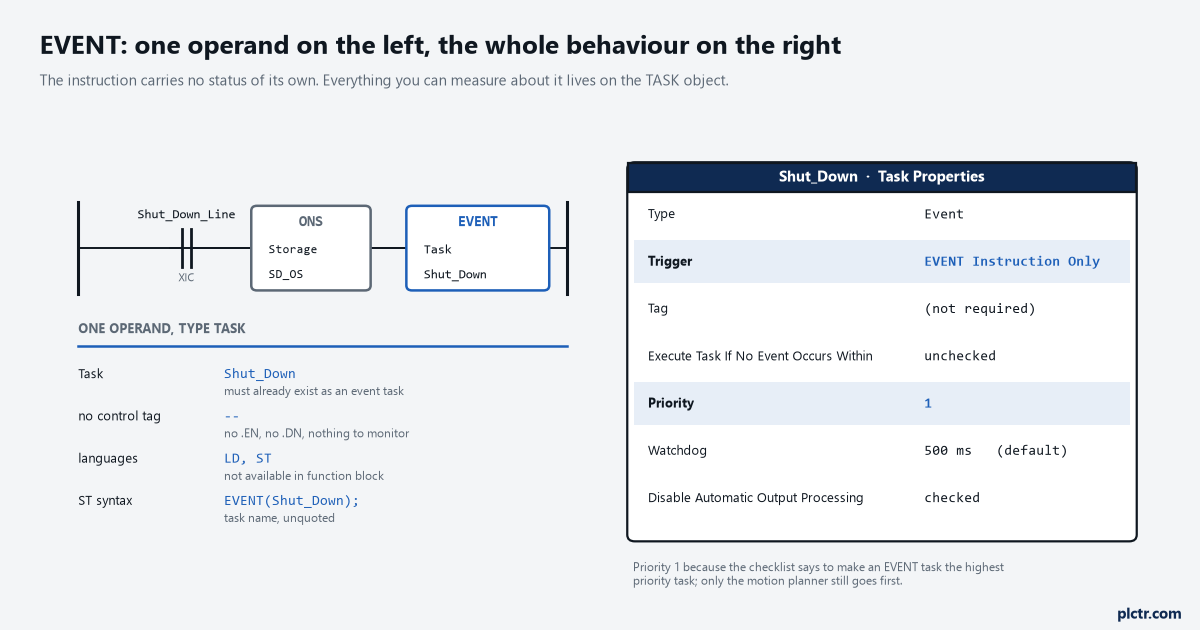
The Tag field is greyed out for this trigger type. The manual’s phrasing is “No tag is required”, which is the giveaway that the only thing that can start this task is a rung somewhere else in the project.
What the instruction actually is
One operand, of type TASK, and no status bits of its own.
The EVENT instruction takes the name of a task and nothing else. It has no control structure, no .DN, no .EN, and its ladder execution table has N/A against prescan, N/A against postscan and N/A against rung-condition-in false — the only row that does anything says “the instruction executes”. That is genuinely all the instruction is, and it is why the interesting behaviour lives in the task rather than the instruction. Two things about the operand are worth knowing before the first one goes in a project. The first is that the task must be configured as an event task with the EVENT Instruction Only trigger; name a periodic or continuous task and 1756-RM018A says the specified task will not be executed, which means the project verifies, downloads, runs, and quietly does nothing. The second is that multiple EVENT instructions can trigger the same task, from different programs, which is the whole reason the instruction exists.
It is not available in function block.
Ladder and structured text only, and in ST the syntax is exactly EVENT(Shut_Down); with the task name unquoted. If the routine that needs to raise the event is an FBD sheet, you need a JSR out to a short ladder or ST routine, or an Output parameter that a ladder rung downstream reads — there is no block form of this to wire up.
The shutdown that three programs share
The example in both manuals is the same one, and it is the right one.
A line has a Filler program, a Capper program and a Palletiser program, each with its own program-scoped Shut_Down_Line
Here is Program_A, in structured text, the way the reference prints it:
IF Shut_Down_Line AND NOT Shut_Down_Line_One_Shot THEN
    EVENT(Shut_Down);
END_IF;
Shut_Down_Line_One_Shot := Shut_Down_Line;
The one-shot is not decoration.
Leave it out and Shut_Down_Line being true for 40 consecutive scans of a 12 ms task means 40 EVENT executions, one of which runs the task and 39 of which walk straight into the overlap counter. The ladder version uses an ONS instruction ahead of the EVENT for the same reason, and the manual’s own Example 2 spells out why it is there: the ONS instruction limits the execution of the EVENT instruction to 1 scan.
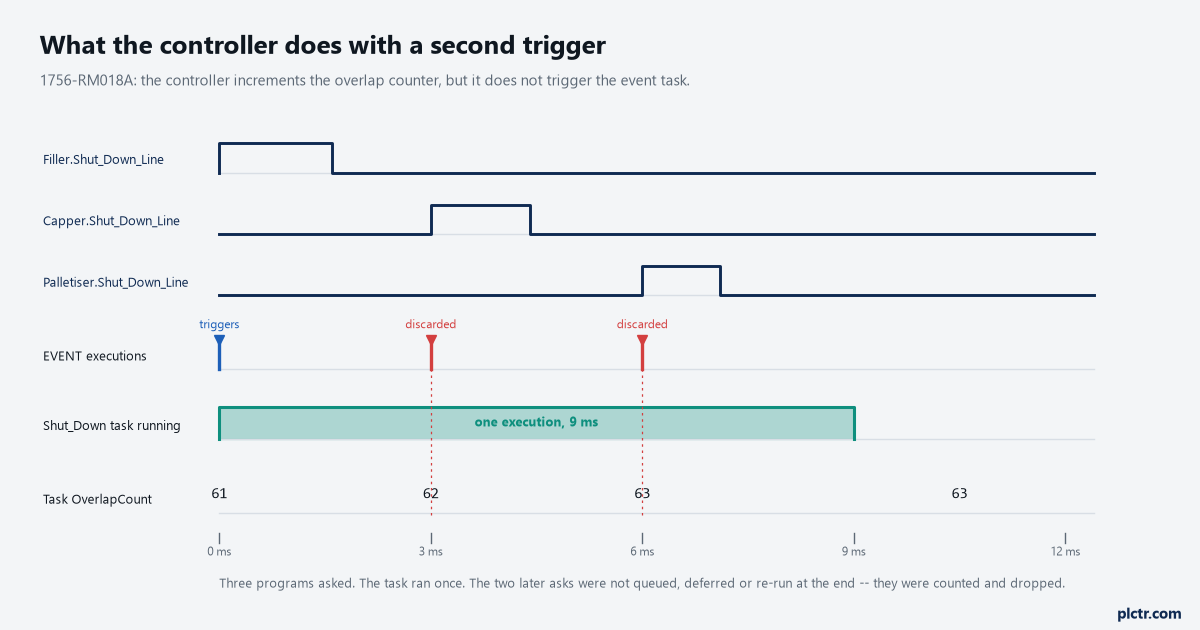
Two of the three EVENT executions land inside the task’s own 9 ms run. Neither is queued. The overlap counter goes from 61 to 63 and the shutdown sequence runs once, which in this case is what you wanted.
Reading what the controller did with your trigger
This is the part that turns a guess into a measurement, and it takes two GSV instructions.
The TASK object carries a Status attribute, a DINT, and three of its bits are the whole diagnostic story: bit 0 is set when an EVENT instruction triggered the task, bit 1 when a timeout triggered it, and bit 2 when an overlap occurred for this task. A fourth number, OverlapCount, also on the TASK object, counts how many triggers were discarded. Both 1756-RM018A and 1756-PM005M attach the same warning to Status, and it is the sentence that catches people: the controller does not clear the bits once they are set, so to use a bit for new status information you must manually clear it with an SSV. Read Status once on a machine that overlapped last Tuesday and bit 2 is still set on Friday. The bit tells you it happened at some point since the last clear, not that it is happening now; for that you need OverlapCount sampled twice and subtracted.
OverlapCount is valid for both event and periodic tasks, and clearing it means writing 0 to it.
There is a second place to look, and it is the one that shows up on a fault screen rather than in a task’s properties. When an overlap occurs the controller logs a minor fault to the FAULTLOG object, and bit 6 of MinorFaultBits is the one that means an overlap occurred for a task. That bit does not say which task, which is exactly why the per-task Status read is worth writing — but it does mean an overlap you never instrumented still shows up in the places a CompactLogix reports its faults, and it is worth knowing that the minor fault is there before somebody chases it as a comms problem.
The sequence that actually works, once a scan in the event task itself:
GSV(TASK, THIS, Status, Task_Status);
IF Task_Status.0 THEN
    (* an EVENT instruction started us, not a timeout *)
    Trigger_Count := Trigger_Count + 1;
END_IF;
IF Task_Status.2 THEN
    GSV(TASK, THIS, OverlapCount, Overlaps_Now);
    Overlaps_Delta := Overlaps_Now - Overlaps_Last;
    Overlaps_Last := Overlaps_Now;
END_IF;
SSV(TASK, THIS, Status, Zero);
THIS is a real instance name and not a placeholder. It means the TASK object for the task the instruction is sitting in, which keeps the routine copyable between projects without editing a task name into it.
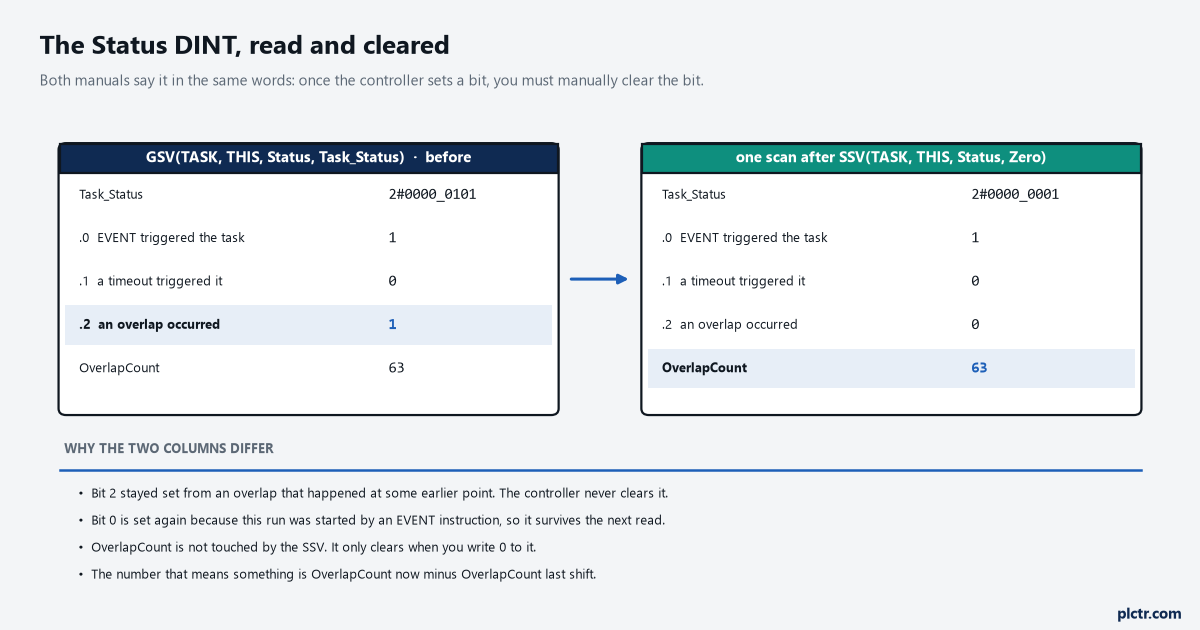
The left column is what a GSV returns on a task that has overlapped at some point. The right column is the same read one scan after the SSV. Only the delta between the two OverlapCount reads tells you whether it is still happening.
The trap: the task that never runs, and the one that runs too often
Two failures, opposite shapes, and the first one has no symptom at all.
Point an EVENT instruction at a task that is not an event task and there is no verify error, no download warning, no minor fault and no counter. The rung goes true, the instruction “executes” in the sense its execution table means, and nothing happens. This is a real trap on a project that grew: somebody converts the Shut_Down task from Event to Periodic while testing, because a 500 ms period was an easy way to make it run without wiring the trigger, and then the conversion back never happens. Everything still verifies. The same silence appears in a subtler form when the trigger type is wrong rather than the task type — the Logix Designer application will let you configure a trigger an event task that your controller does not support, and 1756-PM005M states that the project verifies and successfully downloads but the event task does not run. A CompactLogix 5370 with an Axis Watch trigger configured is the documented case of that.
The dead end here is priority, and it is a convincing one.
When an event task does not appear to run, the reflex is to make it priority 1, and if it already is, to demote everything else. That fixes an event task that runs late. It does nothing whatsoever for an event task that was never triggered, and half a day disappears into task properties before somebody puts a counter in the event task’s own routine and discovers it is sitting at zero. One rung — an OTE or an ADD on a DINT at the top of the task — settles in thirty seconds which of the two problems you have.
The other failure is the overlap, and its cause is almost always the missing one-shot.
A second cause worth knowing about is the task that is genuinely too slow for its trigger rate. 1756-PM005M’s guidance is to make sure the scan time of the task is significantly less than the rate at which the trigger occurs, and for an event task the remedy it offers is to adjust the configuration of your system to trigger the task less frequently — there is no period to lengthen, because the rate is whatever your logic does. A shutdown task with a MSG instruction in it is the classic offender, because the MSG does not complete in the scan it starts, so the task returns quickly, but any retry logic built around it can re-arm the trigger before the sequence is done. The MSG instruction’s path and error codes are their own subject, and an event task is the wrong place to discover them.
The timeout nobody configures
There is a fourth trigger for an event task, and it does not come from your logic at all.
On the Task Properties dialog, Execute Task If No Event Occurs Within takes a time period, and when it is checked the event task runs on its own if the trigger fails to arrive inside that window. The timer starts when the task finishes and resets each time the task is triggered. What makes it worth mentioning in an article about EVENT is that this is the only mechanism a controller-based watchdog on your trigger source has: if the EVENT instruction lives in a program that has itself stopped being scanned, or if a Shut_Down_Line bool is stuck false because of a force, the timeout is the thing that notices. Both the timeout value and its enable are writable at runtime — the Rate attribute of the TASK object is the period for a periodic task and the timeout value for an event task, in microseconds, and EnableTimeOut is 0 for off and any non-zero value for on.
Microseconds. Not milliseconds, and not the milliseconds the dialog box shows.
1756-PM005M’s own example sets Rate to 10,000,000 on first scan, which is ten seconds, and then writes 1 to EnableTimeOut. Wire that to the first scan bit the way the manual does and the timeout survives a download from someone who cleared the checkbox. When the timeout fires, Status bit 1 is what tells the task it was the timer and not a rung that started it, which is the second reason to read that DINT at the top of the routine.
What to check first
Read OverlapCount twice, a shift apart, and subtract. A number that has not moved means the mechanism is fine and the problem is somewhere else; a number that climbs by 40 an hour means a missing one-shot in whichever program is shouting, and the Status bit 0 counter tells you which. Then open the task properties and confirm the Type field says Event and the Trigger field says EVENT Instruction Only, because a project that has been through three hands is where the silent version of this lives.
If the answer turns out to be that the task type is wrong for the job rather than the trigger, the choice between periodic, event and continuous is a design question with its own arithmetic, and the scan-time side of it starts with measuring the scan you already have.