GSV and SSV on a ControlLogix: Reading the Controller’s Own Data, Including the Clock
About one alarm row in forty carried a timestamp that could not have happened: 17:03:00 with 941 250 microseconds, logged after a row reading 17:03:01 with 12 microseconds. Two programs were each doing their own GSV against the WallClockTime object, in two tasks at different priorities, and the higher-priority one was interrupting the other part-way through filling a seven-element array.
GSV reads an attribute of a controller object into a tag; SSV writes one from a tag. There is no status file on a Logix controller the way there is on a PLC-5, so everything about the controller’s own health — scan times, fault records, module state, the wall clock — comes out of an object through one of these two instructions. The clock is the one with a documented rule attached: put the WALLCLOCKTIME GSV in exactly one user task, or wrap it in a UID/UIE pair.
1756-L83E on v34. Both instructions work in ladder and in structured text, and neither exists in function block.
Four operands, and the one that decides whether it works
Class name, instance name, attribute name, destination. Three of those are names you pick from a list.
Class name is the object — WallClockTime, Task, Program, Module, Controller and about a dozen others. Instance name is which one, and a good number of objects have only one instance so the field stays blank; where it matters you either type the name of the task, program or module, or you type THIS, which means the task, program or routine the instruction is sitting in. Attribute name is what you want out of that object, and the list differs per object. Destination is a tag of your own, and this is where the work is: the attribute has a data type, that type is frequently an array or a structure, and your tag has to match it. LocalDateTime on the WallClockTime object is a DINT[7] — year, month, day, hour, minute, second, microsecond — so the destination operand points at element zero of a seven-element array and the instruction fills all seven. Declare six and the read does not fail cleanly.
The programming software shows you the valid classes and attributes as you type. For SSV it shows only the attributes you are allowed to set, which is a useful filter.
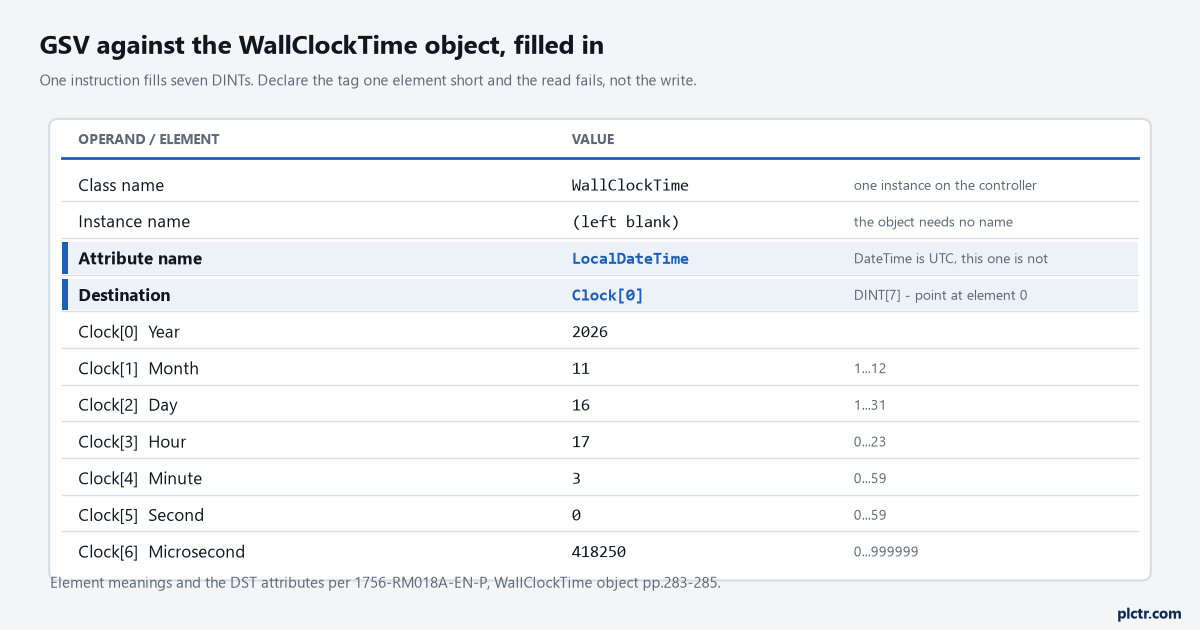
Seven DINTs from one instruction. The highlighted rows are the two that have to agree with each other, and the microsecond element runs 0 to 999 999.
Reading the clock, and the rule that comes with it
Two attributes give you a date and time, and they are not the same date and time.
DateTime is the controller’s time with no local adjustment; LocalDateTime is the adjusted one, and the object carries ApplyDST, DSTAdjustment in minutes and TimeZoneString to do that adjustment. CurrentValue
One task owns the clock and publishes it. Everything else reads that tag.
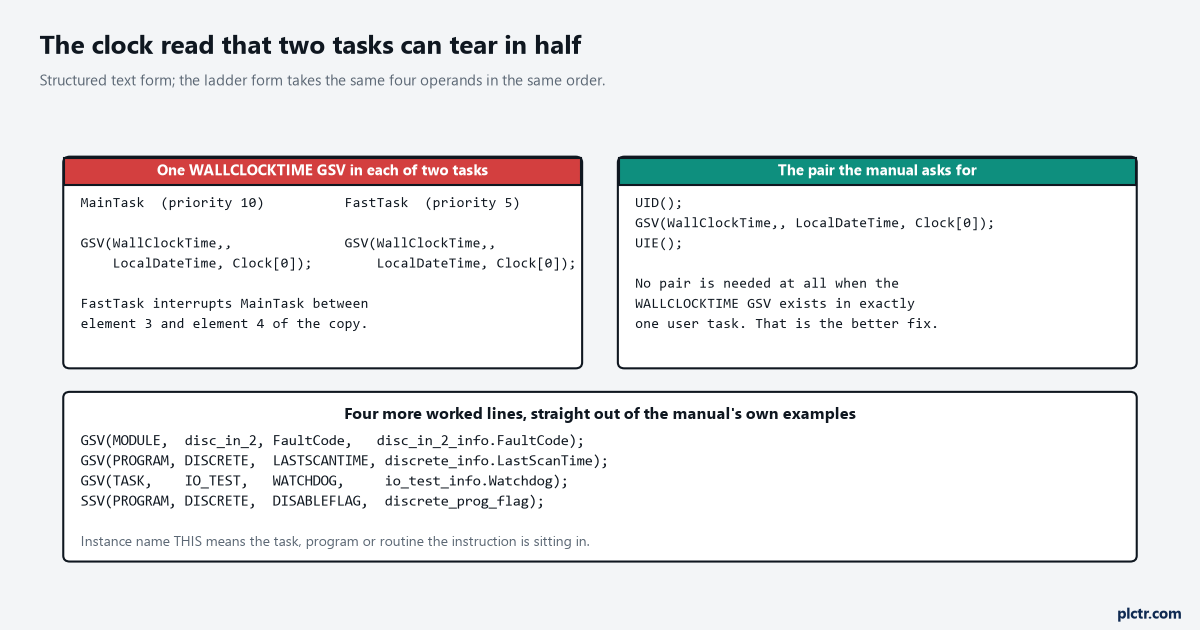
Structured text shown; the ladder form takes the same operands in the same order. The note on the right is the better fix, and it costs nothing.
The destination tag is what actually bites
There are two failure modes and only one of them tells you it happened.
If the destination is a member of a structure and that member is slightly too small for the attribute, the instruction carries on writing past it into the member that follows — the manual’s own example has the last value landing in Member_B — and no fault is logged. If the destination is far too small, the instruction stops, leaves the destination unchanged and logs a minor fault of type 4, code 7. The other codes on the same table are worth memorising because they all look identical from the outside: type 4 code 5 for an invalid object address, and type 4 code 6 covering three separate mistakes — an object that does not support GSV or SSV, an attribute name that is not valid, and an SSV that was not given enough information. Minor faults do not stop the controller, so nothing goes red and the only trace is in the minor fault record and on S:MINOR. Our minor fault code reference has the wider table; reading a controller fault in the four places it appears covers where to go looking.
Build the destination as a user-defined type that matches the attribute exactly. Rockwell recommends it for the fault-record attributes and the advice generalises.
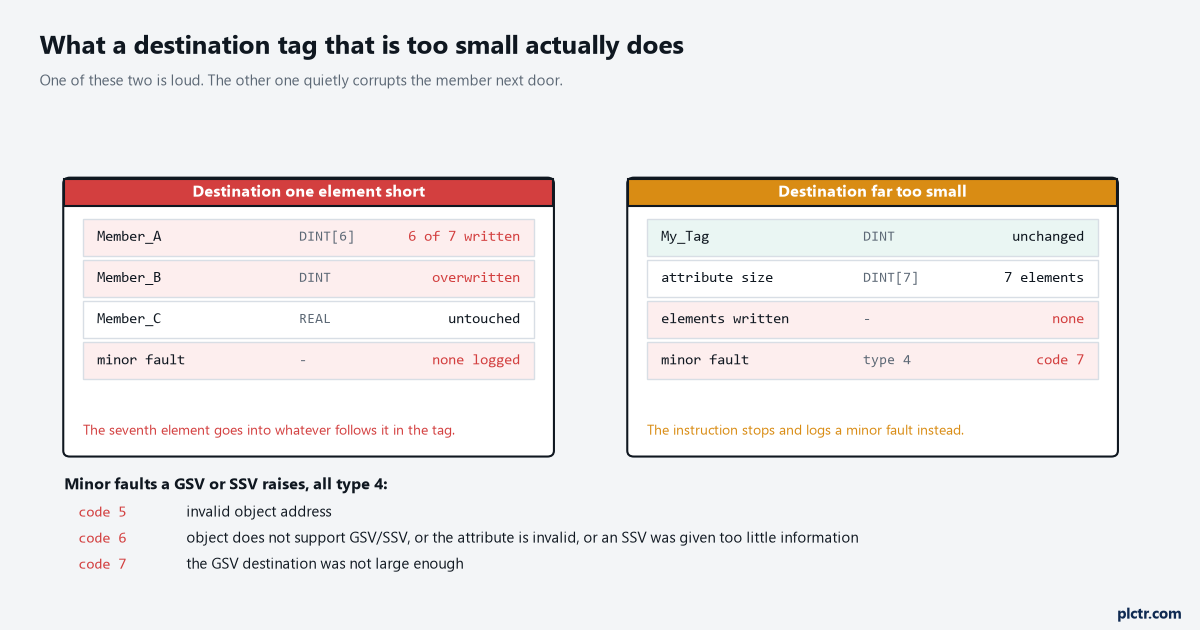
The loud failure is the safe one. The quiet failure on the left is the one that corrupts a neighbouring member and gets blamed on the HMI six weeks later.
What is actually worth reading
A short list covers most of what anyone needs.
The Task object gives LastScanTime and MaxScanTime in microseconds, OverlapCount for the number of times the task was triggered while it was still running, Priority in the range 0 to 15, Rate for the period and Watchdog — and that last one has a quirk: write zero to it with an SSV and the controller assigns 0.5 seconds for a periodic task or 5 seconds for a continuous one. Instance on the same object returns 0 to 31. The Program object carries its own LastScanTime and MaxScanTime plus MajorFaultRecord and MinorFaultRecord as DINT[11], and DisableFlag to take the program out of service. The Module object is where FaultCode, FaultInfo and Mode live, which is how you get module health into an HMI without a MSG instruction. The Controller object has TimeSlice, the system overhead percentage, and the change-detection pair AuditValue and ChangesToDetect. Reading any of these into a trend is the cheapest instrumentation there is — catching an intermittent fault with a trend in the controller is the pattern.
OverlapCount is the single most useful number on the list, and almost nobody reads it.
SSV is a different kind of risk
Reading is free. Writing is not, and the manual puts a CAUTION on it rather than an IMPORTANT.
Changing an object attribute can cause unexpected controller operation, so every SSV needs a reason and a test that proves it only changes what you meant. Two details matter beyond that. SSV changes live in the controller and not in your project file — the manual states that SSV attributes must be uploaded to be saved — so a watchdog somebody stretched from 500 ms to 2 s from an HMI in March is still 500 ms in the .ACD on the laptop, and the next download silently puts it back. And inside an Add-On Instruction, GSV and SSV cannot reference the Module, Message, Axis, Motion Group or Coordinate System classes at all, which kills the obvious idea of wrapping module diagnostics into a reusable AOI.
Upload before you edit. That sentence has saved more projects than any instruction on this page.
The documentation drift worth knowing about
The manual that tells you how to build the instruction does not carry the attribute tables, and its cross-reference is out of date.
1756-PM015Q-EN-P walks you through picking the object and creating the tag, then sends you to the General Instruction Reference Manual, “publication no. 1756-PM003”, for the attribute information. The reference guide that actually carries those tables prints 1756-RM018A-EN-P on its pages, and the old literature link built on 1756-rm003 redirects to it. Nothing is wrong with the content; the number in the cross-reference has simply moved, as Rockwell publication numbers do. If you are searching for an attribute and coming up empty, you are probably in the right manual under the wrong number. For the same problem on the other side of the shop floor, an S7-1500 an hour out after the clocks change covers the Siemens equivalents, and which clock wins when you timestamp PLC data covers the argument between the controller’s clock and everything downstream of it.
Go and count how many WALLCLOCKTIME GSV instructions are in your project and which tasks they sit in. If the answer is more than one task, either consolidate them into a single reader that publishes a timestamp tag, or put the UID/UIE pair around each of them today.