The batch record says the mixer started at 06:14 and the operator watched it start at 07:14, on the Sunday the clocks moved. The CPU 1516-3 PN/DP is keeping perfect time. What is wrong is that somebody wired RD_SYS_T into the timestamp and RD_SYS_T hands back the module time, which on this family is always UTC.
The fix is one instruction wide. Anything a human will read gets its time from RD_LOC_T, which applies the time zone and the daylight saving rules configured under the CPU’s Time of day properties. Anything that has to be compared across sites, or sorted, or handed to a database, keeps RD_SYS_T. Mixing the two in one data block is how a batch report ends up an hour out twice a year and correct the rest of the time.
Everything here is the STEP 7 system manual, checked against the S7-1200 system manual where the two describe the same mechanism in different words.
What the CPU clock actually holds
The manual is unusually direct on this and the sentence is worth reading slowly: the CPU clock interprets the module time as coordinated universal time, so the module time is stored with no time zone and no summer time in it at all, and the local time is calculated from the module time afterwards. That single stored value is the template for everything the CPU does with time. The local time that appears under Online and Diagnostics is derived from it, block properties are derived from it, and every entry in the diagnostics buffer is derived from it. WR_SYS_T writes that value and the manual says plainly that the instruction carries no information about the local zone or about daylight saving. RD_SYS_T reads it back the same way. The DTL range runs from 1970-01-01 to 2200-12-31, the older DT type stops at 2089 and drops the milliseconds on the way in.
So a clock that reads an hour out is usually a clock that is exactly right.
Setting it by hand goes through the same conversion. In the Set time of day group of the Online and Diagnostics view, the module time is shown converted to local time, and with the Take from PG/PC box ticked the programming device’s date and time are converted to UTC before they go down the wire. Untick it and type the values yourself and the same recalculation happens to what you typed. Neither path lets you put a local time into the CPU clock and leave it there.
What goes into the CPU is UTC, whatever the dialog showed you while you typed.
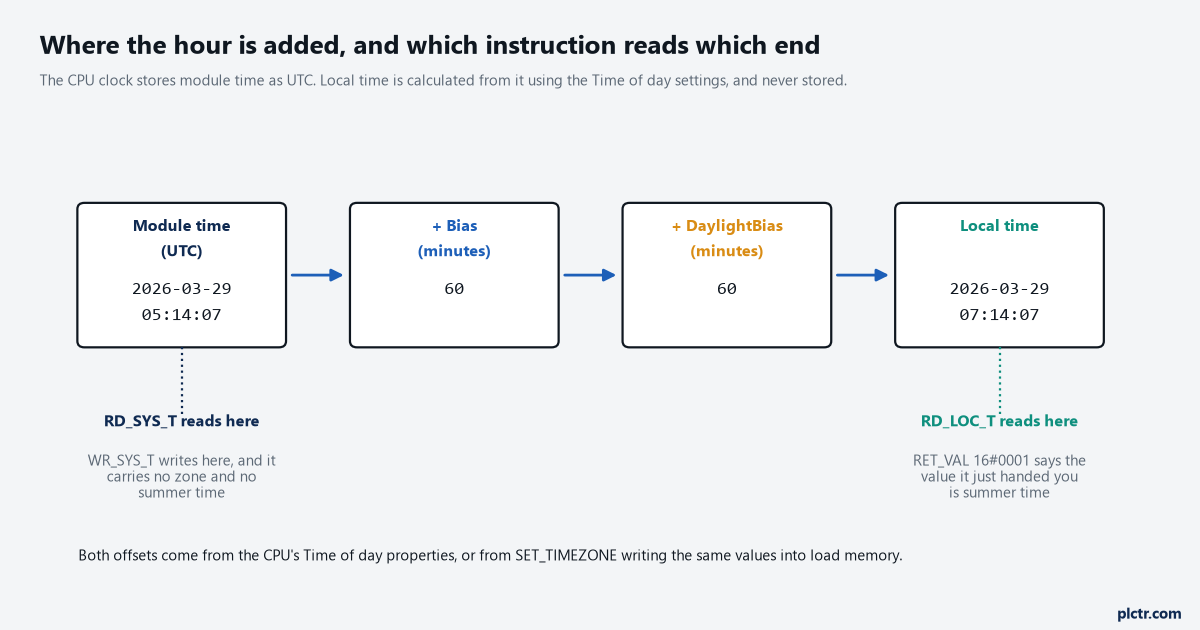
One stored value, two offsets, two instructions. RD_SYS_T taps the left-hand end of the chain and RD_LOC_T the right-hand end.
RD_LOC_T and the return value nobody reads
RD_LOC_T has two parameters worth caring about and most programs use one of them. OUT carries the local time as DT, DTL or LDT, calculated from the module time using the zone and the daylight saving start and end you set in the CPU configuration. RET_VAL is the interesting one. W#16#0000 means no error and standard time. W#16#0001 also means no error, and it means the value being returned is daylight saving time, which makes it the cleanest daylight saving flag available anywhere in the controller without writing a line of date arithmetic. 8080 says the local time could not be read at all. 8081 says the local time is outside the permitted range for the data type you picked at OUT, which is the one you get for choosing DT on a CPU whose clock has run past 2089, and the LDT and DTL upper limits sit at 2262-04-11 rather than 2200 for this instruction.
Wire that RET_VAL somewhere. One word in a diagnostics DB and the daylight saving state stops being guesswork.
The value also changes what a report means. A timestamp taken with RD_LOC_T at 02:30 on the autumn changeover morning is genuinely ambiguous, because that half hour happens twice, and the only thing separating the two is that the first one comes back with RET_VAL 0001 and the second with 0000. Storing both the local time and that return value costs two bytes and settles every argument about which hour a lot was made in.
Two bytes now, or an afternoon with a paper log next November.
The dead end: the buffer is not lying either
Before anybody changes the program, look at where the hour is actually being applied, because half the time the CPU is untouched and the display is doing the arithmetic. The diagnostics buffer view has a check box named “CPU time stamp takes into account local PG/PC time”. Leave it clear and entries are shown with the module time as stored. Tick it and every entry is shown as module time plus the time zone offset of your own programming device, and the manual is explicit that this only makes sense if the module time really is UTC. Ticking or clearing it re-labels the whole buffer immediately, which is why two engineers looking at the same CPU from two laptops in two countries can read two different times for the same event and both be looking at the truth. The manual even recommends clearing it when the clock has been set with WR_SYS_T or from an HMI in local time, because in that case the module time is the only time that means anything.
That check box has cost me an afternoon. It is worth checking before the block is opened.
The other dead end is the NTP server, and it is a dead end because NTP is UTC by definition. A working synchronisation makes the module time more correct, never more local. The S7-1200 manual, describing the same mechanism, puts the default update interval at 10 seconds and warns against configuring more than one time source, because two masters will fight and the events that depend on time of day will move under you.
One time source per CPU, and write down which one it is.
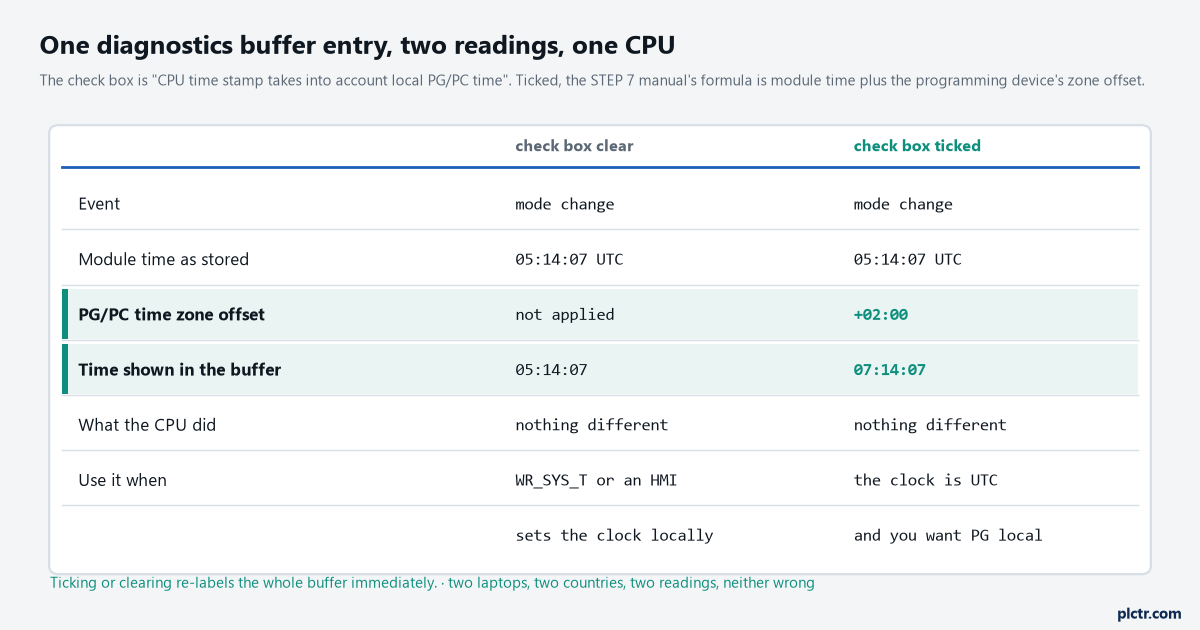
The same buffer entry, two readings, one CPU. The formula under the check box is module time plus the time zone offset of the programming device.
TimeTransformationRule, field by field
SET_TIMEZONE writes the same settings the Time of day page of the CPU properties writes, and it takes them in a system data type called TimeTransformationRule that you declare in a DB or a function block interface. Bias is the difference between local time and UTC in minutes and it must sit between -720 and +780, which is the UTC-12 to UTC+13 range the properties page offers. DaylightBias is the difference between standard and daylight saving time in minutes, from 0 to 120, and the value 0 switches the whole changeover off: the start and end fields are forced to 0 and only Bias is evaluated after that. Set it to anything other than 0 and every field in the structure is evaluated, with an invalid entry coming back as STATUS 808F. The start of daylight saving is given as month, week, weekday, hour and minute, and the end the same way, both expressed in local time. DaylightStartWeek takes 1 for the first occurrence of that weekday in the month and 5 for the last occurrence, and DaylightStartWeekday counts 1 for Sunday through 7 for Saturday. TimeZoneName is a string of up to 80 characters that the manual says is ignored and never written into the CPU.
Week 5 means last, not fifth. That one line saves an argument every spring.
Two operational details come with the instruction. It writes into the load memory of the CPU, so the zone survives a power failure and there is no need to call it again, and the manual’s advice is to call it once in a startup OB when the zone has to change. On the S7-1500 the instruction needs firmware V1.7 or newer. STATUS 80C3 is a resource error and means the CPU is already running as many block calls as it can take, which you handle by trying again rather than by changing anything.
Call it once at startup and the zone stays put through the next power cut.
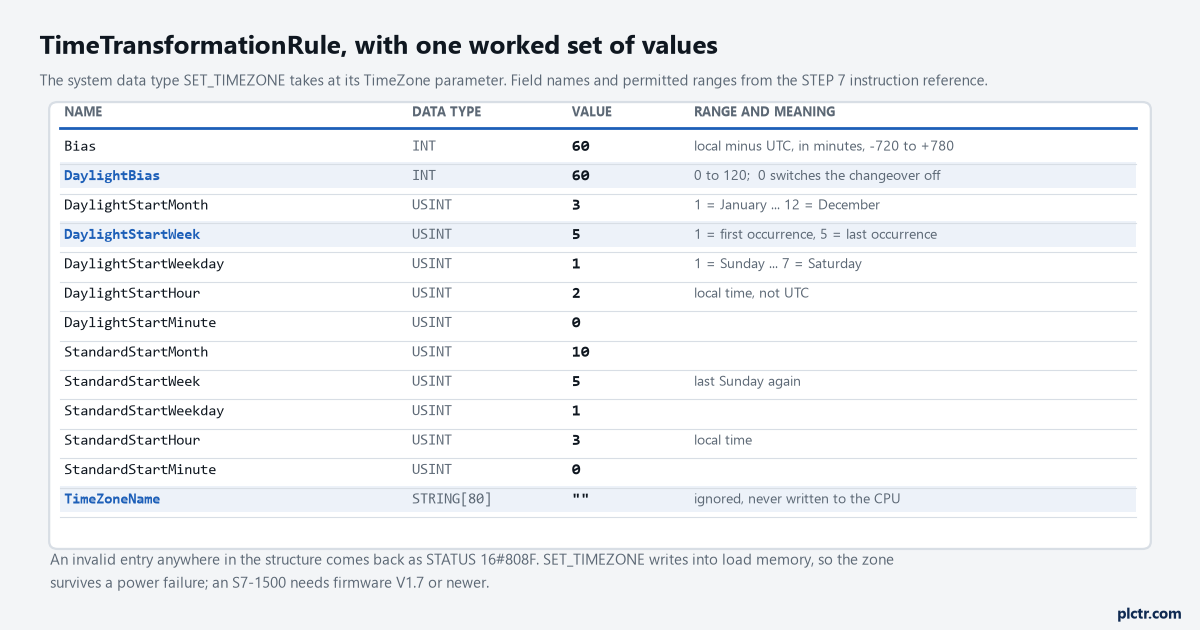
The structure with one worked set of values. Week 5 is the last occurrence of that weekday in the month, and weekday 1 is Sunday.
The double hour, and the one input that exists for it
WR_LOC_T is the writing partner of RD_LOC_T: you hand it a local time at LOCTIME and the CPU works out the module time to store. It carries one extra input that only earns its keep once a year. The DST bit is evaluated only during the changeover from daylight saving to standard time, when the same wall-clock hour occurs twice, and it tells the CPU which of the two you mean: TRUE for the first hour, FALSE for the second. Every other day of the year the input is ignored, which is why nobody remembers it exists. The manual also notes that the granularity of local and system time is product specific and at least a millisecond, and that a LOCTIME value finer than the CPU supports is rounded up when the system time is calculated.
Set that bit from the HMI screen that sets the clock, or accept that one hour a year is a coin toss.
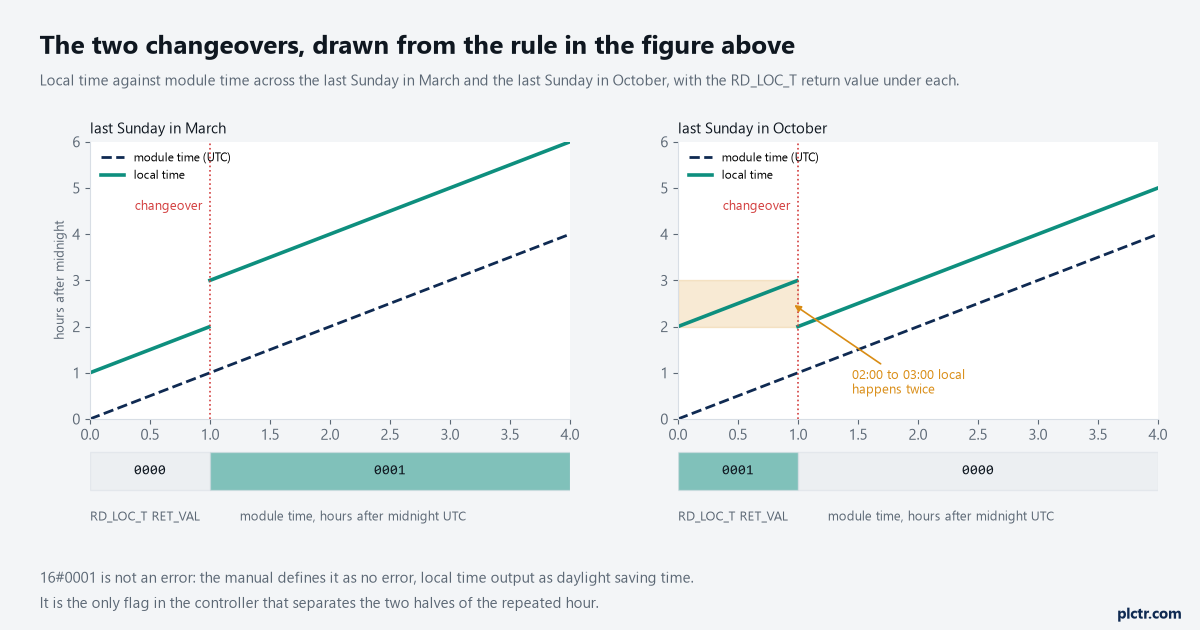
Drawn from the rule in the figure above. The shaded band on the right is the hour that happens twice, and the only thing that separates its two halves is the RD_LOC_T return value.
What to change on Monday morning
Open the data block that holds your timestamps and find out which instruction fills it. If it is RD_SYS_T and a person reads the result, add an RD_LOC_T beside it and store both, with the RET_VAL of the local read in the same structure. Then open Online and Diagnostics, look at the state of the CPU time stamp check box, and write that state into the commissioning notes so the next person reading the buffer knows what they are looking at. Longer term, the timestamp that leaves the controller for a historian or a report should be the UTC one, with the zone applied at the other end, which is the same rule that keeps data logging and remote monitoring honest and the same rule that stops an export to Excel from sorting two shifts into the wrong order. If the return codes above are unfamiliar territory, the S7 error code list is the faster place to look them up than the information system.