Reading a CompactLogix Fault: The Four Places the Controller Says What Broke
I/O Fault Local:2 #0203 Connection Timeout scrolls across the front of a CompactLogix 5380 for a few seconds and then the display moves on to the project name and the IP address. That one string is four separate pieces of information, and on a controller nobody has prepared for it, three of them are gone by the time somebody has found a laptop.
The four places are the display, the Major Faults tab, the module’s own dialog, and a GSV. Only the last one still has the fault tomorrow.
What follows is a 5069-L320ER on firmware read against 5069-UM001N, January 2026, with the fault-handling details from the Major, Minor and I/O Faults programming manual.
What the display is actually saying
The message has a location, a code and the code’s own text, and the location comes in three shapes.
Local:X is slot X of the controller’s own local bank, which on a 5380 is the row of Compact 5000 modules clipped to its right-hand side. ModuleName is the name you typed into the I/O tree, and it is the form you want, because it is the only one that tells somebody standing at the panel which physical device to look at without counting slots. ModuleParent:X is the third and it is the one that costs an hour: it appears when the module has no name configured in the I/O tree, so the controller falls back to naming the parent communication module and a slot number instead. The manual’s own worked example is I/O Fault My_CNet:3 #0107 Connection Not Found, which reads as a connection to slot 3 of the chassis behind the module named My_CNet. Naming every module in the tree at commissioning turns every one of these messages into something a fitter can act on, and it costs nothing at the time.
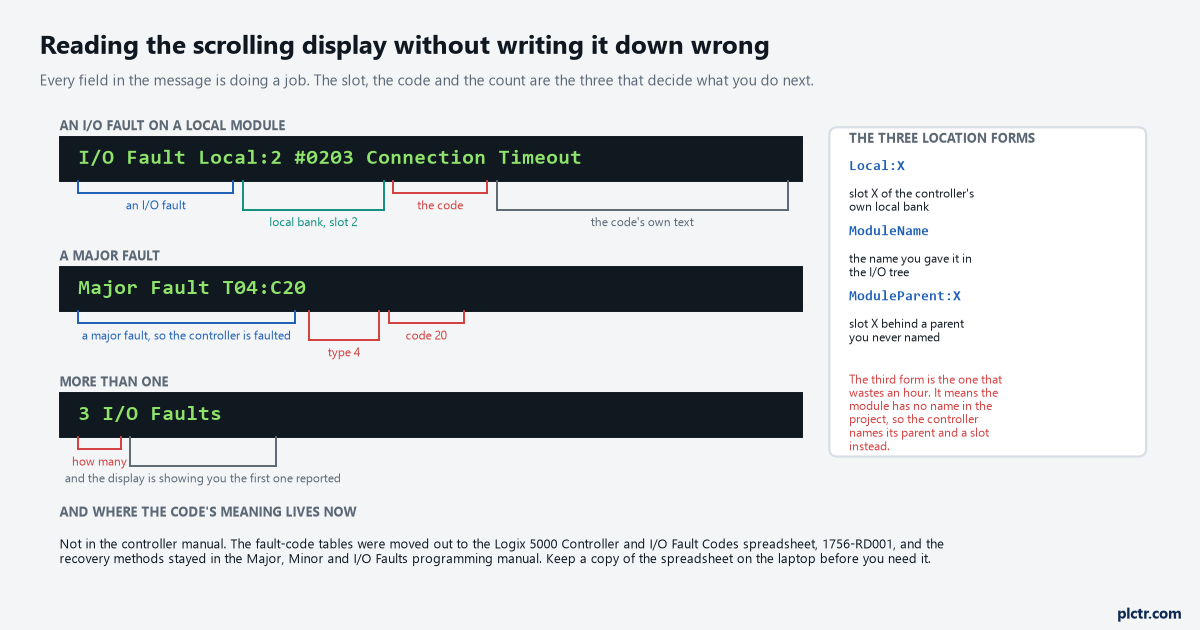
The #XXXX is the part you write down. The location tells you where to walk, and the text is only ever a summary of the code.
A major fault takes the other format, Major Fault TXX:CXX, where the two numbers are the type and the code that also appear on the Major Faults tab.
The count is not a list
3 I/O Faults does not mean you are going to see three messages.
If there are multiple I/O faults the controller indicates the first fault reported, and as each one is resolved the number drops and the message moves to the next. That behaviour is sensible and it catches people out in exactly one situation: a cell that has lost a whole line of remote I/O reports one module, somebody fixes that module, and the display immediately produces another fault that looks like a new problem rather than the second of three. The count is the only clue you get that there is more behind the first message. An exclamation point also appears over the I/O configuration folder and over every device that has timed out, so once you are online the tree gives you the full set at a glance, but at the panel the count is all there is.
Write the count down first, then the message. In that order, because the message changes and the count is what tells you it will.
The Major Faults tab, and the button that empties it
Controller Properties, Major Faults tab: the type, the code, the fault text and a Clear Majors button.
This is the place everyone goes first once they are online, and it is the right place, with one discipline attached. The type and code on that tab are the same pair that the Program object’s MajorFaultRecord attribute holds, and they are what the fault code tables are indexed by. Click Clear Majors and the tab is empty. There is no history behind it, no second page, and no way back to what it said. Reading the tab, photographing it or typing the type and code into the job sheet, and only then clearing it is the whole of the discipline, and it is the difference between a repeat fault you can diagnose in February and one you argue about. The tab also sits next to the Minor Faults tab, which is worth a glance while you are there, because a minor fault that has been accumulating for a month is often what the major fault finally grew out of.
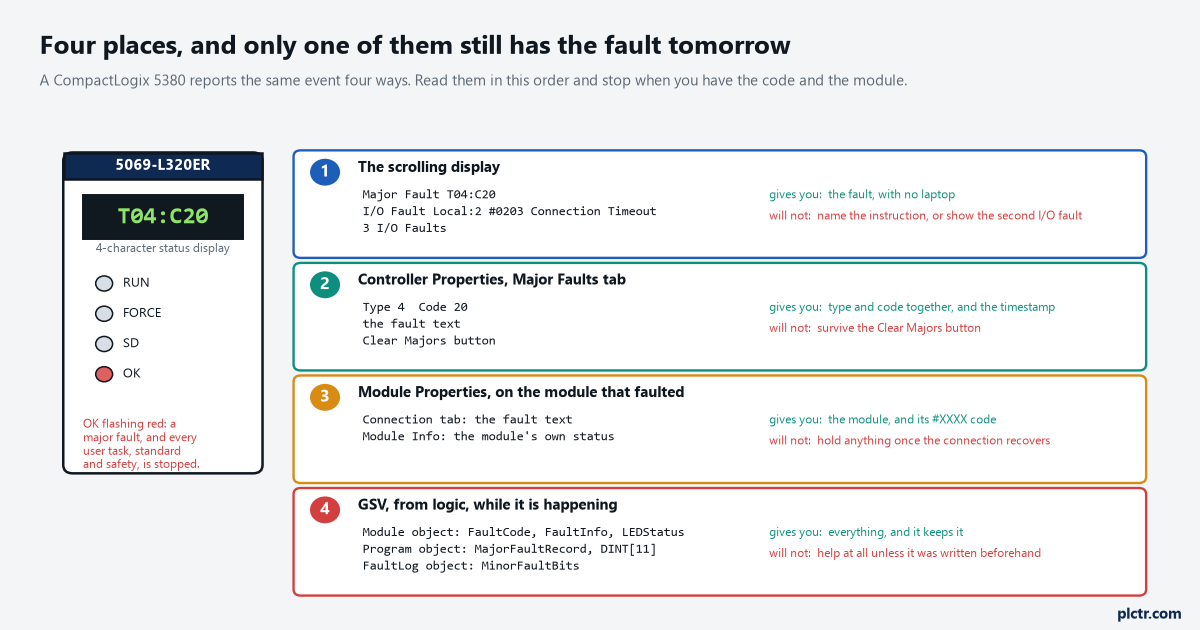
Read them in this order and stop when you have the code and the module. The order matters because each step destroys a little of the one before it.
The OK indicator flashing red on the front is the same event seen from outside: a major fault has occurred and all user tasks, standard and safety, are stopped. It flashes red for a firmware update too, so check the display before reading anything into it.
The module dialog, while the connection is still down
The third place is the Module Properties dialog of whatever actually faulted.
Its Connection tab carries the fault text for that module and the Module Info tab carries the module’s own view of its state, which is the pair you want when the display has told you Local:2 and you need to know whether slot 2 stopped answering or never started. The catch is that this place is only useful while the fault is present. A connection that has recovered on its own — a loose RJ45 that somebody nudged back in, a switch that finished a spanning tree convergence — leaves the Module Properties dialog looking entirely healthy while the controller’s display has long since moved on. An intermittent I/O fault is therefore the one case where the first three places all conspire to show you nothing, and that is what the fourth place is for.
The GSV that keeps it
Eight instructions written before the fault are worth more than an afternoon of investigation after it.
There are three objects involved and they answer different questions. The Module object carries FaultCode and FaultInfo for a named module, which is the same #XXXX the display was scrolling, in a tag the HMI can show and a log can keep; it also carries LEDStatus, and the manual’s own example stores that in a DINT called IO_LED and compares it against 2, because 2 means at least one I/O connection has been lost. The Program object carries MajorFaultRecord, a DINT[11] that is far easier to live with once you have built the FAULTRECORD user-defined type over it: Time_Low and Time_High as DINTs for the timestamp, Type and Code as INTs, and Info as a DINT[8]. A GSV of that attribute in the Controller Fault Handler, copied into a ring buffer of twenty records, gives you the fault with its own timestamp and survives everything anybody does to the controller afterwards. Twenty records is 880 bytes and on most machines it is a fortnight of trips.
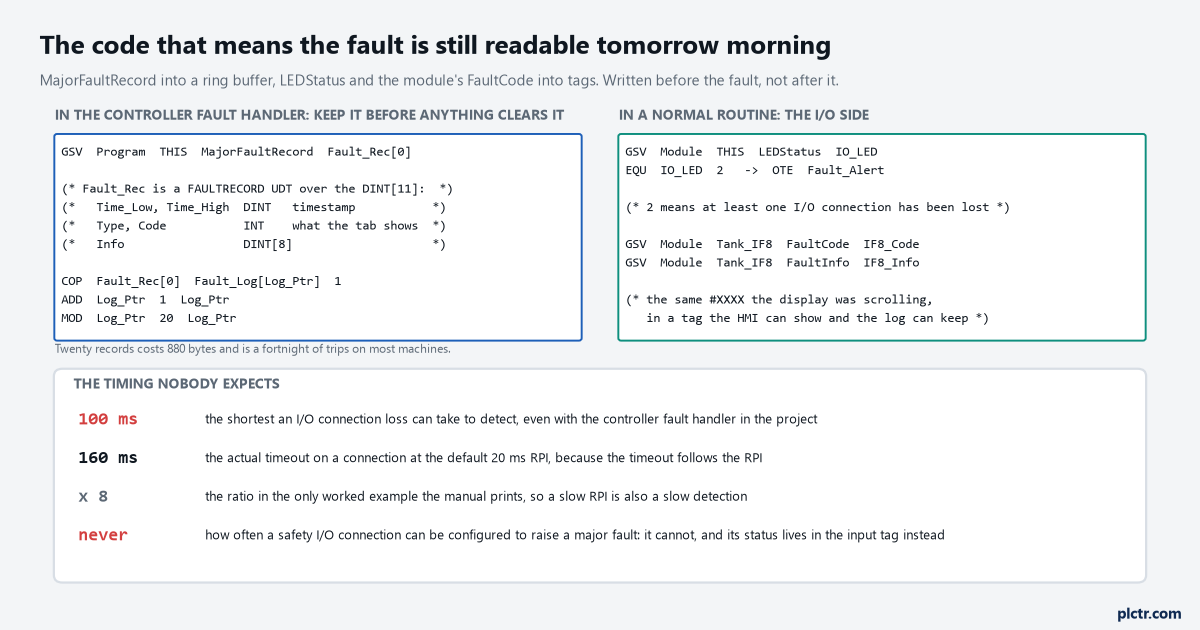
The left block runs once, when the controller is already faulted. The right block runs in a normal routine and never stops.
The FaultLog object holds the minor faults in MinorFaultBits, and four of those bits are worth monitoring on any machine that has ever surprised you: bit 6 is a task overlap, bit 7 is a load from nonvolatile memory, bit 9 is a serial port fault, and bit 10 covers a low battery, energy storage or UPS condition. None of those stops the controller. All of them are the sort of thing that is obvious in hindsight.
The hundred milliseconds you cannot get under
If you want an I/O connection error to interrupt the program scan, there is a module property for it and a floor underneath it.
Tick ‘Major Fault On Controller If Connection Fails While In Run Mode’ on the module or its parent communication module, put the recovery logic in the Controller Fault Handler, and a lost connection becomes a major fault that runs your routine. What the manual attaches to that is a hard number: it takes at least 100 milliseconds to detect an I/O connection loss even if the Controller Fault Handler is used. The timeout itself follows the RPI rather than being fixed — the published example puts a connection at the default 20 ms RPI at a 160 ms timeout, eight times the RPI — so a module you set to a lazy 100 ms RPI to save connections is also a module you will hear about late. On a press or a slitter that difference decides whether the fault handler is a safety measure or a log entry. On a mixer it does not matter at all.
Safety is the exception and it is absolute: a safety I/O connection or a safety produced and consumed connection cannot be programmed to cause a major fault on the controller. Safety controllers put individual connection status on each safety I/O module as part of the input tag instead, and that is where the logic has to read it.
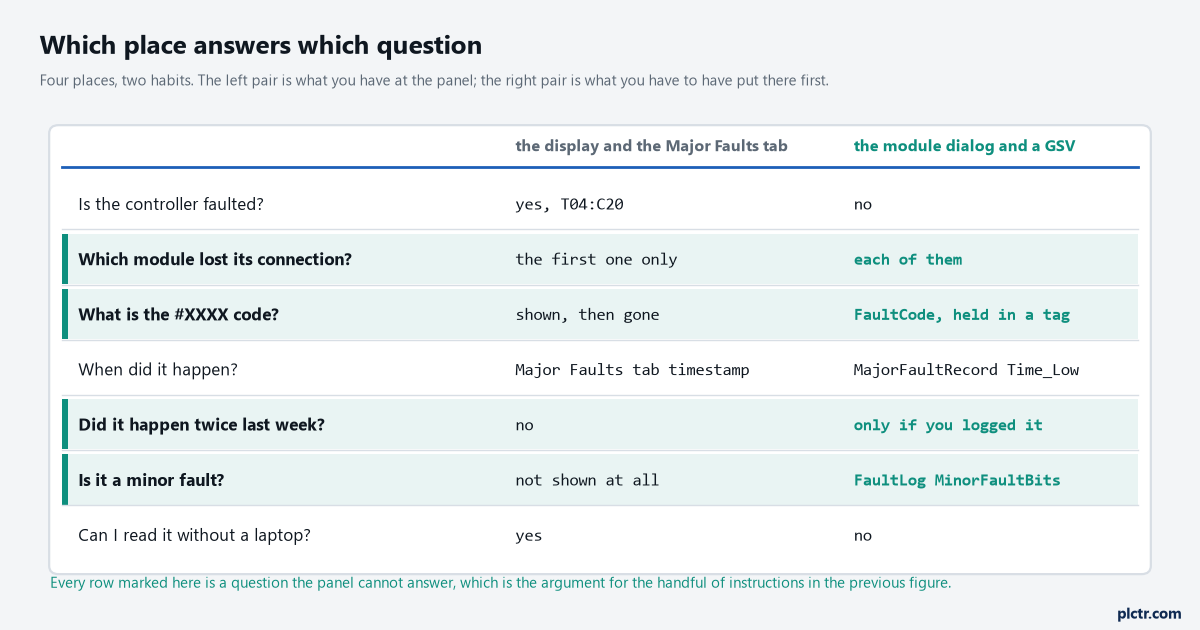
Four of the seven rows are questions the panel simply cannot answer. That is the argument for writing the GSVs before you need them.
The tables are not in the manual any more
Having the code is not the same as having the meaning, and this is where the trail goes cold on a machine with no internet.
The fault code tables have been moved out of the controller manuals into a spreadsheet, Logix 5000 Controller and I/O Fault Codes, 1756-RD001, and the 5380 user manual now carries a line on its own cover telling you to download it for offline access. Suggested recovery methods stayed in the Major, Minor and I/O Faults programming manual, 1756-PM014. That split means two files rather than one, and neither of them is on the laptop by default. Put both on the engineering laptop and on the panel’s own documentation folder before the next shutdown, because #0203 written on a job sheet at two in the morning is only useful if something on site can turn it back into words.
What to do next
Name every module in the I/O tree, which costs ten minutes now and removes the ModuleParent:X form from every message this controller will ever produce. Add the MajorFaultRecord GSV and the ring buffer to the Controller Fault Handler on the next planned download; creating the controller fault routine is a five-minute job and the routine is the same on every Logix controller you own.
Then take the last fault you actually had and look it up properly. Reading the type and the code covers what the pairs mean, the I/O fault causes cover the #XXXX side, and the minor fault codes are where the bits in MinorFaultBits get their names.