At 02:30 on Sunday 25 October 2026 a logger in Berlin writes a row, and sixty minutes later it writes another row stamped 02:30, and the trend viewer draws the second hour on top of the first. Meanwhile the controller it reads from keeps its own idea of the time as a LINT of microseconds since 1970 that does not know what a time zone is, and the cloud table stamps a third time on every row when it arrives. Three clocks write PLC data timestamps, and only one of them can be the record time.
The answer is the Pi’s clock, read once per cycle before the tags, stored as UTC, kept honest by chrony. The rest of this page is why, and the two screens that make the Pi the cell’s time source.
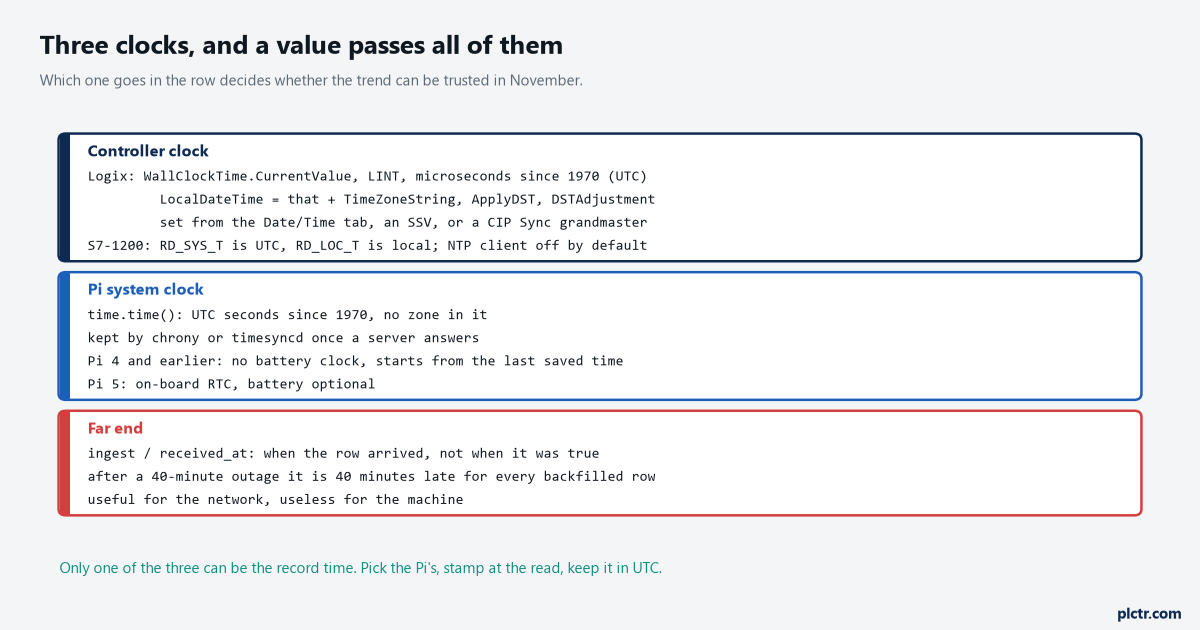
The Logix wall clock is microseconds since 1970 with no zone; the S7 system time is UTC with local time derived from it; the Pi’s time.time() is UTC seconds. All three agree on what UTC is. Only the naive local string does not.
What each clock actually is
The controller’s clock is more precise than people think and less synchronised.
On a Logix controller the time lives in the WallClockTime object, and the General Instructions reference, 1756-RM018, lists its attributes: CurrentValue is the number of microseconds elapsed since 0000 hours 1 January 1970, stored as a LINT or a DINT pair; DateTime is that broken into year, month, day, hour, minute, second and microsecond; LocalDateTime is the same after the controller applies TimeZoneString, ApplyDST and DSTAdjustment, the last of which is a number of minutes. Three things follow. CurrentValue is UTC in all but name, which is why pycomm3’s get_plc_time() returns UTC unless you hand it a tz. The controller does not know when daylight saving starts: ApplyDST is a flag somebody sets, not a rule the controller evaluates, so a Logix LocalDateTime is right until the Sunday somebody forgets. And the same manual carries two warnings that matter to a logger: setting the object is limited to one update every 15 seconds, and reading it with GSV should happen in one task only, or inside a UID/UIE pair, because a GSV of the wall clock interrupted by another GSV of the wall clock can hand you a torn value. Nothing in 5069-UM001 makes the controller an NTP client. Its time comes from the Date/Time tab in Studio 5000, from an SSV, or from a CIP Sync grandmaster over PTP if time synchronisation is enabled, and NTP appears in that manual only as the kind of source a grandmaster might itself be using. An S7-1200 is different in one useful way. The System Manual V4.6 lists five ways to set its clock and the first is an NTP server, with an update interval of 10 seconds by default. The CPU’s NTP client is off by default and, when on, only accepts servers at the IP addresses you configured, which the manual frames as a security property. The clock instructions split the way Logix does: RD_SYS_T reads system time, which carries no zone or DST, and RD_LOC_T reads local time as a DTL with the configured zone and daylight saving applied. WR_LOC_T has a parameter the manual describes as only evaluated during the “double hour” when the clocks change, which is Siemens saying in one line what this whole article is about.
The Pi’s clock is UTC underneath, always. time.time() is seconds since 1970 with no zone in it, and every zone, every DST rule, every “02:30” is a rendering applied afterwards. A Pi 4 or earlier has no clock that runs with the power off; Raspberry Pi OS restores the last time it saved before shutdown, so a board that boots without a network starts minutes or days behind, and a Pi 5 has an RTC on the board with a battery connector, which the Raspberry Pi documentation says provides the time on boot for cases without NTP. Either way the clock is only right once a time server has answered.
Which clock the PLC data timestamps should come from
The row timestamp is the Pi’s, in UTC, taken once per cycle before the reads.
import time
from datetime import datetime, timezone
from zoneinfo import ZoneInfo

ts = time.time()                                     # the record time: UTC epoch, float seconds
rows = [(ts, r.tag, str(r.value)) for r in plc.read(*TAGS) if r]
enqueue(rows)

shown = datetime.fromtimestamp(ts, tz=ZoneInfo('Europe/Berlin'))   # for people, not for storage
Three reasons, in order of weight. It is one clock for every value the Pi logs, from every controller it reads, so a Modbus meter and a CompactLogix on the same Pi carry comparable stamps without anybody reconciling two drifts. It is the clock you can synchronise for free, with chrony and a server, where synchronising the controller takes a dialog on each one. And it is taken at the read, which is the moment the value was true, where any stamp applied later – by the broker, by the database, by the dashboard – is a fact about delivery, and after a 40-minute outage every backfilled row is 40 minutes late by that clock, which is exactly what the SQLite queue article stores ts_src to avoid. The controller’s clock wins for one job only: an event that happened between two of your reads. A fault bit that was set for 120 ms inside a scan, an alarm the controller latched with its own time, a sequence-of-events buffer. A Pi polling once a second cannot stamp those, and the controller can, so those records carry the controller’s time – and then the controller’s clock has to be right too, which is the next section. The far end’s clock is the one to keep as a second column and never as the record. Ingest time minus ts_src is the delivery delay, and a plot of that is the best network monitor you will get for nothing.
Making the Pi the clock for the cell
One chrony file on the Pi, one dialog on the S7, one call for the Logix.
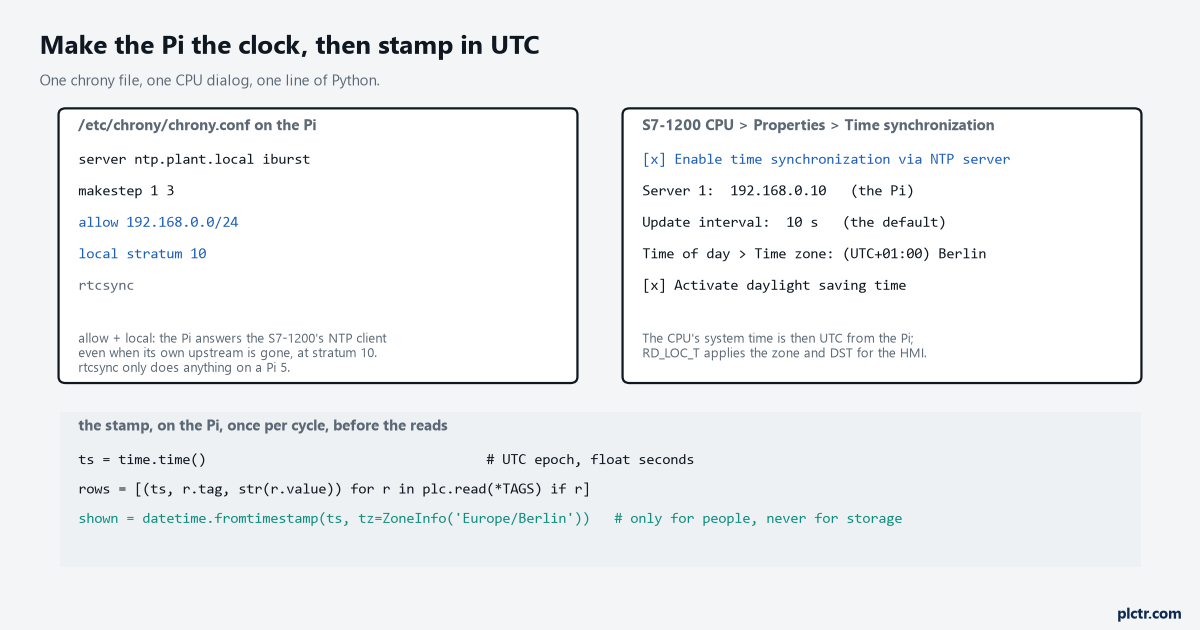
allow and local stratum 10 are the two lines people miss: without them chrony is a client only, and the S7’s NTP client gets no answer.
Raspberry Pi OS ships a client-only time service, so the first step is apt install chrony, which replaces it. In /etc/chrony/chrony.conf, server ntp.plant.local iburst names the upstream – the plant’s own NTP server if IT provides one, otherwise a pool – and iburst makes the first sync fast, a burst of four to eight requests instead of waiting a polling interval. makestep 1 3 tells chronyd to step the clock rather than slew it when the offset is more than a second, but only during the first three updates after start: that is the line that fixes a Pi 4 booting hours behind, and the documentation’s own reasoning for limiting it is that programs which depend on time advancing monotonically should not see a step later in the day. allow 192.168.0.0/24
local stratum 10 lets the Pi answer even when its own upstream is unreachable, marked as stratum 10 so any better source is preferred. rtcsync copies the system time to the hardware clock periodically, which the documentation says the kernel does every 11 minutes on Linux, and which only means something on a Pi 5. Then the S7-1200: CPU properties, Time synchronization, enable NTP, the Pi’s address as the server, the 10-second default interval, and under Time of day the zone and daylight saving so that RD_LOC_T and the HMI show local time while the system clock stays UTC. The manual’s one warning is to configure exactly one time source for the CPU, because two – an NTP server and a CP module both setting the clock – produce conflicting updates and can upset time-of-day interrupts.The Logix has no NTP client to point at the Pi, so the Pi pushes instead. pycomm3’s set_plc_time() with no argument writes the client PC’s clock into the controller, and get_plc_time() reads it back as UTC. Once an hour is plenty, and 1756-RM018’s limit of one update every 15 seconds is nowhere near. Two cautions from the same manuals. If time synchronisation is enabled on the controller, a CIP Sync grandmaster owns the wall clock and will overwrite what you set – the 5380 manual asks for a two-second delay after disabling PTP before writing the WCT for exactly that reason – so either the grandmaster is the Pi’s peer or the Pi does not write. And log the offset before you correct it: get_plc_time().value['microseconds'] against time.time(), once an hour, into its own table. A controller drifting 40 seconds a month is a fact worth knowing about, and a controller that jumps an hour twice a year is a person. The pycomm3 article covers opening the driver; the snap7 one covers the S7 side, and the same DB read is where RD_SYS_T would land if the controller’s own stamp is needed.
The repeated hour
Naive local time is a string that means two different instants for one hour a year, and a computer cannot tell which.
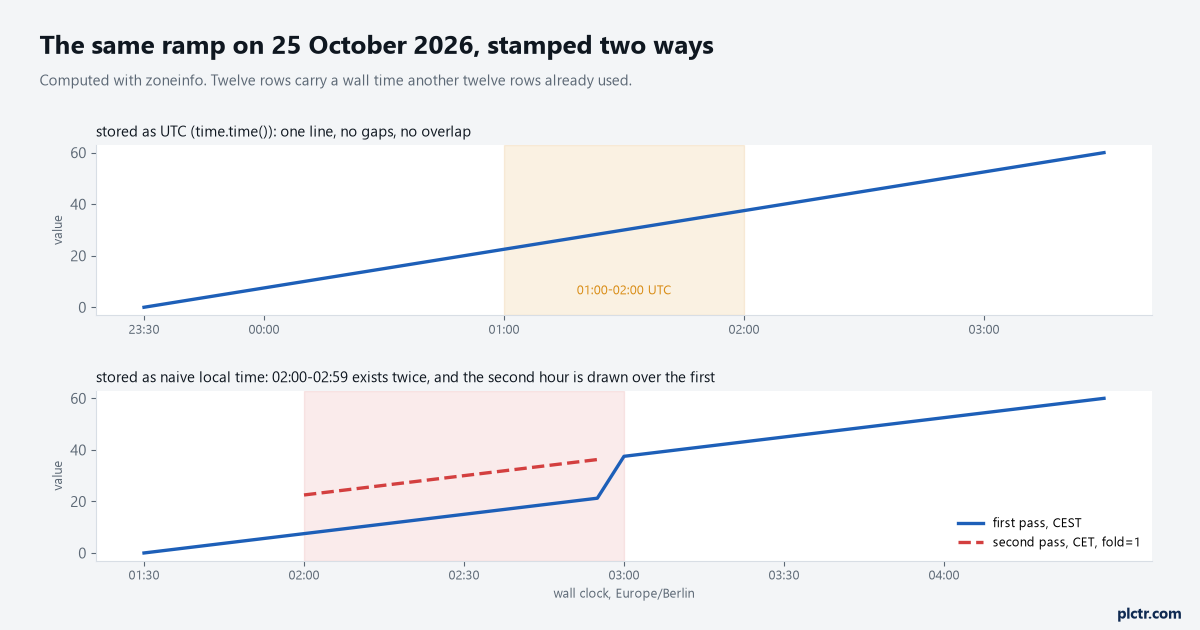
Computed with Python’s zoneinfo. Every row between 01:00 and 02:00 UTC carries a wall time that a row an hour earlier already used, and a chart keyed on that wall time has no way to draw them apart.
On 25 October 2026 the clocks in Berlin go from 03:00 CEST back to 02:00 CET, so 02:00 to 02:59 happens twice. Python’s datetime has known about this since 3.6: an aware datetime carries a fold attribute, 0 for the first pass and 1 for the second, and astimezone sets it for you. Convert 00:30 UTC and 01:30 UTC to Europe/Berlin and both read 02:30, one with fold=0 and +02:00, the other with fold=1 and +01:00. Strip the zone – strftime('%Y-%m-%d %H:%M:%S'), or a naive datetime.now() on a Pi set to the local zone – and the two are identical strings, and datetime(2026, 10, 25, 2, 30).timestamp() gives the same epoch for both, because a naive datetime is presumed local and fold defaults to 0. Twelve rows of history are now sitting on top of twelve other rows, and the database will happily keep both, and the trend will draw a zigzag, and in March the opposite happens: 02:00 to 02:59 does not exist, the ramp shows a one-hour gap, and somebody logs a network fault against the switch. Nothing about this is fixed by choosing a better zone. It is fixed by not storing the zone’s rendering. Store time.time(), or an aware datetime in UTC, or an ISO 8601 string with the offset on the end, and render local time at the edge where a person looks at it, with fromtimestamp(ts, tz=ZoneInfo(...)). The datetime documentation’s own warning is that naive objects are treated as local by many of its methods, which is a polite way of saying they will be interpreted wrongly by whichever machine reads them next. The dead end is the Pi itself. timedatectl set-timezone Europe/Berlin makes date print what the operator expects, every log line in journalctl reads in local time, and the logging script written with datetime.now() inherits all of it. It works for eleven months. The fix is not to set the Pi to UTC – the operator’s date is not the problem – it is that the script never calls now() without timezone.utc in it.
What to do before the first row is logged
Do not stamp anything until the clock is synchronised.
chronyc tracking prints a Leap status line that reads Normal once the clock is disciplined and Not synchronised before, and timedatectl show -p NTPSynchronized --value answers yes or no with no parsing. A Pi 4 that boots at 06:00 with the network switch still starting has a clock from whenever it last shut down, chrony steps it to the right time once a server answers, and every row stamped in between carries a time that is wrong by however long the board was off. Two choices: hold the poll loop until the clock is synced, which loses the rows of that first minute and nothing else, or add a clock_ok column and stamp rows with the flag clear, so the backfill can be reasoned about later. The first is simpler and it is what I would do on a logger; the second is for the case where that first minute is data somebody will ask for.
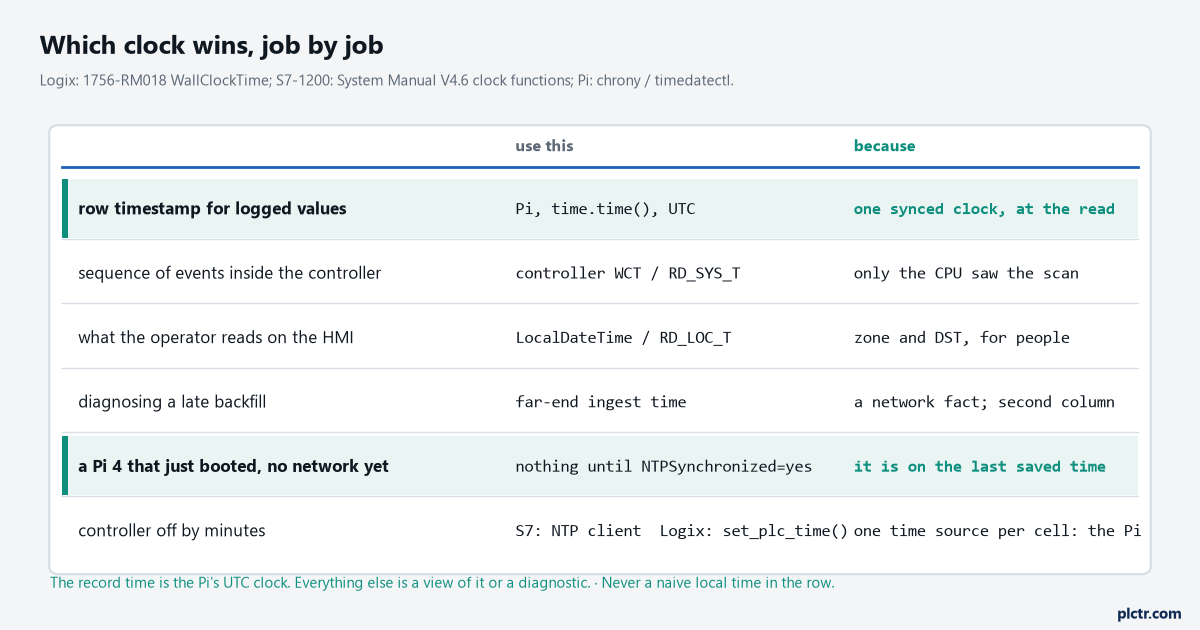
One clock for the record, and it is the Pi’s. The others are either a view of it or a diagnostic about the path.
Next step
Read the controller’s clock and the Pi’s in the same second and write down the difference, then do it again tomorrow. If the two numbers differ, the controller is drifting and needs the NTP client or the hourly set_plc_time(). Then take a week of rows, convert ts_src to local with fromtimestamp(ts, tz=ZoneInfo(...)), and check the count of rows per wall-clock hour: 3600 at one row a second every hour of the week, or the stamping is not what this article described. The data logging article is where the rows go once they carry a time you can defend.