A 1756-L83E carries a 10 ms periodic task at priority 5 and a continuous task that takes 48 ms end to end. Trend the interval between two consecutive executions of that periodic task and it reads 10.0, 10.0, 10.0, 14.2, 10.0, 10.0, 21.8, 10.0. The period is set to 10. Seven of the eight intervals are not 10.
That spread is the whole design question, and it is not a fault.
Put logic in a periodic task when it has a sample rate: a PID, a totaliser, a filter, anything whose maths assumes a known dt. Put it in an event task when the deadline is tied to a moment outside the controller — a product arriving at a sensor, a consumed tag landing, the motion planner finishing. Put it in the continuous task when it has no timing requirement at all, which is most sequencing. And know that 1756-PM005M says a project does not require a continuous task, which is the option most people never consider.
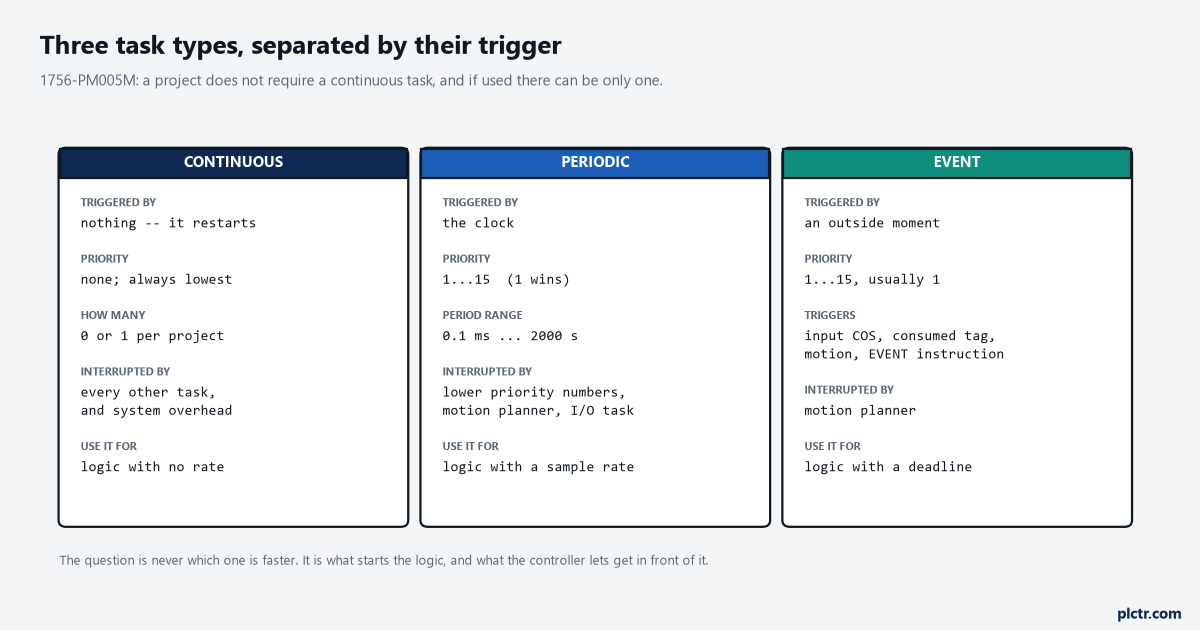
The column that decides it is the trigger, not the speed. A periodic task is not “the fast one” and the continuous task is not “the slow one” — they are triggered by different things and interrupted by different things.
What continuous actually means, which is not what it sounds like
It does not mean “always running”. It means “restart immediately”.
The continuous task runs in the background on whatever CPU time is not allocated to motion, communication, and the periodic and event tasks — and when it completes a full scan, it restarts immediately. There is no wait, no period and no idle. What it also has, and what makes it structurally different from every other task, is no priority field: you do not assign a priority to the continuous task, it always runs at the lowest priority, and all other tasks interrupt it. That last sentence has a consequence worth sitting with, because system overhead interrupts only the continuous task. The system overhead time slice is the percentage of controller time, excluding the time for periodic and event tasks, that goes to unscheduled communication — the HMI polls, the MSG instructions, the laptop you have online — and the controller performs that communication for up to 1 ms at a time before resuming the continuous task. Every one of those 1 ms slices lands in the middle of your sequence.
There can be only one, and there does not have to be one.
A machine whose every routine has a genuine rate — a filler running four periodic tasks at 5, 20, 100 and 500 ms and nothing else — is better off with no continuous task at all, because then the time slice has nothing to interrupt and unscheduled communication simply runs in the gaps between periodic executions. The trade is that you lose the safety net: with no continuous task, logic that overruns has nowhere to spill into, and a routine you forgot to assign runs never rather than slowly.
That is a real trade and not a rhetorical one, so make it on purpose.
Periodic: the period is a promise, and you have to fund it
The period range is 0.1 ms to 2000 s and the default is 10 ms, and almost nobody changes the default deliberately.
What you are promising when you type a number in that field is that everything assigned to the task will finish inside it, every time, including the time the task spends interrupted by something else. 1756-PM005M gives the test in two lines and they are worth writing on the back of the drawing. First, the execution time of your highest priority task must be significantly less than its specified period. Second, the total execution time of all your tasks must be significantly less than the period of the lowest priority task. The manual’s own worked pair is a task running 20 ms in an 80 ms period and another running 30 ms in a 100 ms period: 20 is comfortably under 80, and the 50 ms total is comfortably under 100, so there is room left for unscheduled communication. Swap those to 60 ms and 90 ms with the same periods and both tests fail, the project still downloads, and the machine runs until the day somebody adds a routine.
Miss the promise and you get an overlap.
A periodic task triggered while it is still running from the previous trigger is an overlap, the controller disregards the trigger that caused it, and a minor fault is logged — bit 6 of MinorFaultBits on the FAULTLOG object, which is one of the places a CompactLogix reports a fault that nobody checks until something else has already gone wrong. The remedy the manual gives for a periodic task is one line: increase the period. That is less of a cop-out than it reads, because a 10 ms task that cannot finish in 10 ms is usually a 10 ms task that never needed to be 10 ms.
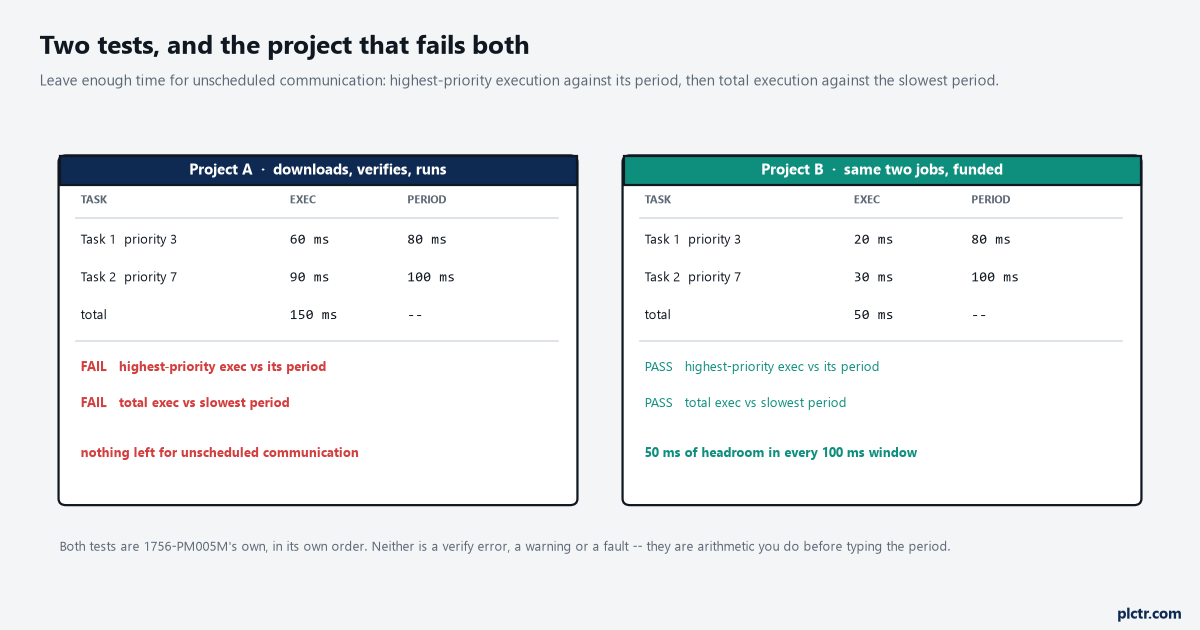
Both projects verify. Both download. The right-hand one has 20 ms of headroom for unscheduled communication across a 100 ms window, and that is where the HMI and the historian have to live.
Priority, and the two things that ignore it
Fifteen levels on a ControlLogix, a CompactLogix, a DriveLogix or a FlexLogix. Three on a SoftLogix5800.
Lower number means higher priority, which trips people who read the field as a rank rather than a queue position — a task at priority 1 interrupts a task at priority 8, and it can interrupt it more than once during a single execution of the lower one. Give two tasks the same number and the controller does something different again: it switches back and forth between them and runs each for 1 ms. That is a genuinely useful tool for two tasks of equal urgency that would otherwise starve each other, and a genuinely surprising one if you set two tasks to priority 10 by accident and then wonder why both of their scan times doubled. None of this touches the continuous task, which has no number and always loses.
Two things run regardless of what you set.
The motion planner interrupts all user tasks, whatever their priority. If it is running when your task is triggered, your task waits; if the coarse update period arrives while your task is running, your task pauses to let it run. On a CompactLogix 5370 and earlier CompactLogix controllers there is also an I/O task that does not appear in the Tasks folder, does not count toward the task limit, operates at priority 6, and runs at the fastest RPI you have scheduled. That last detail is why a task at priority 7 on a 1769-L33ER with a 2 ms RPI somewhere in the tree behaves differently from the same task on a CompactLogix 5380, which has no I/O task at all — and it is a good reason to look at what the RPI on a generic EtherNet/IP module is actually set to before blaming the task configuration.
| What you want | Priority to assign on a 5370 |
|---|---|
| Interrupt or delay I/O processing | 1 to 5 |
| Share controller time with I/O processing | 6 |
| Let I/O processing interrupt or delay the task | 7 to 15 |
Six is the shared lane, and hardly any project ever picks it deliberately.
Where the jitter in that opening trend came from
Back to the 10 ms task that read 14.2 and 21.8.
Nothing about a periodic task guarantees when it runs, only that the trigger arrives on time. Between the trigger and the first instruction of the task sits every higher-priority task that happens to be mid-execution, plus the motion planner, plus on the older CompactLogix families the I/O task — and 1756-PM005M’s example project shows exactly this shape, with an event task at priority 1 whose duration is quoted as 1 to 2 ms for 1 ms of execution, and a periodic task at priority 2 whose duration is 2 to 4 ms for 2 ms of execution. The task takes twice as long as it needs because something else took it. If the logic in that task computes a rate by dividing a difference by its own period, it is dividing by 10 while 21.8 ms actually elapsed, and the number it produces is wrong by a factor of two for exactly one sample. A flow totaliser does this quietly and permanently.
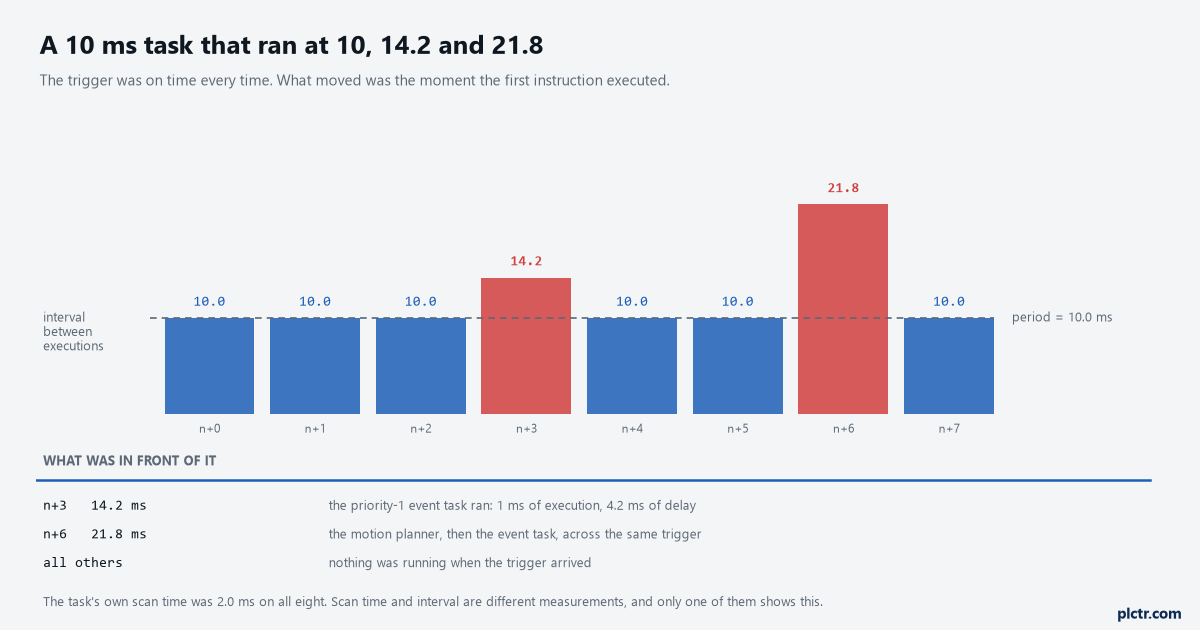
The task never overran. Both late samples are the task waiting its turn, and the second one is two interruptions stacked on the same trigger.
The fix is not a shorter period.
Either raise the task’s priority so that less can get in front of it, or stop the maths from trusting the period — timestamp the samples and divide by the measured interval, which is what any loop that has to survive a busy controller ends up doing anyway. The same reasoning is why loop tuning starts from the real update time rather than the configured one, and the first bump test on a PIDE is the place that shows up.
Neither of those two fixes needs a faster task, and one of them costs nothing.
The dead end here is the watchdog, and it is convincing because the number is right there next to the period.
Somebody sees jitter, assumes the task is running out of time, and raises the watchdog from 500 ms to 2000 ms. The watchdog has nothing to do with jitter: it is the limit on how long a task may run before a major fault, it ranges from 1 ms to 2,000,000 ms, it starts when the task is initiated and stops when all the programs in it have run, and the elapsed time it measures includes interruptions by other tasks. Raising it hides a task that is genuinely overrunning and does nothing at all to a task that is merely late. Worth knowing before you go near it: a controller fault handler can clear a watchdog fault, but if the same watchdog fault occurs a second time during the same logic scan, the controller enters Faulted mode regardless. The major fault codes are the place to go once it has.
Counting tasks, which is not free either
Thirty-two tasks on a ControlLogix, of which one may be continuous. Six on a 1769-L31.
The limit is rarely what bites. What bites is the sentence underneath it: each task takes controller time away from the other tasks, so too many tasks means either the continuous task takes too long to complete or another task overlaps because it was interrupted too frequently or for too long to finish before its next trigger. There is no counter for “too many tasks” and no verify warning. The symptom is a continuous scan time that has crept from 48 ms to 140 ms over two years of small additions, and a periodic task that started overlapping on the Tuesday somebody added a ninth task to read a weigh scale. Two cheap moves are worth knowing about before you add one. Inhibiting a task stops it running when its trigger occurs while still letting the controller prescan it on the transition from Program to Run, which makes commissioning one task at a time practical. And checking Disable Automatic Output Processing To Reduce Task Overhead skips the output processing the controller otherwise performs at the end of every task, which is the default recommendation for an event task and a real saving on a task that runs every 2 ms.
Both of those are checkboxes on the Configuration tab, and neither of them costs a rung.
What to check first
Put the interval between executions of your fastest periodic task on a trend, not the scan time. Scan time tells you how long the task took; the interval tells you when it actually ran, and the difference between the two is the jitter that breaks rate calculations. If the spread is wider than a millisecond or two, list every task with a lower priority number than the one you are looking at and add their execution times together — that sum is your worst case, and it is usually a bigger number than anyone expected.
If the total comes out larger than the period you typed, you already have your answer.
Then decide whether the logic in front of you has a rate at all. Most sequencing does not, and moving it out of a 20 ms periodic task and into the continuous task costs nothing and gives the periodic tasks their headroom back. If the continuous scan itself is the thing that has got out of hand, measuring it before cutting it is the order to do it in.