Driving a Motor from a ControlLogix: From a Rung to a Turning Shaft on a Kinetix 5700
A 2198-D032-ERS3 inverter, a VPL-B1303C motor on one Hiperface DSL cable, and a 1756-L83E that has never carried a motion group. Two rungs will turn that shaft — an MSO and then an MAM — and neither is worth downloading until about forty minutes of configuration has happened somewhere else.
Here is the whole path, in the order it has to happen. Add the drive to the I/O tree and set its module definition. Create a motion group and give it a coarse update period. Create an AXIS_CIP_DRIVE, associate it with the drive’s axis, and pick the motor by its catalogue number so the Motion Database fills in the model. Set the scaling. Then turn the shaft with a Motion Direct Command, before any ladder exists. The rung is the last thing you write, not the first.
Everything below is why that order, and what bites at each step.
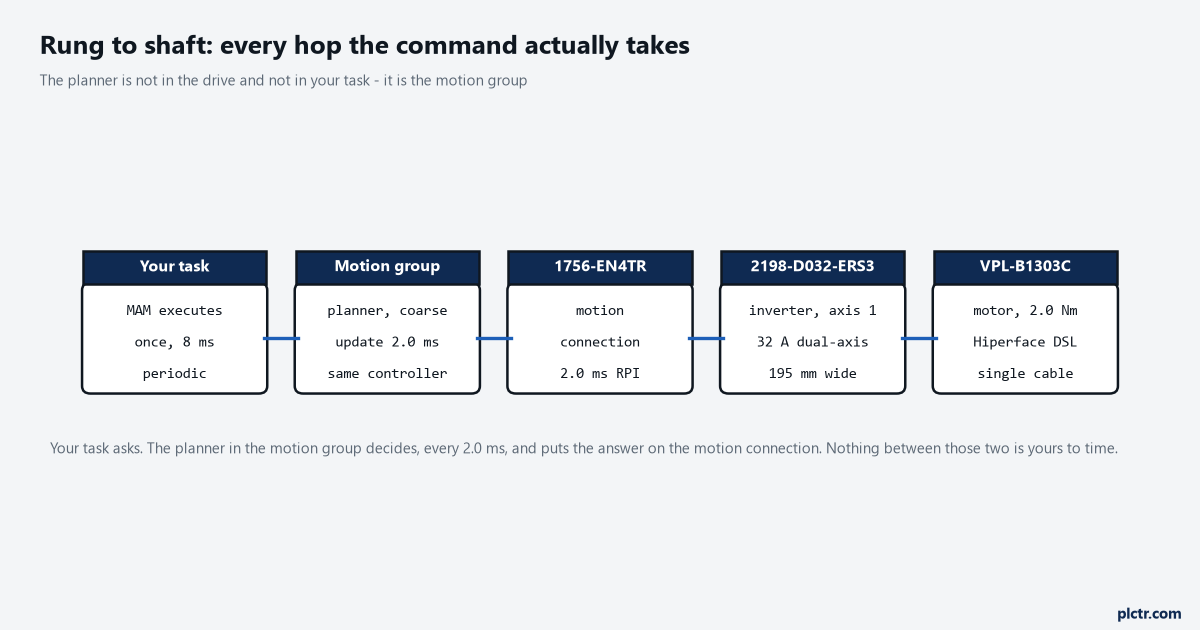
The middle box is the one people leave out of their mental model. The planner is not in the drive and it is not in your task.
Where the command actually goes
Your MAM does not send a position to the drive. It hands a request to the motion planner, and the planner is a piece of the controller that runs on the motion group’s coarse update period — 2.0 ms on a two-axis system is a sensible starting number. Every coarse update the planner works out where each axis should be next and puts that on the motion connection. Your task can be periodic at 8 ms, or 20 ms, and the motion still comes out smooth, because the profile is not being generated at your task rate. This catches people who have come from a drive that took a speed reference over a produced tag, where the update rate of the logic was the update rate of the motion. Here it is not. What your task rate does change is how quickly you notice something, and how quickly you can react to it, which is the same arithmetic as any other PLC scan time question.
The planner decides what the drive sees. Your rung only asks it to.
The eight places an axis gets configured, and the two nobody expects
Seven of the eight are inside Axis Properties and they are in a sensible order down the category list, which is the part that makes people confident. The two that stop a commissioning afternoon are the module definition and the drive’s digital inputs, and neither of them lives in Axis Properties. Module definition is the dialog you clicked past when adding the module in Logix Designer: it decides whether this module carries a Motion connection or Motion and Safety, and changing it afterwards drops the axis association you have already made, so the axis quietly goes back to being unassociated and MSO errors with no obvious reason. The digital inputs page is worse, because the default is not “nothing”. On a Kinetix 5700 inverter the factory configuration is digital input 1 assigned to Enable, input 2 to Home, input 3 to Registration 1 and input 4 to Registration 2, and the Enable Input Checking attribute defaults to Enabled. So the drive is watching IOD-1 for 24 V before it will let the power structure on, and an inverter with an empty IOD connector is an inverter that refuses to enable while everything on the screen looks correct. The rest of the list is ordinary by comparison. An axis that is not in a motion group does nothing at all, so the group has to exist before the axis does, and a group with no axes in it is a legal and useless thing that will let you download happily. Application Type and Loop Response on the General page write the entire gain set the moment you pick a motor catalogue number, so most of what gets called tuning is really a question about those two dropdowns rather than about sliders. Scaling starts at one Position Unit per motor rev and stays there until you tell it about the gearbox, which is its own afternoon.
Unassign the Enable input, or wire it. Both are fine. Leaving it assigned and unwired is not.
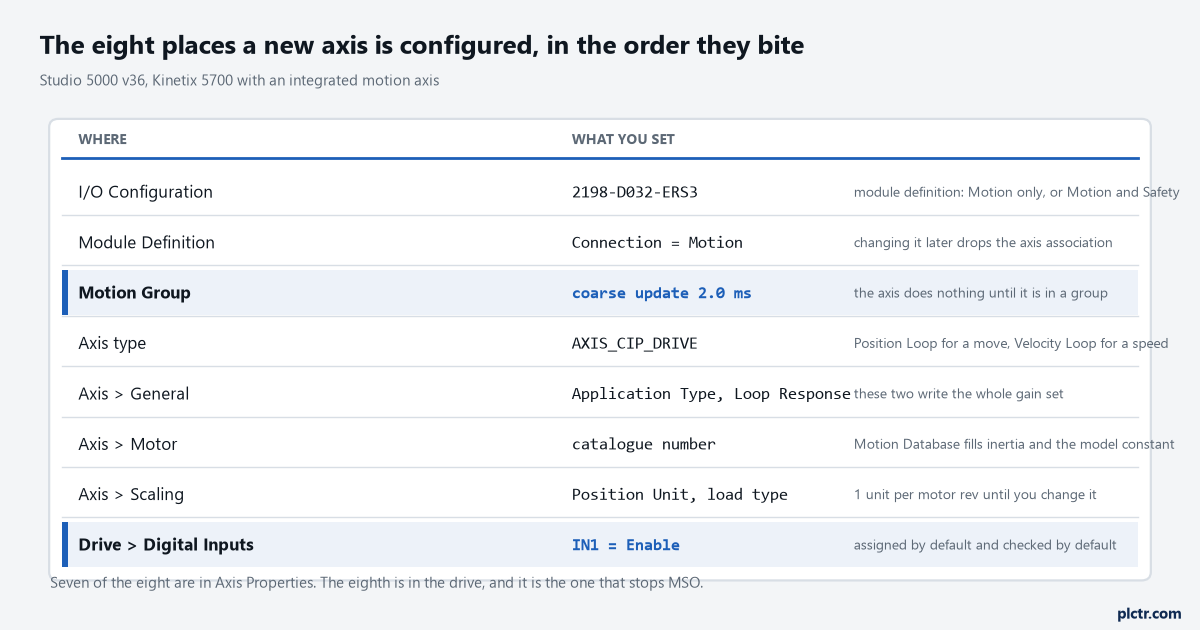
The two highlighted rows are the ones outside Axis Properties. Both are set once and then forgotten, and both take an axis down when somebody changes them later.
Why the first rotation should not come from your rung
Motion Direct Commands are on the right-click menu of the axis, and MSO, MSF, MAJ, MAM, MAS and MAFR are all available there. They execute from Logix Designer while the controller sits in Remote Program, which means your code is not in control of the axis — that is the whole point, and it is also the warning. Nothing you wrote can interlock it. So you clear the machine, you keep a hand on the disconnect, and you jog the axis fifty units at a low speed to answer four questions that no amount of screen-reading answers: does it move, does it move the direction you call positive, does fifty units on the screen match what a tape measure says, and does the drive stay enabled for the whole move. Four answers, ten minutes, and no ladder.
Then write the rung, knowing the mechanics are already proven.
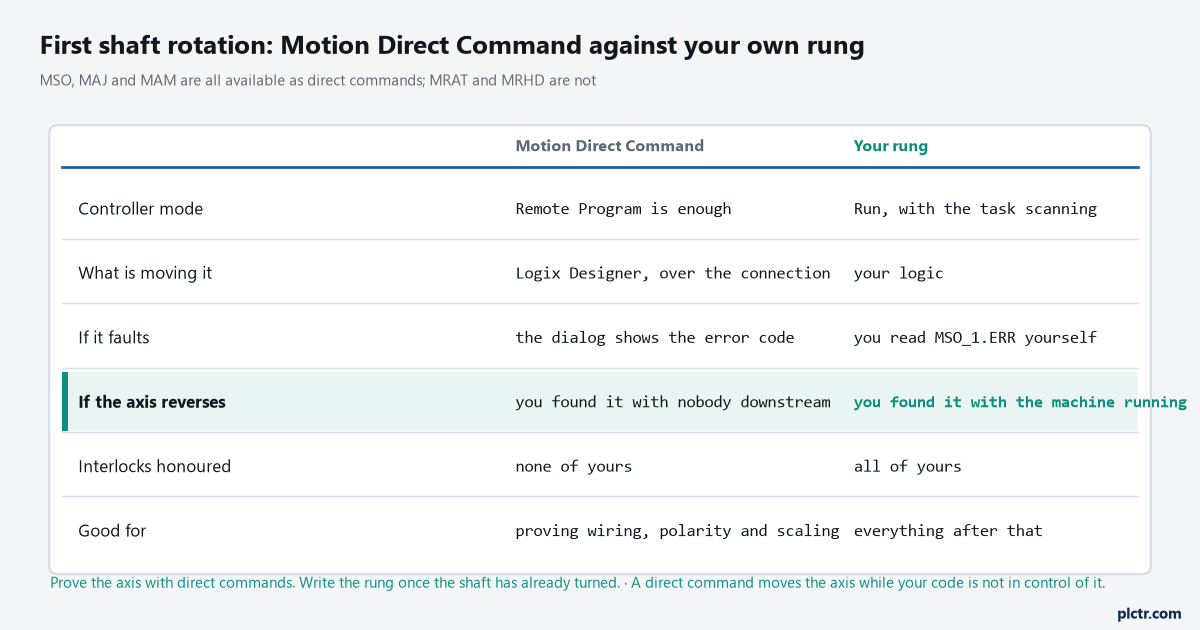
The row that matters is the fourth. A reversed axis found with a direct command is a checkbox; the same axis found by your first automatic cycle is a bent fixture.
The two rungs
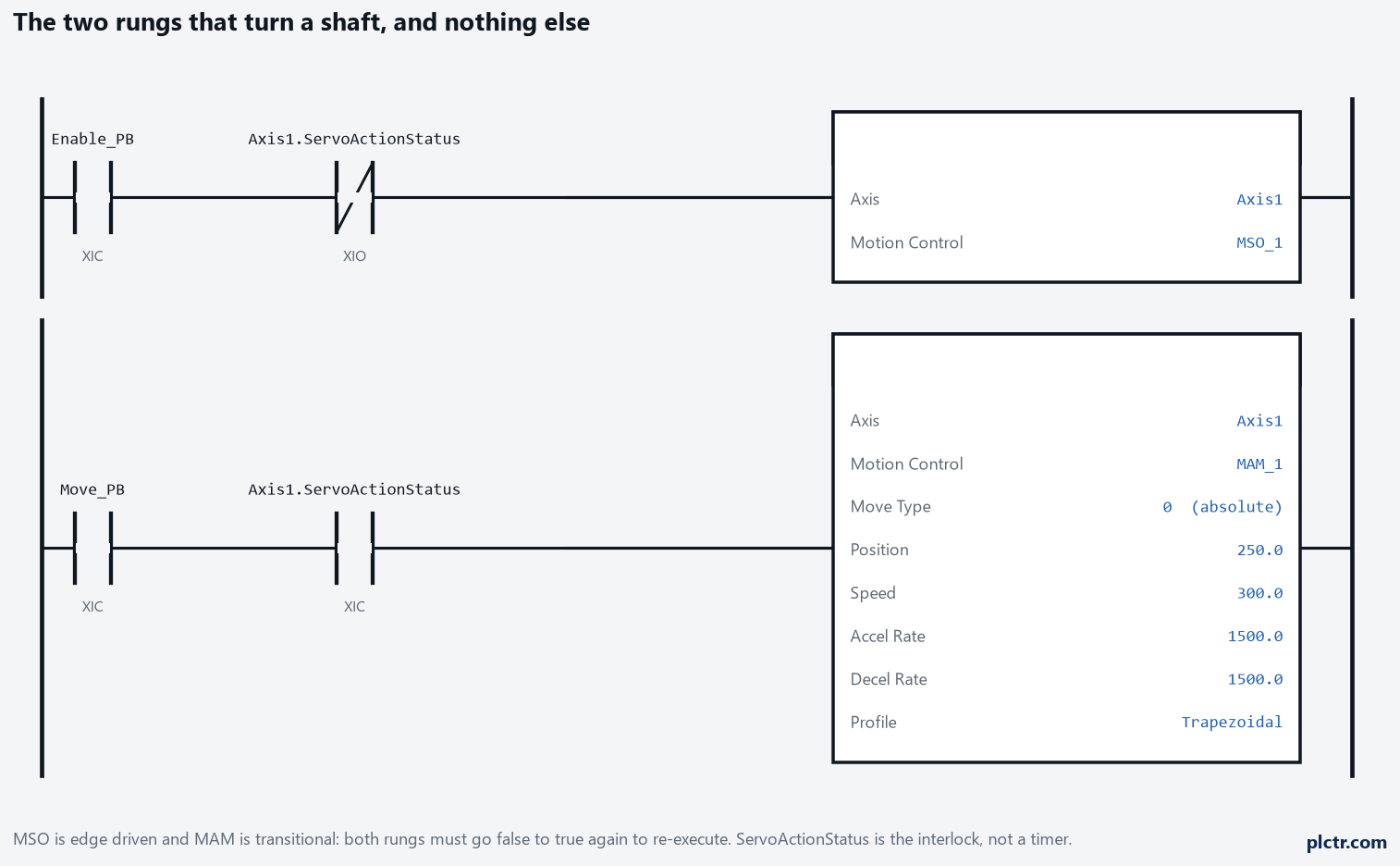
The ServoActionStatus contacts are the interlock. MSO fires when the axis is off, MAM fires only when it is on, and the tags in the second rung are in the Position Units you set on the Scaling page.
Both instructions are transitional. The rung has to go false and true again for either to execute a second time, and the MOTION_INSTRUCTION tag on each one belongs to that instruction and nothing else — reuse MAM_1 on a second MAM and you get behaviour that looks like the drive misbehaving and is not. Watch .DN, .ER and .PC rather than assuming; .PC on an MAM sets when the move reaches its endpoint, not when the instruction is accepted. What MSO waits for before it will do anything is its own subject, in MSO, MSF and MASD on a Logix axis, and so is what MAM does when a move is already running, in MAM against MAJ. For a first move, the two rungs above are the entire program.
The dead end: tuning it before it has moved
The instinct, when the first move is rough, is to open Autotune. The configuration and startup manual is unusually blunt about this: typically you do not need Autotune or Manual Tune at all, because once the drive is selected and the Motion Database is the motor data source, the defaults give adequate performance, and where they do not, the recommendation is to configure the drive for tuning-less operation rather than to tune it. A rough first move is far more often scaling — units that mean something different from what you assumed — or an accel rate that the motor cannot deliver against the load, or a coupling that is not tight. Autotune on an axis whose scaling is wrong produces a confident set of gains for a machine that does not exist.
Move it first. Measure it. Tune it only if the measurement says to.
What to check next
Put a trend on Axis1.ActualPosition and Axis1.PositionError and run the same move ten times. A following error that grows with speed is a gain question; one that grows with load is a mechanical question; one that sits at a constant offset is usually a feedforward that was never written because Application Type is set to Point-to-Point. If the numbers on that trend are not in the units your drawing uses, the scaling page is the place to start, and that is a job worth doing before anything else gets built on top of it. Broader context on what a Logix motion system is doing, if you have not met one before, is in Kinetix 5700 and Logix MAM moves, and the equivalent job with a non-servo drive — a PowerFlex taking a speed reference over EtherNet/IP — is a genuinely different shape of problem, covered in commanding a PowerFlex 525 from a ControlLogix.