MCD and MCCP: Changing the Speed of a Move in Flight, and What MCCP Actually Calculates
An MCD that lowers Decel from 1000 mm/s² to 200 mm/s² 1.72 seconds into an absolute move catches the axis at 391.6 mm with 131 mm/s still to lose. Stopping at the new rate takes 42.8 mm and only 8.4 mm of the move remain, so the axis runs out to 434.4 mm before it comes back to the 400.000 mm it was asked for, and the instruction reports no error at all.
No fault, no warning bit, and a load 34 mm past where the drawing says it stops.
The MCD instruction changes the speed of a move in progress. On a trapezoidal jog it changes the acceleration and deceleration too. It executes in a single scan and sets .DN immediately. What it cannot do is move the end position — nothing in its operand list refers to position, and the only way to change where a move finishes is another MAM. And MCCP, despite what the name suggests to anyone meeting it for the first time, does not change a command position either.
MCCP is Motion Calculate Cam Profile. It is a calculation instruction that builds a cam profile out of an array of points, and the manual’s own line for its effect on status bits is a single word: No.
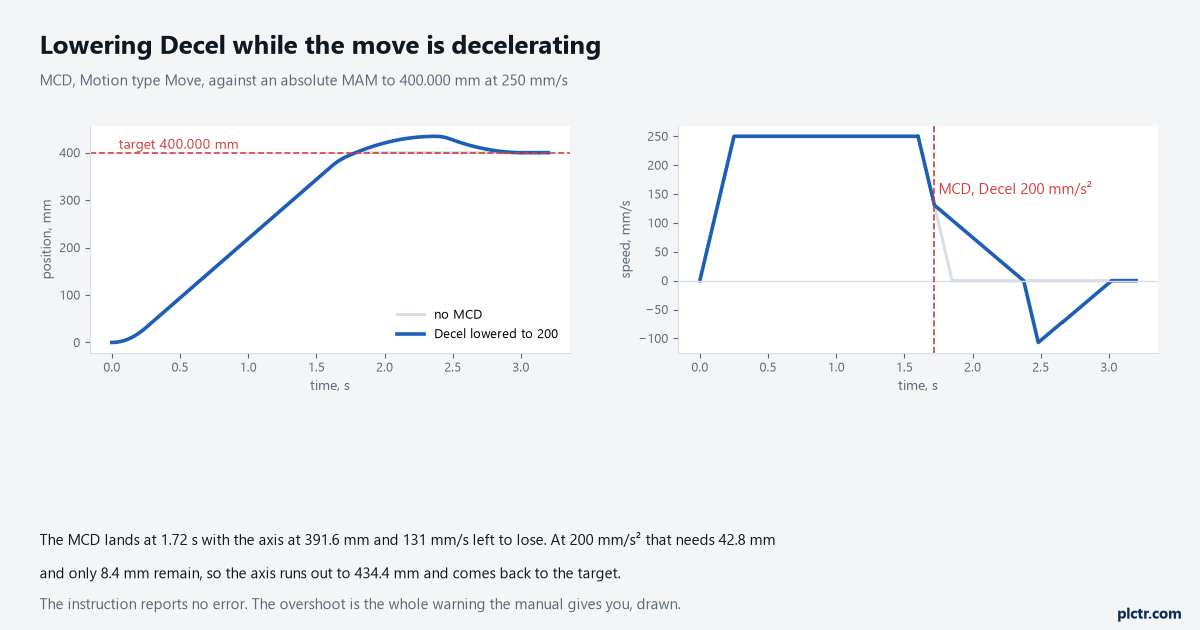
The grey trace is the same move with no MCD. Lowering a deceleration rate that the planner has already committed to is the one change that moves the axis past its target.
What MCD can change, and what it cannot
Each dynamic operand comes in a pair: a Change flag and a value. Change Speed yes with a Speed of 75, Change Accel yes with an Accel of 50, Change Decel no and a Decel that is then ignored — that is the shape of the instruction, and it means an MCD can adjust one rate while leaving the others exactly as the MAM set them. The behaviour when the speed changes is worth knowing precisely, because it decides which of the two rates is used: a new speed higher than the current one is reached at the specified acceleration rate, and a lower one at the specified deceleration rate. Jerk works the same way through its own Change flags.
As on MAM and MAJ, the jerk operands must be filled in even when a trapezoidal profile will ignore them.
The Motion type operand has two choices, Move and Jog, and picking the wrong one is a silent failure.
An MCD with Motion type Jog aimed at an axis running a MAM does not adjust the move; it addresses a jog process that is not there.
Nothing about MCD changes the target. If the endpoint is wrong, the instruction you need is a second MAM, which supersedes the first and takes the axis to the new position without stopping at the old one — that behaviour, and the overrun it can cause, is the second half of MAM against MAJ.
Pausing a move without ending it
The manual gives MCD a second job that is easy to miss: set the speed to zero and the move in progress pauses, and a later MCD with a non-zero speed completes it as originally specified. This is not the same as an MAS. An MAS ends the move: the .IP
.PC never sets, and the axis is left with no target at all. An MCD to zero leaves the move alive with its endpoint intact, the .IP bit set the whole time, and the .PC bit waiting to arrive whenever somebody restarts it.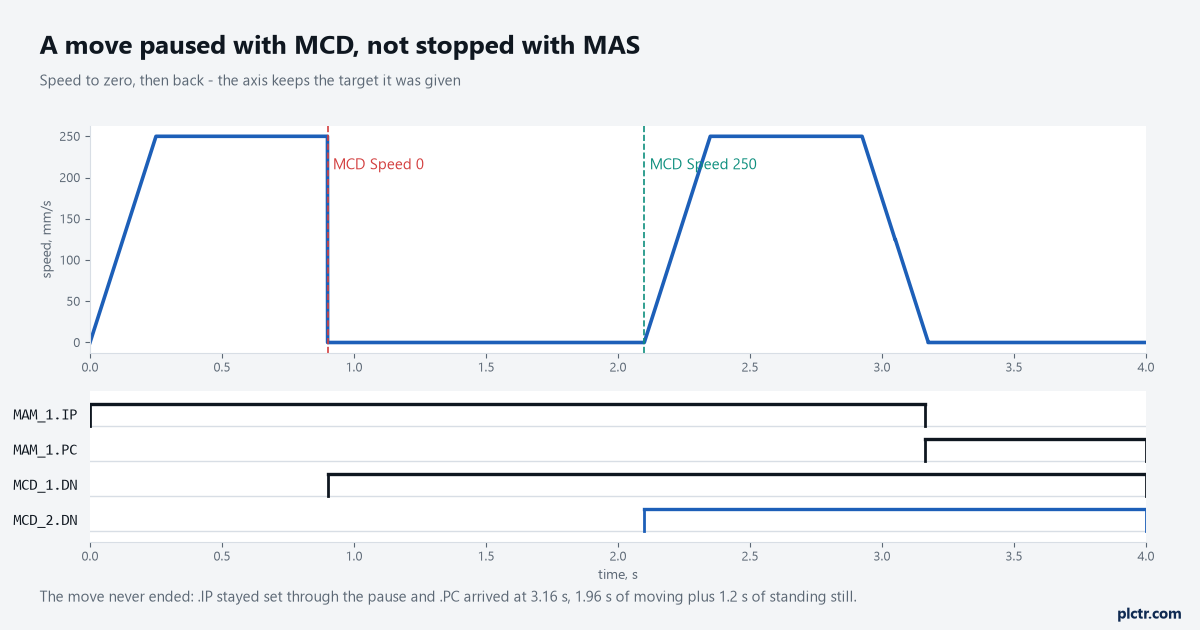
The move took 3.16 s to report complete: 1.96 s of motion and 1.2 s standing still. Nothing in the bits distinguishes a paused move from a slow one.
That last point is the practical catch. A sequence watching only .IP cannot tell a paused axis from a moving one, so a pause implemented this way needs its own status bit in the program if an operator is ever going to be told what the machine is waiting for. There is a related detail for anyone using Master Driven Speed Control: an MCD clears the CalculatedDataAvailable bit on an MAM while the event distances are recomputed, and the manual notes that if the MCD sets the speed to zero the event distance is not recomputed and that bit does not come back until a second MCD restarts the motion.
A paused move needs a tag of its own. The motion bits will not tell anyone.
Moving the command position without moving the axis
The instruction for that job exists, and it is MRP, Motion Redefine Position. It redefines the axis position with no motion at all — absolute mode sets the current position to the value you give it, relative mode offsets the current position by that value — and it may be used while the axis is moving as well as at rest, which is what makes it useful for registration and slip compensation. The choice between the two modes matters much more than it looks. The manual states that absolute and relative MRP have the same effect on a stationary axis, but that on a moving axis absolute mode introduces a position error equal to the distance the axis travels while the instruction executes, and relative mode does not, guaranteeing an exact correction regardless of speed. On a moving axis, use Relative.
There is a warning attached that belongs in any article mentioning MRP at all.
Redefining an axis in absolute mode can invalidate the Max Positive and Max Negative Travel limits in the absolute sense, and a new position outside those limits generates a software overtravel fault the moment the instruction executes.
MCCP is a calculation, not a move
The cam instructions work in two stages and MCCP is the first of them. You build a CAM array whose elements are pairs of unitless points — a slave value, a master value — each with an interpolation type of linear or cubic, either by hand in the tag editor or with the Cam Profile Editor. MCCP reads that array and calculates a CAM_PROFILE array, working out the polynomial coefficients that give slave position as a function of master position or time, so that a master value falling between two points still produces a smooth slave position. The profile, not the array, is what MAPC or MATC then executes. Two things about that calculation catch people. It completes in a single scan, and because a long profile is real arithmetic, the manual recommends putting MCCP in a separate task rather than in the middle of your machine scan. And the Start Slope and End Slope operands default to zero, which is right for a cam starting and ending at rest and wrong when you are blending one cam into another — there the start slope should match the end slope of the profile currently running.
A cubic cam entered at the wrong slope is a step in velocity that the machine will hear.
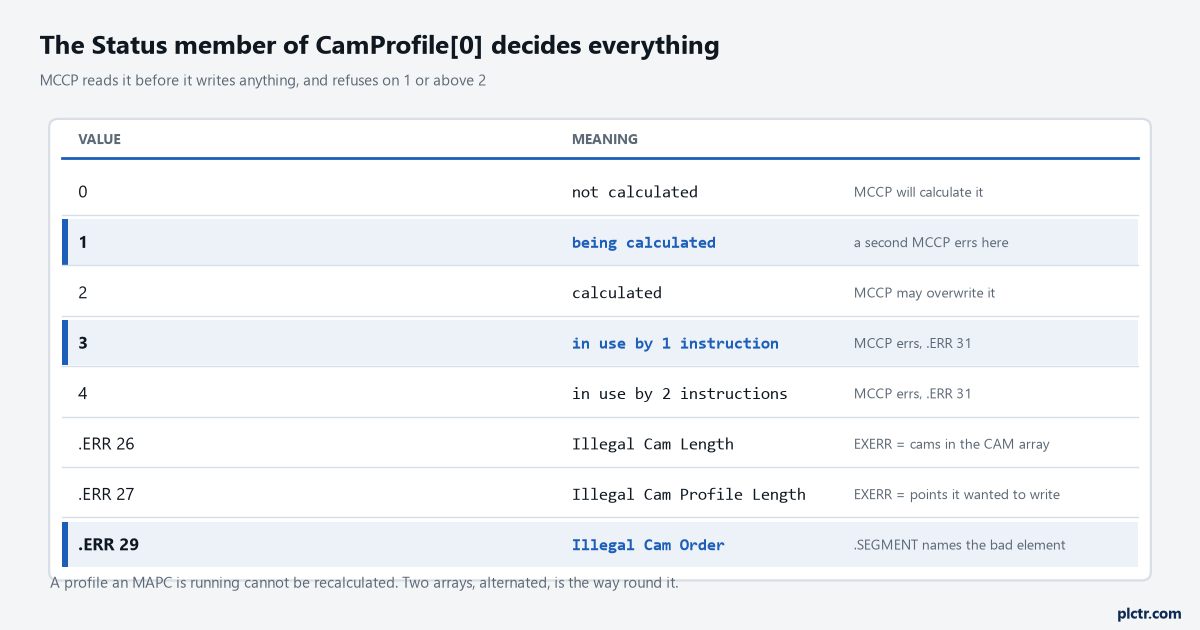
The Status member of the first element is a lock as much as a flag, which is why MCCP insists the cam profile operand starts at index 0.
What blocks an MCCP, and what the error numbers mean
Status is checked before anything is written. If the first cam profile element reads 0 or 2 the calculation proceeds; if it reads 1 another MCCP is already calculating that profile and this one errs; if it reads above 2 the profile is being used by an MAPC or MATC and this one errs as well. That last case is the one that shapes real programs, because it means a profile cannot be recalculated while a cam is running on it. The way round it is two arrays and a pointer: run the cam on profile A, calculate the new shape into profile B, start the next cycle on B. The error numbers are specific enough to find the fault without a debugger — 26 is Illegal Cam Length and its extended code reports how many cams the instruction found in the array, 27 is Illegal Cam Profile Length with the number of points it was trying to generate, 28 is Illegal Cam Type, 29 is Illegal Cam Order, 30 and 31 are the two in-use cases above, and 32 means the profile was never calculated in the first place.
For 28 and 29 the .SEGMENT field of the MOTION_INSTRUCTION names the offending element, counting from zero.
A .SEGMENT of 3 means the fourth element of the array. For error 29 that element holds a master value that is not greater than the one before it, which is the usual result of building a cam array in a loop and getting one index wrong.
Check the master column is strictly ascending before you blame the instruction.
Next thing to do: if you are chasing an overshoot, trend the command position and the command velocity together and find the moment the deceleration rate changed. An MCD that lowered Decel inside the deceleration ramp shows up as a kink in the velocity trace and a target the axis sailed past, exactly as in the first figure. For the axis states behind all of this, MSO, MSF and MASD covers what has to be true before any of these instructions do anything; for the relationship between two axes rather than a single profile, MAG and gearing is the simpler cousin of a cam; and the walkthrough from motion group to first move builds the axis the rest of this assumes.