Zeroing a 500-element DINT array with one FLL costs 0.087 + (500 × 0.04) microseconds on a ControlLogix 5580, which is 20 µs. Write the same job as a FOR loop around a CLR and LOGIX-RM002B gives you 0.268 + (500 × 1.05) for the loop and another 0.006 per CLR, so 528 µs — twenty-six times the cost, to produce exactly the same 2000 bytes of zeros.
That ratio is the reason the instruction exists.
FLL writes one value into a block of memory. Three operands: the Source value, the first element of the Destination, and a Length in destination elements. No CONTROL tag, no .DN bit, no mode, no position — it fills the whole block in the scan the rung goes true and it is finished. If you need each element to be different, this is the wrong instruction and a COP from a prepared template is the right one; if you need one value everywhere, nothing beats it.
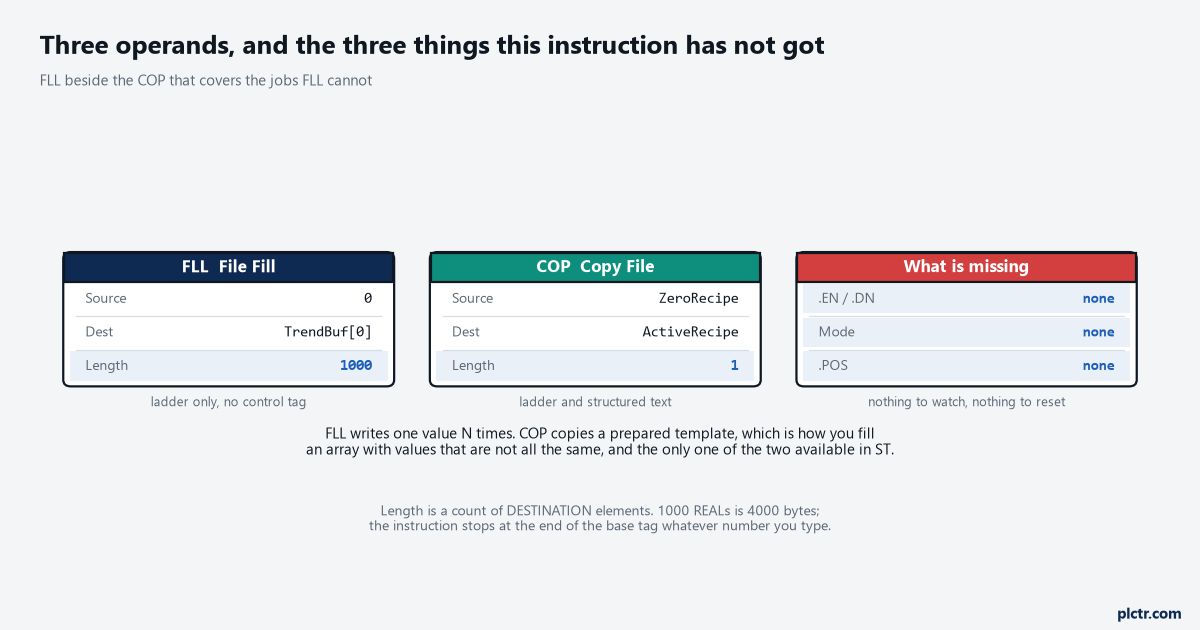
Three operands and no control tag. There is nothing here to watch and nothing to reset.
The rung condition is the entire design
Here is the part that is not in the operand table.
FLL has no transition built into it. Its execution table has one line for a true rung — the instruction fills the memory — and that happens on every scan the rung stays true, because there is no .EN bit remembering that the fill already happened and no done bit to seal it off. So an FLL driven from an HMI command bit that stays on until an operator clears it does not clear the array once. It clears the array forty thousand times, once per scan, for as long as the bit is set, and every one of those fills costs its full price. Worse than the cost is the interaction: anything else in the project that writes into that array during the same scan gets wiped by the FLL if the FLL runs later in the scan order, and survives if it runs earlier, which makes the symptom depend on rung order.
From the outside that looks exactly like data disappearing at random, which is why nobody suspects the fill.
The dead end here is the HMI. It always is.
Values vanish from an array, so the HMI driver gets the blame, then the MSG that populates it, then the tag scope. The check that settles it in one minute is to put the command bit on a trend beside a count of how many scans it has been true, because a clear command that should be a pulse and is actually a level answers the question outright. Drive the FLL from a one-shot, or from a step in a sequence that is true for exactly one scan, and both the cost and the interaction disappear. This is also the natural first-scan job: one FLL under the first scan bit initialises a buffer that would otherwise come out of a download holding whatever the last project left in memory.
Length counts destination elements, and the boundary that saves you
The Length operand counts destination elements. Not bytes, not source elements, not bits.
What the instruction actually writes is defined more carefully than that, and 1756-RM018A gives it as the smaller of two numbers: the requested amount, which is Length times the number of bytes in a destination element, and the number of bytes in the destination tag. That second half is the safety net and it is worth understanding exactly. The end of the destination tag means the last byte of the base tag, so an FLL asked to fill 5000 elements of a 500-element array stops at the end of the array rather than marching through the tag database, and there is no fault to tell you it happened.
You asked for 5000 and got 500, quietly, with every rung still looking correct.
The net has one hole in it, and the hole is structures.
The base tag is the outermost tag, not the member you pointed at, so an FLL that starts at Recipe.Steps[0] inside a UDT will happily run past the end of Steps and into whatever member the user-defined type declares next. It stops at the end of Recipe. The manual’s instruction on this is direct: test and confirm that the FLL instruction does not change data that should not be changed. In practice that means one watch window with the whole UDT expanded, one execution, and a look at the members below the array before the code goes anywhere near a machine.
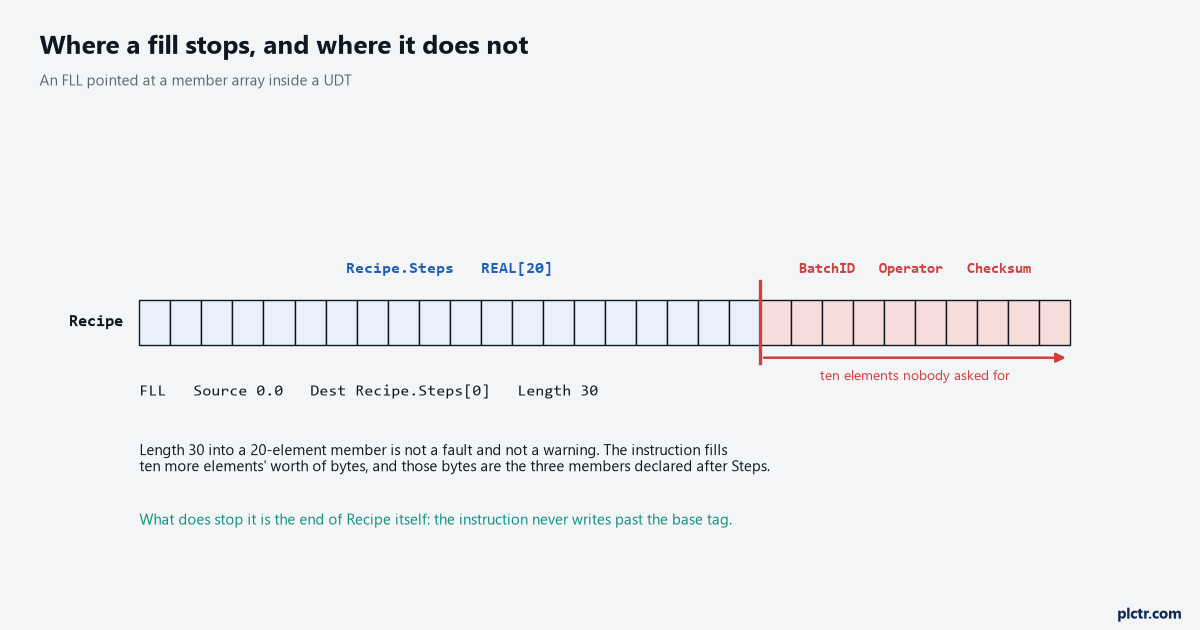
Length 30 into a 20-element member does not fault. It fills the ten elements that follow it inside the same base tag.
What happens to the value on the way in
Source and Destination need not be the same type, and that is where a fill stops meaning what you thought.
1756-RM018A sets out the rules plainly. A SINT, INT, DINT or REAL source is converted to the destination type before it is stored, then written to the destination N times. Converting from a larger integer to a smaller one truncates — the high bits are discarded — so filling a SINT array with the DINT value 300 gives you 44 in every element, because 300 is 16#012C and the low byte is 16#2C. Converting a REAL to an integer rounds, and the Data Conversions section spells the tie out: fractions below 0.5 round down, above 0.5 round up, and exactly 0.5 rounds to the nearest even number. So an FLL of 1.5 into a DINT array writes 2 and an FLL of 2.5 writes 2 as well.
Converting upward sign-extends, which is the behaviour you want and the one nobody checks.
Fill with zero and none of this matters. Fill with anything else and check the type first.
There is one more line in that section worth pulling out, because it is the manual telling you when to stop using this instruction: if you are initialising a structure, keep one instance containing the initial values and use a COP to replicate it, and use FLL for the case where the whole structure is going to zero. That is the cleanest statement of the boundary between the two instructions anywhere in the reference, and the recipe-into-the-controller job is where it usually comes up first.
It is not in Structured Text, and that changes the answer
Check the Available Languages block before you plan around this one.
FLL is ladder only. The reference prints the same two sentences under Function Block and Structured Text — this instruction is not available — and that is a real constraint rather than an oversight, because COP and CPS sit two pages away with COP(Source,Dest,Length); printed as valid ST. So a project written in Structured Text has three ways to clear an array and none of them is an FLL: a COP from a zeroed template tag of the same type, a FOR loop, or one ladder routine called from the ST for exactly this.
The COP is the one to reach for, and at 0.186 + (x × 0.02) µs for DINTs it is cheaper per element than the FLL, because it is a straight byte-to-byte memory copy with nothing to convert.
The FOR loop is the expensive answer and the one that gets written anyway.
At 0.268 + (x × 1.05) µs it costs roughly twenty-six times what the block instruction costs for the same result, and the reason is not the assignment inside it. It is the loop: every iteration is a bounds check, an index update and a branch, and the controller pays that per element while the FLL pays it once. There are jobs that genuinely need a loop, and filling an array with a constant is not one of them.
What the fill costs, and where it stops being the right shape
Work the numbers for the array in front of you.
LOGIX-RM002B gives FLL as 0.087 + (x × 0.04) µs for DINT and REAL destinations, 0.030 + (x × 0.07) for INT and 0.037 + (x × 0.09) for SINT, so the byte-oriented types are dearer per element and cheaper per byte. A 1000-element REAL trend buffer clears in 40 µs. A 10,000-element one clears in 400 µs, which is still only 0.4 ms but is now a number worth looking at against the task period it lives in, and a 100,000-element fill at 4 ms is the sort of thing that turns a watchdog into a fault.
That fault arrives the first time somebody presses Clear while the line is running, which is the worst moment for it.
There is no way to spread an FLL over several scans.
It has no Mode operand and no position, which is exactly the difference between it and FAL — the file arithmetic instruction that can be told to do so many elements per scan, and which has its own article on this site. If a fill is big enough to hurt, the honest options are to move it into a slower task, to split it into several FLL instructions across successive steps of a sequence, or to stop clearing the whole buffer and clear only the part that changed. What you should not do is put a 4 ms fill in the continuous task and hope, because scan time is measured on the worst scan and not the average one.
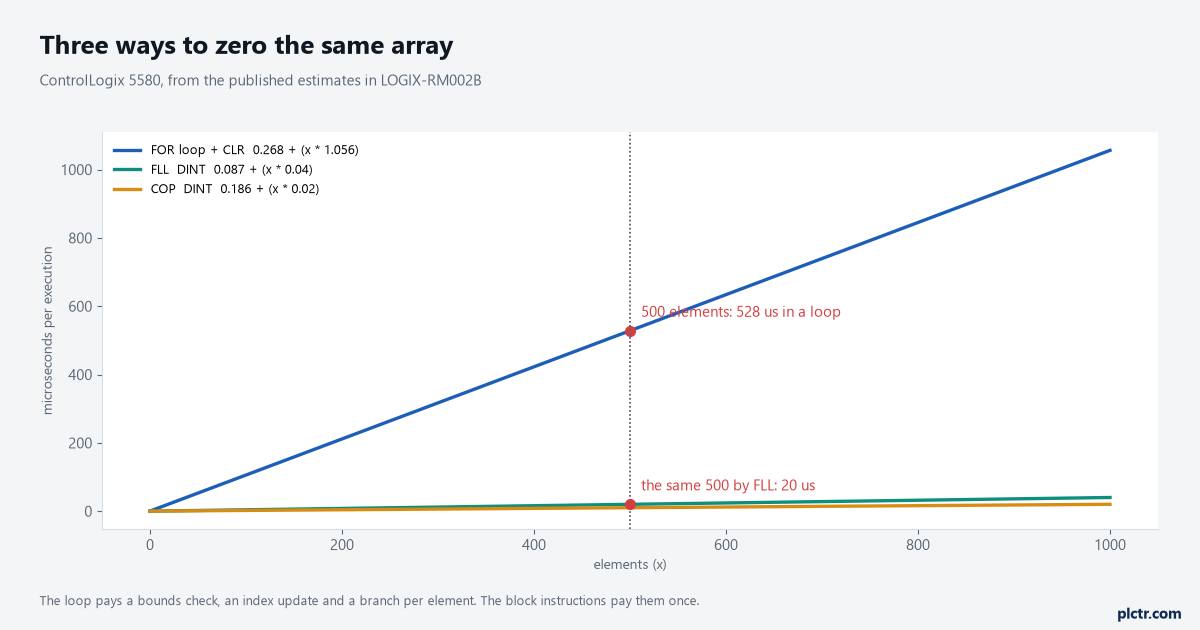
All three produce the same array. The gap is loop overhead, paid once per element.
What to check next
Find every FLL in the project and look at what drives each one, because the ones on a level condition are already costing their full price on every scan and are the cheapest thing you will fix this week. Then check the two numbers that decide correctness rather than speed: whether Length matches the destination array rather than the source, and whether the destination is a member of a structure with something valuable declared after it.
If the array is filled from an index that moves rather than a constant, the fill is not the problem and indirect addressing is where to look next.