One STD instruction over a 1000-element array costs about 4.8 ms on a ControlLogix 5580. LOGIX-RM002B prints the four STD rows as 1.043 to 1.220 µs of overhead plus 4.79 to 4.96 µs for every element, and 1000 elements at the cheapest of those rows is 4790 µs. Call it 4.8 ms, on one rung, for a number an operator glances at — about 240 times what it costs to COP the same array somewhere else.
That is one instruction, on one rung, in one scan.
AVE gives you the mean of a block of elements, STD gives you the standard deviation into a REAL destination, and SIZE tells you how many elements a dimension of an array actually holds. SIZE is free and you should use it everywhere, and the operand-by-operand example of an AVE covers the fields themselves. AVE and STD are the two most expensive instructions in the file set by a wide margin, and the whole skill in using them is deciding how many elements they are allowed to touch and how often they are allowed to run.
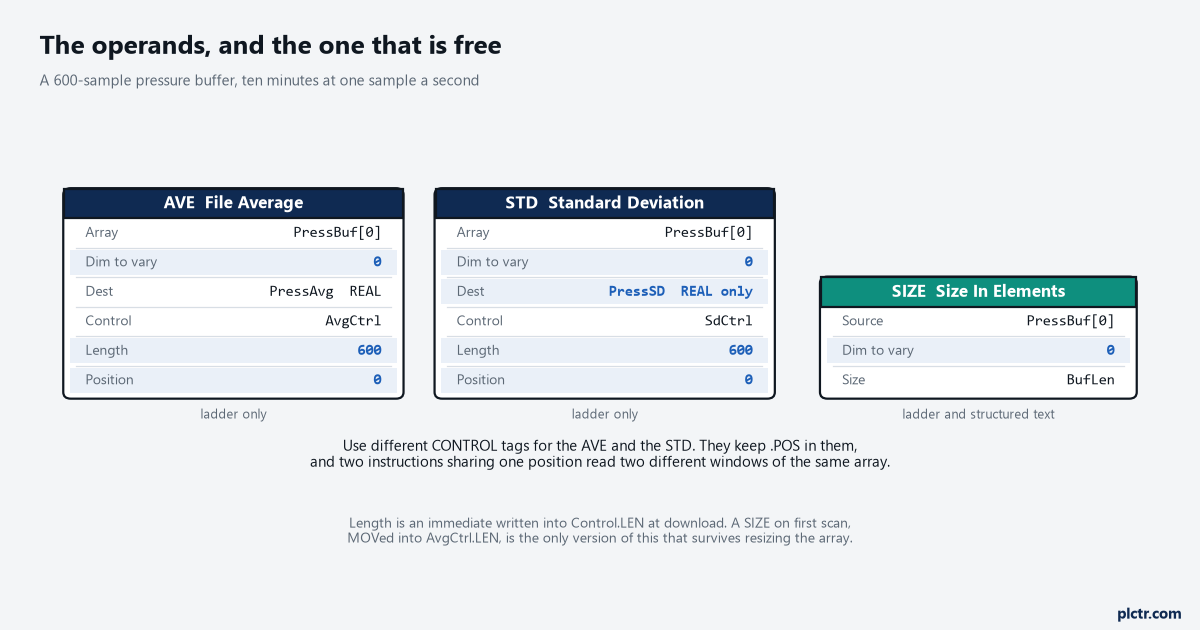
STD’s Destination is REAL and nothing else. AVE’s takes the array’s type, which is where the rounding goes wrong.
SIZE first, because it is the one that costs nothing
SIZE reads the number of elements in one dimension of an array into a tag, for 0.107 µs flat.
Use it everywhere a length would otherwise be typed in. 1756-RM018A lists what it will operate on — arrays, arrays inside a structure, arrays that are part of a larger array, and string tags — and it is available in Structured Text as SIZE(Source,Dimtovary,Size);, which AVE and STD are not. The pattern worth adopting is a first-scan routine that runs a SIZE on each array the statistics touch and MOVs the answer into the matching Control.LEN, because the Length field on AVE and STD is an immediate written into the control tag at download.
Resize PressBuf from REAL[600] to REAL[900] and the SIZE picks it up while a typed 600 does not.
The instruction that tells you how big something is costs a tenth of a microsecond.
The ones that read it cost thousands of times that.
Dimension to vary, and the wrong answer that does not fault
Here is where a mean comes back wrong with nothing on the controller saying so.
AVE and STD both take a Dimension to vary operand — 0, 1 or 2 — and both take a Length, and 1756-RM018A attaches one IMPORTANT note to the pair: make sure the Length does not cause the instruction to exceed the specified Dimension to vary, because if it does, the destination will be incorrect. Not faulted. Incorrect. On a one-dimensional array this never bites, because there is only one dimension and Length can only overrun the array, which sets .ER and stops execution. On a REAL[4,20] it bites immediately. Point the instruction at PressBuf[0,0] with Dimension to vary 1 and it walks the second subscript, which is the twenty elements of row 0, and that is the number the rung was written to produce. Type 80 into Length because the array holds 80 elements and it keeps going into rows 1, 2 and 3, still inside the array, still without a fault, and hands back the mean of the whole array instead of the mean of the row.
The dead end is the transmitter. It always is with a bad average.
An analogue value reads plausible on its own and its average reads wrong, so the scaling gets checked, then the module’s filter setting, then the wiring, and all three are fine because the raw samples in the array are fine. Put the array on a watch window, read ten elements by hand, add them up on a calculator and divide, and you will know inside two minutes whether the array or the instruction is lying.
Nine times out of ten the array is right, and then two candidates are left: Dimension to vary against Length, and a .POS that was not 0 when the instruction started.
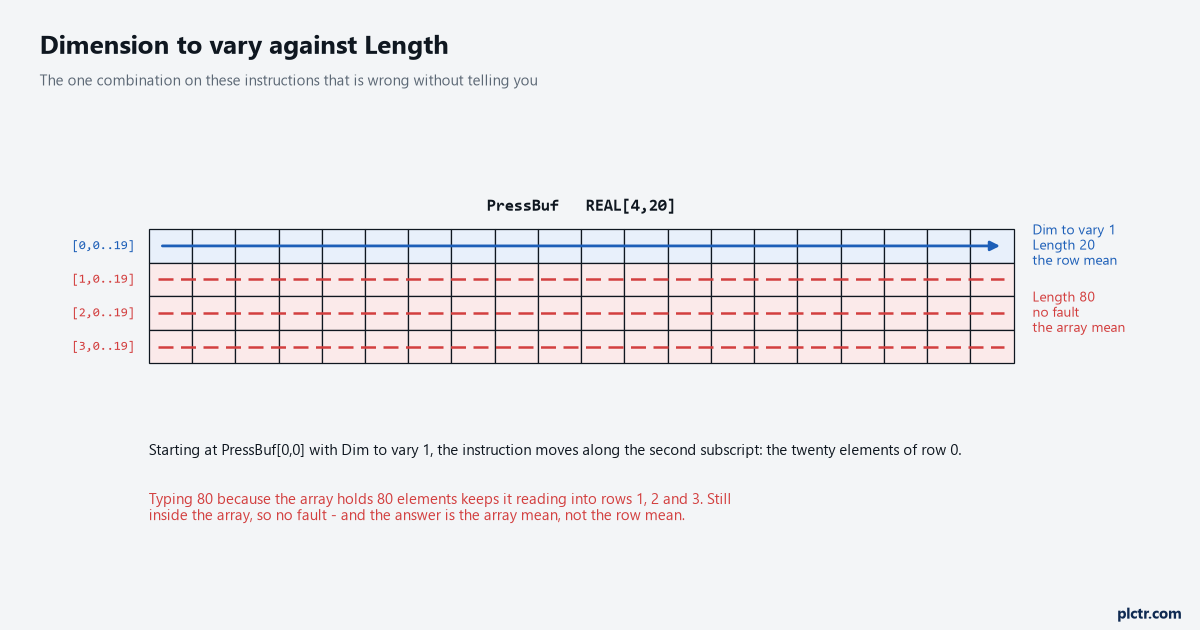
Dimension to vary 1 walks the second subscript. Length 80 keeps walking into the rows below, with no fault.
What the maths actually costs
Now the numbers, because a formula with an x in it stops nobody.
Take a pressure transmitter sampled once a second into PressBuf, a REAL[600] ring buffer holding ten minutes of history. The four published AVE rows run from 1.23 to 1.79 µs per element, so an AVE over the whole buffer costs between 0.74 and 1.08 ms. The four STD rows run from 4.79 to 4.96, so the STD beside it costs about 2.9 ms. Put both in a 100 ms periodic task and they take 3.6% of it, which is fine and nobody will ever notice.
Put both in the continuous task and they run on every scan, perhaps three hundred times a second.
The same two instructions now want more than a second of every second, which is not a slow machine. It is a machine that no longer scans.
Nothing warns you. The task simply takes as long as it takes.
What the controller does instead is show it, in two places worth knowing: the Program Properties Monitor tab, which prints the Max and Last execution time for everything in that program, and the task’s own watchdog, which is 500 ms by default and 1 to 2,000,000 ms by configuration according to 1756-PM005M. A periodic task that cannot finish before its next trigger does not fault either — it overlaps, the trigger is discarded, and the controller logs a minor fault and counts it in the Task Overlap Count.
So the failure is rarely a stopped machine. It is a loop quietly running at half its designed rate, which is where scan time shows it first.
Run it once per sample, not once per scan
The fix is not a faster controller. It is running the instruction only when the answer can have changed.
A 600-element mean moves by one six-hundredth of one sample when a new sample arrives, so computing it three hundred times a second to display a number that updates once a second is three hundred times more work than the job needs. Gate the AVE with the same one-shot that loads the new sample into the buffer and the cost drops from 0.74 ms per scan to 0.74 ms per second, which is under a tenth of one percent of the controller instead of most of it.
That one contact is the biggest saving available anywhere in the file instruction set.
Then shorten what you average.
Statistics over 600 points and statistics over 60 points are different answers to different questions, and it is worth being honest about which one the operator is actually looking at — a ten-minute mean on an HMI trend and a one-minute mean are both defensible, and one of them costs a tenth of what the other does. If the requirement is genuinely a long window at a high rate, move the calculation off the controller: the samples are already in a tag, and reading them out with pycomm3 puts the arithmetic somewhere that has memory and time to spare. Where the number has to stay in the controller and the window has to stay long, the other route is a running sum — add the new sample, subtract the one leaving the window, divide — which is three instructions at about 0.04 µs and does not care how long the buffer is.
The overflow that gets ignored
AVE works the way its execution table says: add every element, then divide.
Add first, divide second, and that order is where an integer mean goes wrong. A DINT[1000] array of values around 8,000,000 sums to eight billion, which does not fit in the DINT the instruction is accumulating into, and the mean you get back is not the mean of anything. The instruction does report it — the Affects Math Status Flags table for AVE says yes, which puts the overflow in S:V where almost nobody looks — but the destination still holds a number, the rung still looks fine, and the HMI still draws a value. STD sidesteps half of this by taking a REAL destination and nothing else, which is the manual admitting where this arithmetic wants to live.
Average REALs, not DINTs, unless you have done the sum on paper.
There is one more asymmetry between the two instructions that is easy to miss on a fast read of the reference. AVE’s destination takes the array’s own data type, so an AVE over a DINT array returns a DINT and the fractional part of the mean is simply gone — average the numbers 10 and 11 and you get 10, not 10.5. If the mean matters to a tenth, either the array is REAL or the destination is, and if you change the destination to REAL while leaving the array DINT, check what the conversion does before trusting the first decimal place.
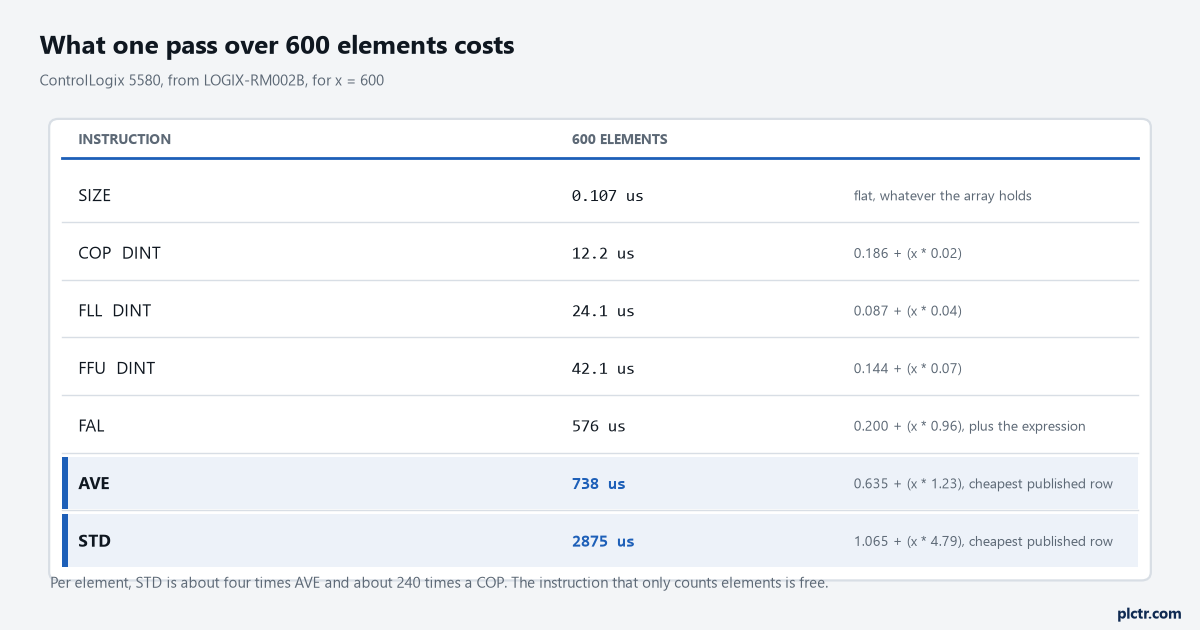
Per element, STD is about four times AVE and about 240 times a COP. The instruction that only counts elements is free.
Ladder only, both of them
Check the Available Languages block before designing around these.
AVE and STD are ladder only — the reference prints “this instruction is not available” under both Function Block and Structured Text for each of them — while SIZE is available in ST. A project written mostly in Structured Text therefore needs either one ladder routine holding the statistics and a JSR into it, or the arithmetic written out longhand, and longhand is not the disaster it sounds. A running sum in ST costs less than the block instruction it replaces, and reads better six months later than a Dimension to vary operand nobody remembers choosing.
What to check next
Find every AVE and STD in the project and answer two questions about each: how many elements it touches, and how often its rung is true. Multiply those together with the published per-element numbers and you have the cost per second, and anything over a few percent of a task is a design decision somebody made by accident. Then check .POS on each control tag while the machine runs, because a position that is not 0 when the instruction starts is reading a window you did not intend, and check Dimension to vary against Length on anything with more than one subscript.
If the array is filled by a trend capture in the controller, the sample rate feeding it is the other half of the same arithmetic, and usually the half that is easier to change.