Arrays, UDTs and Structures Over OPC UA: What the Client Actually Sees
Insert one DINT called Jam_Count into the TR14_Belt user-defined type, put it after the State member where it belongs logically, and download to the 1756-L83E. Fault_Code moves from byte 4 to byte 8, and Starts, Run_Seconds, Speed_mps, Motor_Amps and Last_Fault_S each move four bytes with it.
A client that read the structure template last Tuesday and cached it now reads six of eight members from the wrong place, and every one of those reads comes back with quality Good.
That is the whole risk in one paragraph, and the rest of this page is how to see it coming. The short answer to what a client sees when it browses a controller full of opc ua structures: one of two useful things and one useless one. Either the server has walked the type and made a separate node per member, which any client can read and which costs one read per member, or it hands you the whole thing as a single ExtensionObject, which is one read and is consistent but needs the client to know the layout.
The useless one is the same ExtensionObject arriving at a client that cannot decode it, which the specification says the decoder should skip over as opaque bytes.
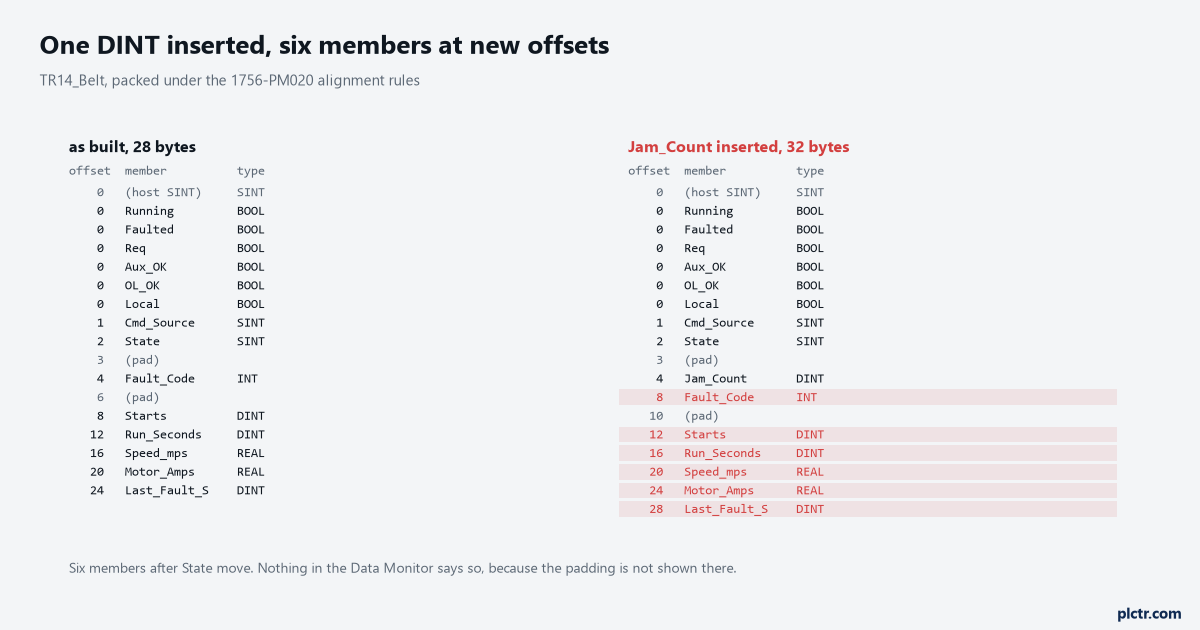
The grey rows are the ones nobody sees. Two pad bytes at offset 6 exist only so that Starts can begin on a 32-bit boundary, and they are what makes the arithmetic non-obvious.
What actually crosses the wire
Nothing about a structure is decided by the controller alone. The controller decides the byte layout; the server decides whether that layout is exposed as one node or as fourteen; the client decides whether it can make sense of what arrives. Three parties, and the two that can change without telling anybody are the first and the last.
Browse the server first, because which of those you get is a property of the server.
A Logix controller reached through an OPC UA server that sits in front of CIP is nearly always flattened, because the server has read the template and can build a node per member. An S7-1500 with its own OPC UA server does the opposite: a PLC data type instance in a global DB appears as one node whose value is a structure, and the members appear as children of it as well. Both are legitimate and both are what the reader will meet, so the useful skill is telling which one you have inside thirty seconds of browsing. Expand the node in whatever client you have to hand. If the leaves carry types like Boolean, Int16 and Float, you are flattened and your life is simple. If the node itself has a value and its DataType is something in namespace 3 with a name matching your UDT, you have a structure, and the next question is whether your client can decode it.
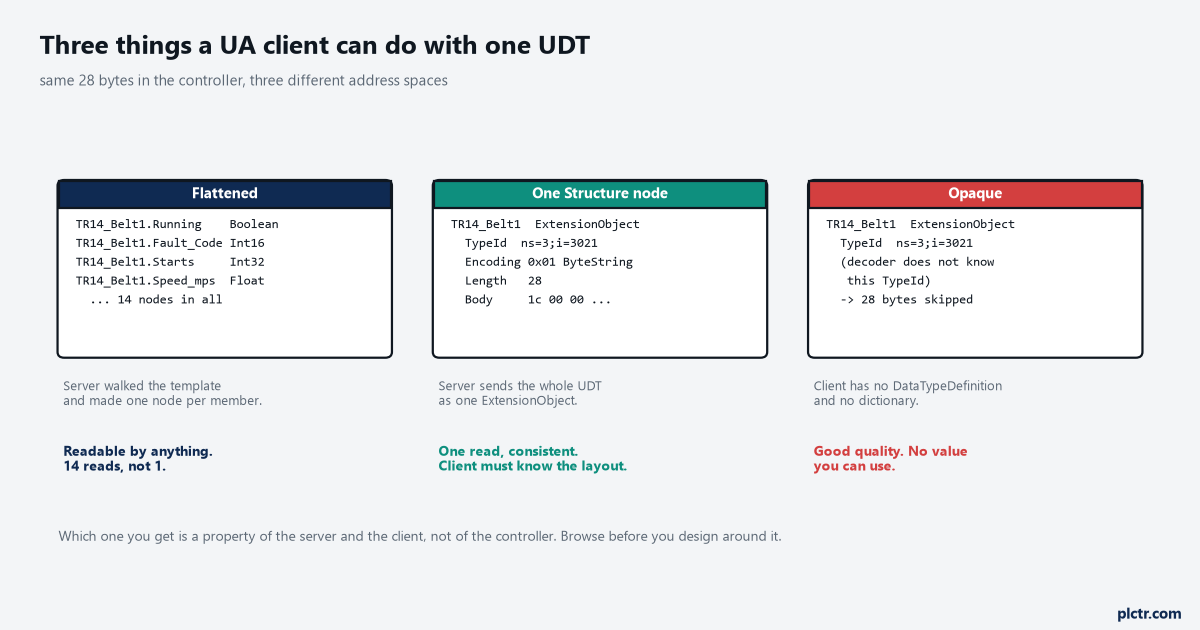
Notice the third column. The status code is Good, the node is there, the bytes arrived, and the tag on the dashboard is empty. That combination is why people blame the network.
The decode question has a version number attached to it. Up to OPC UA 1.03 a client had to read the whole DataTypeDictionary out of the server, parse it and work out the structure from that, which is slow and which some clients simply never implemented. From 1.04 there is a DataTypeDefinition attribute on the data type node, and a client reads it once at the start of the session and uses it for the rest. Siemens says as much in its own function manual, and the practical consequence is that a five-year-old client against a current CPU will show you a structure it cannot open.
The fix for that one is never on the controller side, whatever the vendor tells you.
Where the bytes are
The alignment rules are printed in the Logix data access manual, publication 1756-PM020, and they are four lines long. A SINT aligns to an 8-bit boundary, an INT to 16, a DINT or a REAL to 32, and the structure itself begins and ends on a 32-bit boundary. BOOLs are the interesting case: consecutive BOOLs in a UDT are packed into one hidden host SINT that does not appear in the Data Monitor at all, and neither do the pad bytes inserted to make the next member land where it must. What the Data Monitor shows you is the members you declared, in the order you declared them, with no indication of the gaps. So TR14_Belt as built has six BOOLs sharing the host SINT at offset 0, Cmd_Source at 1, State at 2, one wasted byte at 3 because Fault_Code is an INT and needs an even offset, Fault_Code at 4, two more wasted bytes at 6 because Starts is a DINT and needs a multiple of four, and then Starts, Run_Seconds, Speed_mps, Motor_Amps and Last_Fault_S filling 8 through 27. Twenty-eight bytes, three of which are padding you did not ask for and cannot see. Reorder the same fourteen members with the two SINTs after the INT rather than before it and the total drops to 28 still, but the offsets all differ; put the DINTs first and the BOOLs last and you get a tidier structure with the same members. None of that matters while every reader asks for members by name. It matters entirely the moment something reads the structure as a whole.
Reading member by member is slower and safer. Reading the whole structure is faster and brittle.
TR14_Belt          UDT, 28 bytes as built
  Running          BOOL    offset 0, bit 0
  Faulted          BOOL    offset 0, bit 1
  Req              BOOL    offset 0, bit 2
  Aux_OK           BOOL    offset 0, bit 3
  OL_OK            BOOL    offset 0, bit 4
  Local            BOOL    offset 0, bit 5
  Cmd_Source       SINT    offset 1
  State            SINT    offset 2
                   pad     offset 3
  Fault_Code       INT     offset 4
                   pad     offset 6, two bytes
  Starts           DINT    offset 8
  Run_Seconds      DINT    offset 12
  Speed_mps        REAL    offset 16
  Motor_Amps       REAL    offset 20
  Last_Fault_S     DINT    offset 24
There is a second thing on the Logix side that looks like a safety net and is not. A CIP read or write of a whole structure carries a four-byte tag type parameter, the bytes A0 and 02 followed by a 16-bit Structure Handle that comes from attribute 1 of the template instance. It is tempting to treat that handle as a checksum of the layout and to compare it before and after. The manual specifically says not to: the Structure Handle is not unique among structures, and some positional changes of members within an otherwise identical structure yield the same value. A handle that matches proves nothing at all about whether the layout underneath it moved.
What Rockwell tells you to do instead is read attributes 1, 2, 3, 4 and 10 of class 0xAC with Get_Attribute_List, on a schedule, and refresh the symbol and template information whenever any of them changes, because those attributes move when somebody downloads. The other signal is General Status 0x05, Path Not Known, which means a download is in progress right now and the reply data should be thrown away.
The member that shifts everything after it
Here is what the stale client actually gets after Jam_Count goes in.
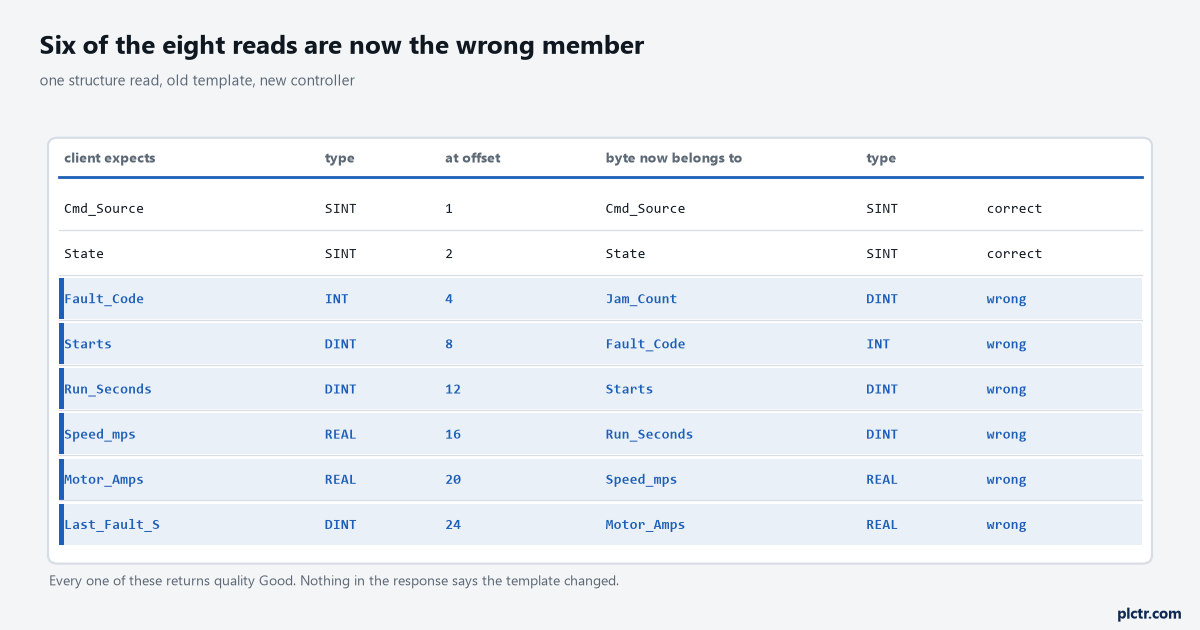
Two rows are right and six are wrong, and the two that are right are the two that sit before the insertion point. Where the new member goes decides how much breaks.
Read Speed_mps at offset 16 and you get the four bytes of Run_Seconds, which is a DINT, interpreted as an IEEE 754 single. A belt that has been running 1,847,200 seconds reads as a speed of roughly 1.5e-38 metres per second, which is small enough that a dashboard rounds it to zero and a trend draws a flat line at the bottom. Read Motor_Amps at offset 20 and you get Speed_mps, which is at least the right type, so 0.62 appears in the amps column and nothing looks broken at all. That second one is worse. A wrong number with the right shape survives review, gets into a report, and is still there three months later when somebody asks why the motor current on TR-14 never rises above one amp. Nothing in the OPC UA response distinguishes these cases from correct ones. There is no status code for “the layout changed underneath you”, because from the server’s point of view nothing failed: it read 28 bytes, or 32, and handed them over. The status quality bits describe the link and the source, not the agreement between two parties about what byte 16 means.
A wrong value of the right type is the expensive failure. A wrong value of the wrong type gets caught on day one.
Which brings up the part that people find annoying and is nevertheless the answer: put new members at the end. A BOOL added to the run of BOOLs already in TR14_Belt changes nothing at all, because it takes bit 6 of a host SINT that already exists and the structure stays 28 bytes. A member appended after Last_Fault_S grows the structure but moves nothing. A member inserted in the middle, which is where it belongs if you care about the declaration reading sensibly, moves everything after it. That is a genuine trade between a tidy type definition and a stable wire format, and on any machine whose data leaves the controller the wire format wins. Write the reason in the UDT description so the next person does not tidy it up. If somebody does insert in the middle, the recovery is to make every consumer re-read the template, which on a Logix path means the 0xAC attribute check above and on a UA path means ending the session so the client picks up the DataTypeDefinition again on the next connect.
Arrays, and where the index origin changes hands
A UA client learns an array from two attributes rather than from the tag name. ValueRank says how many dimensions there are, with minus one meaning a scalar and one meaning a one-dimensional array, and ArrayDimensions gives the length of each. Part 3 tells servers to set both to the most restrictive values they can, so a fixed array of five reals should come back as ValueRank 1 and ArrayDimensions of 5, and a dimension of 0 means something else.
A zero there is the server saying it will not promise you an upper length at all.
Then the numbering changes hands, and this is the one that costs an afternoon.
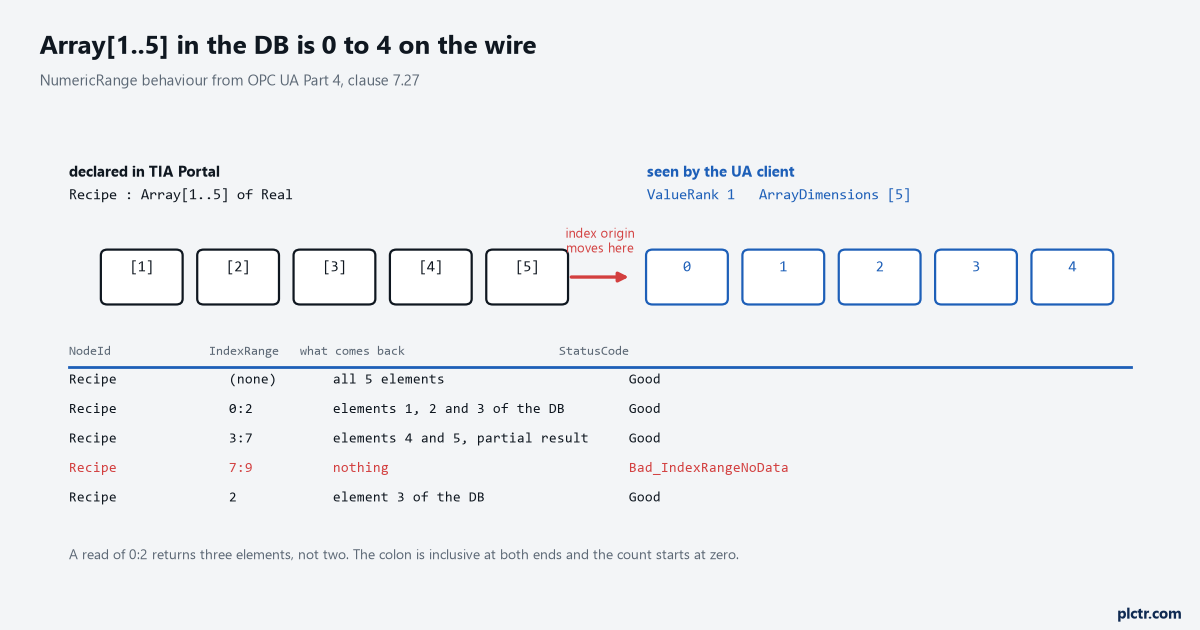
The row to read twice is the second one. An IndexRange of 0:2 returns three elements, because the colon is inclusive at both ends.
Declare Recipe as Array of Real with bounds 1 to 5 in TIA Portal and the S7-1500 server interface presents it with indexes 0 to 4. Siemens documents this as the server converting bounds that do not start at zero into non-negative indexes starting at zero, and it does the same for negative lower bounds, so an array declared minus 9 to 0 becomes 0 to 9 on the wire. Logix arrays are already zero-based so the question never arises there, which is exactly why a Logix person doing their first Siemens integration writes the off-by-one. The NumericRange rules in Part 4 are short enough to memorise: indexes start at zero, both ends of a range are included, a request whose lower bound is past the end returns Bad_IndexRangeNoData, and a request whose upper bound is past the end returns a partial result with quality Good. That last one is the trap inside the trap. Ask for 3:7 of a five-element array and you get two elements and a Good, not an error, so a client that sizes its buffer from the request rather than from the reply ends up with three empty slots it thinks are data.
Bad_IndexRangeInvalid is only ever a syntax error. Everything else with valid syntax comes back as Bad_IndexRangeNoData.
An array of a structure, and the two-dimensional surprise
An array of a UDT is the normal way to hold a recipe book or a set of ten identical stations, and over UA it is a one-dimensional array whose element type is a structure. Each element is an ExtensionObject of its own, so the decode question applies to every element, and a client that can decode one can decode all of them.
Reading the whole array is one service call, and the elements come back in declaration order.
The surprise is on the Siemens side, and it comes from the type mapping rather than from arrays as a concept. A DATE_AND_TIME on an S7-1500 is mapped to an array of eight bytes on the UA side, not to a scalar. Declare an array of DATE_AND_TIME and you have declared a two-dimensional array as far as the server is concerned, which changes which system data type you need if you are hand-building a server interface, and which changes what a NumericRange has to look like because Part 4 requires every dimension to be specified for the range to be valid. The same applies to STRING, which is an array of characters. None of this is exotic and all of it is invisible until a read that worked on a scalar fails on the array of the same type.
What the two sides each have to do
On the controller side the whole discipline is two rules. New members go at the end, and anything a UDT member’s access rights change affects every instance of that UDT. Siemens is blunt about the second one: remove the read or write right from one component of a PLC data type and the rights come off every data block based on that type, and the structure can then no longer be read or written as a whole. Rockwell’s version is the External Access attribute, where a member set to None makes the containing structure unreadable as a whole while the other members stay reachable individually.
Two vendors, one shape of problem: a per-member setting with a whole-structure consequence.
On the client side, check one attribute before you trust a structure read.
An S7-1500 from firmware V2.6 exposes AccessLevelEx, where bit 8 is NonatomicRead and bit 9 is NonatomicWrite, and Siemens states plainly that SIMATIC structures are generally not consistent. A readable and writable structure therefore reports AccessLevelEx of 771, which is 1 plus 2 plus 256 plus 512, and a read-only one reports 257. What that number is telling you is that the server does not promise the members of your structure came from the same CPU cycle. For a set of status bits and a fault code that is fine. For a position and a velocity that will be differentiated, or for a counter and the timestamp that is supposed to belong to it, it is not fine, and the answer is to build a consistency word into the UDT and have the program stamp it, rather than to argue with the server.
The same trick that makes an MES handshake work across two systems works here, for the same reason.
Next step
Browse the controller you actually have with a client you actually have, and write down four things per structure you intend to read: whether it arrives flattened or as one node, whether ValueRank and ArrayDimensions are populated or left at the defaults, what AccessLevelEx says if the server offers it, and the index of the first array element as the client numbers it rather than as the DB declares it. Then add a member to a test UDT, download, and watch what your client does without being restarted. If it carries on reading happily, you have found the failure that will cost you a shift six months from now.
Five minutes on a bench today against half a shift of doubt in March.
The path from the controller tag to the number on a screen has more places to go wrong than most people expect, and OPC UA from PLC tag to SCADA client walks the whole of it. If the client is going to be your own code, a Python OPC UA client against an S7-1500 is where the certificate and security argument gets settled first. The structure itself starts in the controller, and user-defined data types in Logix covers building one that will not need editing. If the machine is going to publish outward as well as be read, the same UDT is the model the gateway should carry, which is the argument in IIoT PLC data with MQTT and Sparkplug B.
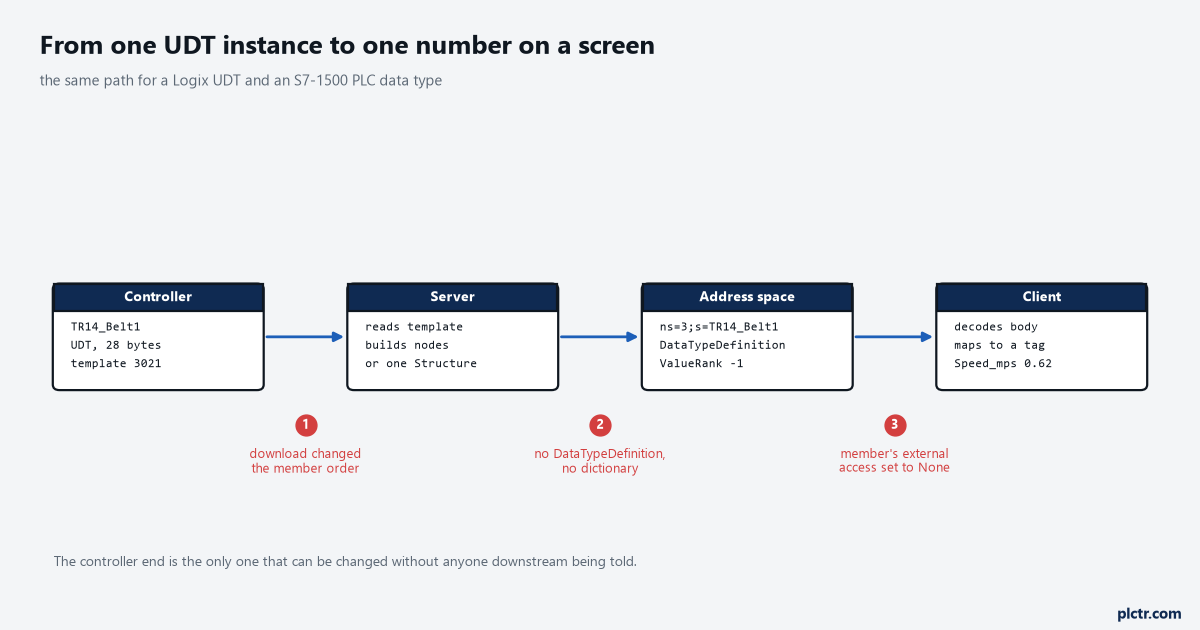
Break point 1 is the only one that can happen without anybody downstream being told, which is why it is the one worth a scheduled check rather than a note in a handover document.