Seven tags carry an entire OEE report: CountGood, CountReject, StateCode, ReasonCode, CycleTime_ms, WorkOrder and Heartbeat. The first tag list on an MES project usually runs to 400 names, polled at 20 ms because the dialog offered it, which is enough CIP traffic to make a 1756-L83E overrun its motion task. Almost none of the work here is protocol work. It is drawing the boundary where ISA-95 draws it, keeping the controller ignorant of the database, and agreeing on five or six numbers that mean exactly one thing each.
Examples below use a 1756-L83E on Studio 5000 v33 with KEPServerEX and an Ignition gateway on the level 3 network. The pattern transfers to an S7-1500 with the built in OPC UA server without changing shape.
What you need
| Item | Notes |
|---|---|
| Controller | 1756-L83E or 5069-L306ER. Any controller with controller scoped tags and UDTs works |
| Tag bridge | KEPServerEX, Ignition OPC UA plus SQL Bridge, or FactoryTalk Transaction Manager |
| One MES contact | The person who can say what a work order record contains. Without this you are guessing |
| Level 3 network | Separate VLAN from the control network, with a firewall rule between them |
| A test database | So you can break the bridge on purpose and watch the line keep running |
| Tag naming standard | Agreed before the first tag is created. Renaming later breaks every mapping |
Put the boundary where ISA-95 puts it
ISA-95 is worth ten minutes of reading because it settles arguments. Level 1 is the sensor and the valve. Level 2 is the PLC and the SCADA that supervises it. Level 3 is manufacturing operations: scheduling the order, tracking the lot, recording the scrap. Level 4 is ERP.
The rule that follows from that split is simple. Level 2 owns real time and safety. Level 3 owns history and paperwork. A controller must never depend on a level 3 answer to keep the machine running, because level 3 lives on a virtual machine that somebody patches on Thursday nights.
In practice that means the PLC publishes what it knows and accepts orders it can validate on its own. It does not query, it does not wait, and it certainly does not open a database connection.
Agree on what the MES actually needs
Most MES projects need far fewer tags than the first spreadsheet suggests. This is the list I start from and defend.
| Tag | Type | Meaning |
|---|---|---|
Line.CountGood | DINT | Parts accepted since the counter was last reset. Monotonic |
Line.CountReject | DINT | Parts rejected. Same counter base |
Line.StateCode | INT | 1 running, 2 idle, 3 planned stop, 4 unplanned stop, 5 changeover |
Line.ReasonCode | INT | Downtime reason, numeric. Text lives in the MES, never in the PLC |
Line.CycleTime_ms | DINT | Last completed cycle, for the performance term of OEE |
Line.WorkOrder | UDT | Order number, part number, target quantity, lot |
Line.Heartbeat | DINT | Rolls once a second so the bridge can prove the data is live |
Availability, performance and quality all fall out of those seven. Availability needs StateCode with timestamps, performance needs CycleTime_ms against the ideal cycle, quality needs the two counters. Anything else the MES asks for should have a named person who will look at it.
Keep reason codes numeric. The day marketing renames “Infeed starved” to “Upstream starvation”, you want that edit to happen in a database table and not in a controller download.
Build a UDT for the work order record
One structure, one download, one place to change. Create it under Data Types, User-Defined.
UDT: WorkOrder_Rec
  Name              Type        Style     Description
  OrderNumber       DINT        Decimal   MES order id, 0 when no order loaded
  PartNumber        STRING      ASCII     Up to 20 chars, left justified
  TargetQty         DINT        Decimal   Pieces to produce
  LotCode           DINT        Decimal   YYJJJ format, 5 digits
  RecipeId          INT         Decimal   Index into the local recipe array
  Req               BOOL                  Set by MES when the record is valid
  Ack               BOOL                  Set by PLC when the record is latched
  Done              BOOL                  Set by PLC when the order is loaded
  Reject            BOOL                  Set by PLC when validation fails
  RejectCode        INT         Decimal   1 bad recipe, 2 line running, 3 qty out of range
A STRING member costs 88 bytes in Logix, so one per record is fine and forty is not. For part numbers longer than 20 characters, make a user-defined string type with the length you need rather than chaining SINT arrays. UDT mechanics are covered in user defined datatype UDT usage examples.
Use a request, acknowledge, done handshake
Writing a group of tags over OPC is not atomic. The order number can land one poll before the quantity. A handshake fixes that, and it also gives the MES a receipt.
// 100 ms periodic task, Logix ST
IF WO_In.Req AND NOT WO_In.Ack THEN
    WO_Latched := WO_In;                    // copy the whole structure once
    WO_In.Ack  := 1;
END_IF;

IF WO_In.Ack AND NOT (WO_In.Done OR WO_In.Reject) THEN
    IF WO_Latched.RecipeId < 1 OR WO_Latched.RecipeId > 40 THEN
        WO_In.RejectCode := 1;
        WO_In.Reject     := 1;
    ELSIF Line.StateCode = 1 THEN
        WO_In.RejectCode := 2;
        WO_In.Reject     := 1;
    ELSE
        Active_Order  := WO_Latched;
        Recipe_Active := Recipe[WO_Latched.RecipeId];
        WO_In.Done    := 1;
    END_IF;
END_IF;

IF NOT WO_In.Req THEN                        // MES dropped the request
    WO_In.Ack := 0; WO_In.Done := 0; WO_In.Reject := 0; WO_In.RejectCode := 0;
END_IF;
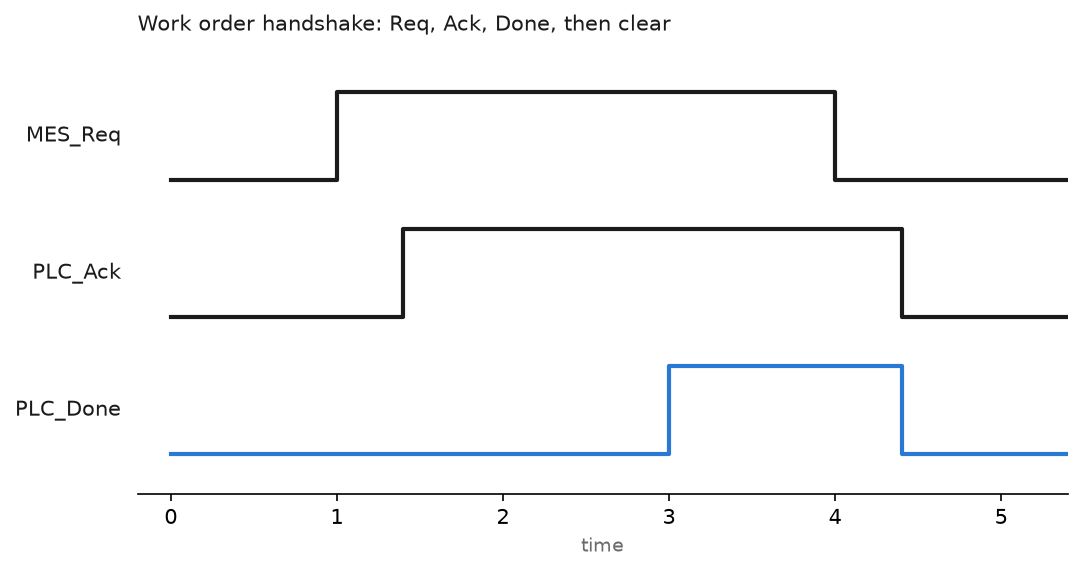
The MES side must wait for Done or Reject before it drops Req. If the bridge writes Req and immediately writes it back to 0, the PLC sees nothing. I have watched that argument run for a full shift.
Bridge the data, do not let the PLC write to the database
Three arrangements work. All three keep the controller out of it.
OPC UA server plus a gateway. KEPServerEX or the native S7-1500 UA server exposes the tags. Ignition or the MES client subscribes. Subscriptions push on change, which means an idle line costs almost no traffic. Server setup is in Kepware channel configuration, and the protocol itself in OPC for PLC integration.
Transaction bridge. FactoryTalk Transaction Manager or the Ignition SQL Bridge module watches a trigger tag, runs a stored procedure, writes the result back to a handshake tag. Good when the MES wants rows rather than tag values.
Store and forward at the edge. The gateway buffers to local disk when the database is unreachable and replays on reconnect. Turn this on before go-live, not after the first outage, and size the buffer for a whole weekend.
What none of these do is give the PLC a socket to SQL Server. It is technically possible with a MSG instruction and a middleware box. It is also how you get a controller sitting in a 30 second TCP timeout while the conveyor runs on.
Make the counters survive reality
Counters roll over. A DINT stops at 2,147,483,647, which sounds far away until a vision system counts every rejected image. Send the raw monotonic count and let the MES take differences between samples. Resetting the counter at every shift change looks tidy and loses every part produced during a bridge outage.
Increment the counter in the same routine that proves the part is real, on a one shot from the discharge sensor, not from the HMI button. One shot behaviour is in RSLogix one shot instructions, and counter instructions in timer and counter instructions.
Field notes: what actually goes wrong
Double counting after a bridge restart. The MES read CountGood every 5 seconds and added the value to a running total instead of taking the difference. After a gateway restart the total jumped by 180,000 pieces and the OEE report showed 340 percent. The fix was on the MES side, but the PLC helped by adding a CounterEpoch tag that increments whenever the counters are cleared, so level 3 can tell a reset from a rollover.
Reason codes that nobody set. A line reported 11 hours of downtime with reason code 0. The operator HMI had a reason selection popup, and the logic only latched the code when the popup was confirmed. Stops shorter than the popup timeout recorded nothing. We changed it so every unplanned stop latches code 99, unassigned, and the operator can only overwrite it. Unassigned downtime that shows on a report gets fixed. Blank downtime does not.
The string that was not a string. Part numbers came across as garbage in the database. The MES was reading the STRING member as an 82 byte array without honouring the .LEN field, so every record carried leftover characters from the previous order. Either map .LEN and .DATA separately in the bridge, or clear the DATA array before every copy.
A 20 ms OPC update rate on 400 tags. The integrator set every tag group to 20 ms because the dialog offered it. The controller spent a measurable slice of every scan answering CIP requests and the motion task started overrunning. Production data does not need to be fresher than the reporting interval. We moved most groups to 1000 ms and left the handshake bits at 100 ms.
Frequently asked questions
Does the MES need direct access to the controller?
No. Give it an OPC UA endpoint or a database view and nothing else. Direct controller access from level 3 means a browse from a reporting tool can add load to a machine that is running.
How do I timestamp events accurately enough for downtime reporting?
Timestamp state changes in the controller using the wall clock, put the value in the record, and let the bridge carry it. A polled timestamp taken at level 3 is only as good as the poll interval, which is usually a second.
Can I do this with a SQL insert from the PLC?
Some controllers and third party modules will let you. It couples machine uptime to database uptime, and nobody enjoys explaining that trade after a stop. Buffer at the edge instead.
What sample rate does OEE really need?
Counters and state on change, cycle time on completion. A one second subscription is plenty for everything except a fast reject gate, where the count belongs on a one shot in logic anyway.
How do I test the handshake without the MES?
Force the tags from a watch list in Studio 5000 and step through it. Set the data, set Req, watch Ack and Done, clear Req. Watch list basics are in how do I open the tag editor.
Next step
Build the tag list and the UDT first, then the handshake, then connect the bridge. Before you hand anything to the MES team, pull the same values into a spreadsheet yourself and reconcile them against the operator screen for one shift. How to get data from PLC to Excel is the fastest way to do that, and it usually finds the scaling error before the database does.