Two identical chassis, a 1756-RM2 in each with both fibres plugged in, remote I/O only, every module flashed from one Rockwell redundancy bundle. That is the price of a ControlLogix redundant pair, and what it buys is a controller handover measured in tens of milliseconds the night one of them dies. It buys nothing at all in functional safety. If the hazard is a person you need a safety controller; if the hazard is eight hours of lost production, a redundant pair is the right tool. This walkthrough covers the pair, the restrictions you design around from day one, and what a switchover really looks like.
What a redundant ControlLogix pair needs
| Item | Requirement |
|---|---|
| Chassis | Two, identical catalog number, identical module layout by slot |
| Controllers | Matched pair, same catalog number, same series, same firmware from the redundancy bundle |
| Redundancy module | 1756-RM2 in each chassis, linked by the supplied fibre pair |
| Communications | 1756-EN2TR, EN3TR or EN4TR in both chassis, same slots |
| I/O | Remote only. No local I/O in a redundant chassis |
| Firmware | A Rockwell redundancy bundle, not individual module firmware you picked yourself |
| Tools | RSLinx Classic with the Redundancy Module Configuration Tool, Studio 5000 v33 |
The bundle matters more than anything else on that list. A redundancy system is a tested combination of controller, bridge and RM firmware. Mixing revisions that were never bundled together gives you a pair that qualifies on the bench and disqualifies at the worst moment.
Step 1: Decide whether you need it
Do the arithmetic before the design.
- Put a number on an hour of unplanned downtime for this process. Not a feeling, a number from the accountants.
- Estimate how often a controller actually fails. It is the rarest failure in the cabinet. Power supplies, Ethernet bridges, 24V distribution and field wiring all fail more often.
- Work out what a spare controller and a good backup would cost you in time: a labelled spare in the store and a tested ACD file gets many plants back in forty minutes.
- Compare that against a second chassis, matched modules, the redundancy bundle, and the restrictions in step 3 that you live with for the next fifteen years.
Redundancy earns its money on continuous processes where a stop is expensive or dangerous to restart: a water treatment works, a compressor house, a furnace, a tank farm. It rarely earns its money on a packaging line that already stops twice a shift for a changeover.
Step 2: Build the chassis as a matched pair
- Populate both chassis identically. Same catalog number in the same slot number in both, so a 1756-EN2TR in slot 2 of chassis A means a 1756-EN2TR in slot 2 of chassis B, same series letter.
- Fit the 1756-RM2 in each chassis and connect the two fibre cables between them. Both fibres. One fibre gives you a working pair with no redundant path between the RMs, which is not what you paid for.
- Flash every module in both chassis from the redundancy bundle. ControlFLASH Plus will do a chassis at a time.
- Put all I/O on remote racks. Local I/O in a redundant chassis is not supported, because the secondary cannot own it.
- Give the pair a partner IP scheme on the Ethernet bridges. The primary bridge takes the configured address and the secondary takes the address plus one, so reserve both and tell whoever runs the IP list.
Step 3: Design around the restrictions
These are the ones that surprise people at commissioning.
- No motion. Motion axes are not supported in a redundant chassis. If the process has servos, they live on a separate non-redundant controller.
- No safety controller. GuardLogix is not part of a redundant pair. Safety and redundancy are separate systems in this family.
- Limited module list. Only controllers, approved communication modules, the RM2 and power supplies belong in the redundant chassis. Anything else has to go remote.
- Task structure. Use periodic tasks. The controller crossloads tags to the secondary at defined points, and periodic tasks make those points predictable. A large continuous task makes crossload timing hard to reason about.
- Program size. Everything the secondary needs is copied on every crossload, so large arrays touched every scan lengthen both the crossload and the switchover.
- Online edits. They work, but they stretch the crossload while the edit is accepted, and a big edit during a high load period can disqualify the pair. Do those in a quiet window.
Step 4: Qualify the pair and read the states
- In RSLinx Classic, browse to the 1756-RM2, right-click it and open Module Configuration. That is the RMCT.
- On the Configuration tab, set the auto-synchronization behaviour. Always is normal for a running plant.
- The Synchronization tab has the manual commands: synchronize, disqualify, and initiate a switchover.
- Watch the Synchronization Status tab during qualification. It runs the compatibility check, then copies program and data to the secondary, a few minutes on a large program.
- The Event Log tab is the first place to look after an unplanned switchover. It records the cause with a timestamp. Export it before anyone power cycles the rack.
Bring the state into the program so the HMI shows it too:
(* SystemTask, 500 ms periodic *)
GSV(REDUNDANCY, , PhysicalChassisID,             Chassis_ID);
GSV(REDUNDANCY, , ChassisRedundancyState,        Chassis_State);
GSV(REDUNDANCY, , PartnerChassisRedundancyState, Partner_State);
GSV(REDUNDANCY, , QualificationInProgress,       Qual_Busy);

(* state values are listed for the REDUNDANCY object in the firmware
   revision you are on. Read them out of the manual, do not assume. *)

IF Chassis_State <> Last_Chassis_State THEN
    GSV(WALLCLOCKTIME, , DateTime, Switchover_Stamp[0]);
    Switchover_Count := Switchover_Count + 1;
END_IF;
Last_Chassis_State := Chassis_State;

(* free running heartbeat, the gap after a switchover is the real outage *)
Heartbeat := Heartbeat + 1;
The heartbeat is the useful part. Historise it at one second and the flat spot after a switchover tells you how long the process was without a controller. That number beats any datasheet figure.
Step 5: Test the switchover before handover
Never hand over a redundant system you have not knocked over.
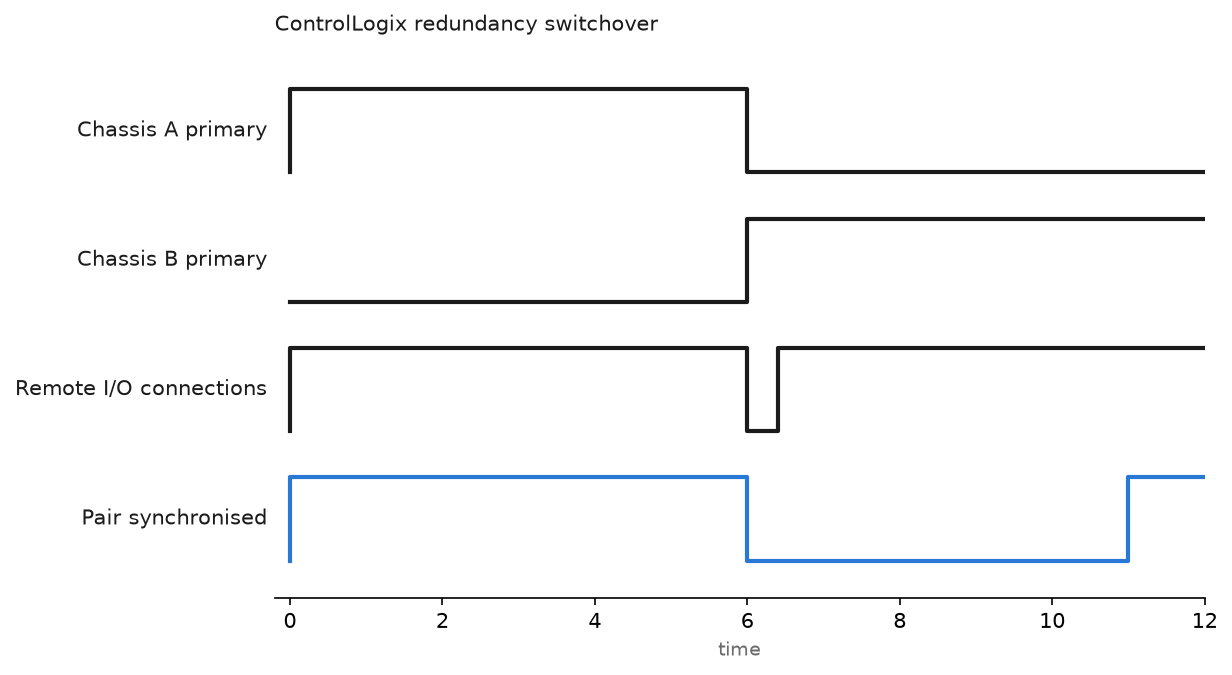
- With the pair synchronised and the process in a safe state, use Initiate Switchover from the RMCT. Everything should carry on. Check the heartbeat gap.
- Do it again the hard way. Pull the primary controller, or switch off the primary chassis power supply. This is the test that finds the wiring mistake.
- Watch the remote I/O. The controller switchover itself is fast, tens of milliseconds on an RM2 pair, but what the process sees is longer, because the remote I/O connections have to time out and re-establish. Budget for a few RPIs, and set the I/O module output states for a connection loss to something the process survives.
- Check that timers and sequences resumed rather than restarted. Retentive values crossload, non-retentive logic that depends on a one-shot may not behave the way you expect across a switchover.
- Run the pair disqualified for a shift on purpose. That is the state you are in the day a controller fails, and you should know how the alarms look.
The Siemens equivalent
S7-1500R and S7-1500H solve the same problem with a different shape.
- R puts two CPUs in a PROFINET ring with the I/O, no separate sync module.
- H uses dedicated fibre sync modules between the two CPUs and gives faster switchover with I/O on the ring.
- Both run in a system redundancy arrangement where one CPU is primary and the other is backup, and the changeover is handled by the system rather than by your program.
- You configure them as a single device in TIA Portal and download once. There is no matched pair of separate projects to keep aligned, which removes a whole class of field mistake.
- The same restriction logic applies. Check which technology objects and which I/O are supported before the design is fixed, not after the panel is built.
Field notes
Mismatched firmware after a module swap. A 1756-EN2TR failed in the secondary chassis. Stores had the same catalog number, different series, newer firmware. It went in, the pair refused to qualify, and the RMCT compatibility check said so clearly. Nobody read it for three hours because everyone was looking at the network. Keep spares at the bundle revision and label them with it.
The fibre nobody plugged back in. Both RM fibres came out during a panel modification and only one went back. The pair still qualified and ran for eleven months. An annual check found it, with the RMCT reporting a degraded link. The system had spent a year one cable away from losing redundancy entirely.
A disqualified pair that nobody saw. The secondary had been disqualified by a brown-out and never resynchronised, because auto-synchronization had been set to Never during commissioning and not put back. There was no alarm on the HMI for the redundancy state, so the plant ran unprotected for weeks. That is why the GSV block above belongs in every redundant project on day one.
Redundancy used to paper over a bad power supply. A site with repeated controller faults bought a redundant pair to fix them. The real problem was a 24V supply sagging under a shared load with a valve bank. Both controllers saw the same sag, so the pair switched over and the new primary faulted nine seconds later. Redundancy covers a failed controller, not a common cause that hits both. Fault codes are in ControlLogix major faults and fault codes.
Frequently asked questions
Does a redundant PLC give me SIL 2?
No. Availability and functional safety are different claims with different evidence: a SIL rating comes from a safety-rated controller, rated I/O and a verified safety function. The background to the standards is in IEC 61508 and IEC 61511.
How long is the switchover?
The controller handover on an RM2 pair is tens of milliseconds, but the number that matters to your process is longer and depends on the remote I/O RPI and the connection timeout multiplier. Measure it with a heartbeat counter rather than quoting a brochure.
Can I add redundancy to an existing ControlLogix later?
Rarely without pain. Local I/O has to leave the chassis, the controller may need replacing, and everything goes to a redundancy bundle. Plan a rebuild, not an upgrade.
What happens to online edits during a switchover?
Finish your edits and accept them before you initiate a switchover. An edit in progress during a handover is the fastest way to end up with a disqualified pair and a nervous evening.
Is hot backup with two independent controllers a reasonable substitute?
That is a project, not a product. You own the failure detection, the data handover and every edge case. If you go that way, budget for the testing.
Next step
Decide what the controller should do when it faults, whether the system is redundant or not, because a fault routine that shuts the process down gracefully is worth more than a second chassis on most plants. Start with create a controller fault routine, and keep the firmware side under control with PLC controller firmware upgrade.