Two I/O racks dropping out with 16#0203 once an hour turned out to be a 16-port unmanaged switch flooding multicast straight into the HMI’s network card. Eleven racks faulting with 16#0204 at startup was a 1756-EN2T that had run out of packet capacity, because every RPI on the job had been set to 2 ms. The complaint from the line sounded identical both times, and the code is the thing that separates them. Here is how I set up a Logix controller with remote I/O and a drive, how I pick the RPI, and which fault codes tell you what actually broke.
Examples use Studio 5000 v33 with a 1756-L83E, a 1756-EN2T scanner and a 5069-AEN2TR adapter. A 5069-L320ER CompactLogix behaves the same way, it just has the Ethernet port built in.
What you need
| Item | Notes |
|---|---|
| Controller and scanner | 1756-L83E plus 1756-EN2T, or any CompactLogix 5380 with embedded dual ports |
| Adapter or device | 5069-AEN2TR remote I/O adapter, PowerFlex 525 drive, or any device with an EDS file |
| Studio 5000 Logix Designer | v21 and up. Unicast I/O connections need a module profile from v18 or newer |
| RSLinx Classic or FactoryTalk Linx | For browsing and download. Setup steps: RSLinx configuration and connect to PLC |
| Managed switch | Stratix 5700 or similar with IGMP snooping. An unmanaged switch will bite you later |
| IP plan | One subnet, fixed addresses, no DHCP leases on control devices |
Know which traffic you are dealing with
EtherNet/IP carries CIP over ordinary Ethernet. Two transports, two behaviours.
Explicit messaging runs over TCP port 44818. Request and response, one at a time, triggered by your code. The MSG instruction, RSLinx browsing, HMI tag reads and firmware flashing all use it. Latency varies. Nothing guarantees when the answer comes back.
Implicit messaging, also called I/O or Class 1, runs over UDP port 2222. Scanner and adapter agree on a connection once, then both ends produce data at a fixed period without asking again. That period is the RPI. This is what moves your input and output words.
Discovery adds a third piece: ListIdentity broadcasts on UDP 44818. That is how RSLinx finds devices nobody configured.
When someone tells you the network is slow, ask which traffic. A slow MSG is a different problem from an I/O connection timing out.
Set the IP address before anything else
- Power the device with only your laptop and the device on the switch.
- Open the BOOTP-DHCP Tool and wait for the MAC address to appear in Discovery History.
- Double-click the entry, type the address, click OK.
- Select the device and click Disable BOOTP/DHCP. Skip this and the device comes up with no address after the next plant power cut.
- Ping it. If the ping works but RSLinx shows a yellow question mark, the EDS file is missing. Install it with the steps in EDS file installation via RSLinx.
The full tool walkthrough is in BootP DHCP EtherNet/IP tool.
Add the device and pick an RPI you can defend
- In the Controller Organizer, right-click the Ethernet port under I/O Configuration and choose New Module.
- Filter on the catalog number, select it, click Create.
- Name it and enter the IP address. Leave Electronic Keying on Compatible Module.
- Open the Connection tab and set the RPI.
- On the same tab, tick Use Unicast Connection over EtherNet/IP when the profile offers it.
RPI is not a wish. It is a promise the scanner makes to send a packet that often, and the adapter makes the same promise back. Two packets per RPI per connection, forever, whether the data changed or not.
| Device | RPI I use | Why |
|---|---|---|
| Discrete remote I/O | 20 ms | Faster than the task that reads it, slow enough to stay cheap |
| Analog remote I/O | 50 to 100 ms | The sensor is slower than the network anyway |
| PowerFlex 525 drive | 20 ms | Speed reference and status, nothing time critical |
| Safety I/O | Derived from the safety task period | You do not pick this one freely |
| Produced and consumed tags | 20 to 50 ms | Watch the packet budget on both controllers |
Set the RPI faster than the task that consumes the data, not faster than you need. A 1756-EN2T has a fixed packet-per-second budget across both its ports, and Rockwell’s own sizing guidance is the only place to get the current number for your firmware. Forty connections at 5 ms RPI is 16,000 packets per second, which is well past what any single dual-port module can sustain, and it will start dropping connections the moment the line gets busy.
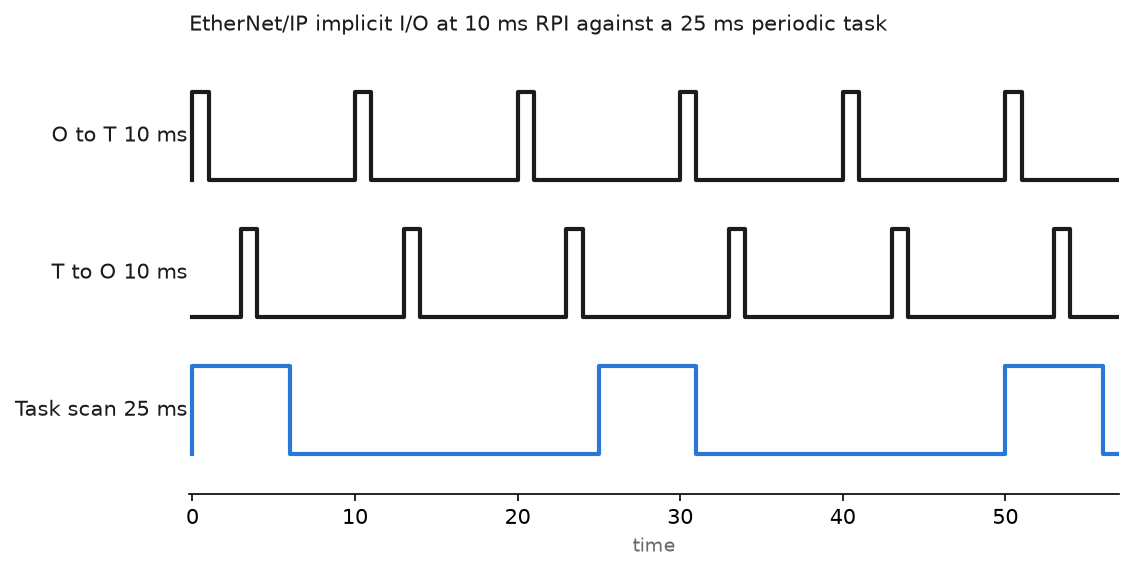
The chart shows the point people miss: the task scan and the RPI are not synchronised. Input data can be one full RPI old by the time the task reads it. That is why I keep the RPI at half the task period or faster.
Read a tag from another controller with MSG
Explicit messaging is for data you need occasionally: recipe values, production counters, a handshake between two lines. Configure it once and cache the connection.
MSG instruction, Configuration tab
  Message Type        : CIP Data Table Read
  Source Element      : Line4_Recipe          (tag name inside the remote controller)
  Number Of Elements  : 20
  Destination Element : Line3_RecipeCopy[0]

MSG instruction, Communication tab
  Path : LocalENB, 2, 192.168.1.24, 1, 0
         |          |  |             |  |
         |          |  |             |  slot of the remote controller
         |          |  |             backplane port of the remote chassis
         |          |  IP address of the remote Ethernet module
         |          Ethernet port number on the local module
         local Ethernet module name from I/O Configuration
  Cache Connections : checked
Trigger it from a periodic task at 500 ms or slower, gated on MSG_Read.EN being clear. Firing a MSG every scan from a continuous task is the most common reason a controller talks to itself all day and never finishes anything.
Watch .ER and read .ERR when it sets. 16#0001 with extended error 16#0204 means the request timed out, usually a wrong path or a device that is not there. 16#0004 is a syntax error, which in practice means the tag name is spelled wrong or is program scoped instead of controller scoped.
Field notes: what actually goes wrong
Multicast flood on an unmanaged switch. A packaging line with three 1756-EN2T scanners and a 16-port unmanaged switch. Every hour or so the HMI screens froze for ten seconds and two I/O racks faulted with 16#0203. The I/O connections were multicast, and an unmanaged switch floods multicast out of every port, including the one feeding the HMI PC. That network card was quietly drowning. The fix had two parts: a Stratix 5700 with IGMP snooping and a querier on the control VLAN, and unicast connections on every module profile that supported it. Unicast is the default on newer profiles for exactly this reason.
Duplicate IP after a spare went in. Night shift swapped a faulted 1756-EN2T for a spare off the shelf. The spare still carried the address of a machine on another line, and both lines sat on the same flat network. Both modules went to a solid red network status LED and the display cycled “Duplicate IP address detected” with the MAC of the other module. Label spares with the address they carry, and park them on 192.168.99.x before they go in the cabinet.
RPI set to 2 ms because faster sounded better. A contractor configured eleven remote racks at 2 ms. The line ran for a week, then started dropping racks at startup when all the drives came online together. Connection failures with code 16#0204, no bad cable, no bad module. The scanner had simply run out of packet capacity. Moving discrete racks to 20 ms and analog racks to 100 ms cut the packet rate by an order of magnitude and the faults stopped.
Electronic keying on a drive swap. A PowerFlex 525 replaced with newer firmware faulted immediately with 16#0116, revision mismatch, because the profile was set to Exact Match. Change keying to Compatible Module in module properties and download again. Adding the drive in the first place is covered in how to add a PowerFlex AC drive to a Studio 5000 project, and when a code will not make sense I start from Allen-Bradley PLC I/O faults, causes and solutions.
Frequently asked questions
Which ports does EtherNet/IP need through a firewall?
TCP 44818 for explicit messaging and browsing, UDP 2222 for implicit I/O, UDP 44818 for ListIdentity discovery. Running I/O traffic across a firewall is still a bad idea no matter which ports you open.
Unicast or multicast for I/O connections?
Unicast when the profile supports it and one controller owns the connection. Multicast when several controllers consume the same produced tag, and only on a switch with IGMP snooping and an active querier.
Why does a module show a yellow triangle while the I/O keeps working?
That is usually a keying or minor fault flag rather than a lost connection. Right-click the module, open Properties, and read the fault text at the bottom of the Connection tab. It names the exact condition.
Can I mix EtherNet/IP and office traffic on one switch?
Physically yes, sensibly no. Put control traffic on its own VLAN. Office broadcasts and backup jobs will eat the bandwidth headroom your I/O connections depend on.
How do I see the real packet rate on a scanner?
Open the module web page in a browser, or add the module diagnostic tags to a watch list. The 1756-EN2T web interface reports CIP connection counts and packets per second on its Diagnostics page.
Next step
Once the network holds, build the fault handling around it so a lost rack stops the machine cleanly instead of leaving outputs frozen. Start with create a controller fault routine, then keep ControlLogix major faults and fault codes open for the codes you will be decoding at 2 a.m.