A flying knife with sixteen servo axes will not hold a cut to half a millimetre if the axes see their setpoints a scan apart. That is the problem an EtherCAT PLC solves, and it solves it with one frame and one clock rather than with faster hardware. The parts that bite in the field are the cycle time you pick, whether distributed clocks are switched on, and the diagnostic counters nobody looks at until the machine starts dropping frames.
Screens below are TwinCAT 3.1 build 4024 on a CX5140 embedded PC. Omron Sysmac Studio with an NX102 uses different menus for the same three decisions.
What you need
| Item | Notes |
|---|---|
| Master | CX5140 or a C6930 industrial PC running TwinCAT 3 XAR. The master is software, the NIC just has to be on the supported list |
| Engineering PC | TwinCAT 3 XAE, same build as the runtime. Mismatched builds fail on activate |
| Coupler and terminals | EK1100 coupler, EL1008 digital input, EL2008 digital output, EL3102 analog input as a starting set |
| Drives | AX5000 or AX8000 for Beckhoff, 1S series for an Omron NX master |
| ESI files | XML device descriptions in C:\TwinCAT\3.1\Config\Io\EtherCAT. Get them from the device vendor, not from a forum |
| Cable | Shielded CAT5e, industrial jacket. EtherCAT is 100 Mbit, so 100 m between nodes is the limit |
Understand why one frame is enough
A normal industrial protocol sends a packet per device. EtherCAT sends one frame down the line, and each slave chip reads its own slice and writes its inputs into the same frame while it is still moving through the device. Processing on the fly costs a few hundred nanoseconds per node.
A hundred digital terminals share one frame instead of needing a hundred frames, so the master’s cycle time rather than the device count sets performance.
Each datagram also carries a working counter. Every slave that processed it increments the counter, so the master knows how many devices answered without asking any of them. A working counter error in the log means a device that should have touched the frame did not, which points to a hardware or state problem rather than network load. Wider protocol background is in PLC communication protocols for SCADA.
Wire it as a line, then close the ring if you need to
EtherCAT is physically a line: out of the master into slave 1 port A, out of port B into slave 2, and so on. There is no switch in the middle, and adding one breaks the timing model. Branches use junction terminals such as the EK1122, not Ethernet switches.
The last device leaves its second port open; the frame turns around inside it and comes back through every device. That return path is why a broken cable mid-line splits the machine into a working half and a dead half, rather than killing everything.
Cable redundancy means a second cable from the far end back to a second NIC on the master, plus the TwinCAT redundancy supplement: worth it on a press line, not a palletiser.
Scan the bus in TwinCAT 3
- Put the ESI files in the EtherCAT config folder, then restart TwinCAT XAE. It only reads them at startup.
- In the Solution Explorer right-click I/O → Devices and choose Scan.
- Accept the EtherCAT master it finds, then answer yes to Scan for boxes.
- Answer no to Activate Free Run until you have looked at the list. Free run starts moving outputs.
- Compare the tree against the panel. Terminal order in the tree is physical order on the DIN rail. If they differ, someone plugged a terminal in the wrong slot.
- Open SYSTEM → Tasks, select the task that owns the I/O, and set Cycle ticks.
- Link variables to terminals, then Activate Configuration and confirm the restart into Run mode.
A device that shows up as an unknown box with a hex vendor and product code has no matching ESI file, the same class of problem as a missing EDS on a CIP network, described in EDS file installation via RSLinx.
Pick a cycle time you can defend
| Cycle | Typical use | Cost |
|---|---|---|
| 100 to 250 us | Current loop on a servo drive, high speed measurement | Needs an isolated CPU core and careful task code |
| 500 us | Coordinated motion, cam profiles, print registration | Comfortable on a CX5140 with a few dozen axes |
| 1 ms | Most machine control with motion | The default I run unless something demands faster |
| 2 to 4 ms | Digital and analog I/O, temperature, valve banks | Put this I/O in a second, slower task |
Faster is not free. The task must complete inside its own cycle, and TwinCAT flags it with an exceeded cycle time counter when it does not. Split the work: one fast task for motion and safety-relevant interlocks, one slow task for tank levels. Task period versus machine response is covered in PLC scan time and cycle time.
Switch on distributed clocks when motion is involved
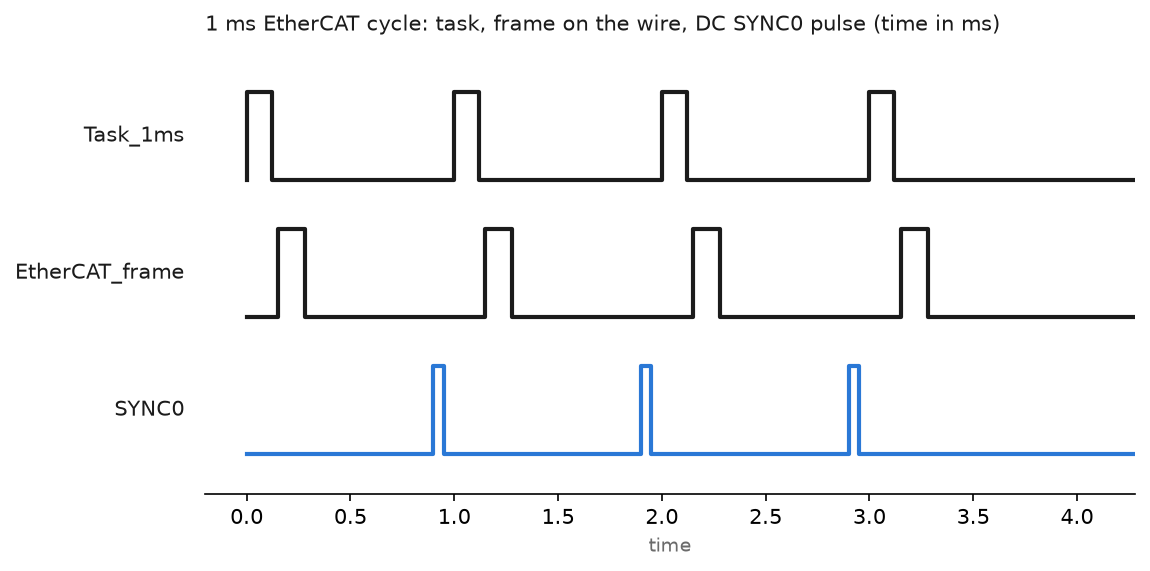
Distributed clocks give every slave a shared time base. One device on the line, normally the first DC capable one, becomes the reference clock. The master measures the propagation delay to each slave, writes an offset into each one, then keeps correcting drift on every cycle.
What you get is a SYNC0 pulse that fires at the same instant on every device, well under a microsecond across the line. Outputs are not applied when the frame arrives; they are buffered and applied on SYNC0, so two drives forty metres apart act on the same tick.
// TwinCAT 3 structured text, task cycle 1 ms
VAR
    fbGearIn   : MC_GearIn;
    axMaster   : AXIS_REF;
    axSlave    : AXIS_REF;
    nCycleCnt  : UDINT;
END_VAR

nCycleCnt := nCycleCnt + 1;          // 1 per ms, use it as a live counter

fbGearIn(
    Master      := axMaster,
    Slave       := axSlave,
    RatioNumerator := 1000,
    RatioDenominator := 1000,
    Execute     := bStartGear,
    BufferMode  := MC_Aborting );
Turn distributed clocks off and the same program still runs. The axes just take their setpoints whenever the frame reaches them, tens of microseconds apart on a long line. Invisible on a conveyor, very visible on a gantry.
Read the counters before you replace a cable
Every EtherCAT port keeps its own error counters in the slave registers, and TwinCAT shows them under the device’s EtherCAT → Advanced Settings → Diagnosis page. Three numbers matter.
- CRC error counter, per port. Anything above zero on a machine that has been running a week means a marginal cable or connector on that link.
- Lost link counter, per port. Counts the times the physical link dropped.
- Lost frames on the master. Counts frames that never came back.
The counters are cumulative and they do not lie. Walk the line from the master outward, and the first port with a non-zero CRC count tells you which cable to change. I have found a crushed cable under a machine foot this way in ten minutes, after two days of blaming a drive.
Why Allen-Bradley shops rarely run EtherCAT
Rockwell sits on the ODVA side of the fence. Logix controllers have no native EtherCAT master, and coordinated motion in that world is CIP Motion over EtherNet/IP with time sync from CIP Sync. Putting EtherCAT into a Logix plant means a third party master card or a gateway module, an extra configuration tool, and a spare part your storeroom does not carry.
That is usually the deciding argument rather than a technical one. If the plant standard is ControlLogix and the machine needs a fast bus, CIP Motion on a dedicated network is the path of least resistance, covered in EtherNet/IP PLC communication. EtherCAT wins where the OEM builds the machine and controls the whole stack, which is why it shows up on packaging, machine tools and semiconductor equipment.
Field notes: what actually goes wrong
Stuck in SAFEOP with a working counter error. A new EL7041 stepper terminal kept the bus from reaching OP, with an invalid working counter on one datagram in the log. Cause was process data size: the terminal was configured for a different predefined PDO assignment than the project expected, so its slice of the frame was two bytes short. Matching the PDO assignment in the terminal’s Process Data tab, then reactivating, cleared it.
Distributed clocks on, reference clock wrong. A retrofit added a non-DC capable coupler as the first device on the line. TwinCAT picked a DC capable device further down as the reference clock, which worked until someone power cycled that section on its own. Every axis reported a sync error. Keep the DC reference at the head of the line, fed from the same supply as the master.
A cycle time chosen by copy and paste. An OEM shipped machines with a 250 us task because a previous project used it. On the newer build, vision processing lived in the same task and the exceeded cycle counter climbed steadily, with random axis faults once a shift. Moving vision into a 10 ms task and leaving motion at 1 ms fixed it with no hardware change.
Office patch cable in a drag chain. CRC errors on one port appeared after three weeks. The cable was a standard stranded patch lead with no strain relief, fitted during a rushed commissioning. Flex rated cable with proper glands, and the counter has read zero since.
Frequently asked questions
Can I use a normal Ethernet switch in an EtherCAT line?
No. Slaves process the frame as it passes, and a store and forward switch breaks that. Use junction terminals instead.
Do I need a special network card for the master?
The master uses a direct mode driver on supported Intel chipsets. Check the Beckhoff compatible NIC list before you buy the PC; a card off the list falls back to a slower mode or does not work at all.
Is EtherCAT safe for safety functions?
FSoE, Safety over EtherCAT, runs safety telegrams inside the normal process data on the same cable and is certified to SIL 3. The black channel principle means the standard devices in between need no safety approval.
Does Omron EtherCAT work with Beckhoff terminals?
An Omron NJ or NX master takes third party slaves once the ESI file is installed in Sysmac Studio, and most Beckhoff terminals work. Vendor support is another matter, so test the exact firmware you plan to ship.
Next step
Build the bus with one coupler, one input terminal and one output terminal, prove the scan and the activate, then add the drives. A start to finish walkthrough of the toolchain is in Beckhoff TwinCAT 3 project, and if the machine involves feedback devices, what is an encoder covers the part that usually needs sorting out before the first move command.