An OPC UA PLC connection is the piece between a controller that knows nothing about databases and a SCADA or MES that knows nothing about ladder logic. Done properly it is one TCP port, one certificate exchange and a subscription. Done the old way, with OPC DA over DCOM, it is a Windows permissions problem that comes back every patch Tuesday. This walkthrough sets up both ends: a Kepware gateway in front of a Logix controller, and the server built into an S7-1500.
What you need
| Item | Notes |
|---|---|
| KEPServerEX 6 | Or FactoryTalk Linx Gateway. Needed because Logix controllers normally have no OPC UA server of their own |
| S7-1500 with TIA Portal V18 | The CPU has an OPC UA server built in, and it needs a SIMATIC OPC UA runtime licence |
| An OPC UA client | Ignition, FactoryTalk View, WinCC, or UaExpert for testing. UaExpert is free and the fastest way to prove a link |
| Network path | TCP 4840 for the standard endpoint, TCP 49320 for the default KEPServerEX UA endpoint. One port, not a DCOM range |
| Controller tag list | An L5X export from Studio 5000 v33 saves typing hundreds of tags into the server |
Understand what changed from OPC DA
OPC Classic, meaning DA, HDA and A&E, rides on Microsoft DCOM. That means Windows only, a random RPC port range, domain accounts that must match on both machines, and a firewall rule nobody can write cleanly. It worked because everything sat on one domain in one room.
Two things ended it. Control networks got separated from IT networks, and DCOM itself got hardened. The 2021 DCOM hardening change shipped by Microsoft raised the default authentication level, and plants that had OPC DA links running for a decade found them dead after a routine Windows update. Most of those links were repaired by force-enabling the old behaviour in the registry, which is a stay of execution rather than a fix.
OPC UA drops DCOM entirely. It is a binary protocol over plain TCP, opc.tcp://host:4840, with its own security model based on X.509 certificates. It runs on Linux, on a controller, inside a drive. The session survives a network blip because the client reconnects to the same session and the subscription carries on.
Set up the Kepware side for a Logix controller
- Open KEPServerEX 6 Configuration. Right-click Connectivity and add a Channel.
- Choose the Allen-Bradley ControlLogix Ethernet driver. Name it
AB_Line3. - Add a Device under the channel. Enter the controller IP, for example
192.168.1.20, and the slot number, normally 0 on a 5069-L320ER. - Under device properties, set the protocol mode. Logical Non-Blocking is the default and handles UDT arrays well.
- Add tags by hand, or import them: Device → Properties → Tag Import Settings, point at an L5X exported from Studio 5000, and pick the controller-scoped tags you actually need.
- Leave the scan rate to the client with Respect client-specified scan rate.
The channel and device layout matters more than people expect, and the reasoning behind it is in Kepware channel configuration. If Kepware is new, start with what is Kepware OPC.
Now the UA endpoint. Right-click the Administration icon in the system tray and open OPC UA Configuration.
Server Endpoints
  URL              : opc.tcp://KEP-SRV-01:49320
  Security Policies: Basic256Sha256  (Sign, Sign and Encrypt)
                     None            <- disable once commissioning is done
  Allow anonymous login : No
Instance Certificate
  Subject           : KEPServerEX/UA@KEP-SRV-01
  Hostname in SAN   : KEP-SRV-01 and 192.168.10.15   <- both, or clients reject it
Trusted Clients
  Ignition-Gateway  : trusted
Restart the runtime after changing endpoints. The service does not pick up endpoint changes live.
Turn on the server inside an S7-1500
- In TIA Portal V18, open the CPU in Device configuration.
- Go to Properties → General → OPC UA → Server and tick Activate OPC UA server.
- Check the port. 4840 is the default and there is rarely a reason to change it.
- Under Security, set the policies you will accept and decide on user authentication. During commissioning, Automatically accept client certificates during runtime saves an afternoon. Turn it off before handover.
- Assign the runtime licence under Runtime licences → OPC UA. Without it the CPU refuses connections after download, and the message is not obvious.
- For every DB variable you want exposed, tick Accessible from HMI/OPC UA, and Writable from HMI/OPC UA only where a write is genuinely allowed.
That last step is the one that generates support calls. The tag exists, the client browses the DB, and the variable simply is not there. It is an attribute per variable, not a setting per block. General TIA Portal orientation is in Siemens TIA Portal.
Connect the client and set the subscription rates
Point the client at the endpoint URL. First connection fails, always, because neither side trusts the other certificate. That is the protocol working. In KEPServerEX, the client certificate lands in the rejected list and you move it to trusted in the UA Configuration Manager. In Ignition, the server certificate shows up under the OPC connection as untrusted and you approve it from the gateway web page. Do the same in reverse for the client certificate on the server.
Once connected, three numbers decide the load.
| Parameter | What it does | Typical value |
|---|---|---|
| Sampling interval | How often the server reads the underlying tag | 250 ms |
| Publishing interval | How often the server sends a notification to the client | 1000 ms |
| Deadband | Change required before an analog value counts as new | 1 percent of span |
| Queue size | Samples held between publishes | 1 for current value, higher only when you need every sample |
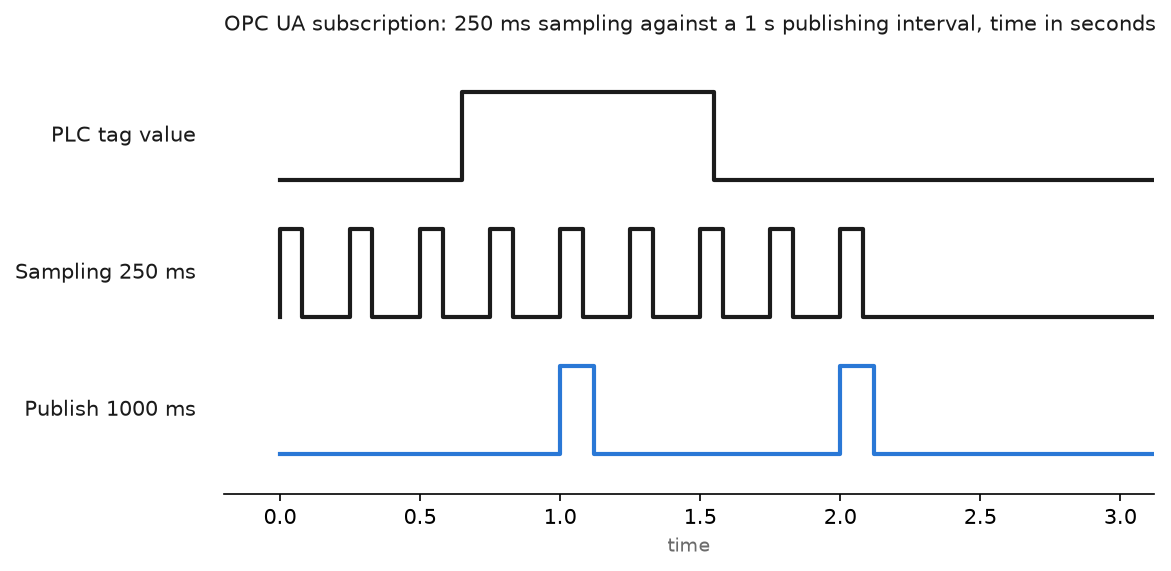
The chart shows the consequence: a value that changes just after a publish waits almost a full publishing interval before the client hears about it. Sampling faster does not fix that, it only fills the queue. If an operator needs to see something inside 250 ms, shorten the publishing interval for that one subscription and leave the other thousand tags at one second.
Field notes: what actually goes wrong
Certificate rejected because of the hostname. An Ignition gateway connected fine from the engineering laptop and refused from the server room. The KEPServerEX instance certificate carried only the short hostname in its subject alternative name, and the gateway was reaching it by IP address. The client compared the endpoint it dialled against the certificate and dropped the session. Regenerating the certificate with both the hostname and the IP in the SAN fixed it. Any time a UA connection fails with a BadCertificate status, read the full status text before touching the firewall.
The DCOM patch that killed a link. A plant with four OPC DA connections into a historian lost all four on the same morning after Windows updates on the historian. The DCOM hardening change had taken effect and the anonymous DA connections no longer met the authentication level. The registry workaround got them running by lunchtime. The permanent fix was a UA tunnel between the two machines, which is where the migration should have started three years earlier.
A browse that took eleven minutes. A KEPServerEX with 46,000 tags across nine devices. Every time an engineer opened the browse tree in the client, the gateway pegged a CPU core. Nobody needed 46,000 tags; the SCADA used about 1,800. Deleting the unused tag groups cut the browse to a few seconds and dropped the controller request rate along with it.
NodeIds that changed after a download. A client stored numeric NodeIds from an S7-1500. After a program change that added a DB, the namespace index shifted and half the client tags went bad quality with no obvious cause. Store browse paths or string NodeIds, and re-browse after any structural change to the program.
Frequently asked questions
Which port does OPC UA use?
TCP 4840 is the registered default and what the S7-1500 uses. KEPServerEX defaults its UA endpoint to 49320. Either way it is one port, and it is the only one you need to open.
Do I still need OPC DA for anything?
Only for legacy clients that cannot speak UA. Put a tunneller between them rather than trying to keep DCOM alive across a network boundary.
Is OPC UA fast enough for control?
For supervisory data, yes. For machine control between a controller and its I/O, no. Cyclic protocols like EtherNet/IP and PROFINET keep that job.
Does OPC UA need a licence?
The protocol does not, the implementations do. Siemens charges a runtime licence for the S7-1500 server. Kepware is licensed per driver. Check both before you quote the job.
Anonymous login or username?
Anonymous for a read-only client on an isolated control VLAN is defensible. Anything that writes gets a named account and Sign and Encrypt, so a write can be traced to somebody.
Next step
With the server running, the data has somewhere to go. The system-level view is in what is SCADA, and for a quick reporting job that does not justify a SCADA node there is how to get data from PLC to Excel.