MAH and Homing a Kinetix Axis: The Switch, the Marker, and the Home That Lands in the Wrong Place
A home-to-switch-then-marker sequence at a Home Speed of 25 mm/s and a Home Return Speed of 5 mm/s takes just over four seconds on a 2198-D032-ERS4 axis, and 1.5 of those seconds are spent crawling back off the switch looking for a marker pulse 6.6 mm behind it. The instruction that starts all that takes two operands: an axis and a control tag.
Everything that decides where the axis ends up is in Axis Properties, not in the MAH instruction. That is the first thing to know about MAH homing, and the second is that .DN is not the bit that means it worked — the reference manual says .DN is set when the homing is successfully completed or is aborted, and .PC is the one set only on success. Sequence on .PC and on HomedStatus. Everything below is which sequence your feedback will actually allow, and the two configuration values that put the axis somewhere other than home.
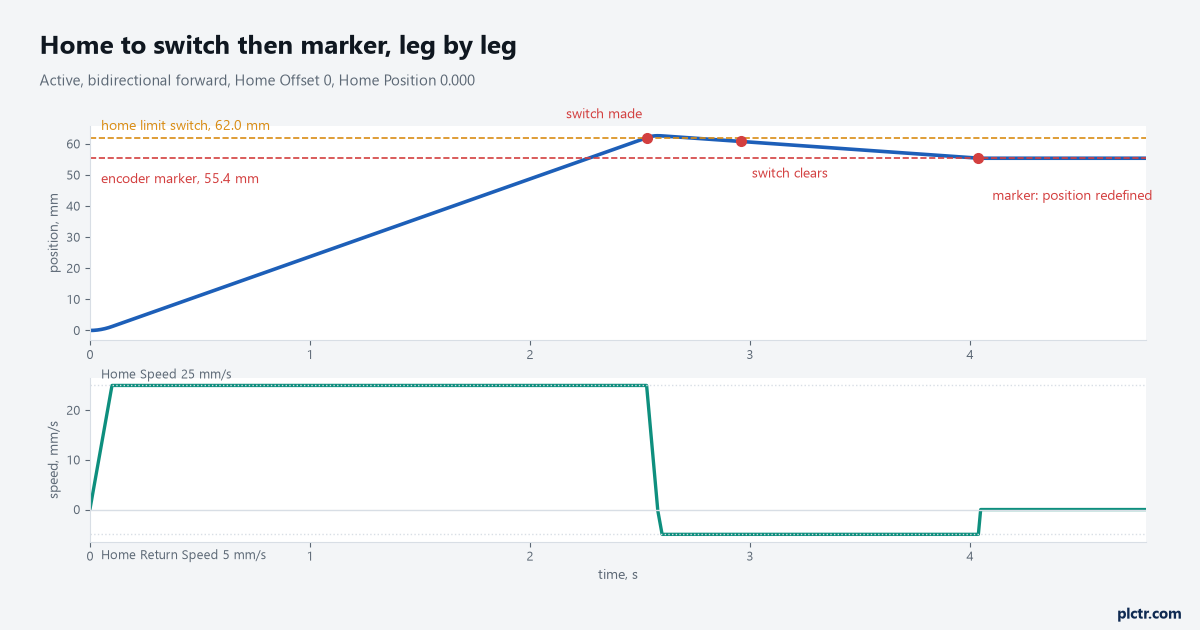
Three legs and two speeds. The last leg is slow on purpose: the marker is found at Home Return Speed, and the slower that leg runs the less the detection delay costs you.
Which sequence the feedback will let you choose
Home Sequence is an enumeration with seven entries — immediate, home to switch, home to marker, home to switch then marker, home to torque, home to torque then marker, and immediate absolute — and three of them need a marker signal that some feedback devices do not have. The integrated motion reference states it directly: if the feedback type configured for the axis does not support a marker signal, home to marker, home to switch then marker and home to torque then marker cannot be used. On a Kinetix 5700 the answer depends on which connector the feedback lands in and what kind of device it is. The Kinetix 5700 user manual says that an incremental Sine/Cosine device gives the drive nothing to synthesise from, so a physical marker signal is required for the home-to-marker sequence and for the marker hookup test to complete. With an absolute device such as Hiperface, the drive synthesises the marker itself, precisely because those encoders do not carry one.
That is worth reading twice. On a VPL motor with Hiperface DSL the marker you home to is manufactured by the drive from absolute position.
It is repeatable, and it is not a physical index slot you can find with an oscilloscope. Run the marker hookup test before trusting it: the test turns the motor by hand and reports whether the drive saw a marker inside the Test Distance you typed in, and a failure there is a wiring or feedback-type problem rather than a homing problem.
Run that test on a new axis before you trust a single home position.
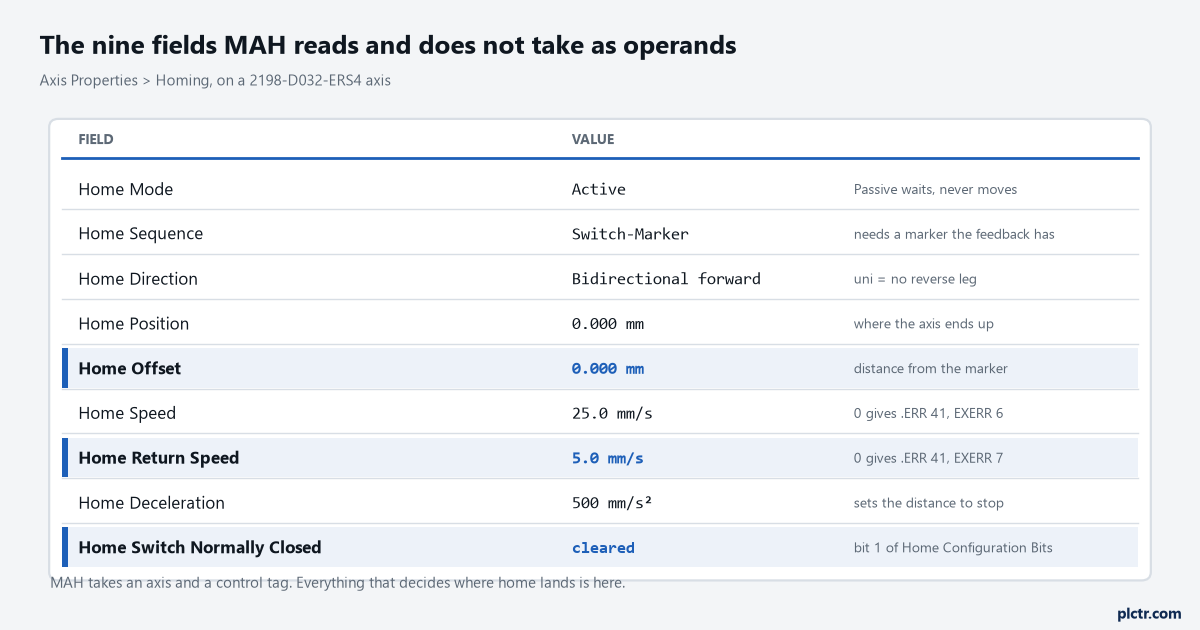
Three of these fields are highlighted because each one has its own way of producing a home that looks wrong. Home Offset is the one that will cost you an afternoon.
Where the home actually lands
Home Position is the absolute position the axis is supposed to hold after homing. Home Offset is the distance between the home event — the marker edge, or the switch — and that Home Position, and the integrated motion manual is specific about the order of operations: the offset is applied at the end of the sequence, before the axis moves to Home Position. With Home Offset at zero on a bidirectional sequence, the axis sits right on top of the marker point and the position register is redefined there. With a non-zero offset, the axis is moved away from the marker by that distance and then the position is set. So far so obvious, and then the unidirectional case arrives and breaks the pattern. On a unidirectional sequence there is no reverse leg to take the axis back to Home Position. The axis decelerates, and the manual says plainly what happens when the Home Offset is smaller than the distance that deceleration needs: the axis does not reverse direction to move to the Home Position, and the .PC leg of the MAH is not set when the .IP leg clears.
Here is the part that makes it hard to spot. The position register is still redefined, so the axis reads as homed and HomedStatus is set.
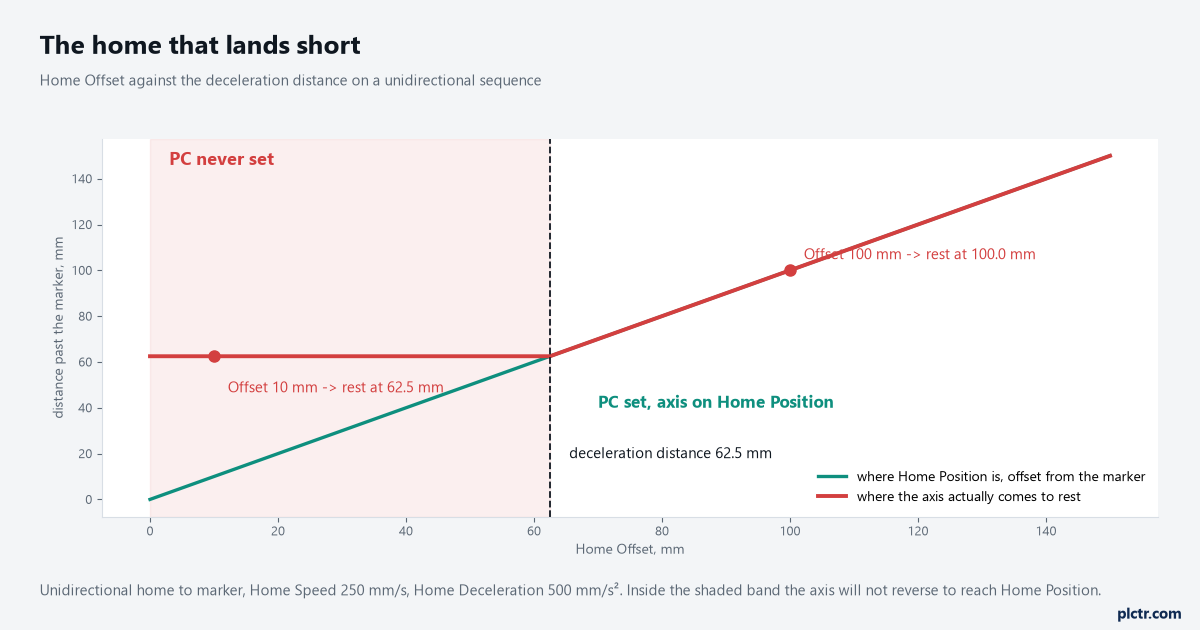
Home Speed 250 mm/s with a Home Deceleration of 500 mm/s² needs 62.5 mm to stop. Ask for an offset of 10 mm and the axis rests 52.5 mm past where you meant it to.
On a cyclic axis the control rescues you, and it does it quietly. The manual describes exactly this case — a unidirectional home on a cyclic axis where the offset is less than the deceleration distance — and says the control automatically adds one or more revolutions to the move distance so the motion to Home Position stays unidirectional. A rotary indexer therefore takes an extra turn and lands correctly, while a linear axis with the same numbers stops short and never sets .PC. Nothing in either case logs an error.
Two machines, the same numbers typed into the same fields, and two different resting positions.
The fix is arithmetic, not diagnosis: make Home Offset larger than the stopping distance at Home Speed, or slow the home leg down.
Passive homing, and the axis the controller cannot move
Passive mode does not command any motion at all. The MAH sets HomingStatus and then waits for the home event to happen — the manual’s description is that passive homing redefines the current absolute position of the axis on the next occurrence of the encoder marker, and that it is identical to active homing to a marker except that the controller commands nothing. Something else has to move the axis past that marker. On a servo axis you can do it with an MAM or an MAJ after the MAH is in process, which is the standard way to build a custom homing sequence that the seven enumerations do not cover. On a Feedback Only axis — a line encoder on a conveyor, a master shaft — the controller cannot command motion at all, so the machine itself has to provide it. Forget that second half and the MAH sits in process forever, looking exactly like a fault.
Start the instruction, then move the axis. Both halves, or neither half works.
The errors that mean the configuration, not the machine
.ERR 41 is Illegal Homing Configuration, and its extended codes name the field: 4 means the Home Sequence is incompatible with the Home Mode, 6 means Home Speed is zero, 7 means Home Return Speed is zero. Both of those fields default to zero on a new axis, and a bidirectional sequence needs both filled in. .ERR 22 is Axis In Motion, and active homing throws it because the instruction confirms the axis is stationary before it starts. .ERR 12 is Servo Message Failure, and its extended code 1, process terminated on request, is what you get when a shutdown, a disable or a stop instruction lands on the axis while it is homing. The status bits explain a related surprise: MAH drives the axis using the Move and Jog profile generators, so MoveStatus and JogStatus go true and false during the sequence, and the manual warns that any disruption of those profiles by another motion instruction can stop the home completing. An operator jog button pressed during homing is exactly such a disruption.
Homing is a move. Anything else that moves the axis is competing with it.
What quietly throws the home away
HomedStatus is the bit that says an absolute machine reference exists, and on the non-CIP drive axis types the manual lists five things that clear it: a download, a control power cycle, a reconnection to the motion module, a feedback loss fault, and a shutdown. Two of those happen on any normal Monday. There is a second consequence for CIP axes that is easy to miss and dangerous to ignore: software overtravel checking is disabled when the Home status bit goes false, because a soft limit expressed in machine coordinates means nothing until the machine reference exists. So an axis that lost its home has also lost its soft limits, and the only things left between the load and the end of travel are the hard overtravel switches. Check HomedStatus in the permissive for every automatic move, not only in the homing step.
An axis that has lost its home has quietly lost its soft limits as well.
Next thing to do: put MAH_1.IP, MAH_1.PC, HomedStatus and the axis position on a trend, home the axis once, and read the rest position off the trend rather than off the HMI. If .PC never sets, the Home Offset against the deceleration distance is the first arithmetic to do. The axis has to be enabled before any of it — MSO, MSF and MASD — and the moves that use the result are MAM against MAJ. If the marker itself is the doubt, wiring an encoder to a high speed counter input covers what the Z channel is and how it behaves, and the walkthrough from motion group to first move sets up the axis this page assumes.