Browsing an OPC UA Server Against a Static Tag List: Which One, and When Each Is Wrong
Node i=2255 is the NamespaceArray, and one Read of it is the single most-skipped call in industrial OPC UA. Skip it and you type ns=3 into a client, which works for a year and then reads the wrong node on the Tuesday somebody loads a companion specification into the server and everything below index 3 shifts up by one. That failure does not produce an error. It produces a value.
The answer to the question in the title, before the reasoning: browse once, while you are commissioning, to build a list; keep that list in the project under version control; resolve the namespace index by URI at every connect rather than typing it; and re-browse on a schedule to compare against the list rather than to find the tags. Browsing is a discovery tool. A running client should not be discovering anything.
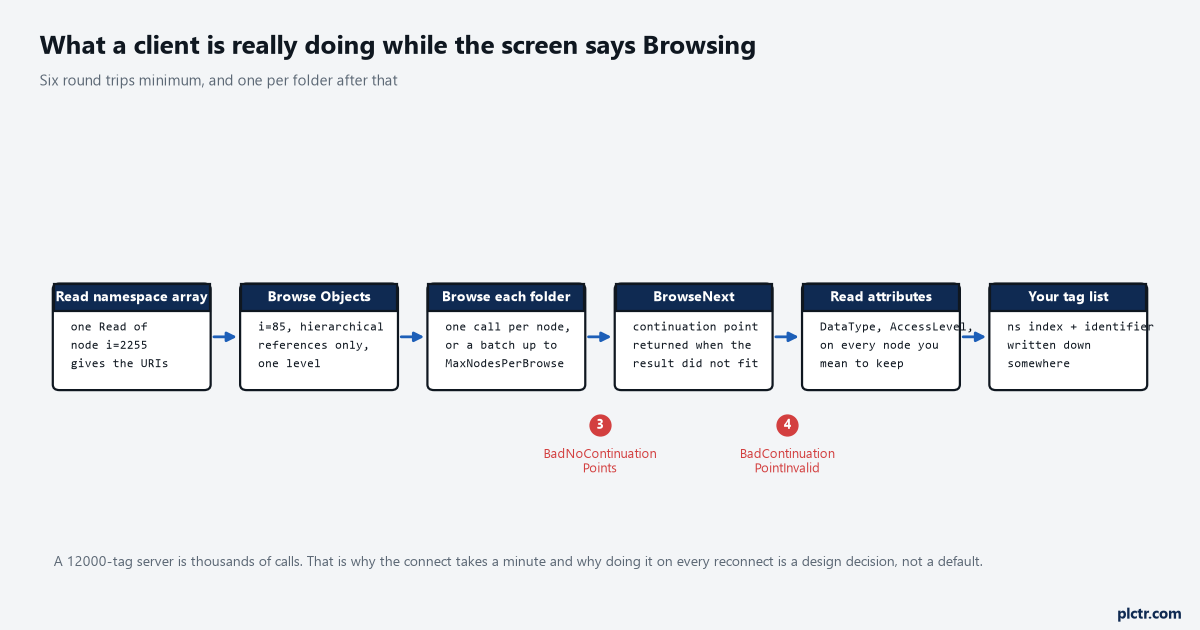
Six round trips is the floor, before a single folder has been expanded. The two break points are the failures that only appear on a large address space.
What a browse actually costs
A Browse is not one call. It is one call per node you expand, plus a BrowseNext for every result that did not fit in one response.
The View Service Set gives you Browse, which returns the references of the nodes you name, and BrowseNext, which continues a result that was truncated. Truncation is not rare on a real server: the specification says outright that a server may return zero results together with a continuation point, before the client’s timeout hint expires, simply because it has not finished. Continuation points are a server resource, and there is a mandatory property, MaxBrowseContinuationPoints under Server/ServerCapabilities, that tells you how many parallel ones the server will hold per session; exceed it and you get Bad_NoContinuationPoints. Let one go stale and you get Bad_ContinuationPointInvalid instead, which is the server having reclaimed the resource while your client was doing something else. There is a matching rule people ignore: a client that decides not to fetch the rest of a result is supposed to call BrowseNext with releaseContinuationPoints set, to hand the resource back. Clients that do not are the reason a server sometimes refuses browses after a week of use.
Then the attributes. A node id alone is not a tag; you need at least the DataType and the AccessLevel to do anything sensible with it, and those are Reads, batched up to whatever MaxNodesPerRead the server publishes.
None of this is slow on a server with forty nodes. All of it is slow on a gateway carrying a few thousand.
A node id is a contract with the server, not with the controller
This is the part that decides everything else, and it is why a tag list cannot simply be copied between installations.
A node id has two parts: a namespace index and an identifier. The identifier is whatever the server’s author chose, and it usually mirrors the way that server organises the world rather than the way the controller does. A Kepware-style gateway builds it from the channel, the device and the tag, joined with dots, so the transfer’s belt tag becomes something shaped like ns=2;s=Line3.TR14.Belt1_Run — the channel name is in there, and renaming the channel changes every node id in the project. An S7-1500 builds it from the PLC tag name in quotation marks, with dotted components for the parts of a data block, giving ns=3;s="TR14"."Belt1_Run"
get_namespace_array() in a Python client returns the list; find your URI in it by string match and use the position you get back. That is one Read at connect, once per session, and it removes an entire class of failure.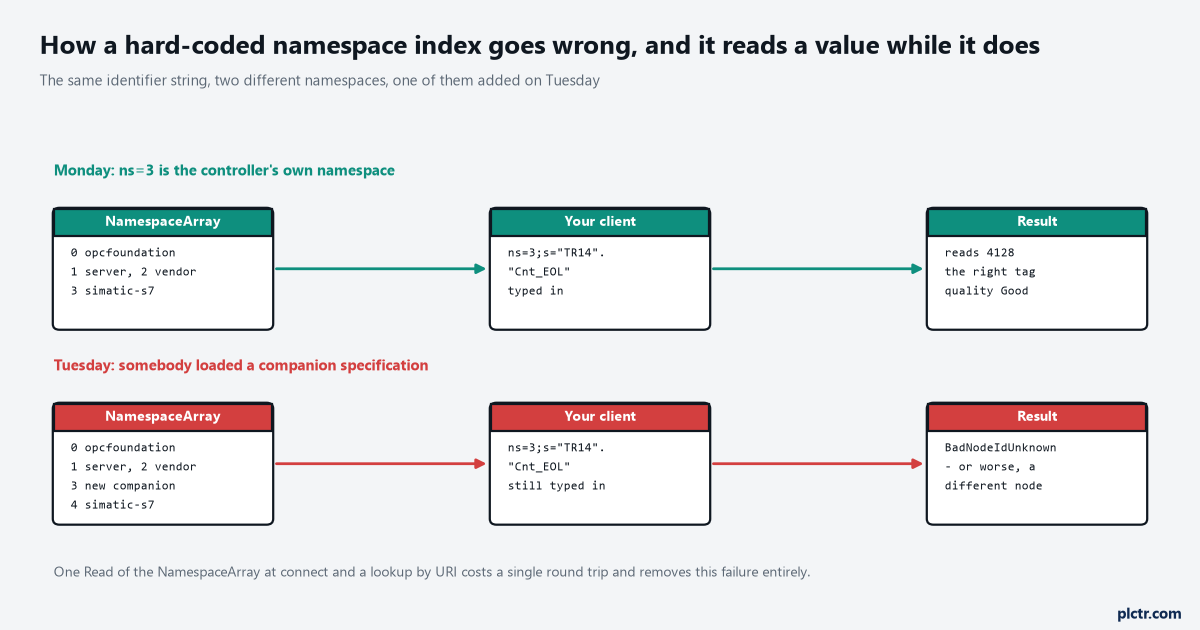
The Tuesday lane is the failure worth fearing, because the right-hand box has a second outcome that is not an error at all.
The browse path is the only address that is really portable, and it is not a node id at all.
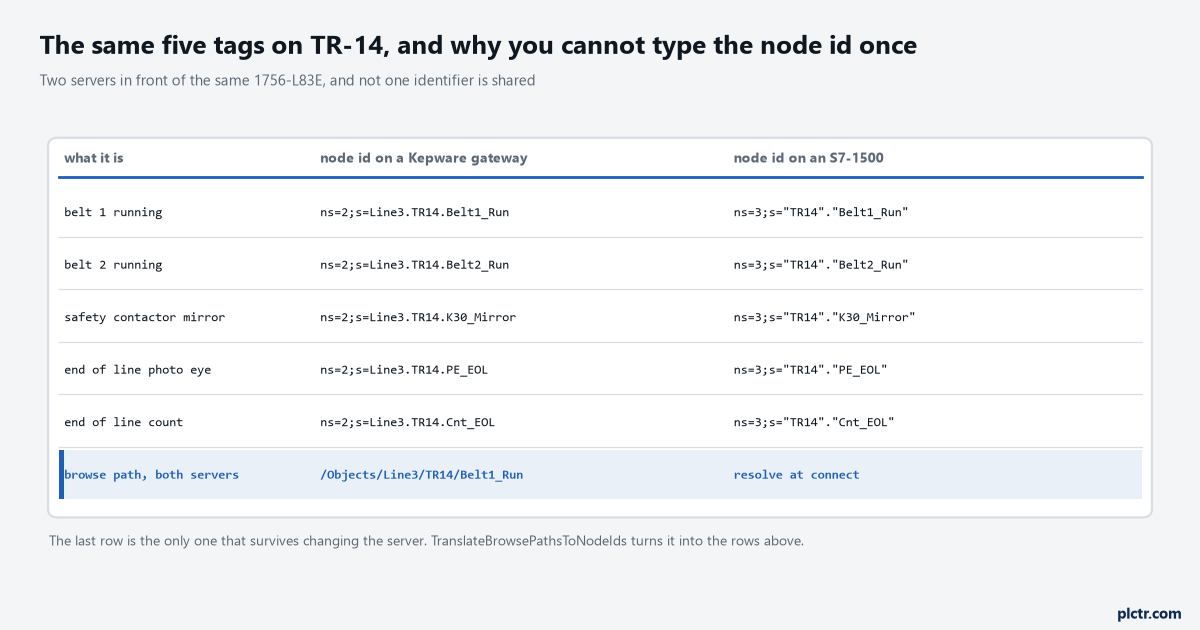
Two servers, one controller, five tags, and nothing in common in the middle two columns. The bottom row is what survives replacing a gateway.
The two services in between that almost nobody uses
Part 4 defines both of them and most integrations use neither, which is a shame because between them they solve the whole argument.
TranslateBrowsePathsToNodeIds takes a starting node and a relative path — a sequence of reference types and browse names — and hands back the node ids they resolve to. The specification’s stated purpose is programming against type definitions, so that a graphical element written for a Boiler object works on Boiler1 without knowing its node id, and that generalises exactly to a tag list: you store /Objects/Line3/TR14/Belt1_Run in your configuration and resolve it at connect. The path is readable by a human, survives a change of namespace index without any special handling, and fails loudly if the structure moved. RegisterNodes is the other one, and it exists because a server often has no direct access to the data it serves — the specification says so in those words — so telling it in advance which nodes you will hit repeatedly lets it set up whatever it needs. The gain is vendor-specific and the spec says so, and it also warns that RegisterNodes does not validate the ids you hand it: unknown ones come straight back, and only structurally broken ones fail the call. Register at connect, unregister at disconnect, read by the registered ids in between.
Neither of these is exotic. Both are in every stack. Almost nobody turns them on.
When browsing is wrong
Four situations, and they all have the same shape: browsing is being used at runtime to answer a question that should have been answered at engineering time.
A client that browses the entire address space on every reconnect is the common one, and on a controller with an embedded server it is genuinely rude — that CPU has a program to scan, and it is now walking a node tree for a client that already knew what it wanted. A client reconnecting every ninety seconds because of a flaky radio link turns that into a permanent load. The second is worse and quieter: using the browse as the tag list, so whatever the server offers is what gets collected. Somebody renames a tag in the controller, the browse no longer finds it, the collector carries on cheerfully with the remaining tags, and six weeks later a report has a gap in it that nobody can date. The third is scope: an MES that should see twelve tags and is instead pointed at a server it can browse in full will, sooner or later, be configured against a tag somebody added for a temporary trial. The fourth is structure — a UDT or a structure appears in a browse as a folder with members under it, and a client that walks it blindly collects every member of every instance, which is how a fifty-tag project becomes a four-hundred-tag subscription. Our note on what a UDT actually is in Studio 5000 is the controller-side half of that.
Browsing is right for exactly two jobs: commissioning, when nobody knows what is there, and auditing, when you want to know what changed.
When a fixed list is wrong
Two situations, and the second one is the one that actually bites.
The obvious one is a controller that gained tags overnight. A new station goes in, the programmer adds four tags, the gateway exposes them, and your list does not have them, so nothing collects them and nothing says so. That is a real failure and it has a real answer, which is not “browse at runtime” but “browse on a schedule and compare”. A weekly job that browses the server, writes the node ids it found to a file, and diffs that file against the configured list gives you a list of additions and removals in an email, and it costs the server one browse a week instead of one per reconnect. The second failure is the list that nobody owns: a spreadsheet exported by an integrator in 2021, edited by three people since, with no record of which entries were verified against the controller and which were typed. A tag list is configuration, and configuration belongs in the same repository as everything else, with the same review as everything else. If yours lives on a shared drive with a date in the filename, the problem is not the design, it is the custody.
And the argument that settles the whole question, which is the behaviour of a tag that goes away.
Delete a tag from the controller, and a client working from a fixed list asks for a node that no longer resolves and gets Bad_NodeIdUnknown — an error, at connect, on a specific named tag, which raises an alarm and gets fixed the same day. A client that browses simply does not find it and reports nothing at all. One of those is a fault and one of those is silence, and on a data layer that somebody will eventually build a report on, silence is far more expensive.
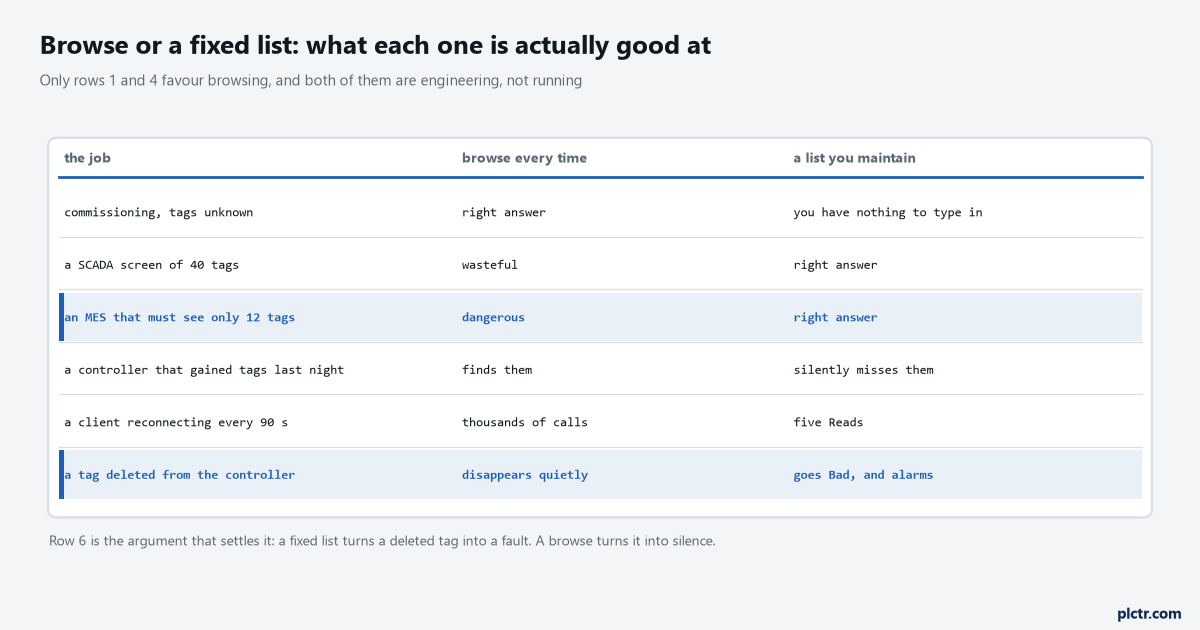
Read the last row first. A fixed list makes a deleted tag noisy, and noisy is the property you want.
The same argument, one layer down
Kepware puts this choice inside the server itself, and the vocabulary is worth knowing because it collides with the one above.
A static tag, which its documentation also calls user-defined, is a tag you create in the server: it has a name, an address, a data type and optionally a scaling, and its whole point is that it is browsable. The documentation is explicit that user-defined tags are what most OPC clients can browse, and that scaling in the server requires one. A dynamic tag is the opposite: nothing is defined in the server, the client asks for a driver address directly, and on connect the server creates a virtual tag for that location and starts scanning it — with an optional data type appended after an @, so Channel1.Device1.R0001@Short overrides the driver’s default. A dynamic tag is not browsable, because it does not exist until somebody asks for it, and if the data type is invalid for that location the server rejects the tag and writes an entry in the Event Log rather than telling the client anything useful.
So there are two independent decisions and people conflate them. Whether the server defines tags, and whether the client discovers them.
The combination that causes the most confusion is dynamic tags plus a browsing client: the client browses, finds nothing much, and somebody concludes the gateway is broken when it is doing exactly what it was configured to do.
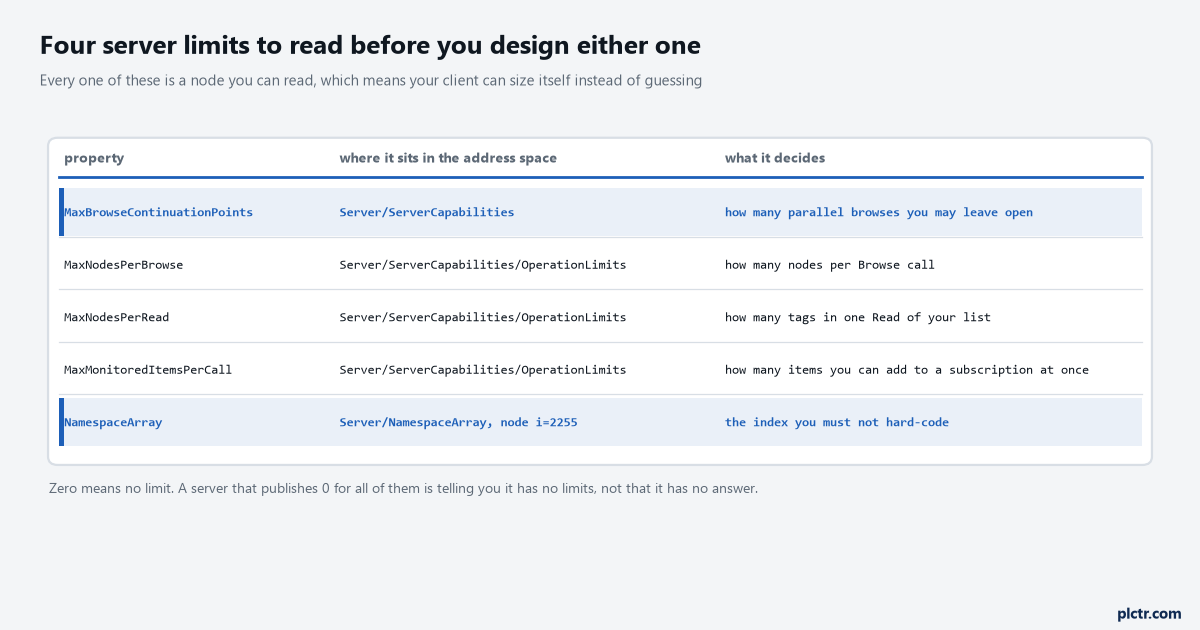
All five are nodes you can read. A client that reads them can size its own batches instead of guessing and getting a refusal.
Five tags on TR-14, done properly
Transfer TR-14 on a carton line: two belt conveyors in series, a 1756-L83E in slot 0, and five things the data layer wants — Belt1_Run, Belt2_Run, K30_Mirror for the safety contactor, PE_EOL for the end-of-line photo eye and Cnt_EOL for the count.
Browse it once, with any client, and write down what you find. Then the client’s configuration holds five browse paths and no node ids at all, and the connect sequence is four steps: read the namespace array, find the server’s URI in it and keep the index, translate the five browse paths to node ids, register those five node ids. After that every Read and every monitored item uses handles the server gave you, and nothing in the running system contains a number somebody typed.
GATEWAY_NS = "urn:line3-gw:kepware:Line3"          # this lives in the config file
NAMES = ("Belt1_Run", "Belt2_Run", "K30_Mirror", "PE_EOL", "Cnt_EOL")

uris = await client.get_namespace_array()          # one Read of node i=2255
ns = uris.index(GATEWAY_NS)                        # the URI is config, the index is not
tags = {n: client.get_node(f"ns={ns};s=Line3.TR14.{n}") for n in NAMES}
Five names in the source, one index resolved at runtime, and nothing about the server’s internal numbering committed to a file. Swap the f-string for a TranslateBrowsePathsToNodeIds call and the stored form becomes the browse path instead of the identifier, which is the version to use if the gateway might be replaced.
Next step
Read your server’s ServerCapabilities before you design either approach, because the four numbers in it decide how your client should batch and most clients guess. Point any browser at Server/ServerCapabilities and note MaxBrowseContinuationPoints, then open OperationLimits underneath it for MaxNodesPerBrowse, MaxNodesPerRead and MaxMonitoredItemsPerCall. Zero means no limit rather than no answer. Then do one full browse, export the node ids, and put the file in the same repository as the controller program with today’s date in the commit rather than in the filename.
The week after that, set up the diff: browse again, compare, and see what has already changed since you started. What the client then does with those five tags — the subscription, the publishing interval and the deadband — is in OPC UA PLC integration from a PLC tag to a SCADA client, and the SCADA end of the same job with a browsable tag tree is connecting Ignition to a ControlLogix.