SCADA PLC integration goes wrong in a predictable way. The link comes up in an afternoon, everybody is happy, and three weeks later the controller is answering an HMI slowly because a SCADA server is asking 4,000 questions a second. This is the sequence I use to connect a supervisory system to a plant floor controller so it still behaves at scale, worked on Ignition 8.1 against a 1756-L83E, with the Siemens equivalent alongside.
Pick the path before you pick the software
| Path | Port | When it fits | Watch out for |
|---|---|---|---|
| Native driver, EtherNet/IP | TCP 44818 | Ignition, WinCC or a historian reading Logix directly | Counts against the controller CIP connection budget |
| OPC UA from the controller | TCP 4840 | S7-1500 with the OPC UA server licence enabled | Needs a runtime licence and a certificate exchange |
| OPC server in between | depends | Mixed brands, legacy DH+ or serial devices, one place to manage tags | One more service to keep alive and patch |
| Modbus TCP | TCP 502 | Power meters, VFDs, third-party skids | No tag names, registers only, byte order arguments |
| S7 communication | TCP 102 | S7-300, S7-400, S7-1200 read by a third-party driver | Needs PUT/GET permitted and non-optimised data blocks |
A middle OPC server earns its place when you have more than two device families. Kepware is the usual choice, and the channel and device setup is walked through in Kepware channel configuration (OPC server). If the whole concept is new, start with what is SCADA.
Step 1: Prepare the controller side first
- Fix the IP address and make sure it is static. A SCADA device connection that follows a DHCP lease is a Monday morning outage waiting to happen.
- Move every tag the SCADA needs into controller scope. Program-scoped tags are either invisible to the driver or hidden under a
Program:<name>folder depending on the driver version, and the folder path changes if the program is renamed. - Group related values into a UDT. A single
Oven_1structure with 30 members reads in one request. Thirty loose tags may not. - Count your connections. Each SCADA device connection consumes CIP connections on the bridge module. A 1756-EN2T runs out well before you think it will, and the 5580 embedded port is not unlimited either.
- On an S7-1200 or S7-1500 being read by a third-party driver, enable Permit access with PUT/GET communication from remote partner in the CPU protection settings, and untick Optimized block access on the data blocks you want addressed by absolute address.
Step 2: Add the device connection
On Ignition:
- Open the Gateway web page, usually port 8088, and go to Config → OPC UA → Device Connections.
- Create new Device, choose Allen-Bradley Logix Driver.
- Enter a name, the controller hostname or IP, and the slot number. A 1756-L83E in slot 0 of its own chassis uses slot 0. A controller behind a 1756-EN2T uses the slot the controller sits in, not the slot of the bridge.
- Save and watch the status column. It should read Connected within a few seconds. Connection Faulted with no further detail almost always means a firewall between the server and the plant VLAN blocking TCP 44818.
The item paths you will see afterwards look like this:
[PLC]Oven_1.Temp_PV                       Ignition Logix driver, controller scope
ns=1;s=[PLC]Oven_1.Temp_PV                the same tag as an OPC UA node id
Channel1.Line3_PLC.Oven_1.Temp_PV         the same tag through KEPServerEX
ns=3;s="DB_Line3"."Oven_1"."Temp_PV"      an S7-1500 OPC UA server node
Step 3: Set a tag group that respects the controller
This is the step that separates a system that scales from one that does not.
- Go to Tag Groups in the Designer and create groups rather than leaving everything on the default.
- Give fast interlock displays a 250 ms group. Give temperatures, levels and totals a 5,000 ms group. Give nameplate data and recipe values a leased group so they only poll while somebody has the screen open.
- Keep the number of tags in the fastest group small. Two hundred tags at 250 ms is fine. Four thousand is not.
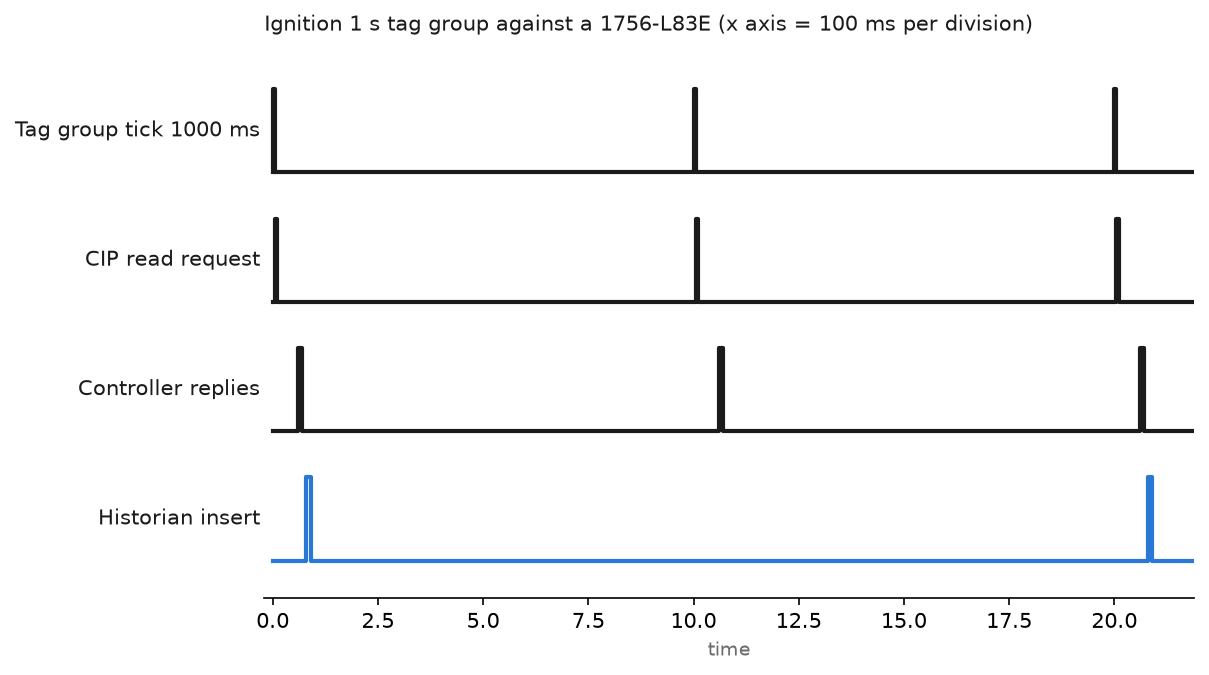
The chart shows one cycle of a 1 second group. Request out, reply back roughly 60 ms later, historian write after that. Nothing is happening for the other 900 ms, which is the point. Shorten the tick to 100 ms and you have ten times the traffic for data that changes once a minute.
Step 4: Turn on history where it is worth storing
- Set up the database connection in Config → Databases → Connections. The connection can be MSSQL, MySQL, PostgreSQL or another database Ignition ships a driver for.
- On each tag, enable History, pick the historical tag group and set a deadband. A tank level that wobbles 0.2 percent does not need a row every second.
- Confirm store and forward is working by pulling the database network cable for a minute. The Gateway should buffer and then flush. If rows end up quarantined, the quarantine list is under Status → Store and Forward.
Trend settings on the controller side follow the same logic, and the sampling tradeoffs are worked through in PLC trend chart settings and monitoring.
Step 5: Prove it survives a bad day
Before handover, do three things with a stopwatch.
- Pull the Ethernet cable to the controller for 30 seconds. The SCADA should mark tags bad quality, not freeze the last value. Operators trust a stale number and act on it.
- Restart the SCADA server. The controller should not fault, and the connection should come back without a manual reconnect.
- Put the controller in Program mode. Confirm the SCADA shows it, because a screen full of last-known values during a maintenance window is dangerous.
Field notes
Four thousand tags at 100 ms. A brownfield site added a SCADA layer to an existing line. The integrator subscribed the entire controller tag database on the default group and set the default to 100 ms. Within a day the PanelView on the same line went from responsive to three seconds per screen change, and the Ignition device connection flapped between Connected and Faulted. Splitting into three groups at 250 ms, 2 s and 10 s dropped the request rate by a factor of twenty and the panel came back. Nothing in the PLC program changed.
Connection in use. A second SCADA server was pointed at a 1756-EN2T that was already carrying two HMIs, a historian and a MES link. The new connection failed with a CIP connection request error, extended status 16#0100, connection in use or duplicate forward open. The module had no connections left. The fix was to consolidate the reads behind one OPC server rather than adding a fifth independent client.
Tags that browsed but never updated. An S7-1200 read through KEPServerEX returned bad quality on every item. Two settings were missing: PUT/GET access was not permitted in the CPU protection tab, and the data block still had optimised block access enabled, so it had no absolute addresses to read. Both are single checkboxes and both are off by default on a new project. Background on the middleware side is in what is Kepware OPC.
Renamed controller, broken paths. Someone renamed a controller during a firmware upgrade. Every Ignition tag pointed at the device name, which was unchanged, so the tags kept working. The historian queries did not, because the tag provider path had the old plant area in it. Decide your naming before you build the tag tree, not after.
A spreadsheet that was really a SCADA request. Half the reporting requests I get are one engineer wanting a daily number in Excel, not a supervisory system. That is a much smaller job, and the direct route is in how to get data from PLC to Excel.
Frequently asked questions
Do I need OPC UA, or is a native driver enough?
A native driver is faster and simpler when you have one controller family. OPC UA is worth the licence when you need certificates, authentication and a vendor-neutral contract between plant and IT.
Which port do I have to open on the firewall?
TCP 44818 for EtherNet/IP explicit messaging, and UDP 2222 as well if implicit class 1 traffic is involved. TCP 102 for S7 communication, 502 for Modbus TCP, 4840 for OPC UA. Open the specific ports, not the whole range.
Can SCADA write to the PLC?
Technically yes, and on real plants it should be limited to setpoints and recipe selection. Keep start and stop, and anything that moves an axis, under local control with an interlock in the controller.
How many tags can one controller feed?
The tag count matters less than the request rate and the structure. Ten thousand tags in UDTs on a 5 second group is comfortable. One thousand loose tags at 100 ms is not.
Where should the alarm live?
In the controller. The condition must stay true whether or not the SCADA server is running, and the SCADA displays and records it.
Next step
Get one device connection, twenty tags and one historised value working end to end before you build the plant model. When you are ready to add a second brand, the middleware setup in Kepware channel configuration (OPC server) is the next thing to read. Where the remote end is an inverter or a battery rather than a PLC, the register-level work is in SunSpec inverter curtailment and wind pitch rate limits.