Studio 5000 Standard Edition gives you no Structured Text editor and no SFC editor, and TIA Portal V18 drops GRAPH and STL from the menu the moment the target CPU is an S7-1200. Those two limits settle more arguments than any comparison of the five PLC programming languages in IEC 61131-3 ever has. This is how the five differ in practice, what Studio 5000 v33 and TIA Portal V18 will actually let you use on your controller, and how to decide before you write rung 0.
What the standard defines, and what your controller supports
IEC 61131-3 names five languages. The third edition from 2013 moved Instruction List to a deprecated annex, so treat it as legacy on new work.
| Language | Short | Studio 5000 v33 | TIA Portal V18 | Good for |
|---|---|---|---|---|
| Ladder Diagram | LD / LAD | Yes, every edition | Yes, S7-1200 and S7-1500 | Interlocks, motor control, anything a maintenance electrician will open at 3 a.m. |
| Function Block Diagram | FBD | Yes | Yes | Analog loops, filters, totalizers, drive control |
| Structured Text | ST / SCL | Full and Professional editions | Yes, called SCL | Math, arrays, string handling, recipes, communication buffers |
| Sequential Function Chart | SFC | Full and Professional editions | S7-1500 only, called GRAPH | Batch sequences, CIP skids, machines with distinct states |
| Instruction List | IL / STL | Not offered | STL on S7-1500 and S7-300/400, not on S7-1200 | Reading old S5 and S7-300 code you have to keep alive |
Two licence traps hide in that table. Studio 5000 Standard Edition has no Structured Text or SFC editor, so a colleague on a Standard seat cannot create or edit the routine you wrote, and on some versions the routine will not open at all. And the S7-1200 has no GRAPH and no STL at all, which surprises people migrating an S7-300 program down to a 1214C.
Use ladder when a technician has to troubleshoot it live
Ladder wins on one thing. You can watch power flow while the machine runs, and a green rung tells an electrician more than a watch window ever will.
Rung 0:
  ---] [-------]/[--------] [-----------( )---
   Start_PB   Stop_PB    Guard_OK      Conv_Run
     |
     ---] [---
      Conv_Run
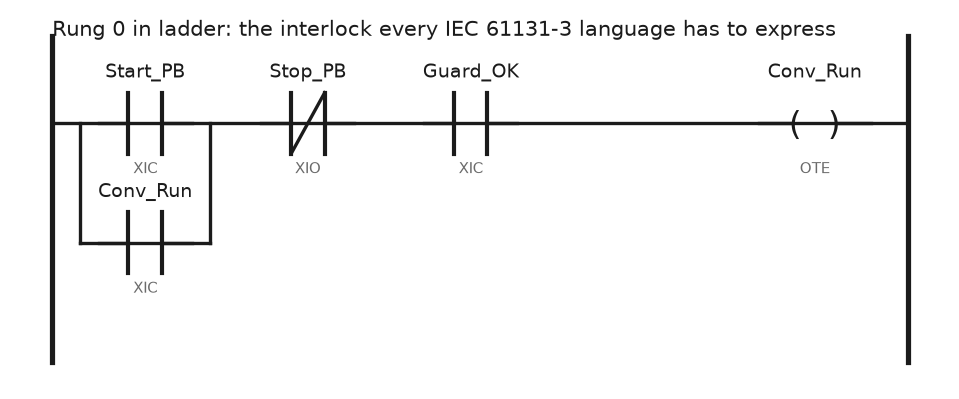
Keep permissives, interlocks and manual overrides here. If the contact instructions are new to you, the four combinations are worked through in PLC bit instructions XIO and XIC, and the wider picture is in PLC ladder diagram.
Where ladder falls apart is anything with an index. A sixteen rung block that copies data out of Recipe[n] becomes a wall of COP and MOV instructions that nobody wants to modify at handover.
Use function block for loops that run every scan
FBD suits signals that flow. PID, filtering, ramping, scaling, drive references. In Logix the process blocks live here and nowhere else: PIDE, ALMA, TOT, SCRV. You cannot call PIDE from a ladder routine.
Watch execution order. In a Logix FBD sheet the compiler sorts blocks by wire dependency, but a wire that feeds backwards is a feedback path and carries the previous scan value. Logix marks it with a small arrow on the wire. Miss that marker and your filter runs one scan behind what you expect.
The block editor and the way sheets execute are covered in Allen Bradley PLC function block programming.
Use Structured Text for math, arrays and anything with a loop
SCL and ST are the same idea with different keywords. Here is a linear scale from a 1756-IF8 raw count to engineering units, written once and reused:
(* 4-20 mA on 1756-IF8, raw 3277..16384 counts, 0..150 degC *)
IF Raw_Count < 3100 THEN
    Sensor_Fault := 1;          (* below 3.8 mA, broken wire *)
    Temp_degC := 0.0;
ELSE
    Sensor_Fault := 0;
    Temp_degC := (Raw_Count - 3277) * 150.0 / (16384 - 3277);
END_IF;

FOR i := 0 TO 15 DO
    IF Zone_Temp[i] > Zone_SP[i] + 5.0 THEN
        Zone_Alarm.[i] := 1;
    END_IF;
END_FOR;
That FOR loop is sixteen rungs of ladder, or four lines here. The cost is that you cannot watch it execute. Structured Text shows you values, not flow, so drop a breadcrumb tag into long routines if you expect to debug them online.
Siemens users get SCL on every current CPU including the 1200. Adding an SCL block is part of the basic workflow in Siemens TIA Portal.
Use SFC when the machine is a sequence, not a state
SFC earns its keep on batch equipment: fill, heat, hold, drain, clean. Each step is a box, each transition is a condition, and the chart shows the operator exactly where the machine stopped.
In Logix, check the setting under Controller Properties → SFC Execution before commissioning. Automatic reset clears step actions when the chart leaves a step. Programmatic reset leaves the last values sitting there. Teams that pick the wrong one end up with a valve that stays open after its step has finished.
If your sequence is really a lookup table of positions, a sequencer in ladder is simpler and faster to commission. That approach is in PLC sequencer programming.
Field notes
The Standard Edition wall. A plant standardised on Studio 5000 Standard for maintenance laptops. An integrator delivered a project with two Structured Text routines. Maintenance could download and run it, but the routines opened as a locked grey pane. Nobody could read the alarm logic during a line stop. The fix was one Professional seat in the office plus a written rule: ST allowed in the engineering project, ladder for anything maintenance touches.
GRAPH that would not compile. A migration from an S7-315-2DP to an S7-1214C DC/DC/DC. The original had two GRAPH sequences. TIA Portal V18 will not offer GRAPH once the target is a 1200 series CPU, and the option is simply missing from Add new block. We rewrote both sequences as SCL state machines with an INT step number. Two days of work that nobody had quoted.
FBD feedback that read one scan old. A flow totalizer in FBD gave a value 250 ms behind the trend. The output of a filter block had been wired back into its own input path for a rate calculation, which Logix treats as feedback. Moving the rate calculation into an ST routine in the same periodic task fixed it.
Mixed languages, no map. Six routines, four languages, no documentation. Before changing anything, export the project to L5X and search the file. Ten minutes of grep tells you which routine actually writes the output you care about.
Frequently asked questions
Which language should a beginner learn first?
Ladder. It maps onto the relay drawings in every panel, and it is the only language guaranteed to be present on every controller and every software edition. Add Structured Text second.
Can I mix languages inside one controller?
Yes. In Logix each routine has one language, chosen when you create it, and any routine can JSR to any other. In TIA Portal each block has one language and blocks call each other freely.
Is Instruction List worth learning?
Only if you maintain S7-300, S7-400 or S5 code. It was deprecated in IEC 61131-3:2013, and no new Rockwell or Siemens controller line is adding it.
What is the difference between ST and SCL?
SCL is the Siemens implementation of Structured Text. The syntax is close enough that you can read one if you know the other, but the standard library calls and the array declarations differ.
Does the language I choose change scan time?
Not much by itself. A FOR loop over 5000 array elements costs about the same whether you write it in ST or unroll it in ladder. What changes scan time is what the code does, not how it looks.
Next step
Pick one language and build something that runs. The start/stop rung above is the usual first project, worked step by step in RSLogix PLC programming motor start/stop program. If you would rather start from the software side, how to learn PLC programming lays out which package to install first.