Wireless PLC communication is easy to demonstrate on a bench and hard to keep alive over a shift. The radio link is not the problem. The problem is that a controller expects data at a fixed interval and a radio cannot promise one. This covers picking the right technology for the distance and the data rate, budgeting the timeouts so a two second dropout does not stop the line, and the antenna work that decides whether any of it holds.
Everything below assumes the wired part already works. If the link is unstable while it is still on copper, a radio will only hide the cause.
Match the technology to the job
| Technology | Typical hardware | Range | Realistic latency | Fits |
|---|---|---|---|---|
| Industrial Wi-Fi, 2.4 and 5 GHz | Cisco Catalyst IW9167, Anybus Wireless Bridge | 30 to 150 m indoors | 5 to 30 ms, more when roaming | AGVs, cranes, moving gantries, rotating tables |
| Licence-free 900 MHz | ProSoft RLX2, Phoenix Contact Radioline | 1 to 15 km line of sight | 100 ms to several seconds | Well heads, pump stations, tank farms, spread-out sites |
| Cellular router | Ewon Flexy, Phoenix TC ROUTER, Sierra Wireless RV55 | Anywhere with coverage | 40 ms to 2 s, unpredictable | Remote monitoring, alarm callout, VPN service access |
| Bluetooth | Anybus Wireless Bolt, Phoenix Contact Bluetooth modules | 10 to 100 m | 10 to 50 ms | Commissioning laptops, handheld panels, short cable replacement |
| WirelessHART or ISA100 | Emerson, Yokogawa field gateways | Mesh across a plant | Seconds | Process measurements that update slowly |
| LoRaWAN | Multitech, Kerlink gateways | Kilometres | Minutes | Slow telemetry, no control |
Two rules keep you out of trouble. Control traffic and monitoring traffic are different jobs, so do not put a remote rack of interlocks on the same link as a data historian. And a wireless link that carries I/O is part of the machine, which means it needs a drawing, a spare, and a label.
Budget the timeouts before you promise anything
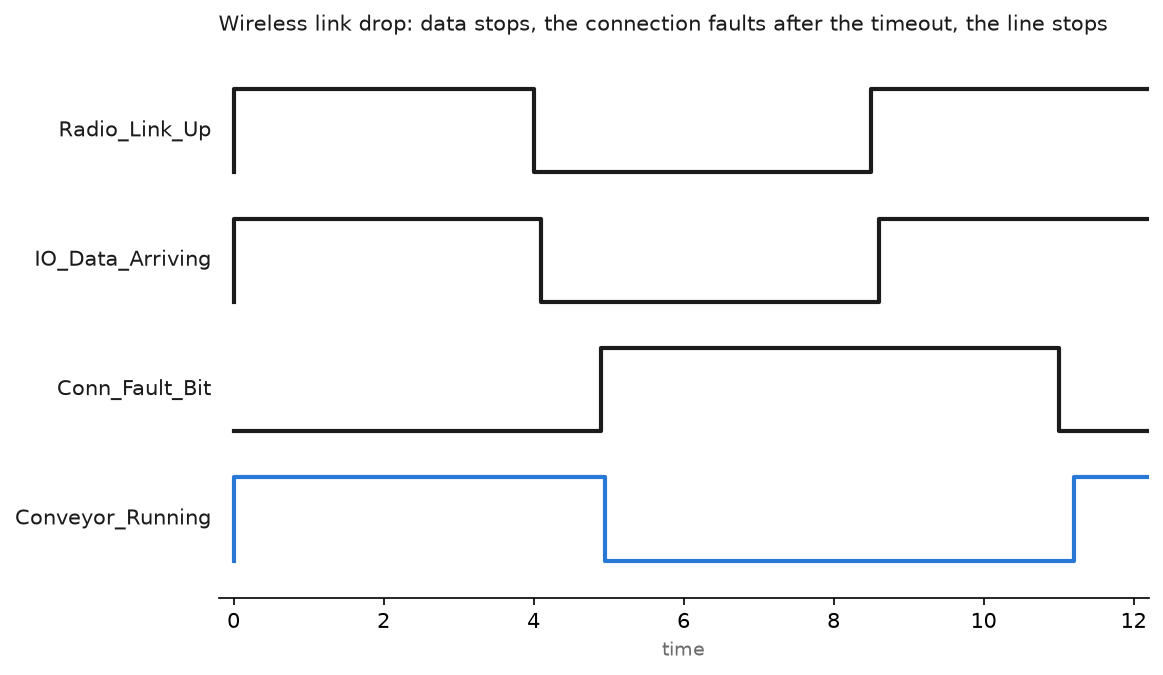
For EtherNet/IP the numbers that matter are the RPI and the connection timeout multiplier. The connection drops when nothing arrives for multiplier times RPI. The default multiplier of 4 with a 20 ms RPI means the controller gives up after 80 ms, which a Wi-Fi client cannot survive while it roams between access points.
| Setting | Wired remote rack | Over industrial Wi-Fi | Over a 900 MHz radio |
|---|---|---|---|
| RPI | 10 to 20 ms | 100 to 200 ms | Poll on demand, or 1 s and up |
| Timeout multiplier | 4 | 8 or 16 | Not applicable, use messaging |
| Connection type | Multicast or unicast | Unicast, always | MSG instructions or Modbus polls |
| What loses the line | Cable damage | A roam, a microwave oven, a new access point | Rain fade, a truck parked in the path |
Unicast matters more than people expect. Multicast I/O connections over a wireless bridge are a reliable way to build something that works in the morning and falls over at shift change. Set the connection to unicast in the module properties on anything that crosses a radio link.
Modbus TCP and MSG based polling are kinder to a slow link than scheduled I/O, because a late reply is just a late reply. Scheduled I/O over a marginal link faults the connection. When the remote end only needs setpoints and status, poll it.
Write the logic that expects the link to fail
Every wireless connection needs code behind it. The controller already gives you a connection status bit per module, and for anything polled you add a heartbeat.
(* Structured Text, 100 ms periodic task                       *)
(* Heartbeat to a remote rack behind a workgroup bridge        *)

Hb_Out := Hb_Out + 1;                 (* written to the remote *)

IF Hb_Echo = Hb_Last THEN
    Stale_Cnt := Stale_Cnt + 1;       (* remote has not echoed *)
ELSE
    Stale_Cnt := 0;
    Hb_Last   := Hb_Echo;
    Link_Good_Time := Link_Good_Time + 1;
END_IF;

Link_Lost := Stale_Cnt > 10;          (* 1 second with no echo *)

IF Link_Lost THEN
    Remote_Conveyor_Cmd := 0;         (* command the safe state *)
    Remote_Divert_Cmd   := 0;
    Fault_Code          := 16#0A01;
END_IF;

(* Do not clear Link_Lost automatically. An operator resets it,
   after the stale data on the HMI has been replaced.           *)
Latching the fault is deliberate. A link that flaps every ninety seconds and recovers silently will run a machine on stale data for years before anyone notices. Latch it, log it, and put the count on a screen.
Do the RF work properly
- Pick the antenna for the pattern you need. An omni on a moving machine, a panel or yagi for a fixed point to point shot. A yagi aimed at a wall achieves nothing.
- Get the antenna out of the cabinet. A metal enclosure is a Faraday cage. Mount the antenna outside, with a proper bulkhead feed through.
- Count the cable loss. LMR-400 loses roughly 6.8 dB per 100 feet at 2.4 GHz, and more at 5 GHz. Twenty metres of thin patch lead can eat more signal than the antenna gain you paid for.
- Fit a lightning arrestor on any antenna that goes outdoors, and earth it to the same bar as the panel.
- Aim for useful signal, not any signal. For control traffic, target better than -65 dBm RSSI with an SNR above 20 dB at every point the machine travels. A link that works at -80 dBm on a quiet Sunday will not work on Monday.
- Plan channels. On 2.4 GHz use 1, 6 and 11 only. On 5 GHz avoid DFS channels for control, because a radar detection event moves everyone off the channel with no warning.
- Survey with the machine moving, not from a laptop standing still. Walk the AGV route and log RSSI the whole way.
For roaming clients, turn on fast roaming in the controller and the client, keep the SSID and security identical across access points, and overlap coverage by about 20 percent. Without fast roaming a re-association takes a second or more, and a second is a fault on any scheduled connection.
Keep safety off the radio, with one qualification
No safety function goes over a plain wireless link. A radio bridge carrying Modbus TCP or standard EtherNet/IP has nothing that detects corrupted, delayed or repeated messages, so an E-stop across it is not a safety function whatever the schematic claims.
Rated safety protocols such as CIP Safety and PROFIsafe use the black channel principle, so the medium underneath them is not restricted by the protocol itself. That is not permission. The watchdog time still has to be met on every packet, and a wireless link that loses a second of traffic will trip the safety connection and stop the machine. Consult the safety manual for your devices, and expect a wired or fibre route for anything that must hold a guard. Where the performance level and the architecture come from is covered in functional safety in PLC programming.
The pragmatic answer on AGVs and cranes is to keep the safety function local. Put the safety controller on the moving machine, wire its E-stops and scanners locally, and send only non-safety status across the radio.
Lock the wireless side down
An access point is an open door if you let it be. Use WPA2 or WPA3 with AES, a separate SSID for control traffic with its own VLAN, and MAC filtering as a nuisance layer rather than a control. Turn off any guest network on the same hardware. Cellular routers need the inbound ports closed and a VPN for service access, not a forwarded port with a memorable password. The wider approach is in cybersecurity for PLC systems, and remote access patterns in remote monitoring and control.
Field notes
The forklift that stopped the palletiser. A workgroup bridge on a moving palletiser lost its connection two or three times a shift with no pattern. The pattern turned out to be a forklift with a mast mounted terminal roaming on the same 2.4 GHz channel, parking next to the antenna while the driver did paperwork. Moving the machine link to 5 GHz and the fleet terminals to their own SSID fixed it. Nothing in the PLC was wrong.
A microwave oven in the break room. A 2.4 GHz link across a corridor dropped every day between 11:40 and 12:20. The break room on the other side of the wall had a microwave on channel 6 territory. The spectrum analyser trace was unmistakable once somebody finally looked at lunchtime.
The radio link that worked until it rained. A 5.8 GHz shot across a yard to a pump house ran for eight months, then dropped in heavy rain. The link had been commissioned with a 4 dB fade margin, which is nothing. The fix was a higher gain antenna at each end and a mast that cleared the Fresnel zone over the yard fence. Commission with margin, and record the RSSI at handover so you can tell later whether it has degraded.
Stale data that looked alive. A remote tank level over a 900 MHz radio froze at 62 percent for two days. The HMI showed a healthy number because the last successful read stayed in the tag. Nobody had a comms health bit on the screen. Show the link status and the age of the data next to any value that came over a radio.
Frequently asked questions
Can I run remote I/O over Wi-Fi?
Yes, with a unicast connection, an RPI around 100 ms and a raised timeout multiplier, for slow I/O such as valves and level switches. Do not do it for anything that needs deterministic timing, and never for safety.
Wi-Fi or a licence-free radio for a site a kilometre away?
A 900 MHz radio, almost always. It penetrates better, tolerates a poor path, and it does not care about the Wi-Fi estate. You pay for it in bandwidth and latency, which for tank levels and pump status does not matter.
How do I get data from a machine to the office without opening the network?
A cellular router with an outbound VPN, or an industrial gateway pushing to a broker. Outbound only, no inbound port forwarding. Which protocol suits what is in PLC and SCADA communication protocols.
Does Bluetooth have a place in an industrial panel?
For short cable replacement and for commissioning, yes. An Anybus Wireless Bolt on a rotating table beats a slip ring for a handful of I/O. As a general network technology, no.
Why does my connection fault only when the machine moves?
Roaming. The client is re-associating with another access point and the gap is longer than your connection timeout. Enable fast roaming, overlap the coverage, and raise the timeout multiplier.
Next step
Get the wired design right first, because a radio inherits every problem the network already had: switch configuration, VLANs and address planning are in advanced PLC networking. Then tune the connection parameters on the wireless segment with EtherNet/IP in PLC communication, and check the effect on your task timing with PLC scan time and cycle time.