A 1756-L83E at firmware 33.011 on a 10.20.30.0/24 cell subnet has four or five conduits crossing its boundary that anyone can name, such as FactoryTalk Linx on TCP 44818, SCADA reaching an S7 CPU on 102, a historian gateway on 502. Whatever else gets through is traffic nobody has written down. Hardening a cell that runs three shifts is a question of ordering: the controls you can apply this week while the machine runs, then the two or three that need a window. This walkthrough goes through a real ControlLogix cell in that order, with the port numbers, the menu paths and the change that will drop your line if you make it at the wrong moment.
None of it needs a budget line. The key switch on the controller is free and still the control most plants skip.
What is in the cell
| Item | This example |
|---|---|
| Controller | 1756-L83E, firmware 33.011, key switch reachable without a permit |
| Ethernet bridge | 1756-EN2TR, cell subnet 10.20.30.0/24 |
| Engineering software | Studio 5000 v33, FactoryTalk Services Platform installed |
| HMI | PanelView Plus 7, 10 inch, on the same cell subnet |
| Third party | S7-1516 on the packer, flow meter gateway speaking Modbus TCP |
| Boundary | Layer 3 switch with ACLs between cell and plant, no direct route to the office LAN |
Step 1: Draw the zones before you change anything
IEC 62443 gives you two words that make the rest of the job easy. A zone is a group of devices with the same security needs. A conduit is the traffic allowed between two zones.
- Open the network drawing, or rebuild one from the switch MAC tables. Do not trust a drawing older than the last shutdown.
- Put a box around the cell: controller, bridges, drives, HMI, remote I/O. That is one zone.
- Put a box around the plant layer: historian, SCADA servers, MES gateway.
- Write down every flow that crosses the line between them. Each one becomes a firewall rule in step 4. If you cannot name the application and the direction, the flow does not exist yet and you should not allow it.
- Mark anything with an outside connection: a vendor VPN, a cellular router on a remote pump, a modem someone left in a panel in 2012.
Most cells end up with four or five real conduits. Thirty means you have a flat network, and that is the finding to write up first.
Step 2: Use the key switch
The key switch on a 1756-L8x or 5069-L3xx has three positions, and it is enforced in hardware.
- RUN: no download, no online edit, no mode change from software.
- REM: everything is permitted from Studio 5000.
- PROG: the controller holds in program mode. Outputs go to their configured state.
In REM, anyone with network access and Studio 5000 can download to the controller. Turning the switch to RUN after commissioning removes that path completely and costs nothing. The usual objection is that maintenance needs online edits at 3am. That is a process decision: the key lives in the electrical room, the shift electrician holds it, turning it is a logged event.
Moving the switch from REM to RUN does not stop the process, but it does drop any online edit session. Do it at a planned stop so you are not interrupting someone mid-edit.
Step 3: Lock the project, not just the network
Network controls stop the casual visitor. Project controls stop the accident.
Logix side.
- In Studio 5000, Controller Properties → Security. Set Security Authority to your FactoryTalk Directory, then assign who may download, go online, and change the mode. Without this, anyone with the ACD file has full rights.
- Add source protection to the routines you own. Tools → Security → Configure Source Protection, load a source key file, then mark the Add-On Instructions and routines that stay read only for everyone else.
- Turn off the module web server on the Ethernet bridges. On a 1756-EN2T or EN2TR you do this from the module’s own web page under Configuration. On a 1756-EN4TR and on 5069 controllers it is a checkbox in the module properties in Studio 5000.
- CIP Security is available on 5580 controllers and the 1756-EN4TR from firmware 32. It adds certificates and message integrity to CIP traffic, and it is configured in FactoryTalk Policy Manager rather than in Logix Designer. Deploying a policy to a running cell restarts CIP connections, so treat it as a project with a window, not a checkbox.
Siemens side.
- In TIA Portal, open the CPU properties and set Protection & Security → Access level. The four levels run from full access down to no access. Pick HMI access for normal running and keep the password for full access with the engineering team.
- On the same page, leave Permit access with PUT/GET communication unticked unless a named partner needs it. Old SCADA drivers ask for it, and each one you allow can read and write CPU memory with no authentication.
- Right-click a block and choose Know-how protection for the code you do not want copied. This protects the block content, not the CPU.
Step 4: Write firewall rules you can defend
The rules follow the conduit list from step 1. Ports you will actually meet:
| Protocol | Port | Direction that matters |
|---|---|---|
| EtherNet/IP explicit (CIP) | TCP 44818 | SCADA and engineering to controller |
| EtherNet/IP implicit I/O | UDP 2222 | Inside the cell only, never across a boundary |
| EtherNet/IP discovery | UDP 44818 | Scanning tools, block it inbound |
| S7 communication | TCP 102 | HMI and SCADA to S7 CPU |
| Modbus TCP | TCP 502 | Gateway polling, no authentication at all |
| OPC UA | TCP 4840 | Prefer this over raw CIP across a boundary |
# cell zone 10.20.30.0/24, plant zone 10.10.0.0/16
allow tcp 10.10.5.11    -> 10.20.30.10  44818   # FactoryTalk Linx server to the L83E
allow tcp 10.10.5.11    -> 10.20.30.30  102     # SCADA to the S7-1516 packer
allow tcp 10.10.5.40    -> 10.20.30.21  502     # historian gateway to the flow meter
allow udp 10.20.30.0/24 -> 10.20.30.0/24 2222   # CIP I/O, stays inside the cell
deny  any any           -> 10.20.30.0/24 any
log   deny
UDP 2222 carries the I/O connections between controller and remote racks. If that traffic has to cross your boundary, the boundary is in the wrong place and you will chase I/O faults for weeks. A deny rule without logging also tells you nothing when a new device appears, so turn the log on and read it a month later.
Step 5: Know when the controller last restarted
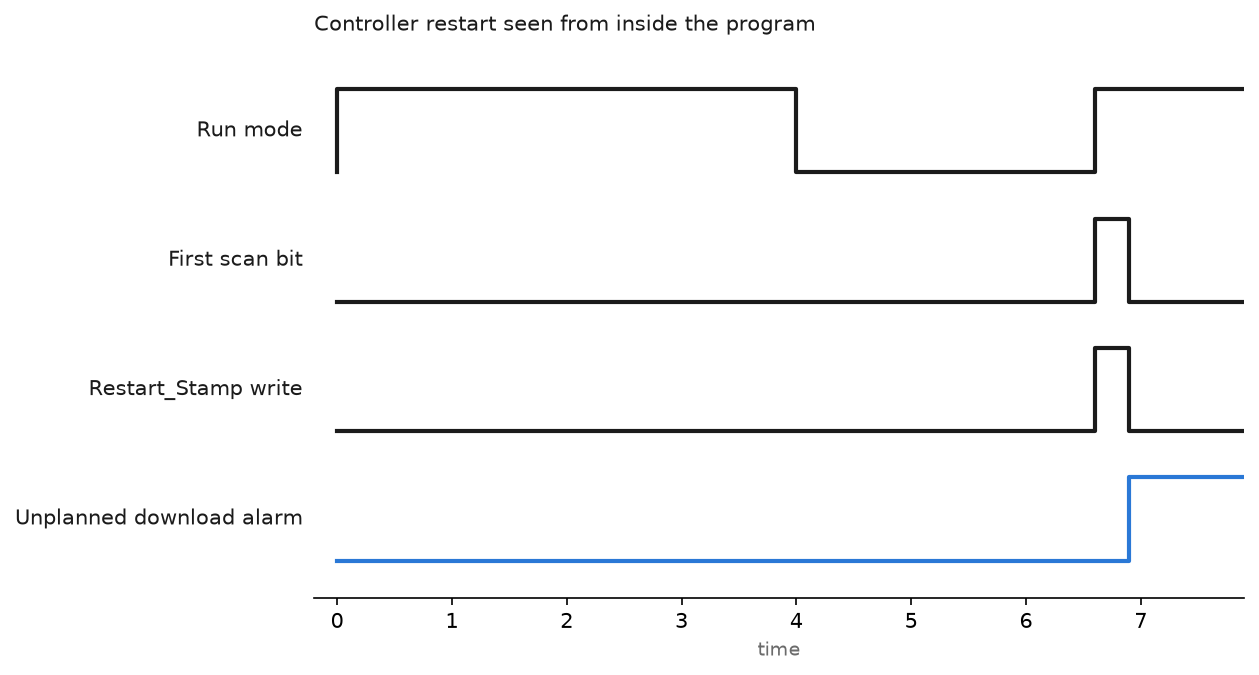
You cannot see a download from inside the running program, because logic stops while the download happens. What you can see is the first scan afterwards. Stamp it, and an out of hours download stops being invisible.
(* MainRoutine, first rung, Studio 5000 v33 *)
IF S:FS THEN
    GSV(WALLCLOCKTIME, , DateTime, Restart_Stamp[0]);
    Restart_Count := Restart_Count + 1;
END_IF;
Restart_Stamp is a DINT[7], year through microseconds. Push both tags to the SCADA and alarm on any change outside a planned window. A download reloads the counter from the saved project value instead of incrementing it, so a count that jumped backwards means a full download rather than a mode change.
On 5580 and 5380 controllers the controller log holds the same events in more detail, and it survives a power cycle.
Step 6: Backups you have actually restored
A backup you have never restored is a guess.
- Keep the ACD file, the HMI runtime, every drive parameter file and the switch configuration together, named for the machine and dated.
- FactoryTalk AssetCentre can poll controllers on a schedule and flag any difference against the archived copy. That report is the cheapest change detection there is.
- Without AssetCentre, run the Studio 5000 Compare Tool against last month’s copy once a month. Ten minutes per line.
- Once a year, restore onto a spare controller and download it. That is the only test that counts. Keeping the archive readable is half of good program documentation.
Field notes
The vendor laptop. A machine builder commissioning a new palletiser plugged straight into the cell switch. His laptop had been on four other sites that month and was carrying something that scanned for port 44818. Nothing was damaged, but the scan opened enough CIP connections on the 1756-EN2TR to starve the HMI, and the operators lost their screens for twenty minutes. Vendors now get a laptop from a locked drawer, and the visitor port sits on its own VLAN.
PUT/GET left on after a migration. An S7-300 to S7-1500 migration kept the old SCADA driver, which needed PUT/GET. Nobody switched it off after the driver was replaced. Two years later a test from a contractor’s tool wrote a data block on the running CPU. Nothing broke, by luck. The tick box is in the CPU properties and takes a download to change, which is why it never gets done during running production. Do it at the next stop.
The firmware upgrade that undid the hardening. Flashing a 1756-EN2TR back to factory defaults re-enabled the web server and reset the IP settings. The hardening checklist had been done once, at commissioning, and never re-applied. Add the security settings to the firmware procedure itself. The upgrade steps are in PLC controller firmware upgrade.
A cellular router nobody owned. A remote pump station had a 4G router fitted by a contractor, public IP, default password, five years in service. You find these by walking the site, not by reading the drawing. Open every remote panel and look at what is blinking.
Frequently asked questions
Does an air gap solve this?
Very few plants have one. A USB stick or a wireless bridge in an overhead panel is enough to break it, and believing in it gives you an excuse to skip the rest. Assume a route exists.
Do I need CIP Security?
Not to start with. Zones, the key switch, FactoryTalk Security and a working backup cover far more risk for far less effort. CIP Security is worth it when you have traffic crossing a boundary you cannot physically protect.
Is a managed switch enough of a firewall?
Layer 3 ACLs will do the port filtering in the table above, which beats nothing. They will not inspect CIP or Modbus content. Acceptable at a cell boundary, not on an internet-facing conduit.
Should I scatter the controller IP addresses to make them harder to find?
No. Obscurity buys nothing and costs you a night of troubleshooting at the next fault. Keep addressing readable, as in RSLinx configuration and connect to PLC.
How do I show an auditor the cell is protected?
A one page zone drawing, the rule list with a named owner per rule, the key switch policy, and a dated restore test. Those four beat any product purchase.
Next step
Your rule list is only as good as your flow list. PLC communication protocols for SCADA systems covers what each protocol puts on the wire, and EtherNet/IP in PLC communication explains why implicit I/O traffic has to stay inside the cell.