FAL and FSC Over an Array: the Control Tag, the Position and the Scan It Takes
An FSC with a Length of 10 found its mismatch at element 3 on a 1756-L83E and then stopped looking. .FD was 1, .POS was 3, .IN was 1, and elements 4 through 9 were never compared — not on that scan, and not on any scan afterwards, because nothing in the project ever cleared .IN.
Both instructions work an array one element at a time and both keep their state in a CONTROL tag. The Position in that tag is where the instruction is, not where it is going next. Mode decides how many elements get done per scan. And on an FSC, .IN is a brake the instruction applies to itself and expects your logic to release.
What the control tag holds, and which bits belong to which
A CONTROL is a predefined structure, and the same one serves FAL, FSC, AVE, SRT, STD and the sequencer instructions SQO, SQI and SQL, which is why the members look over-specified for any one of them.
Six instructions share it. Only the search instruction uses all seven members.
FAL uses five. .EN says it is enabled, .DN sets when .POS reaches .LEN, .ER sets on an overflow in the expression and execution stops there, .LEN is how many elements to work on, and .POS starts at 0 and increments each time round the loop. FSC uses those same five and adds two of its own, and the two extra ones are the whole character of the instruction: .FD is the found bit, set when the expression evaluates true, and .IN is the inhibit bit, set at the same moment to stop the instruction iterating any further. One member behaves differently between the two and it is worth a note in your head — the reference manual says of FSC that the error bit is not modified. An FSC has no way of telling you through .ER that anything went wrong.
That single difference decides which of the two you can diagnose from a watch window.
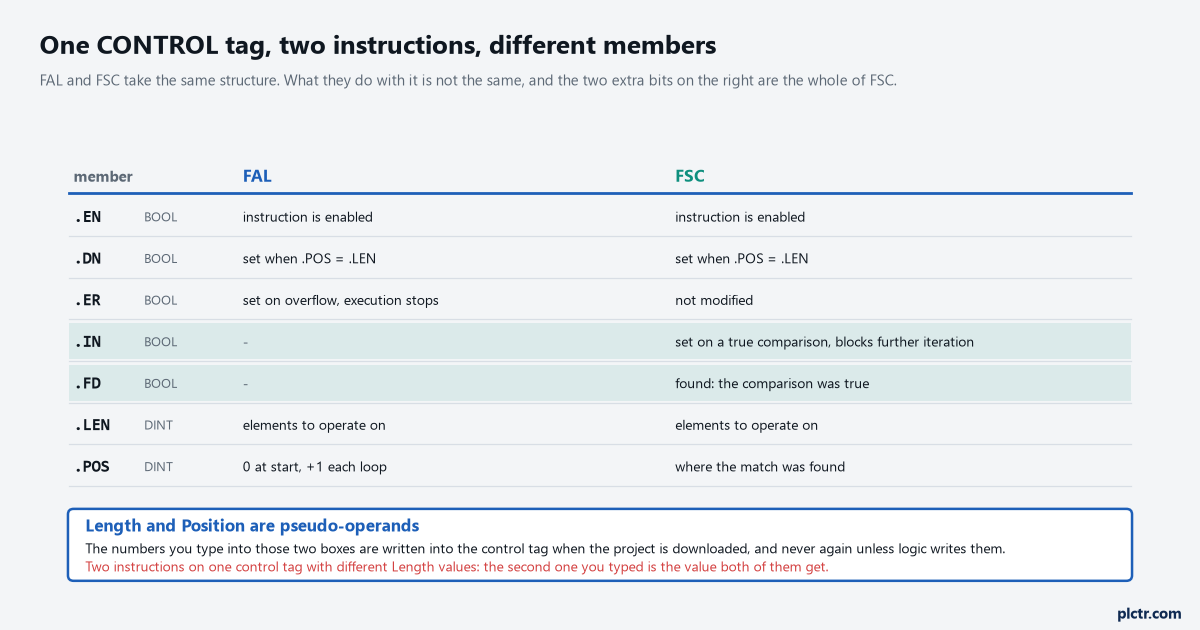
Two highlighted rows and one contradiction. FAL stops on overflow and tells you; FSC does not touch the bit at all.
The overflow behaviour carries a controller-family note of its own. The reference manual lists the CompactLogix 5370 and ControlLogix 5570 as the families that generate the overflow which sets .ER, so the same FAL expression moved onto a 5380 or a 5580 is not guaranteed to flag the same arithmetic.
Check the controller family before you trust an error bit to tell you anything.
The second thing in that figure catches people out later rather than sooner.
Length and Position are pseudo-operands. They are not separate storage, they are the .LEN and .POS members of the control tag wearing a box on the instruction face, and the manual is precise about when they get written: pseudo-operands are initialised when the application is downloaded and never again, unless the application modifies them. So the number in the Length box is a download-time default, not a setting. Change it online without downloading and nothing happens to the running control tag. Give two instructions the same control tag with different Length values and the manual says plainly that the previous value is overwritten by the new one, so both instructions end up with whichever number the compiler wrote last, and neither instruction face shows you that.
This is the same mechanism that makes a shared MESSAGE control tag such a bad idea. It bites here in a quieter way.
Three modes, and what each costs in scan time
Mode is the operand that decides whether this instruction is cheap or expensive, and it is the one most often left on whatever it was.
All operates on every specified element before the controller moves to the next instruction. A DINT array of 5000 elements in All mode is 5000 iterations inside one scan, and the scan is as long as that takes, which is the kind of thing that turns a 12 ms scan into a 40 ms scan overnight. Numerical spreads the work: you enter a count from 1 to 2147483647 and the instruction does that many elements each time it is scanned, for as many scans as it needs. Incremental does exactly one element, and only on a scan where the rung goes false to true. The distinction the manual draws between Incremental and Numerical set to one element per scan is the one to understand, because they look identical on the instruction face — Numerical needs a single false-to-true transition and then runs to completion regardless of what the rung does afterwards, while Incremental needs a fresh transition for every single element.
All is the mode you get if you never think about it, and it is the expensive one.
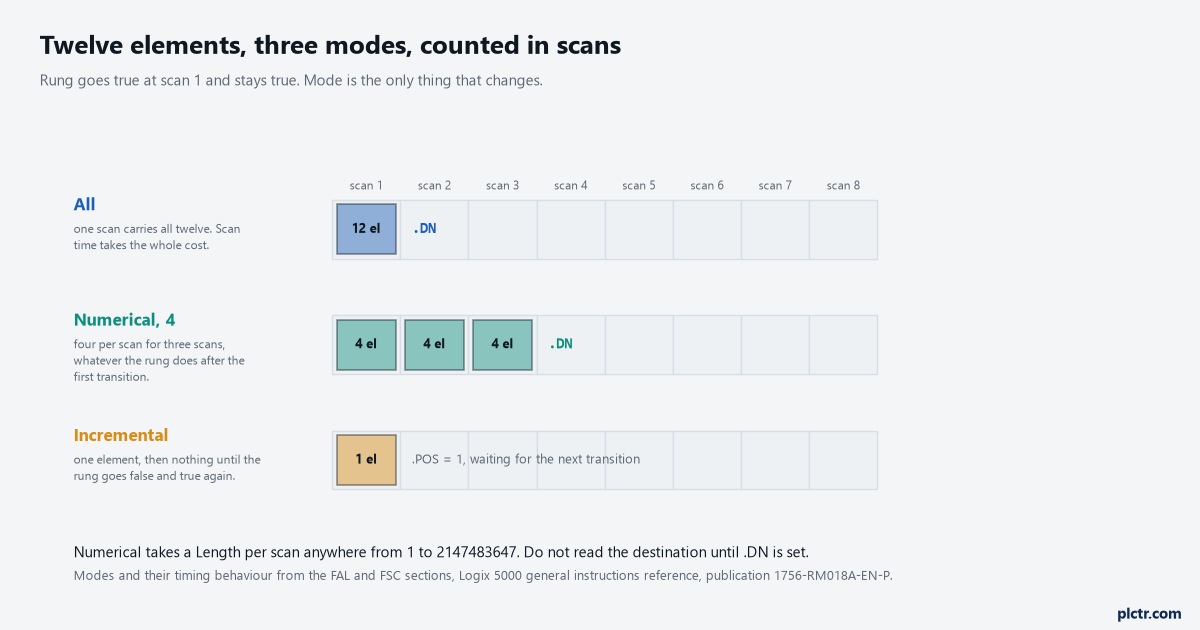
Twelve elements, one rung that goes true and stays true. All finishes inside scan 1, Numerical at 4 takes three scans, and Incremental has done one element and is waiting.
One rule attached to Numerical mode is easy to read past and expensive to ignore: avoid using the results of a file instruction in Numerical mode until .DN is set. Halfway through, the destination array is half this pass and half the last one, which is the same failure shape as an interrupted COP and just as arithmetically plausible.
Test .DN, not the rung. The rung tells you the instruction started, not that it finished.
The All-mode behaviour on a false rung also matters if you are re-triggering. The done bit, the enable bit and the position are all cleared when rung-condition-in goes false, and only then can another execution be triggered by a false-to-true transition. Hold the rung true and the instruction runs once and sits there done, which on a 5069-L330ER looks exactly like an instruction that has stopped working.
The bit nobody clears
Back to the FSC at the top, because this is the single most common way an FSC is wrong.
When the expression evaluates true, the instruction sets .FD, leaves .POS pointing at the element where it was true, and sets .IN to prevent further iteration. That is designed behaviour and it is the right behaviour: a search is supposed to stop when it finds something, and .POS is the answer. What the manual then says, and what an awful lot of code never does, is that you must clear .IN to continue the search operation. Until something clears it, that FSC is inert. The rung can go false and true a hundred times and it will not look at element 4.
Inert is the right word for it. The instruction is not faulted and not errored.
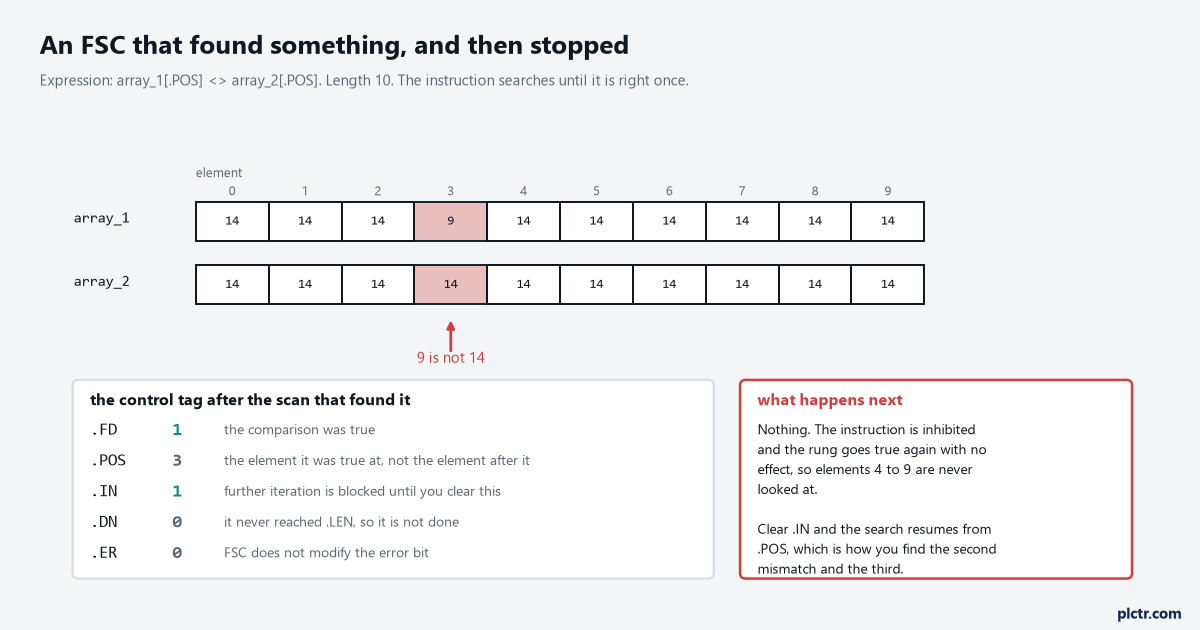
.POS is 3, which is the element that matched, not the element after it. Getting that wrong by one is how a search routine skips every second hit.
So an FSC meant to find the first fault in a 200-element alarm array is a two-rung job rather than a one-rung job: the FSC, and then an OTU that clears .IN once your logic has finished with .POS. Where you put that OTU decides the behaviour. Clear it on the same scan and the instruction runs straight through to the end of the array, so .FD only ever shows you the last match; clear it after you have consumed .POS and you walk the array hit by hit.
One OTU instruction, and where you put it on the rung is the whole design decision.
The string case is worth knowing too, because it is the one use of FSC that has no COP-shaped alternative.
An FSC expression can compare two STRING tags with equal, less than, less than or equal, greater than, greater than or equal and not equal. The comparison is by the hexadecimal value of the characters and it is case sensitive — uppercase A is $41 and lowercase a is $61 — so a barcode lookup table that works on the bench and fails on the line is often a case problem and nothing more. The FSC expression also gets four precedence levels that a FAL expression does not have, for the comparison operators and then the three logical ones, which is what lets you write a search condition rather than an arithmetic one.
A barcode arrives in whatever case the label printer happened to be set to.
When FAL is the wrong instruction
Honestly: most of the time, if all you are doing is moving data.
A FAL with the expression set to array_2[] and the destination array_1[] copies one array into another, which is exactly what a COP does in one instruction with no control tag, no mode and no done bit to wait for. The reason FAL exists is the expression. Write array_1[] = array_2[] / array_3[] and it divides two arrays element by element in one instruction; write array_3[] = array_1[] + value_1 and it adds a scalar to every element of a 10-element array in one go. That is work COP cannot do at all. The other reason is Numerical mode, which is the tidiest way to spread a large operation across scans without writing an index and a loop yourself.
Expression, or mode. If neither of those is why you are here, reach for COP instead.
The manual’s own worked example of FAL earning its keep is a data conversion. A MSG instruction reading integers from a PLC-5 lands them in a buffer of INTs, and a FAL conditioned on that message’s done bit converts the buffer into a DINT array for the rest of the project to use, with the same pattern reversed on the way out. Logix runs on 32-bit integers, the older processor does not, and FAL is what sits between them.
Thirty years old, that pattern, and still the tidiest answer to the problem.
One more limit, from the pseudo-operand table: FAL and FSC are both allowed in safety routines. SQO, SQI and SQL are not.
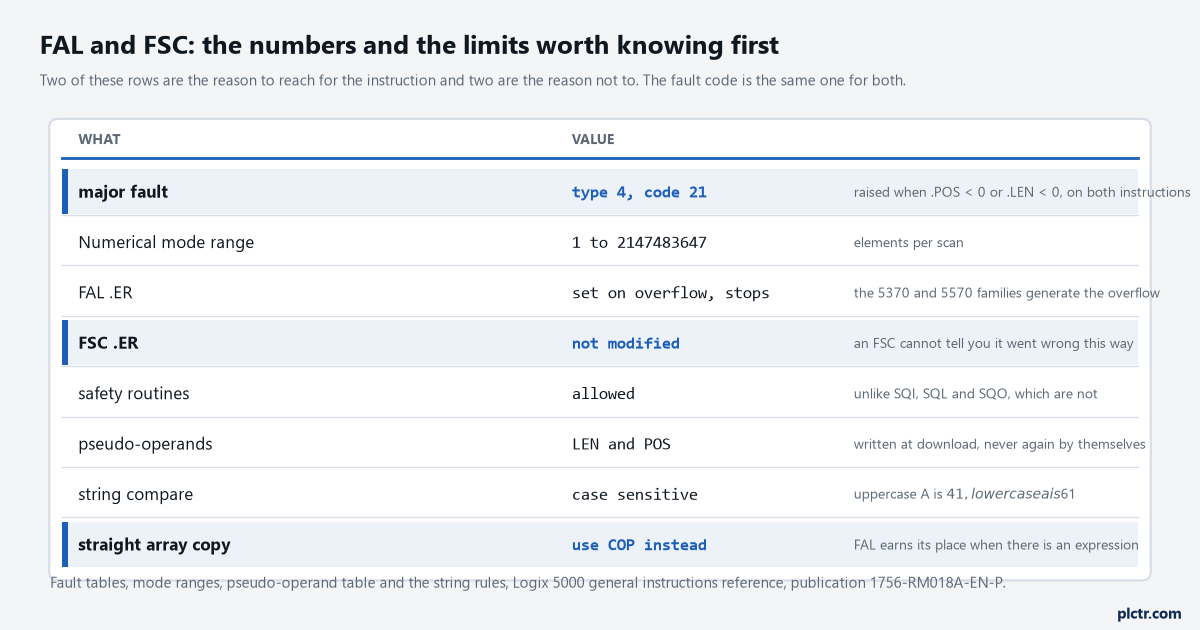
The three highlighted rows change a decision rather than just informing it.
What to check on the one in front of you
Put the control tag in a Studio 5000 watch window and run the machine. Look at .POS first: if it is sitting at a number that is neither 0 nor .LEN, the instruction is partway through, and something is either inhibiting it or never transitioning the rung. Then look at .IN if it is an FSC, and at .ER if it is a FAL. Then look at .LEN against the actual dimension of the array, because a negative .LEN or .POS raises a type 4 code 21 major fault on either instruction and nothing else in the project will warn you first.
Three members, half a minute of looking, and most of these end right there.
If every number looks right and the instruction still does nothing, check that the Length you are reading on the instruction face has actually been downloaded since you typed it. That box is a pseudo-operand, and until a download happens it is a number on a screen and nothing else. The AVE instruction and the sequencers share the same CONTROL structure and the same trap, so it is worth fixing the habit once rather than three times.