A rung comment on a shrink wrapper read: preset raised from 1.5 s to 2.4 s, slow air valve, with a date and two initials after it. That one sentence told us the valve had been marginal for two years, so we changed the valve instead of chasing the logic. Good PLC program documentation is the set of names and comments that does that job: it lets a technician who has never seen your code find the stuck valve in four minutes at three in the morning. Everything below is done inside Studio 5000 v33 or TIA Portal V18, in the project itself, because documentation that lives somewhere else is documentation that goes stale.
I write these before the logic, not after. Twenty minutes at the start saves a night later.
What you need
| Item | Notes |
|---|---|
| Studio 5000 Logix Designer v21 or newer | Tag names up to 40 characters, descriptions up to 512 |
| TIA Portal V18 | Block titles, network comments, PLC tag table comments |
| A one-page naming standard | Written down before the first tag. One page, not a manual |
| An export target | L5X or L5K for Logix, SCL or an Openness export for Siemens |
| Somewhere to keep versions | FactoryTalk AssetCentre, versiondog, or a dated folder on a server that gets backed up |
Name the tags before you write a rung
A tag name is the documentation that gets read the most. Pick a pattern with fixed fields and never break it.
AREA _ EQUIPMENT _ DEVICE _ FUNCTION

L3_FIL_Start_PB      Line 3, filler, start pushbutton
L3_FIL_Mtr_Run       Line 3, filler, motor run output
L3_FIL_Mtr_OL        Line 3, filler, motor overload contact
L3_CAP_Tq_PV         Line 3, capper, torque process value
L3_CAP_Tq_SP         Line 3, capper, torque setpoint
Four rules that matter more than the pattern you pick:
- Same abbreviation everywhere.
MtrorMotor, choose one and hold the line. - Suffix carries the type of signal, not the data type.
_PV,_SP,_PB,_LS,_Cmd,_Sts. - No equipment numbers that will change.
L3_FILsurvives a rebuild,Motor17does not. - Alias every I/O point.
L3_FIL_Start_PBaliased toLocal:2:I.Data.0keeps the rung readable when the wiring moves.
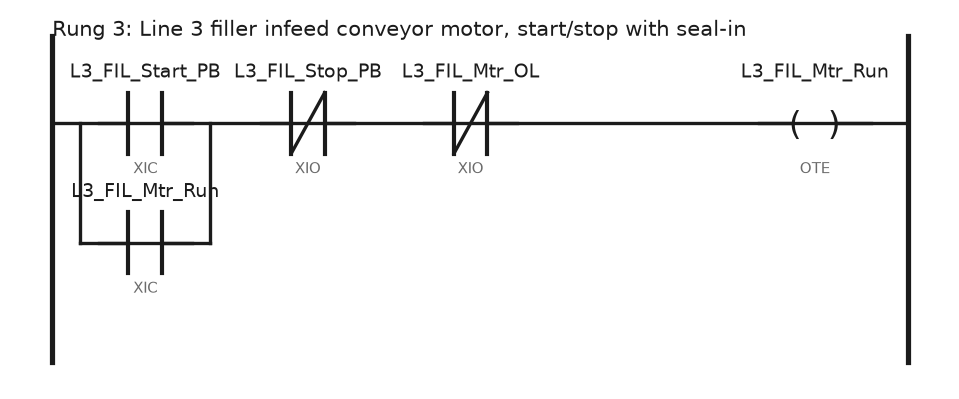
Read that rung out loud. Line 3 filler start button, not stop button, not overload, runs the filler motor, sealed in by its own output. Nobody needs a comment to follow it, which is the entire point.
Comment at three levels, not one
Routine description. Right-click the routine, Properties, and write three lines: what the routine controls, what calls it, what it assumes. This is the first thing anyone reads.
Rung comment. One per logical block, not one per rung. Say why, not what. Conveyor holds for 2 s after the photoeye clears so the case clears the transfer is useful. Turn on motor is noise.
Tag description. Fill the description column in the tag editor while you create tags, not in a cleanup pass that never happens. Opening the editor is covered in how do I open the tag editor in Studio 5000.
Then turn on pass-through. Controller Properties → Project has the pass-through description setting. With it on, an alias tag inherits the description of its base tag and a UDT member inherits the description written in the data type. Write the description once, see it in every rung that touches the tag.
Document data types and instructions once
A UDT is where documentation pays compound interest. Describe each member inside the data type and every instance of that UDT carries the text.
UDT: Valve_Std
  Cmd_Open     BOOL   "Open command from sequence"
  Sts_Open     BOOL   "Open limit switch proven, wired to the panel"
  Sts_Closed   BOOL   "Closed limit switch proven"
  Flt_Travel   BOOL   "Did not reach commanded position inside Travel_PRE"
  Travel_PRE   DINT   "Allowed travel time, ms, default 3000"
Sixty valves, one place to fix a wrong description. The mechanics of building these are in user defined data type UDT usage examples.
Add-On Instructions get the same treatment plus two fields people skip: the Revision Note and the Description on every parameter. Those parameter descriptions show up as tooltips when somebody drops the AOI on a rung. Fill in the revision note every time you change the AOI, with a date and what changed. Creating and versioning them is covered in Studio 5000 Add-On Instructions, and moving a documented AOI between projects is in importing an Add-On Instruction definition.
Keep the revision inside the controller
Put a small block of controller-scoped tags in every project and show them on the HMI:
| Tag | Type | Example |
|---|---|---|
Prog_Rev | STRING | L3_Filler_v14 |
Prog_RevDate | STRING | 2026-08-19 |
Prog_Author | STRING | Initials of whoever downloaded it |
Prog_ChangeNote | STRING | Added torque retry on capper |
Two minutes per download, and the question “which version is actually in the PLC” stops being a question. Write the same string into rung 0 of the main routine as a comment block listing the last five changes with dates.
Export, diff and back up
The ACD file is binary. You cannot see what changed between two versions, which means you cannot review anything.
- File → Save As, type L5K or L5X. Both are text. L5X is XML, L5K is closer to plain text and diffs more cleanly.
- Keep the export next to the ACD with the same name and date.
- Diff two exports in any text compare tool. A three-line change shows as three lines instead of “the file is different”.
- On the Siemens side, export blocks as SCL or use an Openness export, and use Project → Compare for online against offline.
- Archive with a real tool if the plant has one. FactoryTalk AssetCentre and versiondog both pull scheduled uploads and flag any controller whose content stopped matching the archive.
Tick Download Project Documentation and Extended Properties in Controller Properties before you download. If it is off, the controller stores logic without comments, and an upload gives you a program full of Local:2:I.Data.0 and nothing else.
Field notes: what actually goes wrong
The upload with no comments. A coating line went down on a Sunday. The only copy of the program was in the controller because the integrator had never handed over the ACD. We uploaded and got bare logic: no tag descriptions, no rung comments, aliases showing as raw addresses. Project documentation had never been downloaded. Six hours to trace a permissive that a comment would have explained in one line. Since then I check that box on every project on day one, and I verify by uploading to a scratch file.
Comments that described the old machine. A palletiser was rebuilt and the program copied from the previous cell. Comments still described the original pusher, which no longer existed. A technician followed the comment, forced the wrong output and crashed the arm into the frame. Wrong documentation is worse than none. When you copy a program, the first job is deleting every comment you have not verified.
Line3_final_final2.ACD. Three engineers, three laptops, four files with similar names and no way to tell which one matched the controller. We downloaded one, the machine ran a different recipe scaling, and it took a shift to work out why. The revision string tags above came out of that week, along with a rule that the ACD file name carries the date.
A rung comment that saved a night. Worth balancing the list. An intermittent fault on a shrink wrapper traced back to a rung whose comment said the timer preset had been raised from 1.5 s to 2.4 s because of a slow air valve, with the date and initials. That single sentence told us the valve had been marginal for two years. We replaced it instead of chasing the logic.
Frequently asked questions
Do comments use controller memory?
Yes, if you download project documentation. On a 5580 or a 5380 the space is not worth worrying about, and the trade is heavily in your favour.
Do comments slow down the scan?
No. They are stored, not executed. Scan time is unaffected.
How do I compare two Logix programs?
Export both to L5K and diff them in a text compare tool, or use the Logix Designer Compare Tool if your licence includes it. For Siemens, use Project Compare in TIA Portal.
Where do I start with a naming standard?
Borrow the area, unit and module layers from ISA-88 for the prefix and the instrument letters from ISA-5.1 for the suffix. Write it on one page and put it in the project folder.
Should I document in English or the local language?
One language per project, and it should be the one the maintenance team on nights actually speaks. Mixed-language comments are how a permissive gets misread.
Next step
Documentation pays off fastest when the logic it describes is already structured. Wrap repeated device control into reusable blocks with Add-On Instructions, and when a documented program still hides a fault, work through it with PLC troubleshooting. On a building job the naming scheme is most of the documentation, so start from HVAC point names, BACnet objects and overrides that expire.