You add one Static Bool to a working FB, compile clean, load in RUN, and every setpoint in the instance DB is zero. Batch sizes, mix times, an operator’s year of tuning, gone in one download, and the customer is certain you restored an old backup. The TIA Portal download without reinitialization setting is what prevents this, and it only helps if it was switched on before the change that needed it. What follows is the mechanism, the sizing question nobody answers, and what to do on a machine where it has already happened.
| Applies to | Detail |
|---|---|
| Controllers | S7-1200 firmware V4.x and the whole S7-1500 family |
| Block access | Optimized blocks only. A standard access block has no memory reserve |
| Blocks | Function blocks with their instance DBs, and optimized global data blocks |
| Tool | TIA Portal V14 and newer. The wording of the property has shifted between versions |
| Timing | The reserve must be enabled and downloaded before the interface changes |
Why the values disappear
An instance DB is generated from the interface of its FB. Add a variable and the interface is different, so the block that TIA compiles is a different block with a different layout. Loading it writes a fresh image into the CPU, and the values in that image come from the start values in the project. The actual values that lived in the CPU had nowhere to be carried to.
Retain does not save you. Retentive marking decides what survives a power failure and a warm restart, and it does exactly that job. A reinitialization is not a power failure. It replaces both the working copy and the retentive copy from the start values, which is why uploading the DB afterwards shows the same zeros.
If you have made interface changes in the past and kept your values, the likely reason is that the change was in the code and not in the interface. Adding a network, rewriting a condition and changing a timer preset in the code all leave the layout alone.
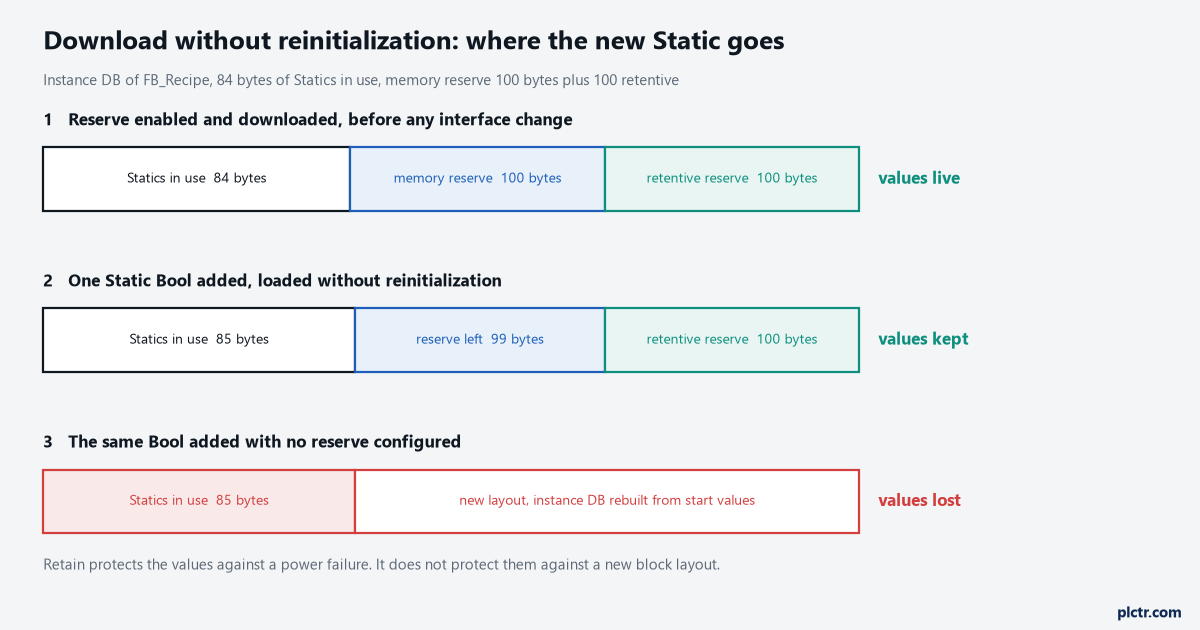
Switch the reserve on before you need it
- Select the FB in the project tree, open Properties, and find the group for downloading without reinitialization. It sits with the block attributes, and the exact wording of the group moved around between versions, look in the properties of the block itself rather than in the instance DB.
- Enable the memory reserve and give it a size in bytes. There is a second field for the retentive part of the reserve. If any of your Statics are retentive, and on a recipe block they will be, fill in both.
- Compile and download. This download is the one that reinitializes, so do it while you can restore the values, at commissioning or with the recipe sheet in your hand.
- From here on, new Statics are placed in the reserve and the download keeps the actual values in the CPU.
The default reserve for new blocks lives in the settings for PLC programming, not in the block, and 100 bytes is the value most installations start with. Setting it once at the start of a project is worth more than remembering it per block.
What the reserve absorbs and what it does not
| Change to the block | Reserve handles it |
|---|---|
| A new Static variable added | Yes, while there is room left |
| A new retentive Static added | Yes, from the retentive part of the reserve |
| Data type of an existing variable changed | No, the DB is reinitialized |
| A variable deleted, or an array resized | No, the DB is reinitialized |
| Retain setting of an existing variable changed | No, the DB is reinitialized |
| A member added to a UDT the block uses | Only for instances whose own block has reserve left |
| Reserve enlarged or enabled | No, the change of the reserve itself costs one reinitialization |
| Start values edited | Nothing to absorb, actual values in the CPU are untouched |
Treat that table as what to expect rather than as a contract. The load dialog is the authority: it states per block whether the download reinitializes, and it is the thing to read on every load that follows an interface change.
The UDT line is the one that bites on bigger machines. A type used by four function blocks pulls all four interfaces with it, and the two blocks somebody forgot to give a reserve are reinitialized while the other two are fine.
The download itself
Compile after the change, then load to the device. In the load dialog, the action shown against the block tells you what is about to happen. When the reserve can take the change, TIA performs the load without reinitialization on its own, with the CPU in RUN. When it cannot, the dialog says the block will be reinitialized, and that sentence is your last warning. Stop there and find out why rather than clicking through it.
The most common reason for that warning on a block that has a reserve is that the reserve is full. The second is a change of a type rather than an addition.
Getting the values back
There is a recovery path, and it has to be prepared before the damage, not after.
- Go online on the data block and switch on monitoring of all values.
- Take a snapshot of the monitored values. The button carries a camera symbol in the DB editor toolbar.
- Copy the snapshot column into the start values with the button beside it.
- Download the block. The reinitialization now writes your real numbers, because they have become the start values.
Once the DB has already been zeroed, the snapshot gives you a column of zeros and the only sources left are the operator, the recipe sheet and last night’s HMI screenshot. That is the argument for keeping setpoints where an instance DB cannot take them with it: a recipe store on the HMI, or a global DB that the HMI writes and the FB reads. Machines that make product to recipe deserve that separation on day one, and the structure of it is covered in PLC batch process control.
How big should the reserve be
Size it by counting what you are likely to add, in bytes, and then double it.
| Data type | Bytes it consumes |
|---|---|
| Bool | 1 |
| Int, Word | 2 |
| Dint, Real, Time | 4 |
| LReal, LTime | 8 |
| String with n characters | n plus 2 |
Ten more Reals and a handful of flags over the life of a machine is under 60 bytes, so the 100 byte default covers an ordinary FB. A recipe or reporting block that gains strings is a different animal, and 300 to 500 bytes is money well spent.
The reserve is not free. It occupies work memory in every instance of the block. A CPU 1214C has 100 KB of work memory, so ten instances carrying 200 bytes each cost 2 KB and nobody notices. Fifty instances carrying 500 bytes is 25 KB and the same CPU starts to argue. The retentive part comes out of a much smaller pot, 10 KB of retentive memory on the S7-1200, which is why a retentive reserve belongs on the blocks that hold setpoints and nowhere else. Both figures differ across the S7-1200 family and the S7-1500 ones are far larger again, so read them off the manual for the CPU in front of you rather than carrying one number around.
Field notes
One Bool, one hour of typing. A mixer shipped the year before got a small change, a single Static added to the recipe FB, and a clean download in RUN. Every setpoint the operator had entered over a year went to zero. The values came back off the customer’s paper recipe sheet, the reserve went on afterwards, and the second test change kept its values. The cost of finding out was an hour of an operator’s evening and a conversation about backups that should never have happened.
The reserve on the wrong block. A line had memory reserve enabled on the two FBs everybody edits, while the setpoints actually lived in a UDT shared with a third block that had none. Adding one member to the type reinitialized the instance nobody expected. Reserve belongs on every block that holds a value somebody typed in.
Enabled it after the change. Switching the reserve on is itself an interface change, so the engineer who reaches for it in response to the first loss pays for it twice. Enable it, download, restore the values, and only then make the change you came for.
Frequently asked questions
My setpoints are marked retentive, why did that not protect them?
Retain covers power failures and warm restarts. A new block layout is neither. The reinitialization rewrites the retentive copy from the start values along with everything else.
Can I do this on a global DB rather than an instance?
Yes, if the DB has optimized access. The same property sits in the block properties of the data block, with the same rule that it has to be downloaded before the change. Confirm the property is offered on the CPU and firmware you are using before you design a machine around it.
What happens when the reserve is used up?
The next addition reinitializes the DB. Enlarging the reserve costs one reinitialization too, so plan it into a shutdown, take a snapshot of the values first and copy them into the start values before you download.
Next step
Go through the blocks that hold numbers somebody typed on a panel, and give each one a memory reserve with its retentive part, then download once while the machine is down. Write the reserve sizes into the project notes so the next change does not become an investigation, in the spirit of PLC program documentation. If values do go missing on a machine you did not build, the process of narrowing it down is in advanced PLC troubleshooting.