Add an equipment phase called HEAT in Studio 5000 v33 and you get six state routines: Running, Holding, Restarting, Stopping, Aborting, Resetting. The software creates all six and writes none of them, and Holding is the one that costs you a batch. Leave it empty, let an operator hold the phase in the middle of the heat step, and the phase reaches Held in one scan with Steam_Enable still on and TIC101 still in auto, because a routine that has stopped scanning cannot clear its own outputs. This walkthrough cuts a jacketed mix tank on a 1756-L83E into ISA-88 phases, writes the Holding and Restarting routines that survive that hold, and keeps recipe numbers like the 450 kg water charge in a UDT instead of in the logic.
If your site has no batch engine, the hand-rolled SFC version further down gives you the same structure without buying anything.
What you need
| Item | Notes |
|---|---|
| Controller | 1756-L83E or a CompactLogix 5380. Any controller and Logix Designer version that supports PhaseManager works; check LOGIX-UM001 for the minimum revision on your firmware |
| Studio 5000 Logix Designer | PhaseManager has been in the software for many releases. Screens here are v33 |
| Recipe engine | FactoryTalk Batch for full S88 recipes, or your own HMI recipe screen for a single unit |
| Field devices | Two on/off valves, a steam control valve, an agitator VFD, an RTD, a load cell |
| Existing PID loop | The heat step uses one. Setup is in implementing PID control in PLC systems |
| UDT experience | Recipe parameters live in a UDT. Refresher: User Defined Datatype UDT usage examples |
Cut the process into the four ISA-88 layers
ISA-88 splits the procedural side of a batch into four levels. The point is not vocabulary. The point is that only the bottom level touches I/O, so the top three can be changed by a process engineer without a download.
| ISA-88 level | Example on this tank | Who owns it |
|---|---|---|
| Procedure | Make Syrup Batch | Recipe author |
| Unit procedure | Run Mix Tank 1 | Recipe author |
| Operation | Charge, Heat, Mix, Transfer | Recipe author |
| Phase | ADD_WATER, ADD_SUGAR, HEAT, AGITATE, XFER_OUT | Controls engineer |
A phase is the smallest piece of work that still means something to production. HEAT is a phase. Opening valve V-102 is not; that is a rung inside the phase.
Keep phases dumb and reusable. ADD_WATER should take a target quantity and a tolerance as parameters, not carry the number 450 in the logic. The moment a phase knows a recipe value, you have two recipes to maintain and only one of them is visible to the process engineer.
Add an equipment phase in Logix
- In the Controller Organizer, right-click Tasks and choose New Phase, or right-click an existing program folder if you are grouping by unit.
- Name it
HEAT. The name becomes the phase name the batch engine sees, so match the naming list the process group already uses. - Studio 5000 creates a tag of type PHASE with the same name and a set of state routines: Running, Holding, Restarting, Stopping, Aborting, Resetting, plus an optional Prestate routine.
- Open Phase Properties and add the input parameters on the Parameters tab. For
HEATthat isSP_Temp,Soak_Time,Temp_Band. - Write the Running routine. This is the only routine that does real work.
- End the Running routine with a PSC instruction when the step is finished. PSC signals that the state routine has done its job and lets the phase move on.
The PHASE tag carries the state in HEAT.State and a set of booleans you can read from any routine: HEAT.Running, HEAT.Holding, HEAT.Held, HEAT.Restarting, HEAT.Aborting, HEAT.Complete. Your interlocks read these. A valve rung that only checks HEAT.Running closes the valve by itself the instant the phase leaves Running, which is exactly the behaviour you want when someone hits hold.
Know what each state does to your outputs
The state model is the part that pays for itself at 3 a.m. Learn what leaves each state and what happens to the outputs on the way out.
| State | What runs | What your outputs should do |
|---|---|---|
| Idle | Nothing | All phase outputs off, phase owned but not started |
| Running | Running routine | Normal control |
| Holding | Holding routine | Move to a safe standstill, remember where you were |
| Held | Nothing | Stay at standstill, keep the step index |
| Restarting | Restarting routine | Bring the equipment back to the state the step expects |
| Stopping | Stopping routine | Controlled shutdown, batch will not resume |
| Aborting | Aborting routine | Fastest safe shutdown, no resume |
| Complete | Nothing | Outputs off, waiting for reset |
Holding and Restarting are where the money is. If you leave both routines empty, the phase jumps straight to Held with whatever the outputs were doing at that moment. That is how a steam valve stays open during a hold.
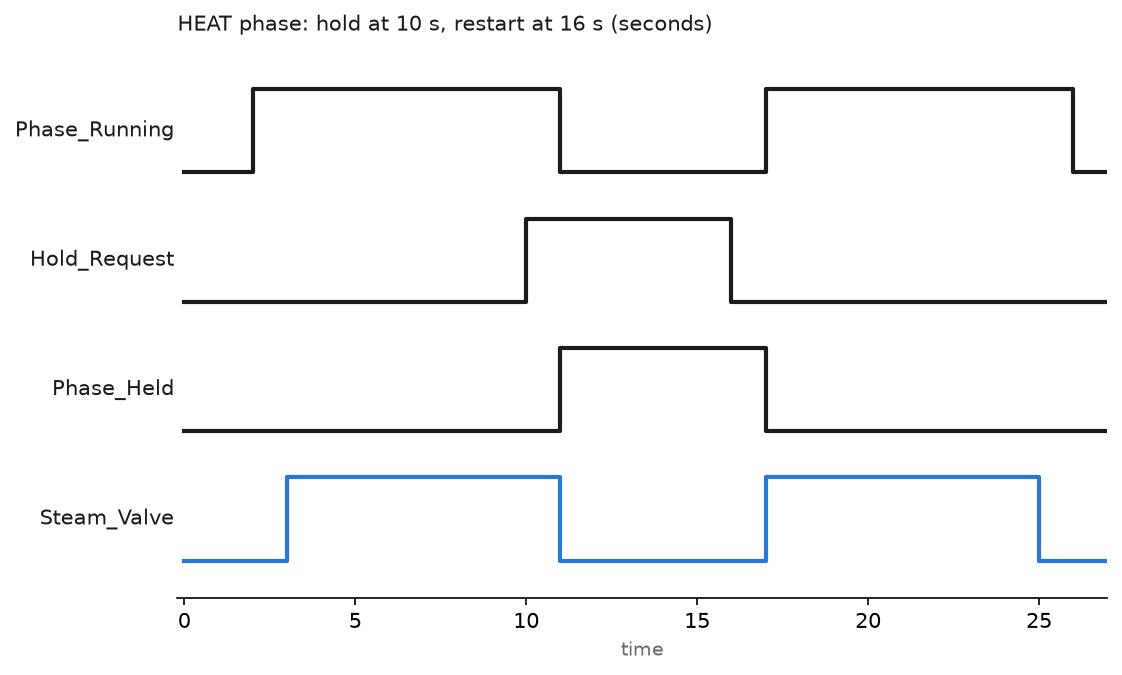
The chart shows one real hold. The operator presses hold at 10 seconds, the Holding routine closes the steam valve and the phase reaches Held one second later. Restart comes at 16 seconds, Restarting brings the PID back to the same setpoint, and Running resumes at 17 seconds. The soak timer must not have run while the phase sat in Held, which brings us to the code.
Write the Running routine so it survives a hold
Structured text is easier to read than ladder for a phase with several steps. This is the Running routine for HEAT, using a step index so Restarting knows where to come back to.
(* HEAT phase, Running routine. Studio 5000 v33, ST *)

CASE HEAT_Data.Step OF

  0:  (* ramp: hand the setpoint to the loop and wait for band *)
      TIC101.SP  := HEAT.SP_Temp;
      TIC101.Aut := 1;
      Steam_Enable := 1;
      IF ABS(TIC101.PV - HEAT.SP_Temp) <= HEAT.Temp_Band THEN
          HEAT_Data.Step := 10;
          Soak_TMR.PRE   := HEAT.Soak_Time * 1000;
          Soak_TMR.ACC   := 0;
      END_IF;

  10: (* soak: timer runs only while the phase is in Running *)
      Soak_TMR.TimerEnable := 1;
      TONR(Soak_TMR);
      IF Soak_TMR.DN THEN
          HEAT_Data.Step := 20;
      END_IF;

  20: (* done *)
      Steam_Enable := 0;
      TIC101.Aut   := 0;
      PSC();

END_CASE;
The Holding routine is four lines and does the work nobody remembers to write:
(* HEAT phase, Holding routine *)
Steam_Enable         := 0;
TIC101.Aut           := 0;
Soak_TMR.TimerEnable := 0;   (* freeze the soak, do not reset it *)
PSC();                       (* Holding is finished, go to Held *)
HEAT_Data.Step is deliberately not cleared. Restarting reads it, puts the loop back in auto if the step index is 0 or 10, and calls PSC. The soak picks up where it stopped because Soak_TMR.ACC was never zeroed.
For a site without PhaseManager, build the same thing as an SFC with one step per phase step and a transition driven by an external hold bit. The mechanics of steps, transitions and stored actions are covered in implementing Sequential Function Charts in PLC programming. The rule stays the same: the hold branch has to actively drive outputs off, not just stop scanning.
Put recipe parameters in a UDT, not in the logic
One UDT per phase, one array of those UDTs per recipe. That is the whole design.
UDT: Recipe_Heat
    SP_Temp     REAL     (* deg C *)
    Soak_Time   DINT     (* seconds *)
    Temp_Band   REAL     (* deg C, plus or minus around SP *)

UDT: Recipe_Charge
    Target_Qty  REAL     (* kg *)
    Tolerance   REAL     (* kg *)
    Dribble_Qty REAL     (* kg, slow-fill changeover point *)

UDT: Batch_Recipe
    Recipe_ID   DINT
    Recipe_Name STRING
    Water       Recipe_Charge
    Sugar       Recipe_Charge
    Heat        Recipe_Heat
Batch_Recipe sized as an array of 20 gives the operator twenty stored recipes. FactoryTalk Batch does the same job from its own recipe database and downloads the values into the phase input parameters at the start of each phase, which is why the phase has parameters at all. On a standalone tank, copy the selected Recipe[n] into an Active_Recipe tag at batch start and let the phases read only from Active_Recipe. Editing a stored recipe mid-batch then changes nothing on the running batch.
Lot tracking rides along with the same structure. Write the lot number, recipe ID, start timestamp and operator ID into a controller-scoped tag at batch start, not at batch end. Anything written only at the end disappears when the power drops.
Field notes: what actually goes wrong
The steam valve that held open. A pilot plant reactor, PhaseManager, all state routines created and left empty except Running. Hold from the HMI, phase went to Held in one scan, jacket kept heating because the OTE for Steam_Enable was in the Running routine and a routine that does not scan does not clear its outputs. The batch cooked. Fix was three lines in Holding and an unconditional Steam_Enable := 0 in Aborting. Since then I write Holding and Aborting before Running.
Restart from step zero. A charge phase kept its step counter in a tag that the Resetting routine cleared, and Restarting ran through Resetting on the way back. An operator held the phase at 380 kg of a 450 kg charge, restarted, and the phase started charging from zero again. Seventy kilos over. The step index and the accumulated quantity have to survive everything except a deliberate reset.
Load cell dribble never tuned. ADD_SUGAR ran full open until target, then closed. In-flight material overshot by 8 to 12 kg every batch. Adding Dribble_Qty
Two batch engines fighting over one unit. A second FactoryTalk Batch server was stood up for testing and pointed at the live controller. Both tried to take ownership of the same equipment phase. The phase reported an ownership conflict and refused commands from either side. Phases are owned by one entity at a time, and the PATT and PDET instructions are how program-driven code takes and gives up that ownership.
Frequently asked questions
Do I need FactoryTalk Batch to do ISA-88 batch control?
No. You need it when recipes are authored by process people, when batches run across several units, or when you need an electronic batch record. One tank with five stored recipes is fine with equipment phases driven from your own sequencer or an SFC.
What is the difference between a phase and an SFC step?
A phase is an equipment capability with a defined state model and an owner. An SFC step is one node in a sequence. You can implement a phase using SFC inside it. You cannot get hold, restart and abort behaviour out of a bare SFC step without writing that behaviour yourself.
Where should recipe values live, in the HMI or the controller?
In the controller, in a UDT array, with the HMI editing them. Values living only in the HMI vanish when the panel is reimaged, and the controller cannot run a batch without the panel.
Can equipment phases run on a CompactLogix?
Yes on the 5370 and 5380 families with a recent firmware revision. Check the user manual for your exact catalog number before you promise it, because the feature list differs across the smaller L1 and L2 models.
How do I handle a power failure in the middle of a batch?
Store the batch context in a tag that survives a power cycle, then decide on the process side whether a partially heated batch can resume. Most sites resume charge phases and scrap heat phases. The controller can only tell you where it stopped. The decision to restart belongs to the process engineer.
Next step
Get the interlocks and the alarms around the phase right before you add the second unit. Start with PLC alarm instructions for the deviation alarms on the heat step, then wire the batch record out to a report using how to get data from PLC to Excel.