Soft Travel Limits, Hard Limits and the Overtravel That Faults a Kinetix Axis
A registration input on a Kinetix 5700 inverter gets a 12.0 µs pulse reject filter. The overtravel input, on the same IOD connector and the same silicon, gets the 20 ms nominal debounce that every other input function gets. At 500 mm/s that is 10 mm of travel past the limit switch before the drive has even acknowledged it, and deceleration has not started yet.
There are three layers of limit on a motion axis and they belong to three different pieces of equipment. Soft travel limits are numbers in the controller, checked by the motion planner, in your Position Units. Hardware overtravel is a pair of normally closed switches wired to the drive’s own digital inputs, checked by the drive. The third layer is a casting, and it is the only one that has never had a configuration mistake made in it.
Each layer catches what the one before it missed. None of them is a safety function.
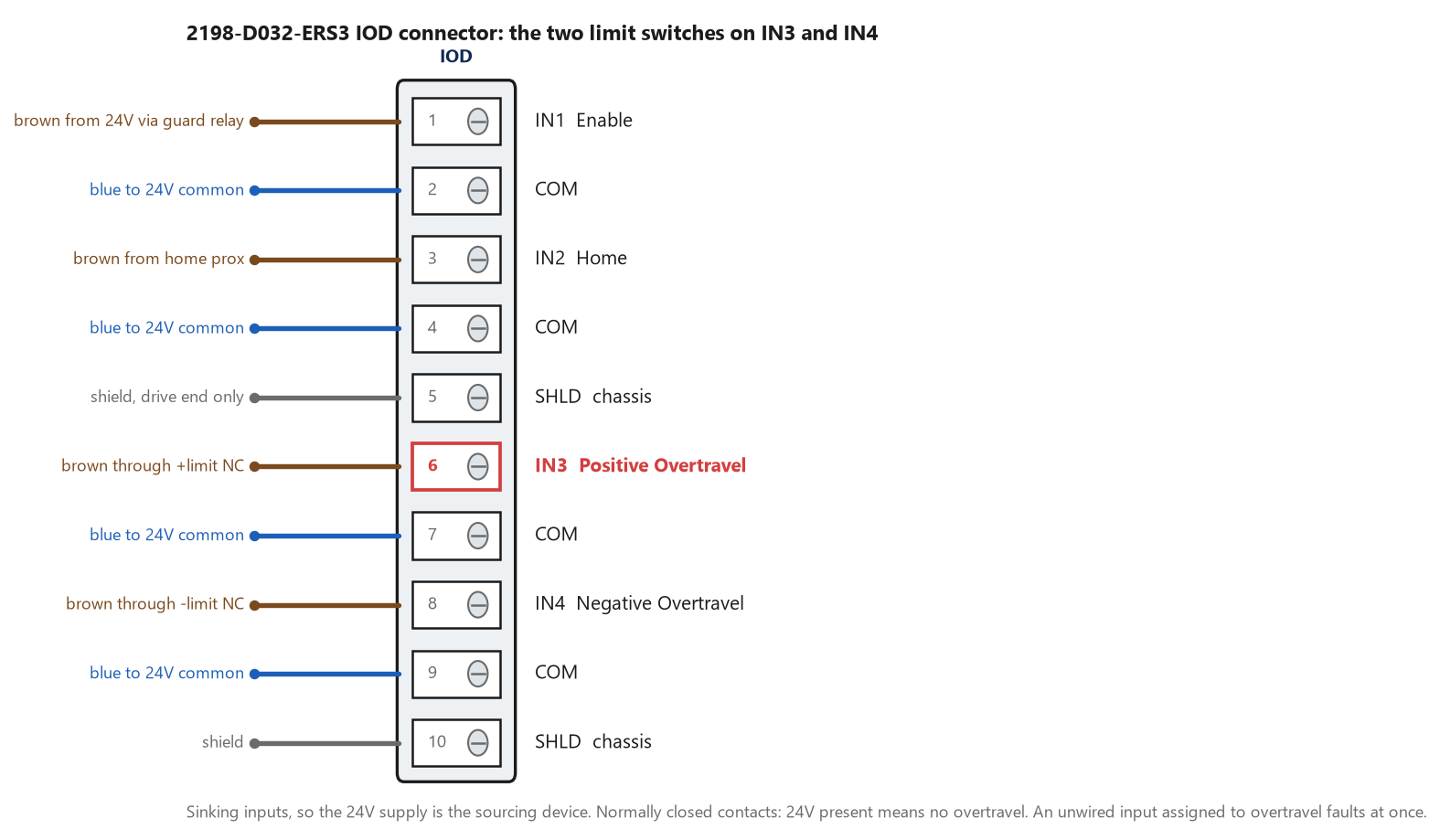
Sinking inputs, so the 24 V supply is the sourcing device. Normally closed contacts mean 24 V present is the healthy state, which is the sense people get backwards on the first panel.
Soft travel limits: two numbers and a condition you will forget
Soft Travel Limit Checking defaults to 0, No, and the two limits themselves default to 0.0, so a fresh axis has no software limits at all and will happily drive into the end of the machine. Turn the check on and the planner compares Actual Position against Soft Travel Limit Positive and Soft Travel Limit Negative whenever motion is being commanded in that direction, and raises an exception if the limit is exceeded. Both values are in the axis’s configured Position Units, which is one more reason the scaling page has to be right before any of this is worth setting, and the positive value has to be greater than the negative one. Then the condition that catches everybody: Soft Travel Limit Checking has no impact until the Axis Homed status bit is set. The reference manual is explicit about why — there is no point checking absolute position when no absolute position reference has been established for the machine — and the HomedStatus bit is described as directly qualifying the software overtravel function. So an axis that lost its home on a download, or whose homing routine errored and nobody noticed, has soft limits configured, displayed, and completely inactive. Cyclic travel mode switches them off as well, for the same reason: a rotary axis with an unwind has no absolute end to run into.
Configured is not the same as active. The homed bit decides.
Hardware overtravel: normally closed, sinking, and 20 ms late
The inverter has four configurable digital inputs on the IOD connector, and the factory assignment is input 1 to Enable, input 2 to Home, input 3 to Registration 1 and input 4 to Registration 2. Overtravel is not in that list, so on an out-of-the-box drive both overtravel functions are inactive — the Kinetix 5700 manual puts it as a footnote that is worth reading twice, that a function is always inactive unless it has been assigned to a digital input in Logix Designer. Assign Positive Overtravel to IN3 and the picture reverses: Hardware Overtravel Input Checking defaults to Enabled, so from that moment an inactive input produces a Hardware Overtravel Positive exception, and an assigned-but-unwired input is inactive. The wiring is 24 V DC at 15 mA nominal, optically isolated, active high, current sinking to EN 61131-2 Type 1, with an on-state of 15 to 30 V and about 12 mA of input current, which means a sourcing 24 V supply and a normally closed limit switch in the line. The status bits invert the way people do not expect: bits 4 and 5 of the axis I/O status are named Positive and Negative Overtravel OK Input, and Off means an overtravel fault while On means no fault. Reading that tag as if 1 meant “limit hit” gets the whole HMI page backwards.
Assign it, then wire it, in that order. Doing it the other way round faults the axis in between.
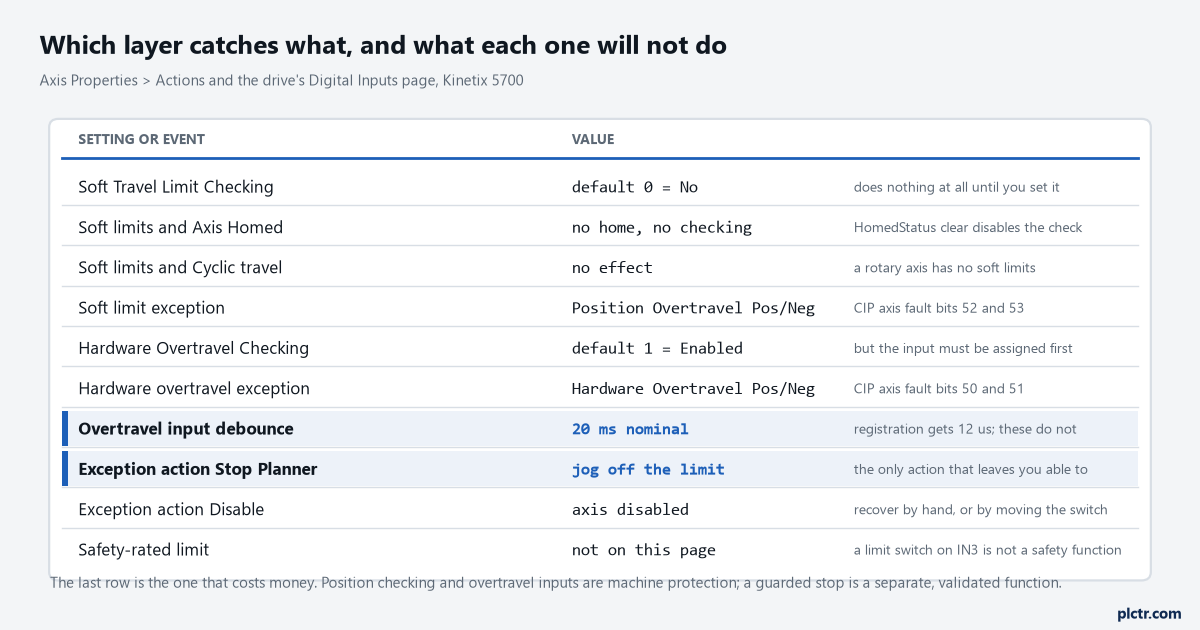
Two defaults face opposite ways. Software checking is off until you turn it on; hardware checking is on and waiting for an input assignment.
The dead end: moving the switch back
An axis overruns its positive limit and slams the casting. The obvious response is to move the limit switch further from the end, and it works, until the next product runs at 900 mm/s instead of 500 and the same thing happens again. The number that decided the overrun was never the switch position on its own. It was the debounce, plus the drive’s reaction, plus the distance covered decelerating at Max Decel from whatever the axis was doing — and only the last of those three is in your ladder. Work it the other way: take the fastest move the machine will ever make, compute the stopping distance at Max Decel, add the 20 ms of debounce travel at that speed, add a margin, and that is where the switch goes. On the 1200 mm axis in the figure below, 500 mm/s and a 60 mm gap between the soft limit and the switch leaves 10 mm of that gap spent before deceleration even begins. There are Positive and Negative Overtravel OK Input Pulse Reject Filter attributes as well, expressed in seconds, for the case where a particular switch chatters. Lengthening one of those buys noise immunity with stopping distance, which is a trade worth making on purpose rather than by accident.
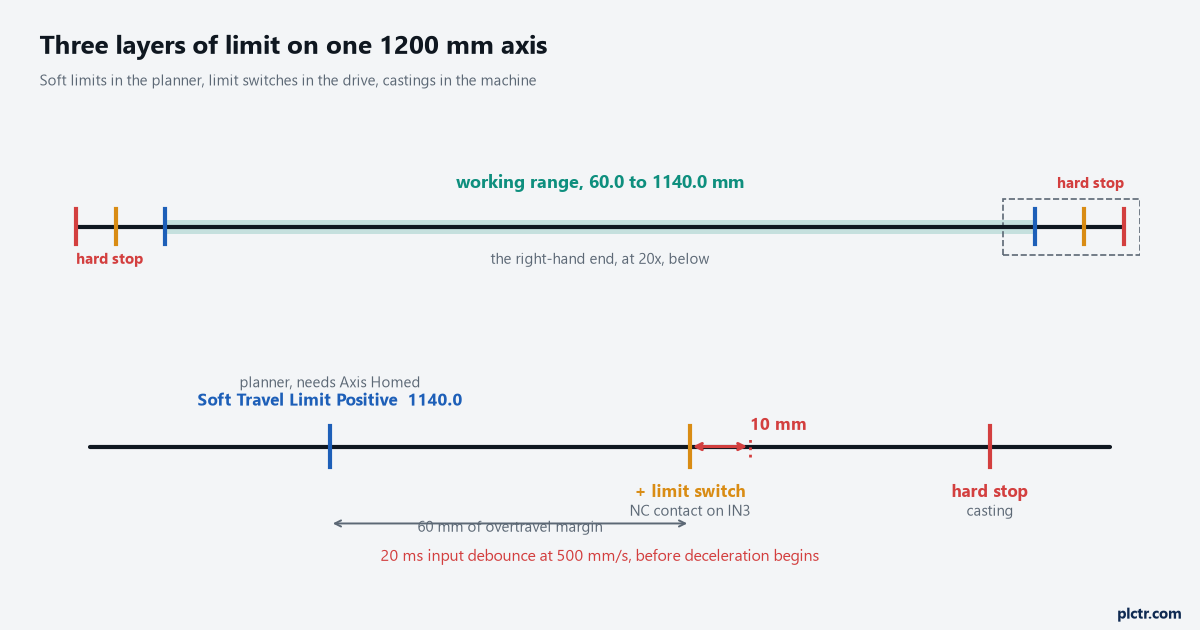
Sixty millimetres of margin between the soft limit and the switch, and a sixth of it is gone before the drive reacts. The magnified band is the part nobody draws.
The one fault action that lets you drive off the limit
Every exception on a Logix motion axis has a configurable action, and for overtravel the choice decides whether recovery takes thirty seconds or a fitter with a spanner. The actions available run from Ignore and Alarm, through Fault Status Only, to Stop Planner, Disable and Shutdown. Stop Planner leaves the servo loop and the drive enable alone and brings the axis to a stop at its Maximum Deceleration rate, and the configuration and startup manual notes the specific exemption that matters here: once an axis has stopped on a fault you normally have to clear the fault before it will move, and hardware and software overtravel faults are the exception where you can jog or move the axis off the limit. Disable zeroes the amplifier output and drops the drive enable, so the axis coasts or stops on its own stopping torque, and getting off the switch then means either a handwheel or a temporary configuration change. Shutdown is more severe again: it forces the axis into the shutdown state, disables gearing or camming that uses this axis as a master, drops the power structure immediately, and needs an explicit shutdown reset. Soft travel limits have their own recovery rule that works with this. While the axis is outside the limits, an exception is not generated if no motion is being commanded or if motion is being commanded back inside the travel range — so a fault reset, an enable, and a jog inwards is the whole procedure. A Feedback Only axis gets none of that leniency: the exception is always generated when it is outside the limits, and any attempt to clear the fault while still outside re-issues it immediately.
Stop Planner for overtravel. Choose it once and write down why.
What none of this is
A limit switch on IN3 is machine protection and nothing more. It stops a normal axis in a normal condition, and its behaviour in an abnormal one — a welded contact, a broken wire on the sourcing side, firmware that has stopped scanning — is not analysed, not diagnosed, and not rated. A guarded stop, an end-of-travel that has to hold when someone is inside the cell, or any function you are claiming a performance level or SIL for is a separate, validated safety function built from safety-rated devices and assessed against your own risk assessment under ISO 13849-1 or IEC 62061, with the drive-side stop categories of IEC 61800-5-2 doing the work at the motor. None of the settings in this article contribute to that assessment, and reading this article is not part of doing one. The distinction is the same one that decides whether a stop belongs in standard logic or in the safety task on a GuardLogix, and the same one behind moving a safety function from a 440R relay to GuardLogix.
Machine protection keeps the machine off the casting. It does not keep a person safe.
What to check next
Put the axis in manual, drive it slowly onto each limit switch in turn, and watch the two overtravel status bits change state — slowly enough that the 20 ms means nothing, so you are testing the wiring and the assignment rather than the dynamics. Then check the fault actually raised: Hardware Overtravel Positive and Negative are CIP axis fault bits 50 and 51, and the software pair, Position Overtravel Positive and Negative, are 52 and 53, and confusing the two sends you looking at the wrong layer. Where those fault bits surface, what the drive’s own display says at the same moment, and which of the four places to look first, is a job in its own right and the next thing this series takes up. If the axis has not been commissioned yet, the soft limits are one of the last things to set, after driving a motor from a ControlLogix and after the axis has been homed at least once.