A v33 project will not download to a controller running firmware 32.011, because the project major revision has to equal the controller’s. RSLogix Micro Starter Lite is free but stops at the MicroLogix 1100, so a 1766-L32BWA MicroLogix 1400 still needs a paid RSLogix 500 licence. Those two rules account for most of the time lost on a new site. This is the map of Rockwell PLC software I hand to new engineers: what each tool is for, what it will not do, which versions match which firmware, and where the licence lives.
Versions here are current as of Logix Designer v36. The Product Compatibility and Download Center on the Rockwell site is the only authority on exact support, so check it before you order anything.
Start with the controller, then pick the tool
| Controller family | Software | Typical catalog numbers |
|---|---|---|
| ControlLogix 5570, 5580 | Studio 5000 Logix Designer | 1756-L73, 1756-L83E |
| CompactLogix 5370, 5380 | Studio 5000 Logix Designer | 1769-L33ER, 5069-L320ER |
| GuardLogix 5570, 5580 | Studio 5000 Logix Designer, safety edition | 1756-L73S, 1756-L84ES |
| SLC 500 and every MicroLogix | RSLogix 500 | 1747-L551, 1766-L32BWA |
| MicroLogix 1000 and 1100 only | RSLogix Micro Starter Lite, free | 1761-L16BWA, 1763-L16BWA |
| Micro800 | Connected Components Workbench | 2080-LC50-24QWB |
| PLC-5 | RSLogix 5 | 1785-L40E |
Studio 5000 Logix Designer, and the edition trap
Logix Designer is the RSLogix 5000 code base with a launcher in front of it. What changed at v21 is the licence model, and editions gate controllers and languages, not features you can work around:
- Mini and Lite cover CompactLogix and Compact GuardLogix only, ladder only. Useful on a single skid, painful the day a ControlLogix arrives.
- Standard adds ControlLogix and GuardLogix, still ladder only. Function Block, Structured Text and SFC come as a separate Multi-Language Pack on top of it.
- Full bundles that pack in: ladder, function block, Structured Text and Sequential Function Chart together. If your site writes any ST or FBD, this is the floor.
- Professional, catalog 9324-RLD700NXENE, bundles Full plus Logix Emulate and Studio 5000 Architect.
The controller list per edition shifts between releases, so confirm it in the ordering guide 9324-QR001 or on the PCDC before you quote. The day it bites is the day a contractor cannot open your ACD. A walkthrough of the environment is in Studio 5000 PLC programming software, and the first project from scratch is in how to create a project in Studio 5000.
Two neighbours share the Studio 5000 launcher and confuse people:
- Studio 5000 View Designer builds projects for PanelView 5000 terminals only. It does not touch PanelView Plus.
- Studio 5000 Architect draws the system layout and pushes device lists between Logix and View projects. Ignored on most jobs.
RSLogix 500 is not dead and will not be for years
RSLogix 500 programs SLC 500 and MicroLogix. Addressing is fixed and file based, which is the real difference from Logix. There is no tag database. B3:0/0 is a bit in binary file 3, T4:0/DN is the done bit of timer 0, N7:12 is an integer. Every technician over 40 reads this natively, and every new graduate hates it for a week.
RSLogix 500 rung, SLC 500 or MicroLogix
  |--] [-----]/[-------------------( )--|
     I:1/0    I:1/1                O:2/0
     Start    Stop                 Motor
  |--] [--|
     O:2/0                (seal-in branch)

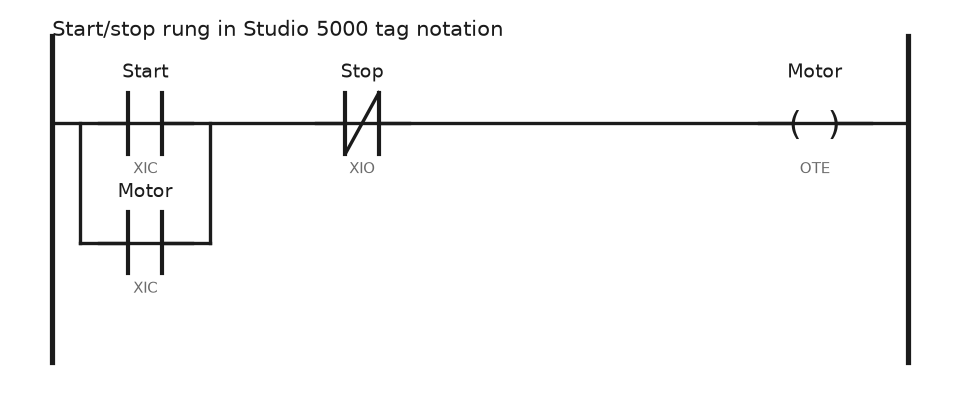
Studio 5000 Logix Designer, same machine, same rung
  |--] [-----]/[-------------------( )--|
     Start    Stop                 Motor
  |--] [--|
     Motor
  Start is an alias for Local:2:I.Data.0
RSLogix Micro Starter Lite is the free cut of the same editor and handles the MicroLogix 1000 and 1100 only. A 1200 or 1400 needs the paid RSLogix Micro Starter, and a 1500 needs RSLogix 500. The hardware side of that family is covered in Allen-Bradley SLC 500 CPU.
Connected Components Workbench for Micro800
CCW is a separate product, not a Studio 5000 edition, and it also configures PowerFlex 525 drives and PanelView 800 terminals from the same project tree. The Standard Edition is free and covers normal Micro800 work in ladder, function block and Structured Text. The paid Developer Edition adds Run Mode Change for online editing, user-defined data types, and protection for user defined function blocks.
CCW is slower than Logix Designer. On the free edition, plan on going offline to change logic on a Micro850, and budget for that on a commissioning shift.
RSLinx Classic against FactoryTalk Linx
Both are communication servers. They do different jobs and most sites run both.
| RSLinx Classic | FactoryTalk Linx | |
|---|---|---|
| Job | Driver layer for programming tools and OPC DA | Data server for FactoryTalk View and FactoryTalk applications |
| Networks | EtherNet/IP, DF1 serial, DH+, DH-485, ControlNet, DeviceNet | EtherNet/IP, plus whatever a 1756 bridge can route to over CIP |
| Legacy serial | Yes. This is why it survives | No |
| OPC | OPC DA server, licensed by edition | OPC UA and DA through FactoryTalk Linx Gateway |
| Editions | Lite, Single Node, OEM, Professional, Gateway | Included with FactoryTalk View |
Practical rule: if you are going online with a PLC-5, SLC or MicroLogix over serial or DH+, you need RSLinx Classic. If you are feeding a FactoryTalk View SE screen, use FactoryTalk Linx. RSLinx Lite ships with Studio 5000 and is enough to download a program. Driver setup step by step is in RSLinx configuration and connect to PLC.
FactoryTalk View: ME for panels, SE for servers
FactoryTalk View Studio is one install with two project types.
Machine Edition builds a .MED project that you test on the PC and then create a .MER runtime file from, which downloads to a PanelView Plus 6 or 7. One terminal, one application, no server. The runtime is version locked: a runtime created for version 12 will not load on a terminal running firmware 8, so pick the older version in the Create Runtime dialog when the terminal is older than your Studio.
Site Edition is a client and server system for PC based SCADA. An HMI server holds the displays, a data server holds the tag connections through FactoryTalk Linx, and clients connect to them. It scales to a plant and it needs a FactoryTalk Directory, which is the part people forget until the client cannot find the server. Details are in FactoryTalk View Site Edition and SE and client edition.
Logix Emulate and ControlFLASH Plus
Studio 5000 Logix Emulate runs a soft controller on your laptop. You create the project with Emulate 5570 as the controller type, put the emulator in a virtual chassis slot, and download over the 1789-A17 virtual backplane driver in RSLinx. Motion and most specialty modules are not supported, so it is for logic testing, operator training and HMI development, not for proving I/O. Setup is in Studio 5000 Logix Emulate.
ControlFLASH Plus replaced ControlFLASH for firmware. It browses the network itself, flashes several devices in one pass, and reads the .dmk firmware kits from the PCDC without a separate install step. Keep the old ControlFLASH around anyway; a few legacy devices still want it. Procedure and the things that go wrong are in PLC controller firmware upgrade.
Version and firmware, the table to keep on the wall
| Logix Designer | Controller firmware major | Notes |
|---|---|---|
| RSLogix 5000 v20 | 20.x | Last release under the RSLogix 5000 name |
| Studio 5000 v21 to v24 | 21.x to 24.x | First Studio 5000 releases, 5570 era |
| v28 to v31 | 28.x to 31.x | ControlLogix 5580 and CompactLogix 5380 appear here |
| v32 to v33 | 32.x to 33.x | Common plant standard today |
| v34 to v36 | 34.x to 36.x | Newest controllers and firmware only |
The rule behind the table is simple. The project major revision must equal the controller firmware major revision. A v33 project will not download to a controller running 32.011. You either flash the controller or change the project revision under Controller Properties → General → Change Controller. Versions install side by side, so keep every one your site actually runs.
Licensing runs through FactoryTalk Activation Manager
Every paid tool above draws an activation. FactoryTalk Activation Manager handles them, and two facts matter:
- An activation is tied to a host ID, normally the MAC address of a physical network adapter. Docking stations and virtual adapters change it and break the activation.
- Activations are node locked on the laptop or served concurrently from an activation server. A concurrent licence is checked out while the tool is open, which is why a crashed Logix Designer can hold a seat until it times out. Borrow one for a set number of days before you leave the plant network.
When Studio 5000 starts and says no activation found, check the Activation Manager service first. The usual cause and fix are in FactoryTalk Activation Manager helper service not running.
Field notes: what actually goes wrong
The version that upgraded itself. A contractor opened a v24 ACD on a v33 laptop and saved it. The plant standard was v24. Nobody on site could open the file afterwards, and the controller on the line was still at firmware 24. Two days lost restoring from a backup. Rule on my jobs: open a project with the version that matches the controller, and copy the file before touching it.
Free software, expensive surprise. A small OEM quoted a job on RSLogix Micro Starter Lite and then the customer asked for a MicroLogix 1400. Starter Lite does not cover it. The RSLogix 500 licence arrived three weeks later. Check the controller against the tool before the quote, not after.
Frequently asked questions
What is the difference between RSLogix 5000 and Studio 5000?
Same programming environment, renamed at v21. Studio 5000 added a launcher and the surrounding tools like View Designer and Architect. Projects from v20 and earlier open and convert.
Can I program a MicroLogix in Studio 5000?
No. MicroLogix and SLC 500 need RSLogix 500 or RSLogix Micro. The file formats and the addressing model are different products.
Is there a free Rockwell PLC programming tool?
Connected Components Workbench Standard Edition and RSLogix Micro Starter Lite are free. Both are limited to small controllers. There is no free version of Logix Designer.
Do I need FactoryTalk View to use a PanelView Plus?
Yes, View Studio Machine Edition to build the application and create the runtime file. Older PanelView Standard terminals use PanelBuilder32 instead, and PanelView 800 lives in CCW.
Next step
Before the next project, write down two things for your site: the Logix Designer versions you are allowed to install, and the controller firmware each line runs. Then get the emulator working so you can test logic without a controller, using Studio 5000 Logix Emulate, and set your download routine from how to download a program to a PLC.