Fault 64 on a PowerFlex 755 reads Drive OverLoad on the HIM, and the first move most people make is to open the motor overload group and start editing P413 [Mtr OL Factor]. That is the wrong fault. A PowerFlex 755 fault 64 is P940 [Drive OL Count] arriving at 100 %, and P940 counts what the drive’s own power unit has been carrying. The motor’s overload is fault 7, it has its own count in P418 [Mtr OL Counts], and the two share nothing but a word in their names. The rest of this page is how long is long enough, what the drive quietly gives up before it faults, and which settings are worth touching when the answer turns out to be that the drive is too small for what the machine has become.
The short answer: output current above the drive’s rated current, held there long enough.
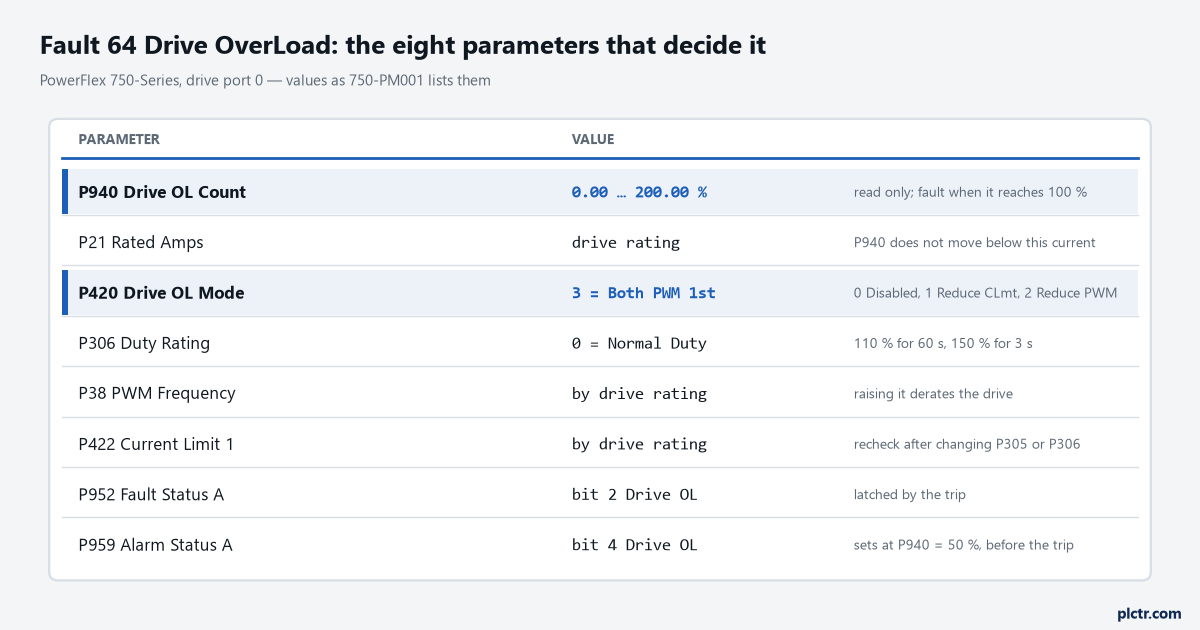
P940 is the power unit’s I2T count. The motor has its own, in P418, and it is governed by a different set of parameters entirely.
What P940 counts, and when it starts counting
P940 [Drive OL Count] is an I2T accumulator for the power unit, in percent, and 750-PM001 is unusually direct about the one thing everybody gets wrong about it: the value sits at zero until output current reaches 100 % of rated current, and overload measurement only begins there. Below rated current the count does not creep. It does not slowly fill up over a shift of moderate loading and then trip on the one heavy batch. The drive is either above its own rating and counting, or it is not. That single behaviour explains most of the arguments about fault 64, because it means a drive that trips has genuinely been run above its continuous rating, and the question is never whether the current was too high but for how long and why nobody noticed.
Above rated current the clock starts. That is the whole trigger condition.
How long depends on P306 [Duty Rating], and the numbers are in the parameter description rather than a separate table. Normal Duty, which is the default, gives the largest continuous rating and the smallest overload allowance: 110 % for 60 seconds, 150 % for 3 seconds. Heavy Duty trades continuous rating for headroom and gives 150 % for 60 seconds and 180 % for 3. On frame 8 drives and larger there is a third option, Light Duty, at 110 % for 60 seconds. Those are the shapes of the curve P940 is climbing. A drive at 118 % of rated on Normal Duty is not going to last a minute of it, and a drive at 104 % will sit there for a long time before the count matters. Change P306 and the drive changes what it will let the motor draw; 750-PM001 says so plainly, and it also tells you to go back and check P422 [Current Limit 1] and P423 [Current Limit 2] afterwards, because those two do not move themselves and will happily go on allowing the old current.
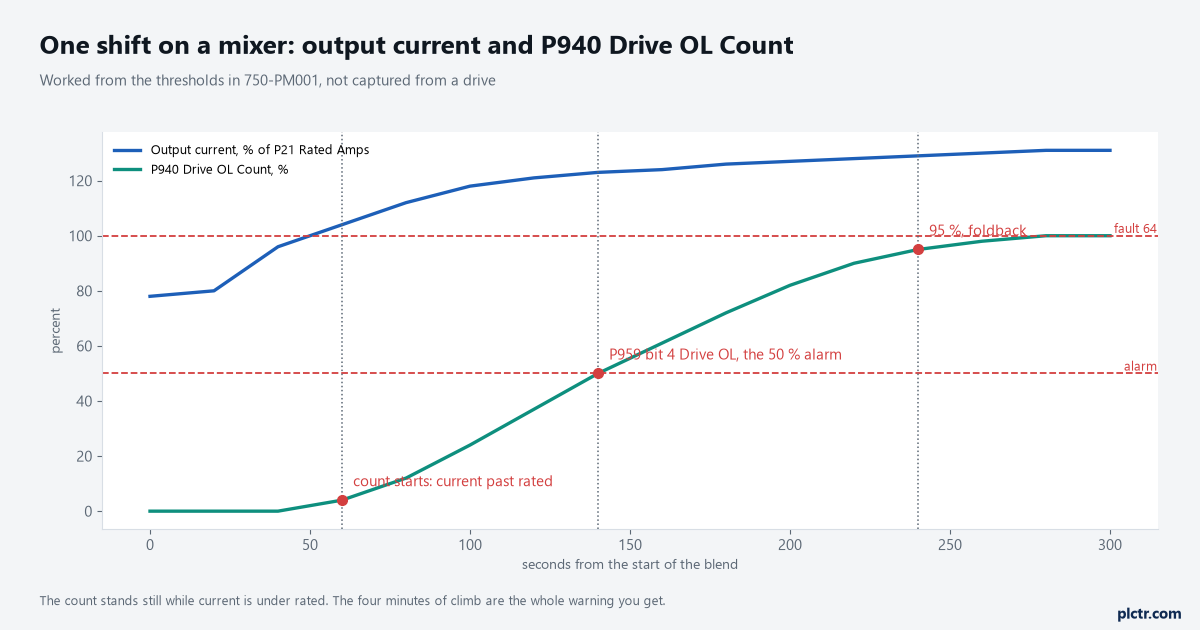
Worked from the manual’s thresholds rather than captured. The count stands still for the first forty seconds because current is under rated; once it starts, the whole warning is about four minutes long.
Why a PowerFlex 755 fault 64 is not the motor overload
Two faults, two counts, two sets of parameters, and no overlap. Fault 7 Motor Overload comes from P418 [Mtr OL Counts], which is shaped by the motor nameplate data, P413 [Mtr OL Factor] and P414 [Mtr OL Hertz]; P419 [Mtr OL Trip Time] even tells you how many seconds are left before it acts. What happens when it acts is yours to choose in P410 [Motor OL Actn], from Ignore through Alarm and a minor fault to a coast, ramp or current-limit stop. Fault 64 has none of that. There is no action parameter, there is no trip-time readout, and the drive coasts. It is a power structure fault, which is why it sits under protection bit 2, PwrStrucFlts, in the fault configuration table alongside the heatsink and transistor overtemperature faults rather than with the load faults.
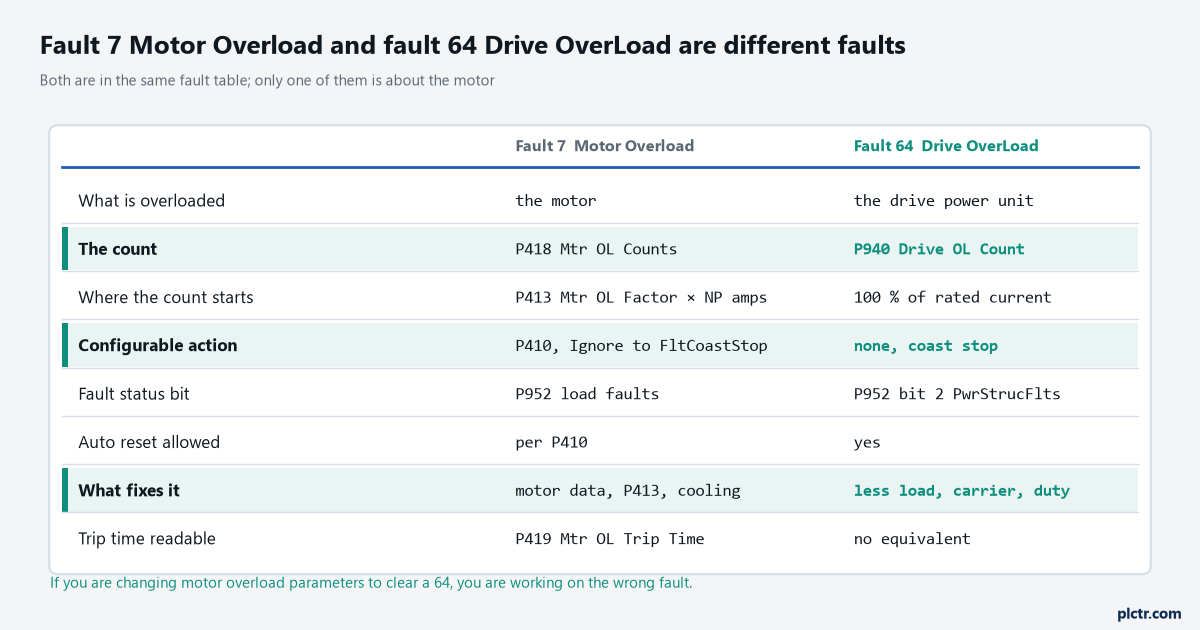
The only row the two faults share is that both end with the motor stopping. Everything a PowerFlex 755 fault 64 responds to is in the left-hand column of the drive, not the motor’s.
The practical consequence is worth saying out loud. If somebody has been raising P413 to make a nuisance trip go away and the drive keeps faulting with 64, they have been working on a fault the machine is not having. Worse, they have moved the motor’s thermal protection in a direction that no longer matches the motor, so when a real motor overload does arrive it will arrive late. The same goes the other way: a drive that keeps tripping on fault 7 while P940 never leaves zero is telling you the motor is working harder than its nameplate, and the power unit is comfortable. Reading a drive fault properly starts with reading which one it actually is, and on this drive the fault number is the whole of that reading, because 64 and 7 respond to entirely different work.
Auto-reset makes this worse before it makes it better, and that is worth knowing.
Fault 64 clears on a reset and auto-reset is allowed for it, so a drive with P348 [Auto Rstrt Tries] set restarts into the same overload until the tries run out and fault 33 arrives instead.
What the drive gives up before it faults
The 755 does not go straight from healthy to fault 64. There is a whole ladder of warnings, and all of them are visible from the PLC if anybody has mapped the status words. At 50 % of the count, P959 [Alarm Status A] bit 4 sets and the type 1 Drive OL alarm appears. That is the alarm nobody has connected to anything, and it is the single most useful bit on the drive for this problem, because it fires while there is still time to do something about the load. Further up, the drive starts protecting itself by degrading performance. Alarm 169 PWM Freq Reduced means the carrier has been pulled below whatever P38 [PWM Frequency] is set to, because the IGBT junction temperature reached the foldback level about 10 degC under its maximum. Alarm 170 CurLimit Reduced means the current limit has been pulled below the value in P422 or P423, either for the same thermal reason at about 5 degC under the maximum, or because P940 has reached 95 %. That second trigger is the one worth writing on the panel: at 95 % of the count, the drive is already limiting current on its own, so the machine slows down a few seconds before it stops, and an operator will usually describe it as “it got heavy and then it tripped”. They are describing foldback, not a mechanical change.
P420 [Drive OL Mode] decides what the drive is allowed to trade away, and there are four answers.
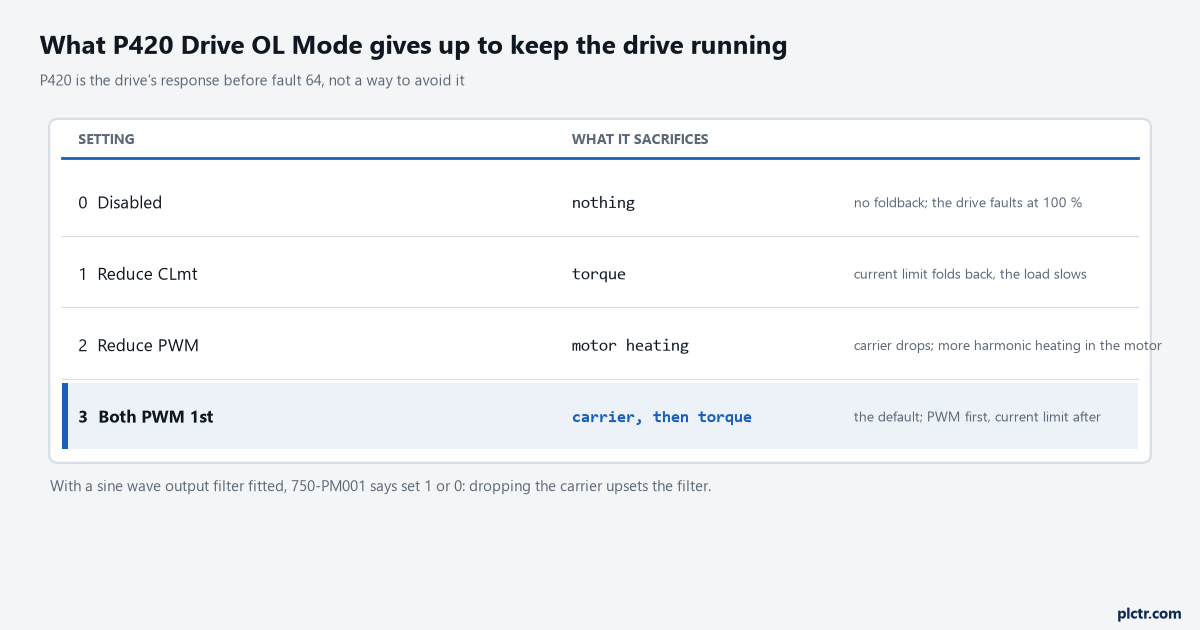
The default gives the drive two things to trade away. Setting 0 gives it none, which means the fault arrives without the slowdown that warns the operator.
There is one case where the default is wrong, and 750-PM001 calls it out. With a sine wave output filter fitted, set P420 to 1, Reduce CLmt, or to 0. A filter is tuned around a carrier frequency, and letting the drive move the carrier underneath it is a good way to turn a fault 64 into something stranger. The default setting of 3 is the right one on almost every drive that does not have a filter on its output, because two things to give away beats one, and because the operator notices the machine slowing before it stops.
What to change, in the order that costs least
Start by finding out whether the drive is overloaded or just badly set up, and the fastest way is to read P940’s history rather than its present value. The Predictive Maintenance group and the fault queue will tell you when the last 64 happened; the alarm bit tells you how often the machine goes over 50 % without tripping. If 50 % is reached on every cycle of a machine that has never faulted, the drive is running near its limit continuously and the next hot week will trip it. Then, in rising order of pain: check P38 [PWM Frequency] against what the application needs, because a carrier raised to quieten a motor derates the drive, and 750-TD001 carries the derating curves that say by how much. Check P306 against the actual duty; a mixer or a crusher that was ordered as Normal Duty and now runs a heavier product may simply need the drive re-rated to Heavy Duty and a bigger frame behind it. Check the mechanical side, because 750-PM001’s own corrective action for fault 64 is to reduce the mechanical load on the drive and it is right more often than the parameter work is. And check what the machine is being asked to do, since a drive sized for a 45 kW motor at a 20 % duty cycle is a different drive from the same unit running continuously.
Sizing is the honest answer more often than anyone wants it to be.
Raising P422 [Current Limit 1] does not help. It is not what raised P940, and a higher limit only lets the drive reach the same count sooner.
What I would wire up before it happens again
Map three parameters into the PLC over the datalinks you already have on the drive’s EtherNet/IP connection and put them on a screen: P940 [Drive OL Count], P943 [Drive Temp Pct] and P959 [Alarm Status A]. The count is the one that matters, and a trend of it across a week answers the sizing question without anybody arguing about it in a meeting. If you have not mapped drive parameters to a controller before, adding the drive to the Studio 5000 project with its Add-On Profile is where the datalinks get configured, and the same connection carries the speed reference and the command word. On smaller drives the same discipline pays, though the parameter numbers are different: a PowerFlex 525 with an F004 undervoltage or an F013 ground fault is a different conversation, but the habit of reading the fault’s own counter before touching anything is the same habit.
Put an alarm on P940 crossing 50 %, and give it to whoever schedules the batches rather than to maintenance. That is who can actually change the answer.