A Node-RED Logix tag read takes one install script, one palette install and two dialogs on a Raspberry Pi 4: Zone7_Speed from a 5069-L306ER appears in the debug sidebar as 30.0, and none of it involves typing a line of code. The node that does it is node-red-contrib-cip-ethernet-ip 1.1.3, installed from the palette manager, configured in two tabs, and wired to a debug node. That is the whole of the reading part, and this page is the settings, the three modes the node offers, and the list of tags it will not read, which is short and is the reason people give up on it in the second hour.
Who this is for: the person who read the pycomm3 article and closed it at the first import. Same job, same controller, same port 44818, no Python. The costs are different and they are at the end.
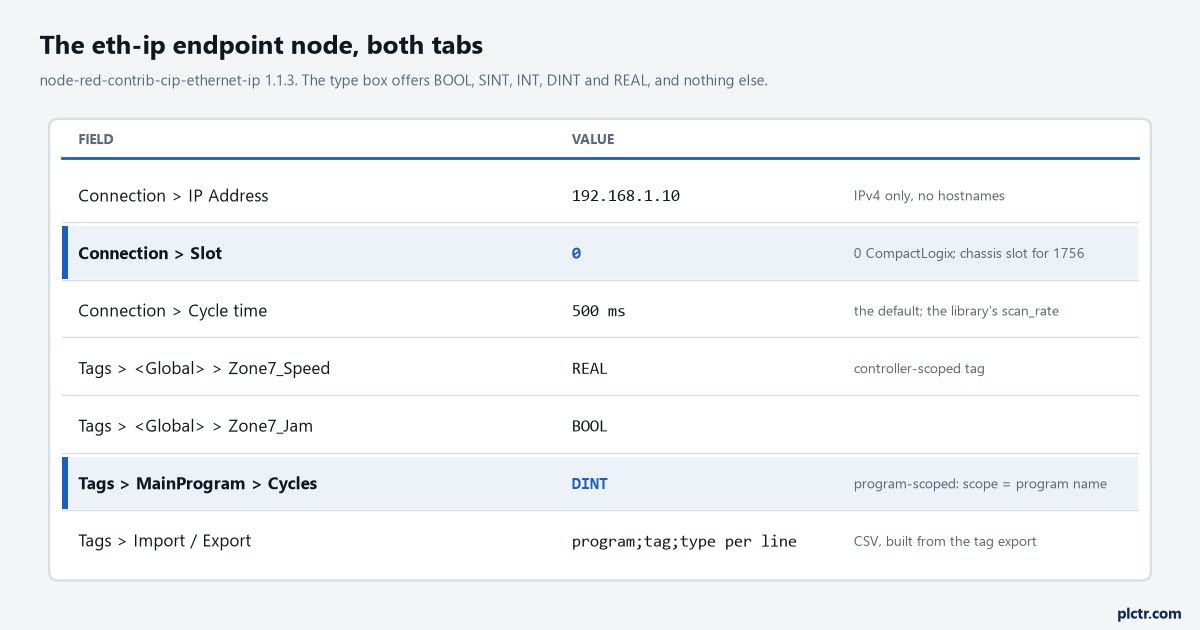
Two tabs. The type box on the Tags tab offers five types and no more, and the highlighted Slot row is the one ControlLogix people get wrong: 0 is right for a CompactLogix and wrong for a 1756 controller in slot 2.
Getting Node-RED onto the Pi
The Node-RED project’s own “Running on Raspberry Pi” page carries a one-line installer, and it is the right one; it is not copied here because the line changes, and that page is where it lives.
# run the installer line from the Node-RED Raspberry Pi page, then:
sudo systemctl enable nodered.service
node-red-start
The script installs Node.js and Node-RED together and offers a set of Pi-specific nodes on the way; say yes to those, they cost nothing. systemctl enable makes it start at boot, which is the difference between a logger and a demo, and node-red-start runs it now and shows the log. The editor is then on port 1880 of the Pi’s address, in any browser on the same network, and on a board with little memory – a Zero, an old 1 GB model – the same page says to run it as node-red-pi --max-old-space-size=256 instead, which caps the Node.js heap so the board does not spend its life swapping. Then the palette: the menu at top right, Manage palette, the Install tab, search for cip-ethernet-ip, install. The alternative is cd ~/.node-red && npm install node-red-contrib-cip-ethernet-ip in a terminal, and the documentation is explicit that after an npm install Node-RED has to be restarted to see the new nodes, which the palette manager does for you. Either way three nodes appear under a plc category in the left-hand palette: eth-ip in, eth-ip out, and the endpoint, which you never drag onto the canvas because it is a configuration node that the other two share.
The waiting is the install script. The rest is two dialogs.
The endpoint that makes a Node-RED Logix tag arrive: address, slot, cycle, tags
Drag an eth-ip in
Controller.connect(address, slot), whose own README says 0 for a CompactLogix. A 1756 controller sits in a chassis, and the number is its slot in that chassis, the same one a MSG path would carry, and putting 0 there for a controller in slot 2 gets the “Error connecting to PLC” status and nothing more helpful. The Tags tab is a list grouped by scope. <Global> is controller scope. Press Add next to it and type the tag name exactly as Studio 5000 shows it, Zone7_Speed, and pick its type from the box: BOOL, SINT, INT, DINT or REAL. For a program-scoped tag add a scope group named after the program, MainProgram, and put the tag under it; the node builds the program-scoped reference from the two halves itself, so Program:MainProgram.Cycles typed as a name is the wrong shape, and a name the library’s own check refuses is logged as “Skipping tag with invalid name” and left out of the read group. There is an Export button that writes the list as program;tag;type lines and an Import that reads the same, which means a fifty-tag list can be built in a spreadsheet from the controller’s tag export rather than typed into a browser. The type has to be right. The node hands it to the library as the CIP data type to decode, and a REAL declared as DINT decodes into a large wrong integer with no error, the same four bytes read the wrong way, which the pycomm3 article shows from the Python side where at least the library reports the type it found.The three modes, and what arrives on the wire
Back in the eth-ip in node, Mode has three entries: Single tag, All tags one per message, and All tags.
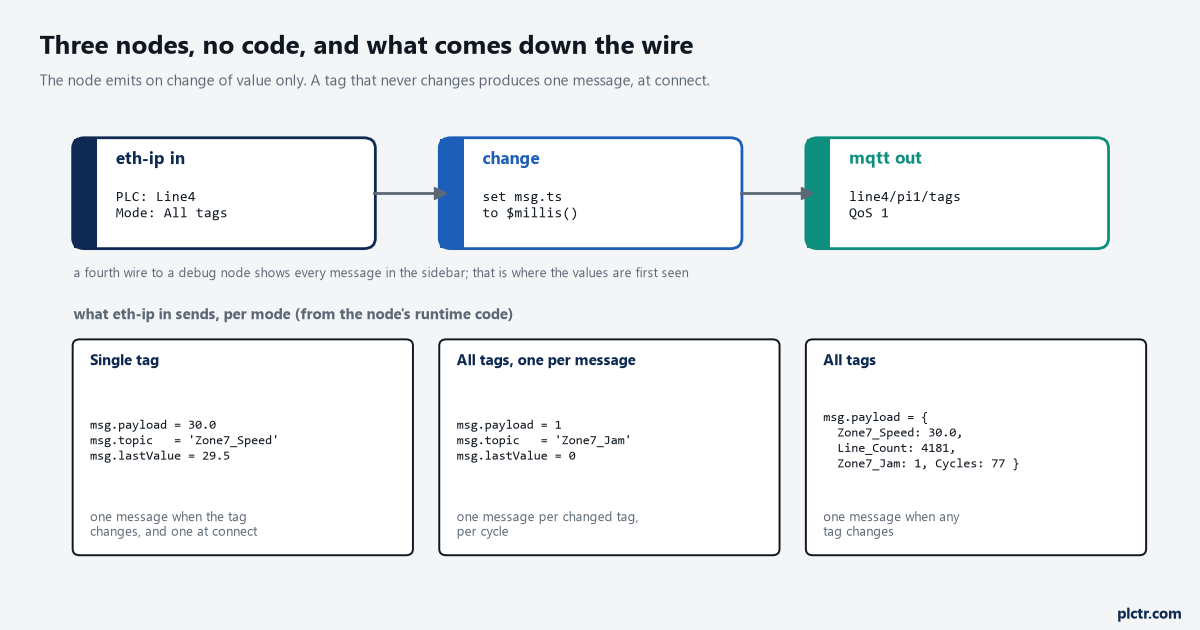
The shapes come from the node’s runtime code. In every mode a message is sent only when a value changes, plus one when the connection first reads the tag; a tag that sits still sends nothing.
Single tag picks one name from the endpoint’s list and sends msg.payload with its value and msg.topic with its name, plus msg.lastValue with the previous value, every time the value changes and once when the tag is first read after connecting. All tags, one per message does the same for every tag on the list, so a change in Zone7_Jam is one message with topic Zone7_Jam, and a scan in which twelve tags changed is twelve messages. All tags sends one message whose payload is an object with every tag’s name as a key and its value as the value, whenever any of them changed. That last one is the mode for a logger, because a change node can stamp the object with $millis() and an mqtt out node can send it as one JSON document per cycle, and the SQLite queue article receives exactly that shape. One thing about the object: its keys are the bare tag names, without the scope, so a Cycles
<Global> and a Cycles under MainProgram land in the same key and the last one read wins. Give program-scoped tags names that are unique across the controller, or read them in a separate endpoint. The README on npm describes a diff checkbox that sends every cycle when unticked. The published 1.1.3 code has no such option: the node subscribes to the tag’s Changed event and that is the only thing that produces a message. If you need a heartbeat row every second whether or not anything moved, an inject node on a one-second repeat pulling the last values from flow context does it, and it is still not code.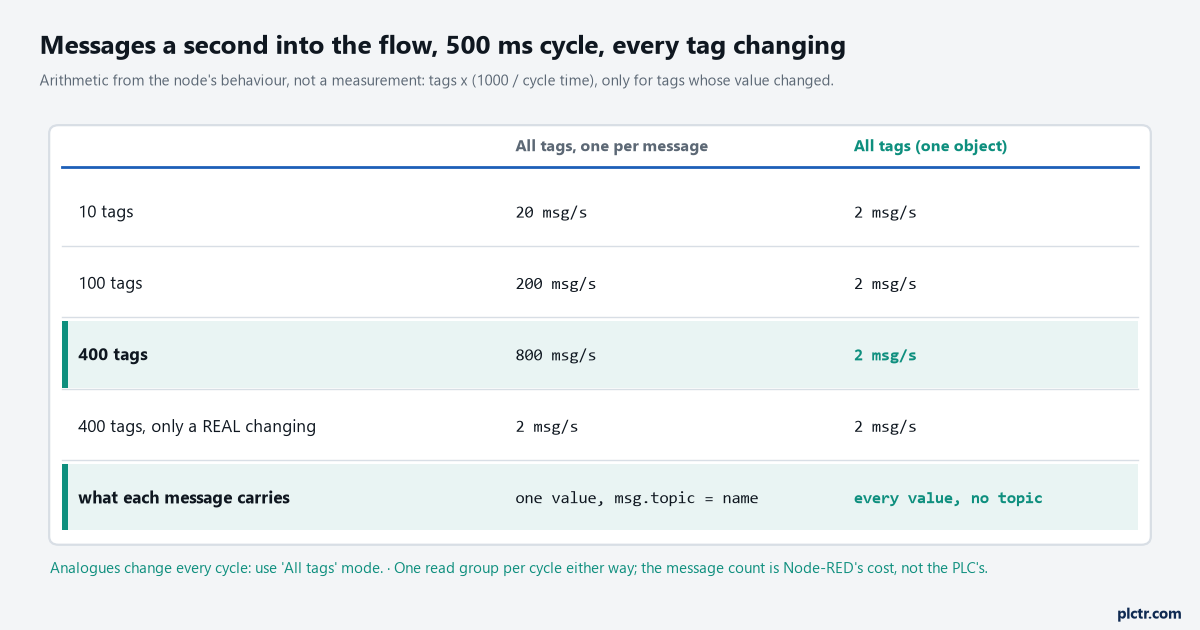
Arithmetic, not a measurement: the node emits per changed tag per cycle in one mode and per cycle in the other. A REAL that flickers in its last digit counts as changing every cycle.
The rate is where the one-per-message mode goes wrong on a Pi. Four hundred tags on a 500 ms cycle is 800 messages a second if all of them move, and analogue REALs do move, in the last decimal place, every scan. The debug sidebar was never built for that, and the editor tab is where the strain shows first. All tags mode makes the same 400 tags two messages a second regardless, which the Pi does not notice. The controller sees no difference: the library reads the whole subscribed group once per cycle either way, so this is a Node-RED cost, not a PLC cost, and the way to check what the PLC sees is the scan time article’s method, trend the task while the Pi polls.
What it will not read
Five types, atomics only, and the reason is the library underneath, not the node.
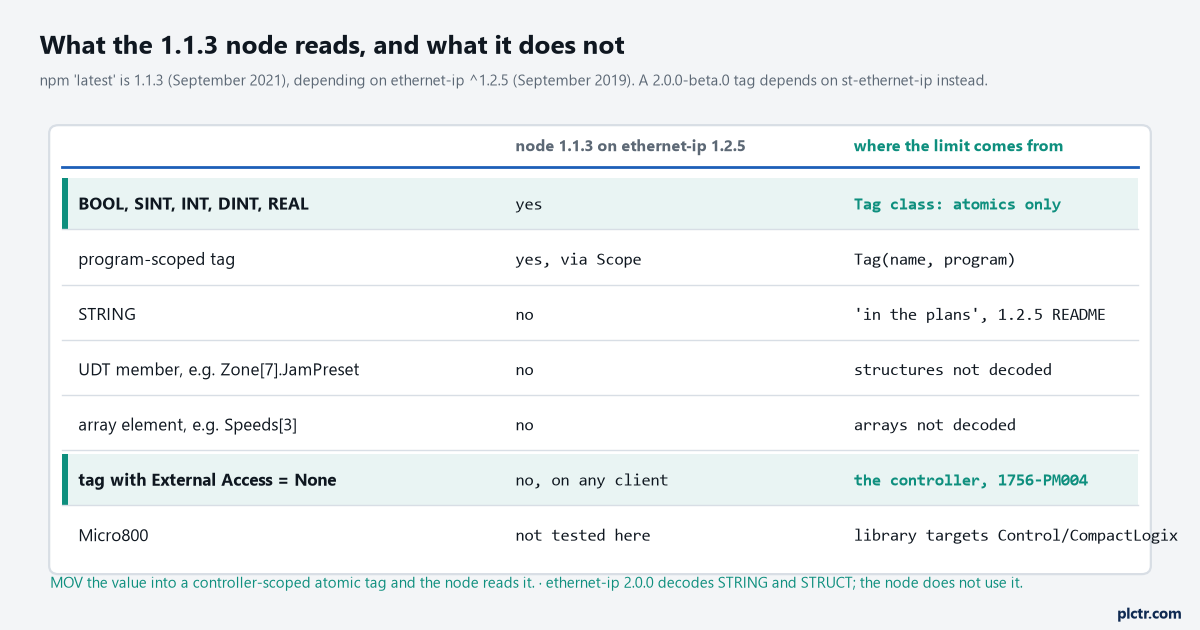
npm’s latest is 1.1.3 from September 2021 on ethernet-ip 1.2.5 from September 2019, whose README lists STRING, arrays and UDTs as “in the plans”. The plans went into a different library.
node-red-contrib-cip-ethernet-ip 1.1.3 depends on ethernet-ip ^1.2.5, and the README of that version says the Tag class supports atomic types – SINT, INT, DINT, REAL, BOOL – with STRING, ARRAY and UDT support “coming soon”. It did not come to that line. The same author published ethernet-ip 2.0.0 in April 2026 with a rewritten API that decodes STRING, STRUCT and arrays, but it wants Node 18 and a different calling convention, and the Node-RED node is pinned to 1.x and has not been updated in five years; the flows.nodered.org page says so in as many words, and shows a couple of hundred downloads a week from people finding that out. There is a 2.0.0-beta.0 on npm under the next tag, from the same day as 1.1.3, that depends on st-ethernet-ip instead, a fork whose README does read UDTs and string arrays. I have not run the beta and this article does not recommend a five-year-old beta for a panel. The fix that works with the published node is on the controller: a MOV of Zone[7].JamPreset into a controller-scoped DINT called Zone7_JamPreset, one rung, and the node reads it. For a STRING, a small routine that copies the characters into SINTs is more trouble than installing pycomm3, which reads STRINGs and whole UDTs as a dict, and that is the honest line where this article hands you back to the Python one. Two things it will not read that are not the library’s fault. A tag whose External Access is None in the controller is unreadable by any client on any protocol, and no value for it will ever reach the canvas whatever the node’s status shows; the property is in the tag’s properties in Studio 5000, and Rockwell’s I/O and Tag Data manual, 1756-PM004, names third-party software as exactly what it governs. And a name the library’s check refuses is dropped before it ever reaches the controller, with the “Skipping tag” warning in the log and nothing on the canvas, which is the dead end: the flow deploys clean, the endpoint shows online, the tag never arrives, and the log line was written once at deploy and scrolled away.
Writing back, and why the node warns you
eth-ip out writes msg.payload to one selected tag, and the node’s own dialog carries the line “Caution when writing data to production PLCs!” for a reason.
There is no handshake, no range check, no permissive: whatever arrives in payload goes into the tag on the next cycle, from any flow that can reach the node, which on a default install is anything on the network that can reach port 1880. Reading is the job this page is about. If a setpoint has to come down from the Pi, the interlock that makes it safe lives in the controller – a rung that only accepts the value inside a range, with a panel key permissive, into a staging tag the logic copies from – and the remote monitoring without open ports article is the network half of that argument. Until both halves exist, leave eth-ip out in the palette.
Next step
Put one REAL in the endpoint, wire the node to a debug node in Single tag mode, deploy, and watch the value against the watch window in Studio 5000 for a minute; if the two agree, the type is right and the path is right. Then switch to All tags mode, add the rest of the list by CSV, and count the messages a second in the debug sidebar before you point them anywhere. When the first tag you need turns out to be a UDT member, add the MOV rung rather than hunting for a node that reads structures: there is not one on the palette today, and the rung takes a minute.