Looking carries almost all of the value of remote PLC access and almost none of the risk. Writing is needed maybe twice a year and carries the rest, which is why the 100 ms permissive rung further down clamps every remote setpoint to a range the controller owns and leaves a row behind with the user id on it. The connection itself is the easy half: an industrial router dials out to a rendezvous server, so no inbound firewall rule has to exist and nothing on the plant side listens.
The setup below uses an Ewon Cosy on Talk2M in front of a CompactLogix, with FactoryTalk ViewPoint for the read-only view. Secomea, Tosibox and IXON follow the same shape.
What you need
| Item | Notes |
|---|---|
| Industrial router | Ewon Cosy+, Secomea SiteManager, Tosibox Lock 150 or an IXrouter. All of them dial out |
| Rendezvous service | Talk2M for Ewon, GateManager for Secomea. This is what removes the need for an inbound rule |
| WAN | A plant DHCP address with outbound HTTPS, or an LTE SIM for a site with no network |
| Web HMI | FactoryTalk ViewPoint on a View SE server, WinCC Unified’s built-in web client, or Ignition Perspective |
| Key switch | A physical selector on the panel wired to an input. This is the part people skip |
| Written access matrix | Signed by operations and by IT before the router is ordered |
Separate monitoring from control before anything else
Most of the value is in looking, and looking carries almost no risk. Almost all of the risk is in writing, and writing is needed maybe twice a year. Split them and the security conversation gets short.
| Action | Operator on site | Plant engineer, remote | OEM support, remote |
|---|---|---|---|
| View HMI screens and trends | Yes | Yes | Yes, during an approved session |
| Acknowledge an alarm | Yes | Yes | No |
| Change a setpoint inside limits | Yes | Yes | No |
| Change a limit or a recipe | No | Yes, with a change record | No |
| Force an input or output | No | No | Only with the key switch on site |
| Go online and edit the program | No | Scheduled window only | Key switch plus an engineer standing at the panel |
| Download a project | No | Scheduled window only | Key switch plus an engineer standing at the panel |
Note the last two rows. A ControlLogix key switch in RUN refuses downloads and online edits no matter who is logged in and from where. That single physical switch is worth more than any software policy, because it cannot be misconfigured from a laptop.
Understand why the outbound router works
An industrial VPN router opens a session from inside the plant to a rendezvous server on the internet, over TCP 443 or UDP 1194. The engineer’s client connects to that same server and authenticates, and the server bridges the two. Nothing listens on the plant’s public address, because there is no plant public address in the path.
That gives you three things IT will care about. There is no inbound firewall rule to review, the tunnel can be killed centrally when a contractor’s contract ends, and the router sits between the WAN and the machine subnet, so only the machine subnet is reachable rather than the whole plant.
The LAN side should be its own subnet holding the PLC, the HMI panel and nothing else. If the router can reach the file server, it is a router in the wrong place.
Wire a physical permissive for the tunnel
A router that is always connected is always available to whoever has the credential. On machines where remote access is occasional, feed the router’s enable input from a key switch on the panel, or gate the VPN with a digital output that logic controls.
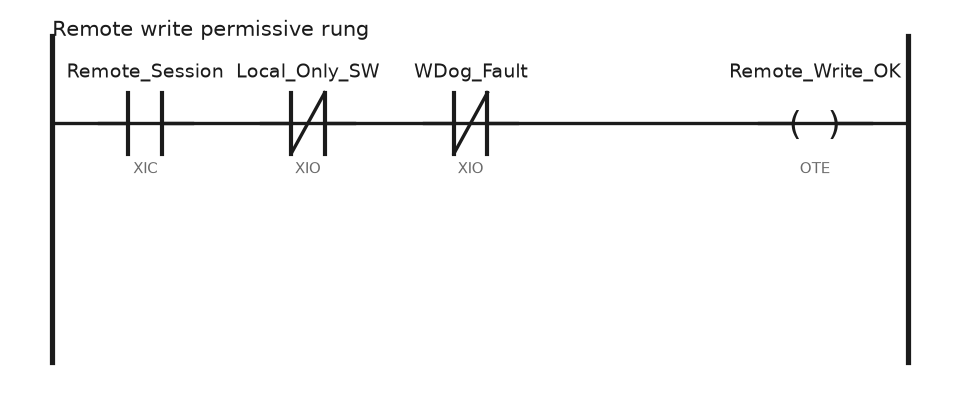
// Remote write permissive and session watchdog, 100 ms periodic task
IF Remote_HB_In <> Remote_HB_Last THEN
    Remote_HB_Last  := Remote_HB_In;
    Sess_TMR.PRE    := 5000;              // 5 s of silence ends the session
    Sess_TMR.DN     := 0;
    Sess_TMR.TT     := 0;
END_IF;

TONR(Sess_TMR);
Remote_Session := NOT Sess_TMR.DN;

Remote_Write_OK := Remote_Session
                   AND NOT Local_Only_SW          // key switch, panel input
                   AND NOT WDog_Fault;

// Every accepted remote setpoint change leaves a record
IF Remote_Write_OK AND SP_New <> SP_Active THEN
    IF SP_New >= SP_Min AND SP_New <= SP_Max THEN
        SP_Active            := SP_New;
        Audit[AuditIdx].Time := WallClockTime;
        Audit[AuditIdx].User := Remote_UserId;
        Audit[AuditIdx].Item := 101;           // setpoint id
        Audit[AuditIdx].Val  := SP_New;
        AuditIdx             := (AuditIdx + 1) MOD 200;
    ELSE
        SP_Reject := 1;
    END_IF;
END_IF;
Two ideas in that rung are worth keeping. Remote writes are clamped to a range the controller owns, so a fat finger on a laptop cannot command 900 degrees. And every accepted change writes a row with a user id, so the morning after is a conversation about a record rather than about who might have been logged in.
Choose the remote view
Web HMI is the right default. FactoryTalk ViewPoint publishes existing View SE or ME screens to a browser, and you can publish a read-only subset. WinCC Unified serves HTML5 screens from the panel or the runtime PC. Ignition Perspective does the same with a session model that suits phones. The engineer sees the same graphics the operator sees, which removes a whole class of misunderstanding on the phone. Setting up the underlying SE server is covered in FactoryTalk View Site Edition.
VNC to the panel is the lazy option. It works, it is one session at a time, and it hands the remote user the operator’s exact buttons with no way to make it read-only. Use it for a machine the OEM supports and nothing else.
Going online with the programming software belongs behind the same tunnel, with the driver pointed at the router’s LAN side. RSLinx sees the controller across the VPN the way it sees a local one, and the setup is unchanged from RSLinx configuration and connect to PLC. Expect browse to be slow and expect an upload of a large project to take a coffee break, especially on cellular.
Insist on MFA and a session log
The single shared password taped inside the panel door is still the most common authentication scheme in the field. Replace it with per-person accounts on the rendezvous platform, multi-factor on every account, and a group for OEM users that an administrator can disable in one click.
The platform side should log who connected, from where, when, and for how long. The plant side should log what changed: FactoryTalk AssetCentre diffs the controller against its archived copy and tells you a rung moved, and the Logix change detection audit value in Controller Properties changes whenever the program does. Compare that value before and after a support session and you know whether anyone touched the code, whatever the support ticket says.
Write the retention period down. A log nobody keeps for 90 days answers no question that gets asked in month three.
Cellular sites have their own rules
- Carriers usually hand out addresses behind carrier-grade NAT, so nothing inbound is possible. The outbound rendezvous design is not optional here, it is the only thing that works.
- Put the antenna outside the steel cabinet. A cabinet is a Faraday cage and a 20 dB loss turns a workable signal into a modem that reconnects all night.
- Size the data plan for the worst month, which is the month an engineer uploads the project twice and leaves a trend window open.
- Give the router a hardware watchdog that power cycles it if the tunnel has been down for 30 minutes. On a pump station an hour from the nearest road, that watchdog pays for the whole installation.
- Uninterruptible supply for the router as well as the PLC. A site that loses power and comes back without the modem is a site visit.
Field notes: what actually goes wrong
Port 44818 forwarded on the plant firewall. A contractor could not get a VPN approved, so someone forwarded the EtherNet/IP port to the controller so support could get in. It stayed open for eleven months. We found it during a network audit with the controller answering identity requests to anyone who asked. Nothing had happened, which was luck, not design. Anything that needs an inbound rule to a controller is the wrong answer.
The router on the wrong subnet. An Ewon was installed with its LAN port on the main plant network so the engineer could reach the historian too. The VPN then bridged a remote laptop onto the same broadcast domain as 200 devices. Give the machine its own subnet on the router’s LAN side and route nothing else.
Shared credential, no idea who. A setpoint changed overnight on a mixer and nobody could say who did it, because four people and two OEMs used the same Talk2M login. Per-person accounts and MFA went in that week. The audit array in the code above went in the week after.
Watching a trend over LTE for three days. An engineer left a browser trend open on a metered SIM to keep an eye on a bearing temperature. It ate 6 GB. Trend history belongs on site, sampled locally and pulled when needed. Local trending is covered in PLC trend page usage and tag history.
Frequently asked questions
Can I just use the corporate VPN?
If IT will give a contractor a domain account with a narrow route, yes, and it is often cheaper. The trouble starts when the OEM needs access for one week and the account survives for three years. A dedicated remote access platform makes revocation somebody’s actual job.
Is remote downloading a program ever acceptable?
For a machine that is stopped, with someone on site who can see it and a key switch they control, yes. For a running line with nobody there, no. The recovery path matters more than the download: see how to download a program to a PLC and get the program from a PLC.
What bandwidth does going online with Studio 5000 need?
Very little bandwidth and a lot of patience with latency. Browsing and monitoring on a 4G link is usable. An upload of a 30 MB project over that same link is not something to attempt during a breakdown.
How do I stop a remote session from leaving outputs forced?
Alarm on the controller’s force status bit and display it on the HMI. A forced I/O indication on the main screen ends this problem permanently, and the fault handling behind it is in PLC troubleshooting.
Does the PLC need to know a remote session is active?
Yes, if remote users can write anything. Feed the router’s session status into an input, show it on the HMI, and use it in the permissive rung above so the operator on site always knows somebody is connected.
Next step
Order the router, put the machine on its own subnet, and commission it read-only first. Get a month of remote viewing under your belt before anyone gets write access. If the connection path itself is new to you, start from connect to PLC and communication interface and repeat the same steps across the tunnel once it is up.