BadIdentityTokenRejected is the answer an OPC UA server gives when the secure channel is up, the client certificate is trusted, and the session request arrives with no user in it, and on an S7-1500 with guest authentication off that is exactly where a first Python OPC UA client stops. It is the third of four refusals between pip install asyncua and a value, and none of the four is a network problem. ping works at every one of them.
The short version: on the CPU, one secure endpoint on, None off, the Pi’s certificate in the Trusted clients list, guest authentication off and a user created; on the Pi, a self-signed certificate whose URI matches what the client announces, set_security_string("Basic256Sha256,SignAndEncrypt,cert,key"), set_user and set_password. Then a node id with the tag name in quotation marks and a namespace index you ask the server for rather than type. The OPC UA integration article does this with a SCADA client that has dialogs for each step; this is the same exchange done in a script, where every dialog is a line and every refusal is a status code.
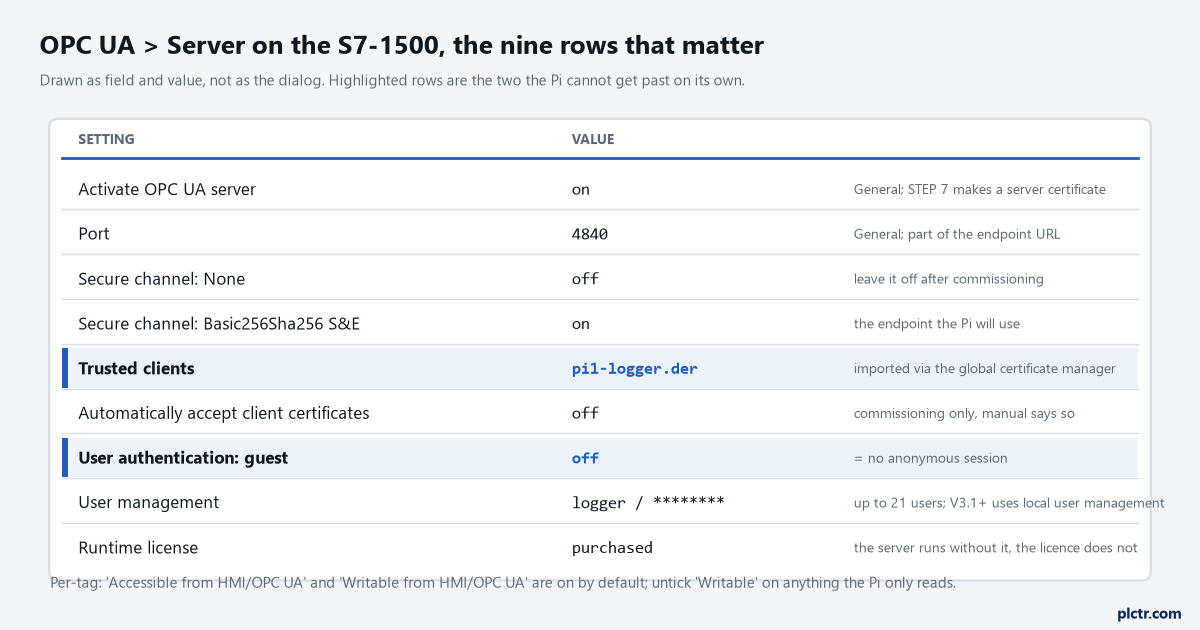
Two highlighted rows: the trusted-clients list and the guest switch. The Pi cannot get past either on its own; both take a compile and a download.
What the CPU checks, and the order it checks it in
Four gates, and a client hits them in sequence, so the error names which one you are at.
First the endpoint. The manual’s section on endpoints describes what a client sees: opc.tcp, the IP, port 4840 unless somebody changed it under OPC UA > Server > Port, and for each endpoint a message security mode and a policy. A client that asks for a policy the server does not offer gets nothing – asyncua reports it as “No matching endpoints” before a byte of the channel is opened. Second the client certificate: on a secure endpoint the client sends its certificate to open the channel, the CPU looks for it in its trusted clients, and if it is not there the channel is refused with BadCertificateUntrusted. Third the session: with the channel up, the client sends an identity token, and if the CPU has guest authentication off and the token is anonymous, that is BadIdentityTokenRejected; if it is a user name with the wrong password, BadUserAccessDenied. Fourth, and the one nobody writes about because it fails quietly, the tag: every PLC tag and DB element carries “Accessible from HMI/OPC UA” and “Writable from HMI/OPC UA” checkboxes, on by default, and a tag with the first one cleared is simply absent from the address space. No error. The node is not there. The manual’s own security rules put the four in one list: use the None endpoint only in exceptional cases, use guest authentication only in exceptional cases, use the trusted clients list so only certain clients get in, and only expose tags that genuinely need exposing. Read as a checklist for a Pi, that is: secure endpoint, certificate exchanged, user created, tags chosen. The S7-1200 manual, for comparison, prints its defaults in a table – No security enabled, Basic256Sha256 Sign and Sign & Encrypt enabled, guest authentication the default, client certificates automatically accepted – and those are commissioning defaults, not the state a reader will find on a CPU somebody has already hardened. The S7-1500 manual is blunter: Basic128Rsa15 and Basic256 are deactivated by default and should not be used, Basic256Sha256 needs SHA256-signed certificates on both ends, and if you can, use Aes256Sha256RsaPss.
Firmware matters for the guest switch. Up to V3.0 it is a checkbox, “Enable guest authentication” under OPC UA > Server > Security > User authentication, next to “Enable user name and password authentication” and a user table that takes up to 21 users. From V3.1 the manual sends you to the local user management and an “Anonymous” user, and the role-based access editor gives the Anonymous
The Python OPC UA client, all of it
Eleven lines that matter, and four of them are the ones the CPU checks.
import asyncio, os
from asyncua import Client

URL = "opc.tcp://192.168.0.10:4840"             # OPC UA > Server > General on the CPU

async def main():
    c = Client(URL, timeout=4)
    c.application_uri = "urn:pi1.plant.local:plctr:logger"      # same string in the cert and the session
    await c.setup_self_signed_certificate("certs/pi1.pem", "certs/pi1.der", host_name="pi1")
    await c.set_security_string("Basic256Sha256,SignAndEncrypt,certs/pi1.der,certs/pi1.pem")
    c.set_user("logger")
    c.set_password(os.environ["OPCUA_PW"])       # guest is off on the CPU, so this is not optional
    async with c:
        uris = await c.get_namespace_array()                        # index 3 is only the default
        ns = next(i for i, u in enumerate(uris) if u.endswith("simatic-s7-opcua"))
        node = c.get_node(f'ns={ns};s="DB_Line".Temp_PV')
        print(await node.read_value())

asyncio.run(main())
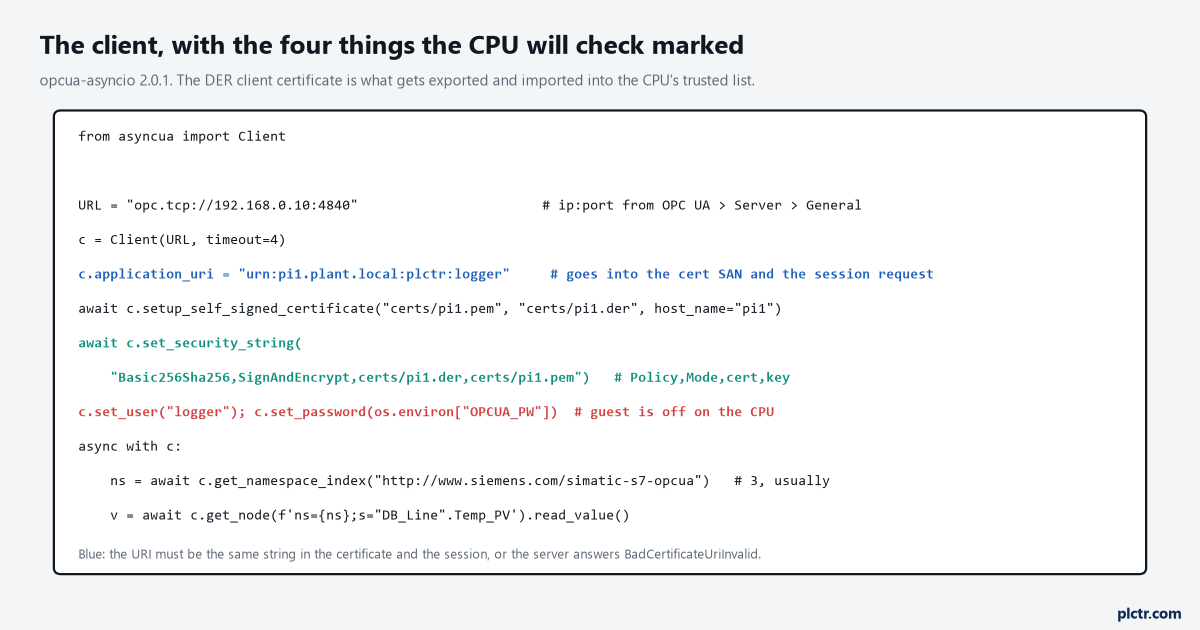
Four things the CPU will check are on four lines. The URI in blue is the one that produces the least helpful error when it is wrong.
pip install asyncua is the install; the package is asyncua, the project is opcua-asyncio, and the version on this machine is 2.0.1. It is async all the way down, so the poll loop lives inside a coroutine; if the rest of the logger is plain Python, asyncio.run() around one function that reads the tags and hands rows to the queue is enough, and the library’s auto_reconnect=True constructor flag takes care of the CPU rebooting under it. setup_self_signed_certificate(key_file, cert_file, host_name=...) is new enough that older examples do it by hand with openssl: it writes a 2048-bit key in PEM and a DER certificate valid for 365 days, puts the client’s application_uri into the certificate as a URI subject-alternative-name, adds the host name as a DNS SAN, and reuses the pair on later runs while it is still valid. The DER file is the one you carry to TIA. set_security_string is documented in the source as Policy,Mode,certificate,private_key[,server_certificate], with Basic256Sha256, Aes128Sha256RsaOaep or Aes256Sha256RsaPss for the policy and Sign or SignAndEncrypt for the mode, and it does something worth knowing when the fifth field is left out: it opens a None channel to the server first, fetches the endpoint list, and takes the server’s certificate from the endpoint that matches. That is how the Pi comes to “trust” the CPU, and it is not trust at all, which is the next section. The URI line is the one people delete because it looks optional. The library’s default is urn:example.org:FreeOpcUa:opcua-asyncio, and if you leave it, the generated certificate carries that URI and the session announces the same one, and the pair is consistent. Change one without the other – a certificate made last month with openssl and no URI SAN is the common case – and the check the manual describes for its own server certificate, that the SAN URI “must be correctly entered because it is checked against the communicated application description”, runs against you from the other side, and the standard’s answer for it is BadCertificateUriInvalid – I have not provoked that one on a 1500, only read it in the status table. Set the URI once, generate the certificate after, and never touch either again.
The four refusals, in the order you will meet them
The five rows below are a run of the code above, with the server end played by opcua-asyncio’s own Server on this machine: one endpoint, Basic256Sha256_SignAndEncrypt
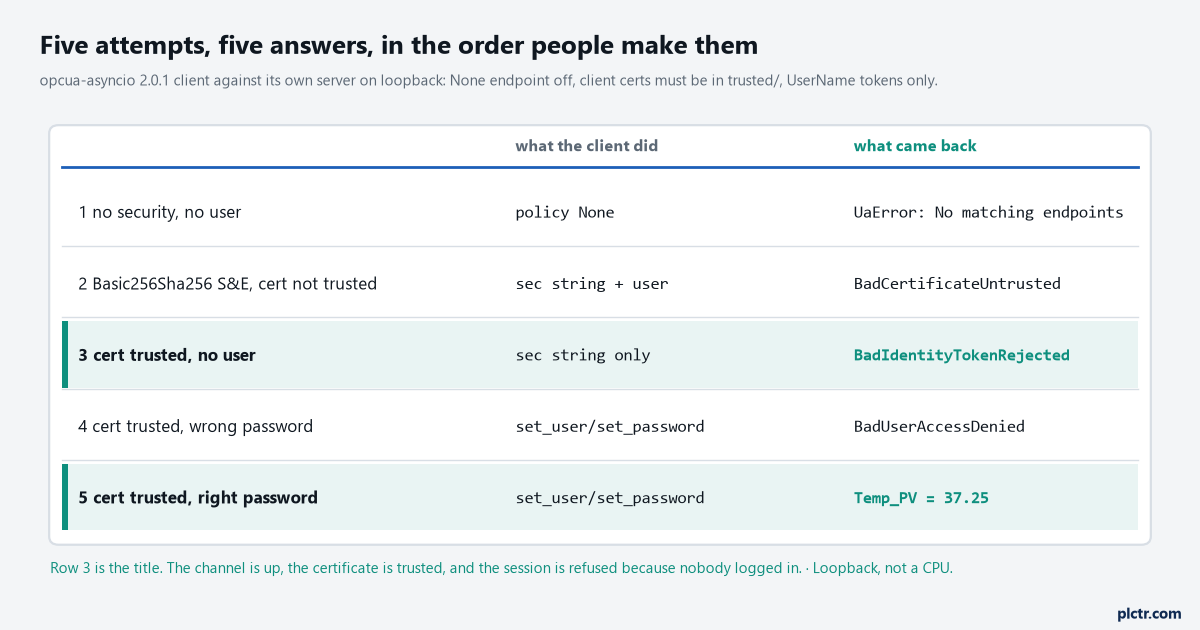
Loopback, not a CPU. Row 3 is the title: the channel is up, the certificate is trusted, and the session is refused because nobody logged in.
UaError: No matching endpoints: 1, ...SecurityPolicy#None is row 1 and it is the good news: it means somebody turned the None endpoint off, the way the manual says to, and the fix is on your side. Row 2, BadCertificateUntrusted: The certificate is not trusted, is the CPU saying the DER file is not in its list. The exchange is a paper-and-scissors job in TIA and the manual gives it as seventeen numbered steps, of which the ones that matter are: tick “Use global security settings for certificate manager” under Protection & Security on the CPU, which needs the project protected and you logged in; import the Pi’s DER under Security settings > Security functions > Certificate manager > Trusted certificates; then OPC UA > Server > Security > Certificates, scroll to Trusted clients, add new, pick the imported certificate; compile; download. A configuration download, so the CPU goes through a stop unless the change qualifies for a download in RUN. The alternative the manual offers, “Automatically accept all client certificates during runtime”, is under the same list, and the notice beneath it says to deactivate it again after commissioning. It is the checkbox that makes row 2 vanish and it is also the checkbox that lets any laptop on the subnet open a channel, which is why row 3 exists. Row 3 is BadIdentityTokenRejected: The user identity token is valid but the server has rejected it, and the wording is precise: the token was well-formed – anonymous is a legal token – and the server’s policy does not allow that kind. That is guest authentication off. It is not a certificate problem, however much it feels like one at 11 pm, and reimporting the DER file will not change it. The fix is a user on the CPU and two lines on the Pi. Row 4, BadUserAccessDenied: User does not have permission to perform the requested operation, is the wrong password, or on a V3.1 CPU a user whose role has no rights in the namespace, and the same code covers both. Row 5 is 37.25.
The dead end is the firewall, and it eats an evening every single time.
nc -zv 192.168.0.10 4840 says open, Wireshark shows the Hello and the OpenSecureChannel going out, and the answer is a service fault. All of that is a CPU that is reachable and configured to refuse you, exactly as a snap7 client sees port 102 open on a CPU with PUT/GET off. The status code is the diagnosis; the packet capture only confirms the cable is fine.
Trust runs both ways, and asyncua only does one of them
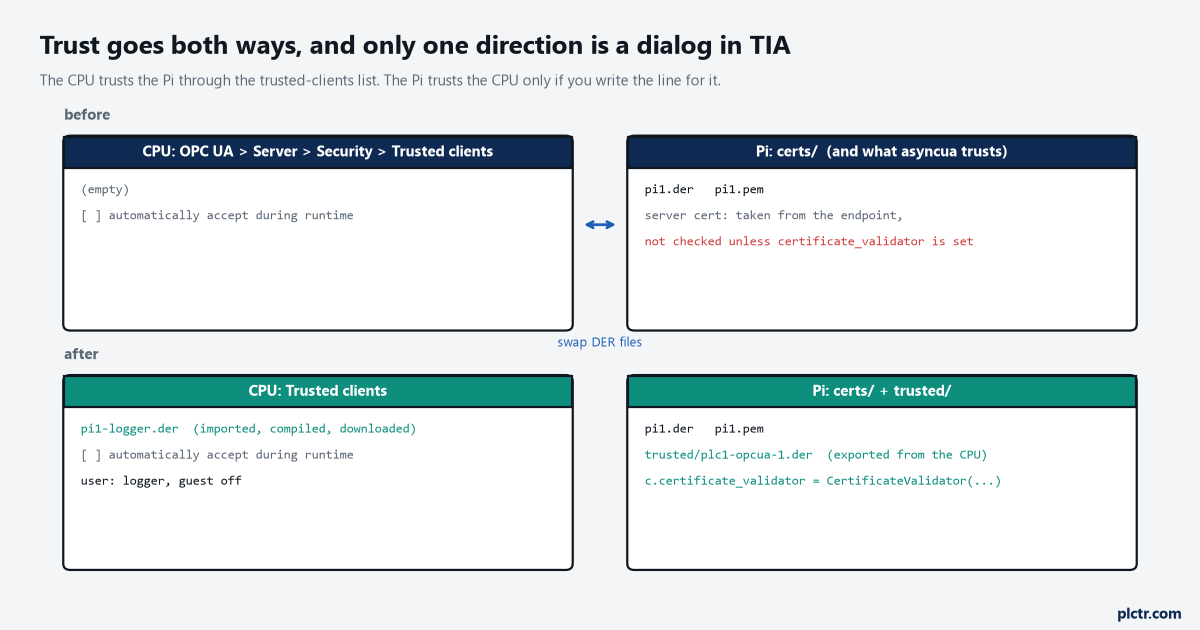
The CPU trusting the Pi is a list in TIA. The Pi trusting the CPU is a line you have to write; without it the client accepts whatever certificate the endpoint offers.
With no server certificate in the security string, the client believes whatever the endpoint hands it.
set_security fetches the server’s certificate from the endpoint and uses it, and does not compare it with anything. The manual’s picture of this step is a dialog in the OPC Foundation’s sample client – “the client user decides whether the server certificate is to be trusted” and clicks Yes – and asyncua has no dialog, so its default is yes. For a logger on a flat cell network that is a defensible default; for a Pi that will one day be moved to a network somebody else administers, it is the hole an attacker with a laptop and the CPU’s IP would use. The fix is the library’s certificate_validator attribute: build a CertificateValidator with TRUSTED_VALIDATION over a TrustStore pointed at a folder, export the CPU’s server certificate from the local certificate manager in TIA into that folder, and the client will refuse any endpoint whose certificate is not the one you exported. The same validator class is what the loopback server used to refuse the Pi in row 2, run the other way round. Five lines, and they belong in the script from day one because nobody adds them later.
Node ids, and the number you are not supposed to hard-code
"DB_Line".Temp_PV with the quotation marks inside the string is the identifier, and 3 is the namespace index you should not assume.
The manual is specific on both. The identifier is the name of the PLC tag in quotation marks – the quotation mark being the one character STEP 7 forbids in a name, so it cannot collide – and a DB element is the DB name and the element name as dotted components, each quoted. All of a CPU’s tags live in the standard server interface’s namespace, the Siemens URI ending in simatic-s7-opcua, which has index 3 by default, and the same paragraph says the index may change if namespaces are added or removed and a client should therefore request the current index before reading. get_namespace_array() is that request – one round trip at connect, and a next() over the list to find the Siemens entry – and get_namespace_index(uri) does the same with the full URI typed in. A script with ns=3 typed in works on every CPU until the one with a companion specification loaded, where it reads a different namespace’s node with the same string and gets BadNodeIdUnknown – or worse, a value. The other quiet one is a DB element that reads fine from UaExpert and is missing from the Pi: check “Accessible from HMI/OPC UA” on that element, and if the DB is optimized it makes no difference here, unlike the PUT/GET path, because OPC UA addresses by name and the CPU does the layout. OPC UA is the one way into an S7-1500 that does not care about the optimized-block checkbox, and that alone is a reason to prefer it over snap7 on a 1500.
The licence is a runtime licence, and nothing in the CPU checks whether you bought it.
The S7-1200 manual says the server “requires a runtime license to operate” and then shows a drop-down where you declare which one you bought; the S7-1500 manual has a section by the same name. A Pi reading tags from an unlicensed server is a paperwork problem rather than a technical one, and it is somebody’s paperwork.
Next step
Turn None off on the CPU first, before the Pi is even on the network, so that the first connection you make is the secure one and row 1 is where the script starts. Then work down the table: import the DER, create the user, set the two lines. When row 5 prints a number, export the CPU’s certificate to the Pi and add the validator, then swap the CPU’s certificate for a freshly generated one and confirm the client refuses it – that is the test that the validator is doing something. What to do with the value once it arrives, and how often to ask for it, is the OPC UA and MQTT models article and the timestamp article, in that order.