A GET on a CPU 1511 that reads from a CPU 1214C and comes back with ERROR = 1 and STATUS = 8 has almost always been refused by the 1214C, and the 1214C has no code in it to blame. Two settings on the partner decide whether PUT and GET ever return data, and both of them are properties, not program: the “Permit access with PUT/GET communication from remote partner” box under Protection & Security, and the “Optimized block access” attribute on the data block you are pointing at.
Tick the first, untick the second, download the hardware configuration to the partner.
Most of the failures in this article go away before you have written a network.
The rest is about what has to match on the client side, how much one job can carry, what the STATUS numbers are telling you, and one thing PUT does that catches people out on a machine that has been running for a year.
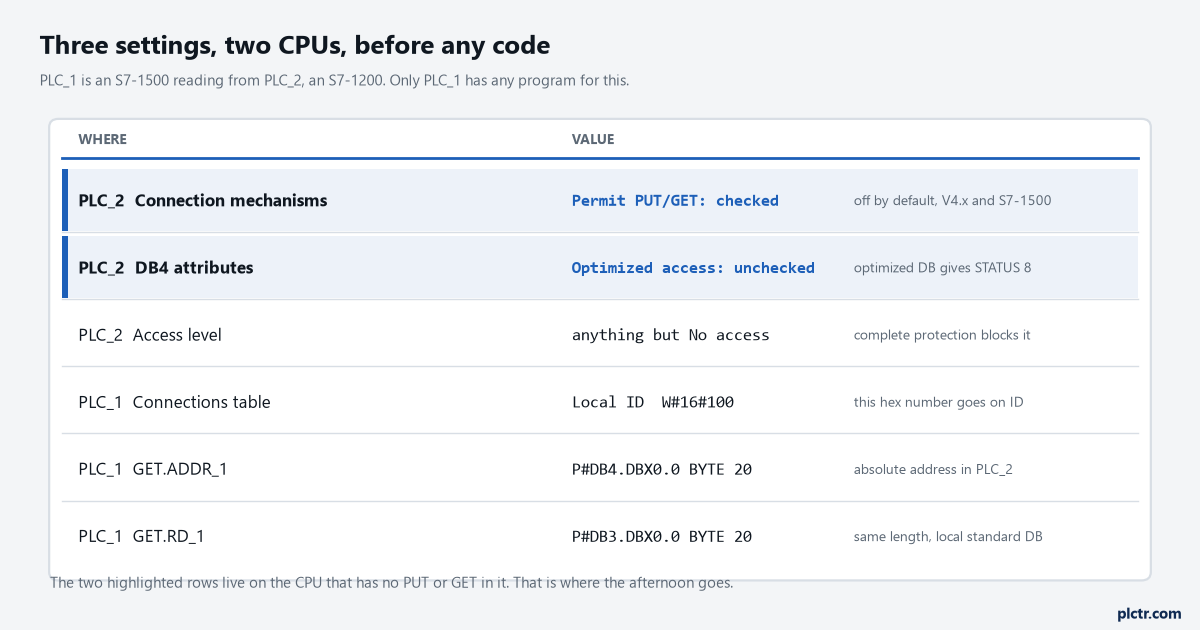
The two highlighted rows are on PLC_2, the server. PLC_2 has no PUT or GET in its program, and that is exactly why people forget it needs configuring.
Which CPU gets the instruction
One of them, and only one. PUT and GET are one-sided instructions: the Communication function manual says you need only an instruction in one communication partner, and the S7-1200 FAQ on the same subject puts it as a server-client principle, with the connection not needing to be configured on both sides. The CPU with the instruction is the client; the other one is a server that answers reads and writes into its own memory without knowing or caring. Put the instructions on the S7-1500. It has the connection resources, it has the faster scan, and the S7-1200’s job limits are the tighter ones, so a 1200 acting as client is the side that runs out of room first. A CPU 1511 has 128 connection resources at the station level with 10 of them reserved; an S7-1200 has 8 reserved for S7 communication and can borrow up to 14 from a pool of 34 dynamic resources that HMIs, the web server and OPC UA are also drawing from. That pool is the number to watch on a 1200 that already has two panels on it, because the third panel and your GET are competing for the same 34.
The partner can be in RUN or STOP. The GET table in the S7-1200 manual says so in as many words.
It matters more than it looks: a GET that keeps returning NDR proves the partner is powered and reachable and nothing more. If you want to know the partner’s program is running, read a counter it increments and check the value moves.
The two settings on the partner
Permit access. Select the partner CPU in the device view, Properties, General, Protection & Security, Connection mechanisms, and tick “Permit access with PUT/GET communication from remote partner”. On an S7-1200 at firmware V4.x and on every S7-1500 the box is clear by default. The S7-1200 manual is explicit that with the box clear, PUT/GET access from other S7 CPUs is not possible during operation, and neither is HMI access through PUT/GET, which is why a panel that talks to the same CPU without complaint is not evidence that the box is ticked — modern panels do not use it. Download the hardware configuration after ticking it; the setting lives in the configuration, not in a block.
The access level on the same page has to be something other than “No access (complete protection)”. The manual lists that as step one and the tick box as step two, in that order.
Then download the hardware configuration to the partner, not only its program.
Optimized block access. Open the DB you intend to read from or write to, Properties, Attributes, and clear “Optimized block access”. The application example for exactly this pairing, entry 82212115, does this for both DB3 SendData and DB4 RecvData on the client as well, because the ADDR pointer is an absolute address and an optimized DB has no absolute addresses. The S7-1200 manual says the same in three bullets: absolute addresses only in ADDR_x, a standard DB only on the remote side, and no access at all to an optimized DB in a remote S7-1200.
Clearing that attribute on a DB that already holds values is not free. The DB gets a new layout, and the next download reinitialises it from its start values. On a running machine that is the same trap as any other interface change, and the download without reinitialization rules apply — take a snapshot of the actual values into the start values first, or move the exchange data into a fresh standard DB and leave the working DBs alone. The second is what I would do on anything that has been in production for more than a week.
What the client needs
The connection first. Drop a GET into an FB, select it, and the Configuration tab in the inspector window offers the connection parameters: pick the partner end point from the drop-down, and STEP 7 creates the S7 connection and fills in the interfaces, the subnet and the addresses. The Connections table under Devices & networks then shows it with a Local ID, and that hex number is what goes on the ID pin. The manual is blunt that ID is a numerical expression such as W#16#1, not a connection name. Change the number on the block by hand and one of two things happens: if the new ID belongs to an existing connection you have re-pointed the block, and if it does not, STEP 7 quietly creates a second connection. That is how a project ends up with S7_Connection_1 and S7_Connection_2 to the same partner, one of them never downloaded, and a GET that returns STATUS 1 while the other block on the same CPU works.
Then the pointers, which is the other place a typing slip costs an hour. ADDR_1 is the area in the partner, written as an ANY pointer:
ADDR_1 := P#DB4.DBX0.0 BYTE 20     // partner: DB4, byte 0, 20 bytes
RD_1   := P#DB3.DBX0.0 BYTE 20     // local:   DB3, byte 0, 20 bytes
The number after BYTE is the count, and the manual’s rule is that the length and the data types of ADDR_x and RD_x or SD_x must match. Twenty bytes at one end and twenty-two at the other is STATUS 4. The local side may be symbolic on a 1200 — RD_x and SD_x accept either — but if you point it at a DB with an absolute address, that DB has to be standard access too, which is the second reason the application example unticks the attribute on the client’s own blocks.
Bool is allowed as a single bit and nothing more. Pack flags into a Word and send the Word.
One job at a time
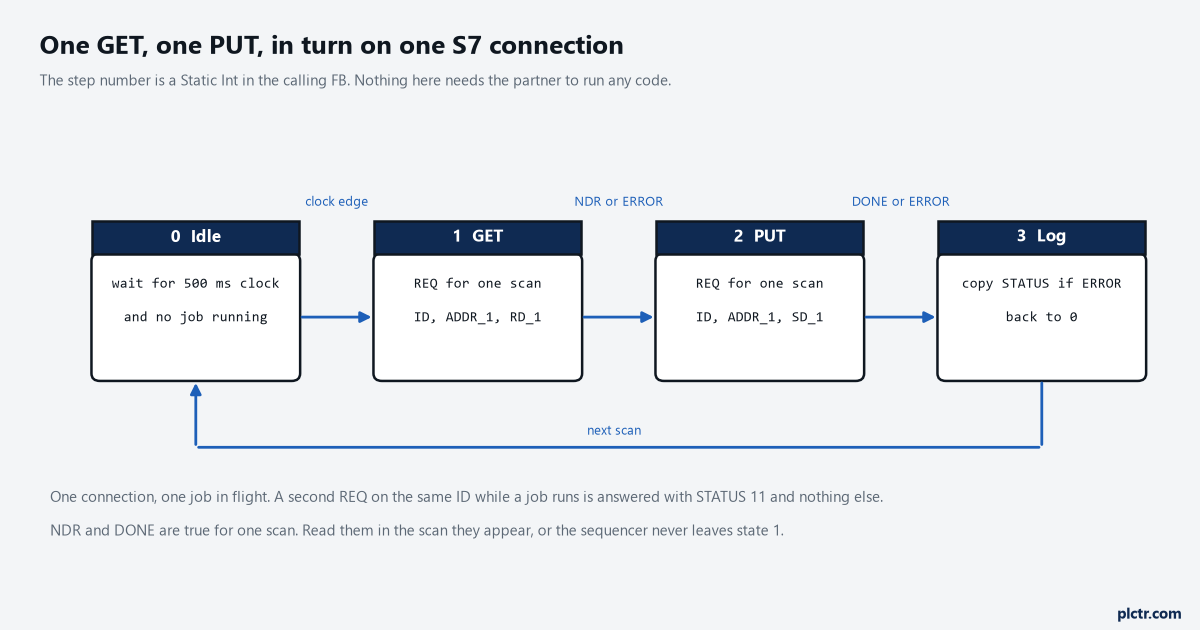
Two instructions on the same connection ID, called in turn. The step number is a Static in the FB, and the whole thing lives on the S7-1500.
The FAQ for the S7-1200 states the rule without hedging: only one job at a time can be triggered by GET and PUT over a configured S7 connection, and the instructions can only be called sequentially, the next job triggered when the previous one is complete. Its example program reads 400 bytes and writes 240 through a sequencer in FB111 for that reason, one GET after another, each one’s REQ reset when the block reports NDR or ERROR. Drive REQ from an edge, not a level. It is edge-triggered anyway — a low to high signal starts the operation — but a REQ held true makes the block look dead when a second instance shares the connection, because every scan the sequencer is not expecting an edge is a scan in which nothing happens.
A job in flight and a second REQ on the same ID gives STATUS 11 and nothing else.
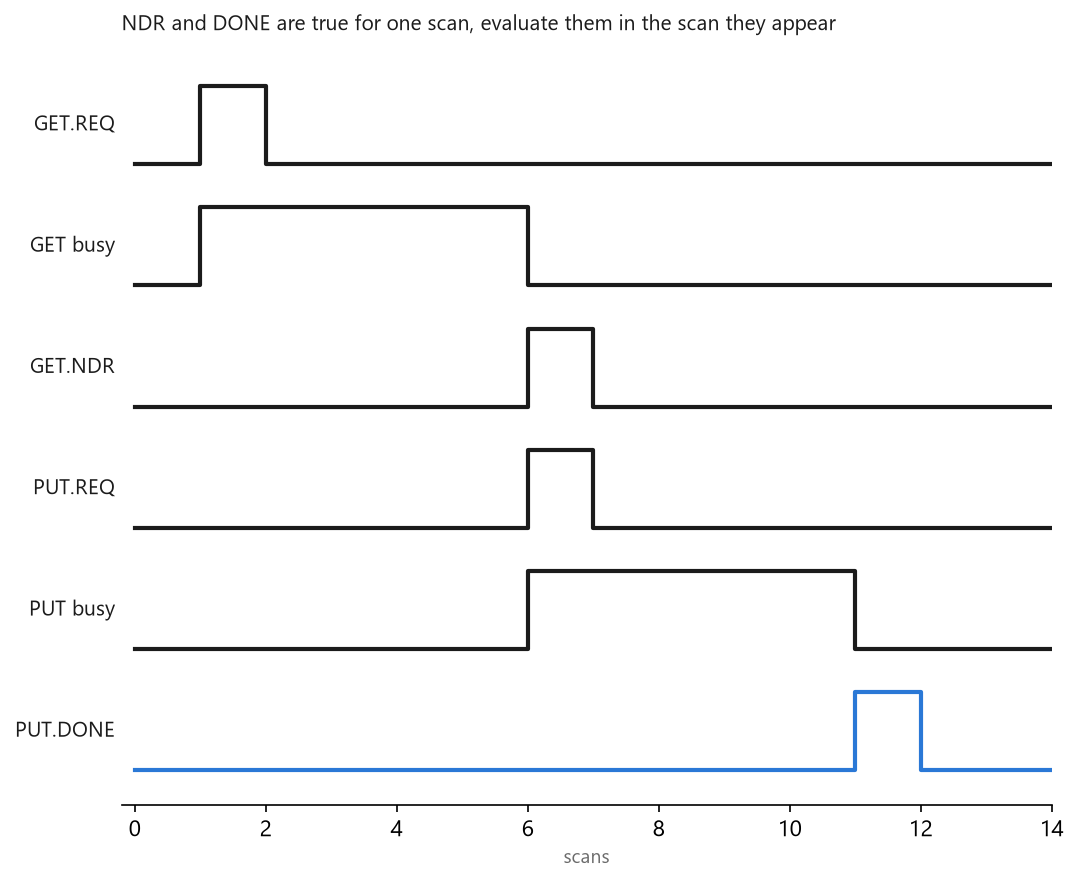
NDR and DONE are true for one scan only. Evaluate them where they appear or you will wait forever for a bit that has already been and gone.
NDR on a GET, DONE on a PUT, ERROR and STATUS on both: the S7-1200 FAQ notes they are only valid in the same cycle. So the step logic that evaluates them has to run in the same block, after the call, every scan. A sequencer written in SCL for the FB above is short:
CASE #step OF
  0: IF #clock_500ms AND NOT #busy THEN #step := 1; END_IF;
  1: #get_req := TRUE;  #step := 11;
  11: #get_req := FALSE;
      IF #get_ndr OR #get_err THEN
        IF #get_err THEN #last_get_status := #get_status; END_IF;
        #step := 2;
      END_IF;
  2: #put_req := TRUE;  #step := 21;
  21: #put_req := FALSE;
      IF #put_done OR #put_err THEN
        IF #put_err THEN #last_put_status := #put_status; END_IF;
        #step := 0;
      END_IF;
END_CASE;
The GET and PUT calls come after the CASE, with #get_req and #put_req on their REQ pins and the outputs written back to the Statics the CASE reads. Note the status is copied only on an error, because STATUS on a good job reads 0 and would overwrite the number you wanted to see. How often? A GET per 500 ms on a machine-to-machine link is comfortable. Every scan is not: a 1200 servicing a request every couple of milliseconds from a 1500 is spending its communication load on you, and that load is capped in the CPU properties by the cycle load from communication percentage. If the 1200 starts missing its cycle time, that setting and your REQ rate are the first two places to look.
How much one PUT and GET job carries
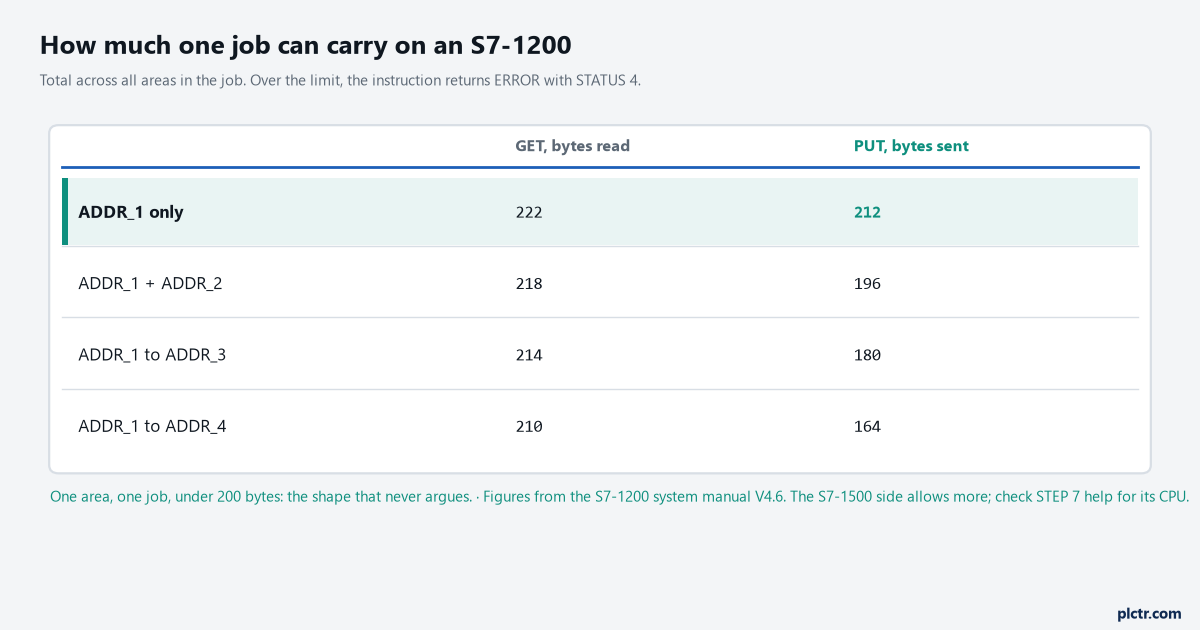
The four-area limits are lower because each extra address area costs header space. One area per job keeps the arithmetic out of the design.
The S7-1200 manual publishes the limits for its own GET and PUT, and they fall as you use more of the four address areas: 222 bytes for a GET and 212 for a PUT with ADDR_1 alone, down to 210 and 164 with all four in use. Exceed them and the instruction returns an error rather than truncating.
The S7-1500’s own figures are larger, and I am not going to quote a number I could not find in the 11/2025 Communication manual — it is in the STEP 7 online help for the instruction on your CPU. Design to the 1200’s numbers regardless. The 1200 is on one end of the link, and 200 bytes is 50 Reals, which is more than most machine-to-machine handshakes need in one go. If it is not, split by function: one job for the recipe, one for the status word and counters, one for the alarm bits packed into Words. There is a second limit on the S7-1500 that has nothing to do with the instruction and everything to do with how the data lands. When a 1500 is the server, the Communication manual says there is no instruction that can coordinate the transfer in its user program, the data updates while the program is running, and there is no point in the cycle at which the data is exchanged consistently. It asks for transfer areas smaller than 512 bytes and offers UMOVE_BLK on the receiving side to copy into a working area consistently. A PUT of 20 bytes can still land with the first 16 written before the server’s scan and the last 4 after it, and the server’s program will run one cycle on a Real whose high word is new and low word is old.
If a value must arrive whole, put a sequence number at the start of the block and repeat it at the end, and have the server copy the block only when the two agree. Four bytes and one compare.
Reading STATUS
STATUS is documented in decimal in the S7-1200 manual and shows as a hex Word in a watch table, so 11 is 16#000B on the screen. The numbers that come up in practice:
| ERROR | STATUS | The manual says | What it usually is |
|---|---|---|---|
| 0 | 11 | New job cannot take effect since previous job is not yet completed | A second REQ on the same ID while a job is running |
| 0 | 25 | Communication has started, the job is being processed | Normal, seen for a few scans on the first call |
| 1 | 1 | Communications problems: connection description not loaded, connection interrupted, connection to partner not yet established | Connection not downloaded, wrong ID, partner off, wrong subnet |
| 1 | 2 | Negative acknowledgement from the partner device | The partner answered and said no; check the permit box and the access level before anything else |
| 1 | 4 | Errors in the send area pointers involving the data length or the data type | ADDR and RD/SD lengths differ, or the job is over the byte limit |
| 1 | 8 | Access error on the partner CPU | Optimized DB, DB does not exist, pointer runs past the end of the DB |
| 1 | 10 | Access to the local user memory not possible | The local DB has been deleted or never downloaded |
| 1 | 20 | Maximum number of parallel jobs or instances exceeded, or instances overloaded, possible on first execution | Too many instances on one connection, ignore it once, worry if it stays |
STATUS 8 is the one worth memorising, because it points at the wrong CPU. The instruction is on the client, the error came from the client, and the fix is on the server: a DB attribute, a DB number that does not match, or a pointer that asks for 20 bytes from a DB that has 16. That last one is worth checking against the partner’s own diagnostics as well — a pointer past the end of a standard DB is an area length error on a 1500 server, and the buffer will say so. The dead end is STATUS 1 after everything has been checked twice. More often than not the connection was created a second time when somebody edited the ID on the block, and the one the block now names was never downloaded. Open the Connections table, look at which connections show a local ID matching the pin, and download the hardware configuration to the client, not just the program.
When not to use it at all
Siemens says this itself, in the chapter that documents PUT/GET: S7 communication is vendor-specific, it is used for migration and for connecting to existing systems, and for data transfer between two S7-1500 systems the recommendation is open user communication. TSEND_C and TRCV_C need code on both ends and give you a receive block that knows when data has arrived, which is precisely the consistency PUT cannot offer. A 1500 talking to a 1200 with a full program on both sides is a candidate for that too. PUT/GET earns its place when the other end cannot or will not run code for you: a machine from another supplier whose program you may not touch, a CPU 315 that only speaks this, a 1200 doing a small job where one tick box is all the integration anyone will fund. That is a lot of installations. It is also a CPU that any S7 client on the network can now read and write, which is what that tick box means, and the reason the default is off.
If you are doing the same job between two ControlLogix controllers, the answer there is produced and consumed tags, and it fails in different places.
What to check first
Before a single network: on the partner, Protection & Security, Connection mechanisms, tick the box; on the partner, the DB you will read, Attributes, clear optimized access; download the hardware configuration to the partner. Then on the client, one GET, one area, twenty bytes, REQ from a one-second clock, STATUS to a watch table. Get that to NDR before you write the sequencer, and add the PUT only when the GET has run clean for ten minutes.