Two routines both end on an OTE for Local:3:O.Data.2, and the valve on that channel buzzes at whatever rate the continuous task happens to be running that shift. The Studio 5000 cross reference on that one tag names both routines in about four seconds, and it is the window a surprising number of people have never opened.
Here is the whole method, and the rest of this is why it works. Right-click the tag anywhere it appears, choose Cross Reference, and read the list. Every place in the project that touches the tag comes back, and the only thing you have to do with your own head is separate the entries that change the tag from the entries that merely look at it. Two entries that change the same output is a bug in almost every case, and it is behind a large share of the “the output flickers” calls.
None of this needs a connection you do not already have to go online.
Written against Studio 5000 Logix Designer v36, on a 1756-L83E with 1756-OB16D output modules. The instruction behaviour comes from 1756-RM018, the scan and I/O behaviour from 1756-PM004 and 1756-PM005.
What the Studio 5000 cross reference counts as writing the tag
The distinction you are filtering for has a plain definition: does the instruction change the tag, or does it only examine it?
An XIC and an XIO read a bit and change nothing. An OTE, an OTL and an OTU all change it. So does the destination operand of a MOV, a COP or a CPS, an accumulator loaded by an ADD, a timer’s .PRE written by a MOV, and any Add-On Instruction output parameter wired to the tag. Studio 5000 separates the two kinds for you in the listing, and the labels have moved between versions, so read it by the instruction and the operand position rather than trusting a column heading you half remember.
The operand position is the tell here, not the instruction name.
The one that fools people is the timer, because a timer is a structure and not a bit. Conveyor_Jam.DN looks like an output of the TON, and reading it is harmless. Conveyor_Jam.ACC is a member somebody can and does write with a MOV from another routine, and when that happens the timer stops meaning what the rung says it means. 1756-RM018 puts a general warning against exactly this pattern next to the output instructions: unexpected operation may occur if output tag operands are overwritten, or if members of a structure operand are overwritten.
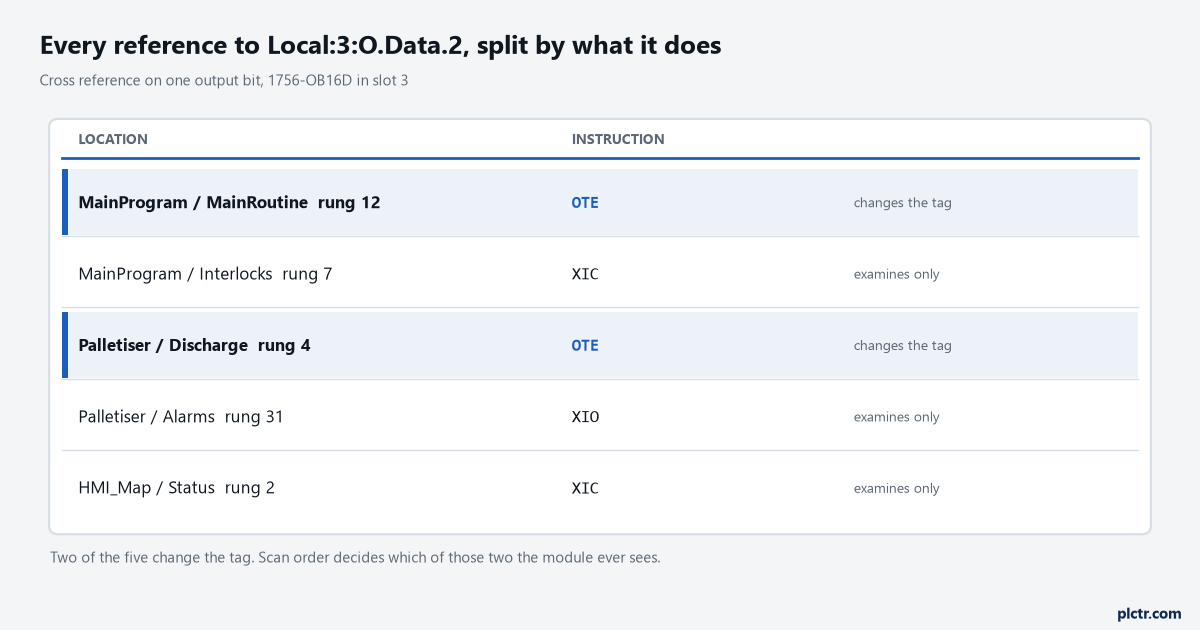
Four references, two of which change the tag. Rung 12 of MainRoutine and rung 4 of Palletiser both drive the same output bit, and neither author knew about the other.
Why the second OTE always wins
An OTE does not only turn a bit on.
Read the execution table in 1756-RM018 and there are three rows, not one. On prescan the data bit is cleared to false. With rung-condition-in true the data bit is set to true. With rung-condition-in false the data bit is cleared to false. That last row is the whole problem: an OTE writes the tag on every single scan, in both directions, whether its rung is doing anything interesting or not. So when two OTEs hold the same tag, the one that executes later in the scan simply overwrites whatever the earlier one decided. The earlier rung is not ignored — it runs, it writes, and then it is thrown away microseconds later. Which of the two wins depends on execution order, and that order has three levels to it: a Logix 5000 controller runs one task at a time and another task can interrupt the one that is running; within any task only one program runs at a time; and within a program the routines run in the order the JSR instructions call them. The continuous task never wins an argument about priority, because it has no priority assigned and everything else interrupts it.
OTL and OTU behave differently and that difference matters when you are reading the list. An OTL sets the bit and, when its rung goes false, leaves it exactly where it was. So a latch in one routine and an OTE in another is not a fair fight at all: the OTE clears the bit every scan its rung is false, and the OTL only ever sets it.
That pairing gives you an output that latches on and then refuses to stay on.
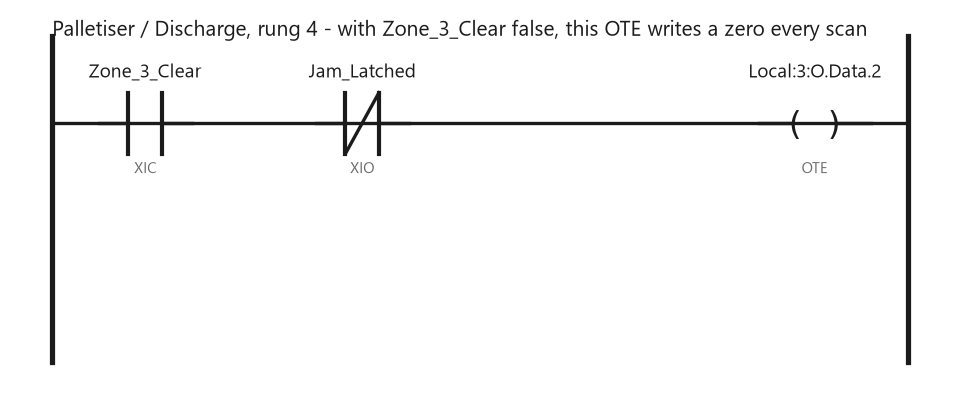
Nothing on this rung looks like it is doing harm. With Zone_3_Clear false, the OTE writes a zero to the output every scan, which is enough to cancel what any earlier rung decided.
Why “the output flickers” is usually not the output
This is where a lot of afternoons go, and the fix is nearly always upstream of where people start looking.
The first move is almost always to swap the output module or the field device, and it is almost never the cause. What is happening instead is arithmetic. I/O values on a Logix 5000 controller update at a period you configure in the I/O configuration folder, and 1756-PM004 is explicit that the update is asynchronous to the execution of logic — at the specified interval the controller updates the value independently of what the logic is doing. It takes whatever is sitting in the tag the instant its RPI comes around. A bit that gets set on rung 12 and cleared on rung 400 of the same scan may reach the terminal as a pulse, as nothing at all, or as an on state, depending entirely on where the RPI lands relative to those two rungs. Change the continuous task load and the pattern changes with it, which is why the symptom moves around after an unrelated edit and why it is so often blamed on hardware.
The output module never gets to see the end of your program scan.
There is a separate piece of task behaviour worth knowing about here.
At the end of a task the controller performs output processing for the I/O modules in the system, and 1756-PM005 notes that while this is not the same as updating the modules, it can affect that update. You can turn it off per task with the Disable Automatic Output Processing To Reduce Task Overhead checkbox in the task properties, which reduces the elapsed time of the task. Somebody optimising scan time two years ago may have ticked that box on the task your output lives in, and that is one more variable between the rung you are reading and the LED you are watching.
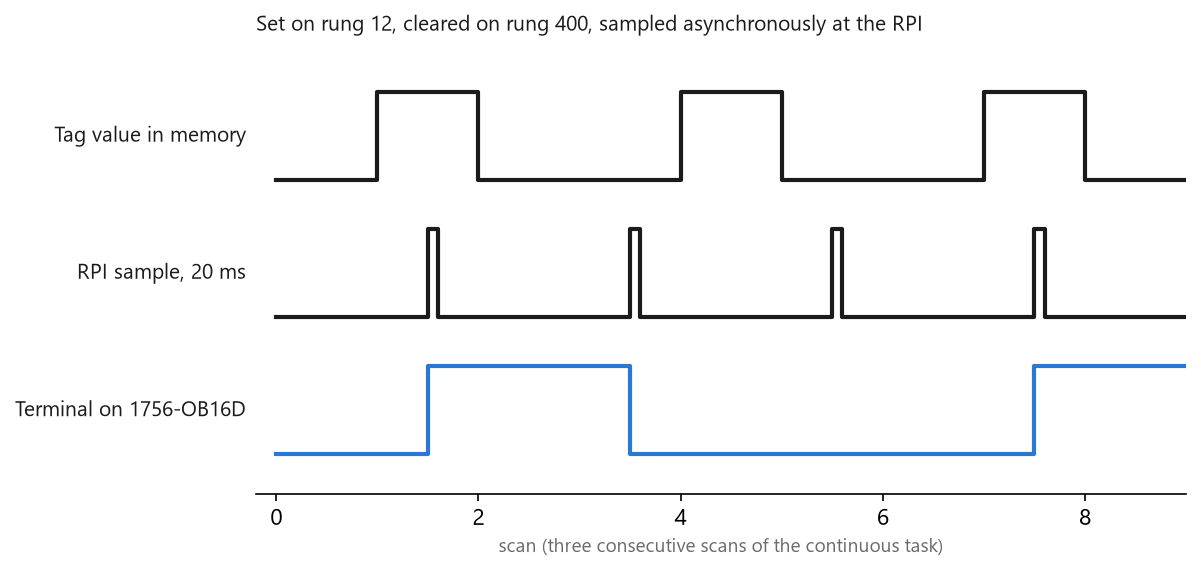
Same logic, three consecutive scans, one 20 ms RPI. The terminal sees a one, then a zero, then a one, and nothing in the program changed between them.
Aliases change what you are searching for
An alias tag and its base tag share one value. Cross-referencing one name does not automatically show you what was done under the other, and that is the single most common way a write hides.
The route to the base tag is Search > Go To with Base Tag chosen in the Go to what list, which 1756-PM004 describes as the convenient way to find a base tag among the cross-reference records. Run the cross reference on both names. If the program uses aliasing seriously, expect three or four names for the same bit and cross-reference every one of them before you conclude anything. There is a second reason to care, and it is a smaller one that still eats an hour. You can only change the external access setting of an alias tag through its base tag, and the External Access list is unavailable when the selected tag is an alias. So a tag that an HMI cannot write, viewed through its alias, gives you no clue at all about why — the answer is on a different row of the tag editor.
What a protected routine will and will not tell you
Source protection changes the answer, and in a direction that surprises people the first time.
1756-PM016 sets out what happens when the license does not carry View permission. Cross reference information is still displayed for items referenced inside a protected component, so you can see that something in there touches your tag — you simply cannot navigate to the line. Double-clicking gives you a status bar message saying the source is not available, and the Go to Location menu item is unavailable.
Then the sentence that catches people: Find does not search locked components even when a View license is present.
So a text search across the project can come back clean while the cross reference on the same tag shows a reference inside a protected Add-On Instruction. If you have been using Find rather than cross reference to answer “what else touches this”, that is a hole you did not know you had, and it is exactly the sort of program where somebody’s vendor-supplied AOI is quietly driving an output.
Reading it on a program you did not write
On a project with four thousand tags the list comes back long, and the only way through it is to narrow before you read.
Three things collapse the list fast. Start at the tag scope: a program-scoped tag can only be referenced from inside its own program, so half the project is eliminated before you begin, while a controller-scoped tag genuinely can be touched anywhere. Then take the writes only and ignore the reads, because a hundred XIC references on an output tag tell you nothing about who set it. Then sort what remains by program and look at the ones you have never heard of first, since the routine you wrote last week is rarely the one arguing with you. Two writers to a real output is a design decision somebody has to make, not a bug you can delete your way out of. Either one routine owns the output and everything else sets a request bit, or the two routines are genuinely mutually exclusive and you prove it. The first is the version that survives, and the extra line of ladder it costs you buys the next person a cross reference with one destructive entry in it instead of two.
One owner per output, and the whole argument goes away permanently.
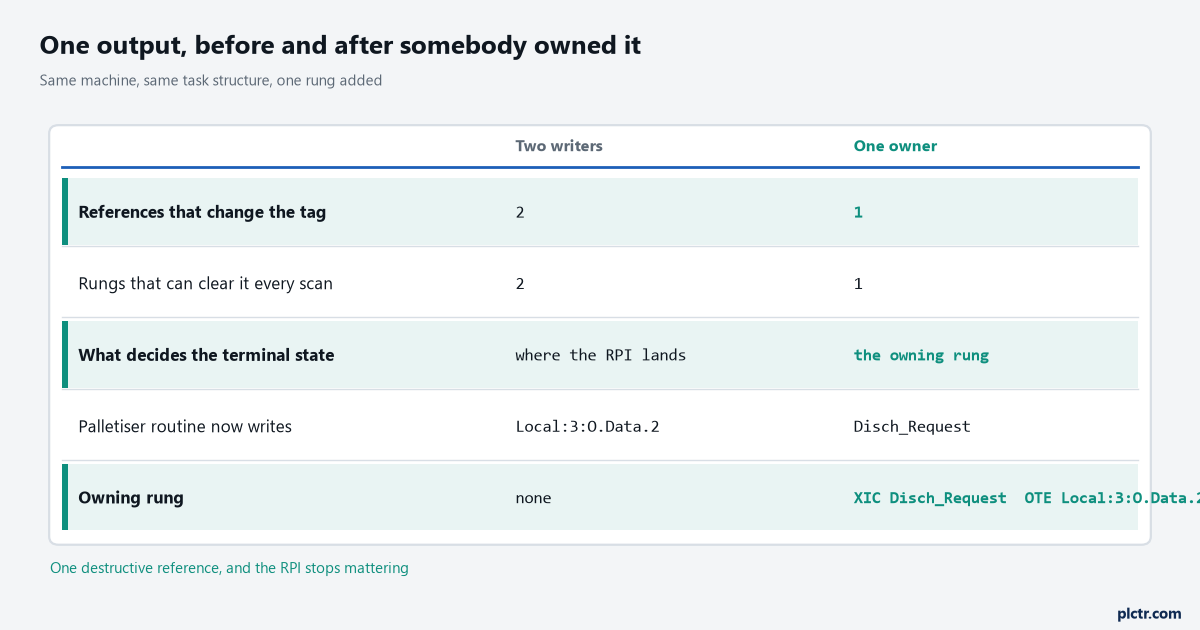
The left column is what a cross reference on a fought-over output looks like. The right column is the same machine after the palletiser routine was changed to set a request bit that the owning rung reads.
Next
Pick the tag whose behaviour you cannot explain, cross-reference it, and count the entries that change it. If there is exactly one and the symptom is still there, the problem is not who writes the tag and you can move on to rung-by-rung ControlLogix troubleshooting. If the tag is an alias, do the cross reference again on the base tag from the tag editor before you decide. If the value in the tag looks right and the terminal disagrees, check the front panel for a force somebody left installed, and then look at the RPI against your scan time — the article on scan time and cycle time has the measurement, and XIC and XIO in ladder is the place to start if any of the instruction behaviour above was new.