Force drill_1_depth_limit on a 1756-IB16 in slot 2 and you have forced Local:2:I.Data.3, because an alias tag and its base tag share one value in one place. Remove the force through either name and it leaves both, which is convenient when you know the alias exists and a genuinely bad afternoon when you do not. That sharing is the whole of what Studio 5000 alias tags are, and it decides everything else. An alias costs no memory of its own, never goes stale, and never disagrees with the thing it points at. It also means two names now reach the same bit, so anybody searching the project has to know both, and any tool that answers a question about one name answers it about one name only.
Written against Studio 5000 Logix Designer v36 on a 1756-L83E. The behaviour comes out of 1756-PM004, with two specific points from 1756-RM094 and 1756-RM100.
An alias against a copy
The alternative people reach for is a MOV or a COP into a second tag, and it behaves differently in a way that matters more than it looks. A copy makes a genuinely separate value. It is correct only until the next time the source changes, and it is refreshed once per execution of whatever rung does the copying, which means it is one scan behind at best and much further behind if the copying rung lives in a program that is conditionally called. The two values can and do disagree, and when they do, half your HMI is showing one and half your logic is acting on the other. An alias cannot do that. There is one value, one address, and both names are windows onto it — 1756-PM004 puts it as plainly as it can be put, both tags share the same value, and when the value of one of the tags changes the other reflects the change as well.
That difference has a cost you should want, not one you should avoid.
A copy is what you use deliberately when you want a value to hold still. Buffering an input at the top of a routine so that four rungs all see the same state is the standard example, and 1756-PM004 recommends it precisely because I/O updates asynchronously to the execution of logic and an input referenced at the beginning of a task can be different when referenced later. An alias would defeat that on purpose. So the two are not competing: the alias is for naming, the copy is for freezing.
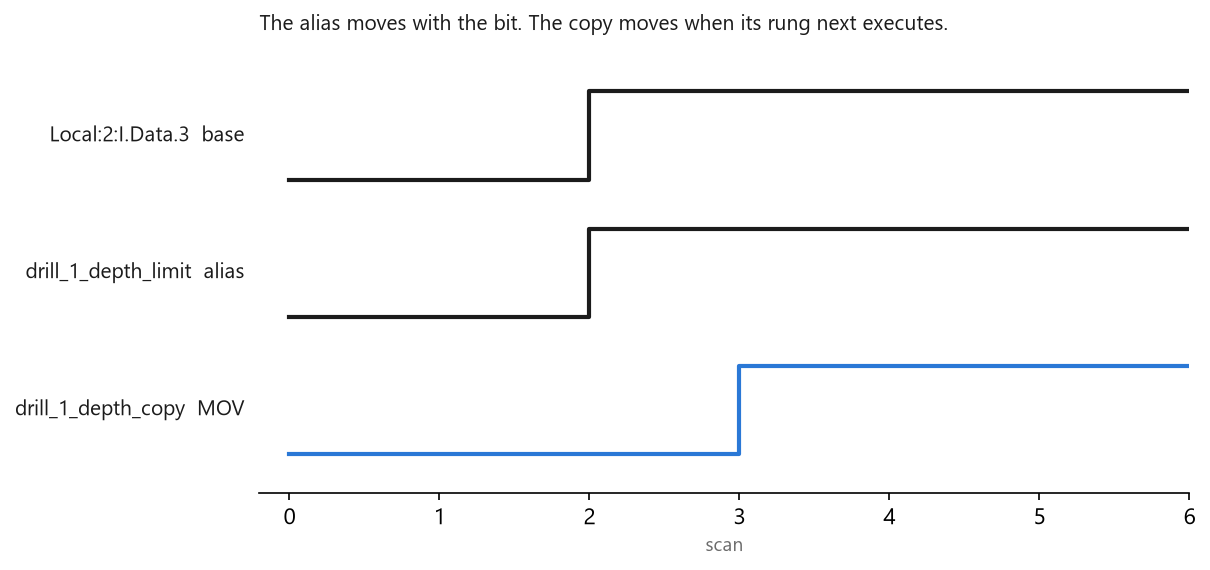
The alias changes on the same scan as the base because there is nothing to change — it is the same bit. The copy moves on the next execution of the rung that copies it, and everything reading the copy is wrong until then.
One name, one bit, and no arithmetic between them anywhere.
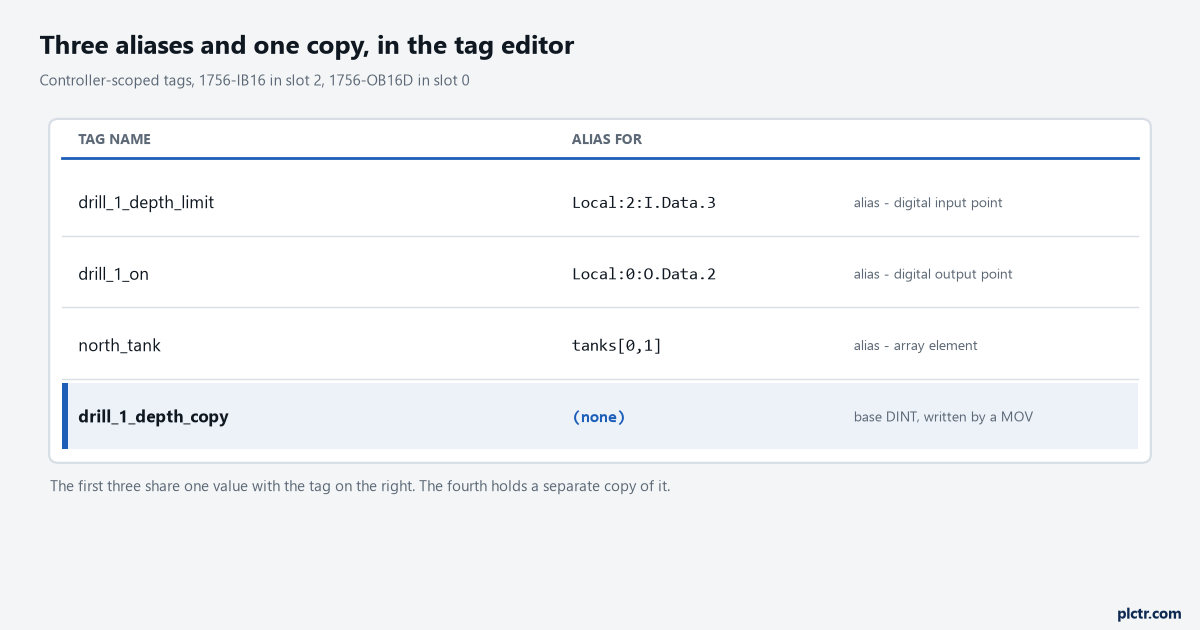
The first three rows share their value with the base tag on the right. The fourth is an independent DINT that happens to hold the same number right now, which is a different thing entirely.
Where Studio 5000 alias tags earn their keep
1756-PM004 lists four uses, and one of them is a working method rather than a feature.
The method is programming in advance of the wiring diagrams. Create a tag with a name that describes the device — conveyor for the conveyor motor — write and test all your logic against those descriptive names, and then, when the drawings finally show up, add the modules to the I/O configuration and convert the descriptive tags to aliases for their respective I/O points. The logic never changes. Nobody has to find and replace 400 references, and the testing you did before the panel was built still stands. The other three uses are more ordinary and still worth having: a descriptive name for an I/O device, a simpler name for a complex tag, and a descriptive name for an element of an array. north_tank as an alias for tanks[0,1] reads better than tanks[0,1] on every rung it appears on, and it costs nothing at run time.
Turn on the display option before you go any further.
Tools > Options, expand Ladder Editor, choose Display, and tick Show Tag Alias Information. From then on the editor shows you, on the rung, which base tag each alias points at. Working on an aliased program with that box unticked is the source of more confusion than the aliases themselves, because the rung shows you a friendly name and gives you no hint that there is anything behind it. Assigning an alias is done from the other direction: right-click Controller Tags, choose Edit Tags, and fill in the Alias For cell on the tag’s row.
Two minutes of setup that changes how the whole program reads.
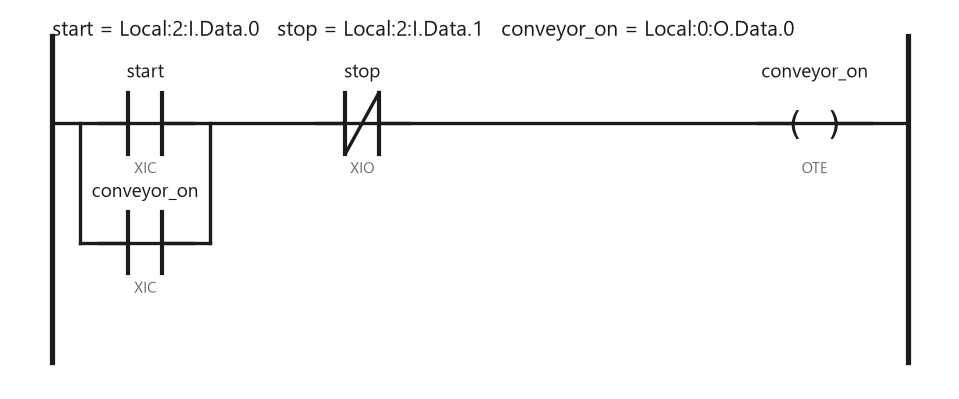
The same rung reads two ways depending on one checkbox. With alias information off, nothing here tells you that stop is an input bit in slot 2 rather than an internal flag somebody sets in another routine.
What an alias does to a search
This is the half of the subject nobody warns you about until it has already cost you.
A cross reference answers a question about a name. Run it on conveyor_on and you get every reference to conveyor_on; run it on Local:0:O.Data.0 and you get every reference to that. The two lists are not merged for you, and neither one is wrong — they are answers to two different questions about one bit. In a program where three generations of engineers each added their own aliases, a bit can carry four names and the honest answer to “what touches this output” is the union of four cross references, which nobody has time for unless they know to look. There is a command that helps. Select the alias in the Tag Editor, then Search > Go To, and choose Base Tag from the Go to what list. 1756-PM004 describes that as the convenient way to find a base tag among the cross-reference records, and it is the fastest route from the friendly name to the address that actually lands on a card. The same applies to forces, and there it is worse, because a force is invisible unless you are looking at the right name. Forcing an alias tag also forces the associated base tag, and removing a force from an alias removes it from the base. So the force installed on drill_1_depth_limit
Local:2:I.Data.3 today, the routine you are staring at may never mention either name, and the front-panel indicator will tell you a force exists without telling you where.Two things an alias will not let you do
Both are small and both waste an hour the first time.
An alias cannot carry its own external access setting. The External Access list is unavailable when the selected tag is an alias, and 1756-PM004 says you can only change the external access setting of an alias tag through its base tag. So when the HMI cannot write to a tag and the tag’s own properties give you nothing to change, you are looking at an alias and the answer is on a different row. And extended properties do not survive the trip into logic. 1756-RM094 states it in one line among its guidelines for extended tag properties: alias tags with extended properties cannot be accessed in logic. If you have built limits or engineering units into a scheme and expect to read them from a rung, an alias in the path breaks it.
The upload, and where the fidelity used to break
This one is worth knowing if you support older hardware, because it decides whether an upload is a backup or an approximation.
An upload from a 5570 is a recovery, not a copy.
1756-RM100 documents the change under the heading Upload Fidelity Change. On the 5580 controllers, projects that contain program parameters and aliases are now consistently reproduced on upload, and the uploaded ladder diagram source code is an exact replica of what was downloaded. Then the sentence that matters: this was not the case in 5570 controller ladder diagram subroutines which referenced aliases or program parameters. So if the only copy of a program is an upload from a ControlLogix 5570, and that program leans on aliases, what you have is close to the original rather than identical to it. Treat it as a recovered file, verify it against the machine, and do not assume the diff you see against an old ACD is somebody’s undocumented edit.
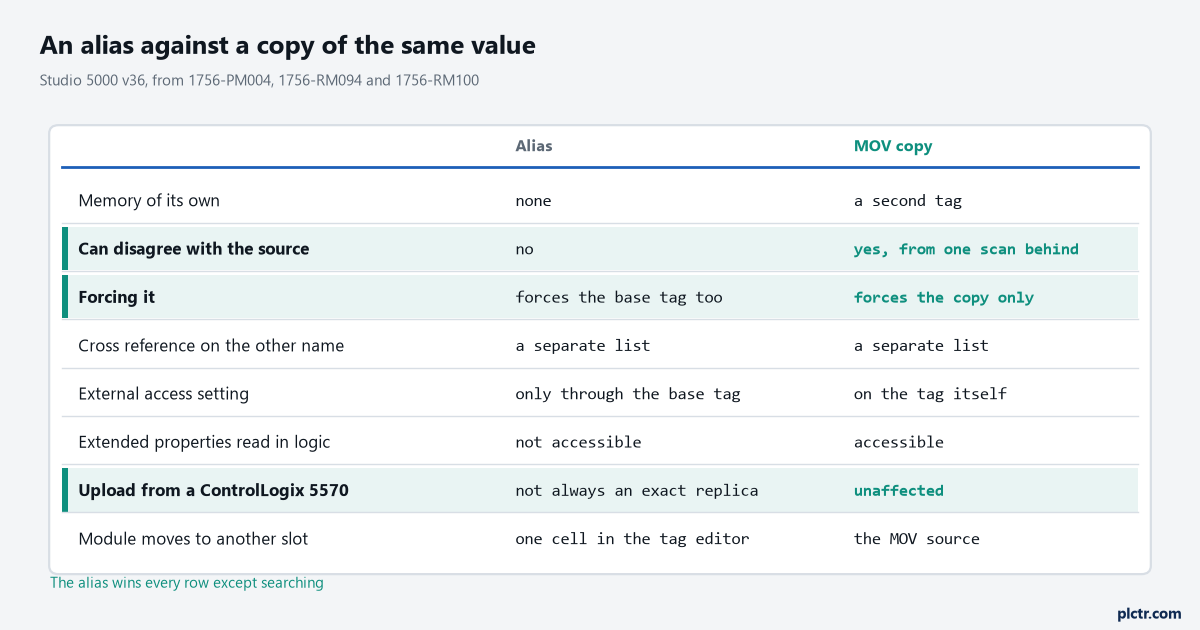
Five of the six rows favour the alias. The row that does not is the one about searching, and it is the row that costs the most time on a program you did not write.
When the module moves slot
An I/O tag name is built from where the module physically sits, which is a fact with teeth. 1756-PM004 spells the format out: the name of the tag is based on the location of the module in the system, and the Slot field in that name is the slot number of the I/O module in its chassis or DIN rail. So Local:2:I.Data.3 carries a slot number in it, and moving that 1756-IB16 from slot 2 to slot 4 changes the name of the base tag your alias was pointing at. This is, honestly, an argument in favour of aliasing rather than against it. The logic that references drill_1_depth_limit does not care which slot the module is in — the repair is in one cell of the tag editor rather than in every rung that used the raw address. What you do have to do is go and look, because an alias whose base tag no longer exists is a problem you would rather find at your desk than during the restart. Fix the Alias For cells first, then verify the project, then download.
The case against aliasing over a bad tag scheme
Here is where I would push back on how aliases are often used.
An alias renames, and renaming gets confused with organising. If the base tags are Tag_1 through Tag_400 and you put a descriptive alias on each one, the project now has 800 tags, two naming schemes, and no way for the next person to tell which of the two any given piece of documentation is talking about. The HMI will be built against one set and the diagnostics against the other. The cross reference on either name returns half the truth. Every fault message that names a tag will name whichever one that developer happened to be looking at, and the person reading that message at 3am will search for it and find nothing, because the string in the message and the string in the routine are different names for the same bit.
A bad tag scheme wants renaming at the source rather than a second layer laid over it.
One alias per I/O point is the version of this that ages well.
The clean rule is the one 1756-PM004’s own workflow implies: alias from the descriptive name to the physical address, and only there. One alias per I/O point, created for a reason you could write on one line, and never an alias onto another alias. Everything internal keeps the name it was born with. That way the alias set is exactly as long as the I/O list, which is a document the plant already has, and anybody can hold both halves of it in their head.
Next
Open the tag editor on a project you support and sort by tag type. If the alias count is roughly your I/O point count, the scheme is doing its job. If it is three times that, you have a naming problem wearing an alias costume, and the fix starts with tag documentation and program documentation rather than with more aliases. Before you change anything, cross-reference both names — finding every rung that writes a tag covers how to read the result, and the tag editor is where the Alias For column lives. If a bit is behaving as though something is overriding it, check for a force installed through the other name before you rewrite any logic, and if you are building structured names from scratch, UDTs in Logix will do more for you than an alias layer ever will.