Zone 7 is four metres long with a slow transfer, and a long box legitimately sits on its photo-eye for three seconds. Its jam timer had been left at 2000 ms, copied wholesale from the previous project, and the line nuisance-tripped every twenty minutes for a week. Good PLC conveyor control comes down to two decisions: how a zone knows it may run, and how long you wait before calling something a jam. This walkthrough builds a twelve zone accumulation line on a CompactLogix 5380, with the zone logic, the cascade sequencing, the jam timers and the PowerFlex 525 commands over EtherNet/IP.
The line here feeds a palletiser. Zone 1 is the infeed, zone 12 discharges into the palletiser infeed gate.
The line
| Item | This example |
|---|---|
| Controller | 5069-L320ER CompactLogix 5380, firmware 33, Studio 5000 v33 |
| Inputs | 5069-IB16, one diffuse photo-eye per zone, PNP, 24V DC |
| Drives | Twelve PowerFlex 525 on EtherNet/IP, one per zone motor, 0.75 kW |
| Network | Managed switch, device level ring not used, star topology |
| Safety | Pull cord along both sides, dropping the drive safety inputs, separate from this logic |
| Task | Periodic task ConveyorTask, 50 ms, priority 9 |
50 ms is fast enough. A box at 0.5 m/s travels 25 mm per scan. If your product is smaller than that, go to 20 ms, and watch the drive connection RPIs at the same time.
Step 1: Name the zones before you write a line of code
Number from the infeed and never renumber. Zone[1] through Zone[12], one UDT per zone, one array. Put the photo-eye, the drive reference, the jam timer and the state bits in the UDT. The moment you copy and paste twelve near-identical blocks of ladder with hand-typed tag names, the line becomes unmaintainable and the electrician cannot find anything at 3am.
A workable UDT:
| Member | Type | Purpose |
|---|---|---|
PE | BOOL | Photo-eye, true when blocked |
Occupied | BOOL | Filtered version of PE |
RunReq | BOOL | This zone should be driving |
Jam | BOOL | Latched jam for this zone |
Running | BOOL | Drive feedback, actually turning |
JamTmr | TIMER | Jam detection |
Speed_Hz | REAL | Commanded speed |
The array and UDT approach is the same pattern shown in user defined datatype UDT usage examples.
Step 2: Decide the accumulation rule
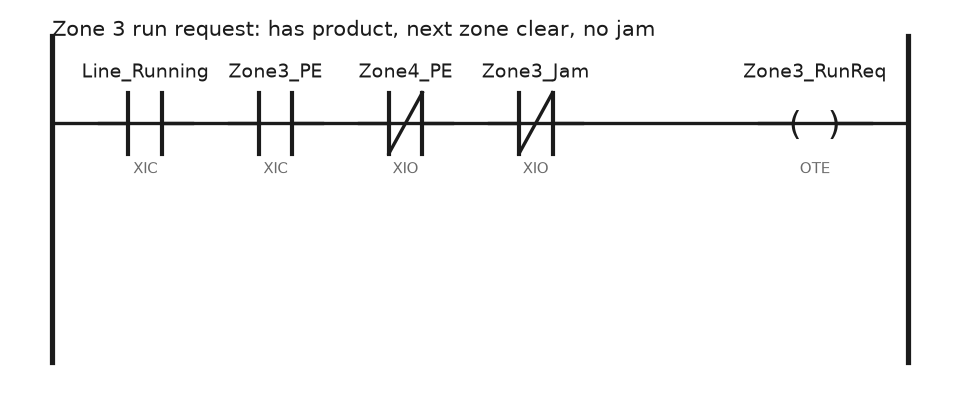
Zone accumulation comes down to one sentence: a zone runs if it has product and the zone downstream is clear.
That single rule gives you a line that fills from the discharge end backwards and stops gently when the palletiser stops, instead of everything crashing into a wall of product. Two things people forget:
- The last zone is special. Zone 12 runs when the palletiser says it may release, not when zone 13 is clear, because there is no zone 13.
- An empty zone between two full ones still has to run to close the gap, or your line becomes a set of isolated islands. Give the zone a short run-on time after the eye clears so the box actually leaves.
Step 3: Write the zone logic once
One routine, one loop, twelve zones.
(* ConveyorTask, 50 ms periodic, routine Zones, Structured Text *)
FOR i := 1 TO 12 DO

    Zone[i].Occupied := Zone[i].PE;

    (* the discharge zone waits on the palletiser, everything else on its neighbour *)
    IF i = 12 THEN
        NextClear := Palletiser_Ready;
    ELSE
        NextClear := NOT Zone[i+1].Occupied;
    END_IF;

    Zone[i].RunReq := Line_Running
                      AND NOT Zone[i].Jam
                      AND NOT Line_EStop_Active
                      AND (Zone[i].Occupied OR Zone[i-1].Occupied)
                      AND NextClear;

    (* jam: commanded to run, eye still blocked after 8 seconds *)
    Zone[i].JamTmr.PRE := 8000;
    Zone[i].JamTmr.TimerEnable := Zone[i].RunReq AND Zone[i].Occupied;
    TONR(Zone[i].JamTmr);
    IF Zone[i].JamTmr.DN THEN
        Zone[i].Jam := 1;
    END_IF;
    IF Jam_Reset_PB THEN
        Zone[i].Jam := 0;
    END_IF;

    (* drive command word, PowerFlex 525 over EtherNet/IP *)
    Drv[i].O.Start      := Zone[i].RunReq;
    Drv[i].O.Stop       := NOT Zone[i].RunReq;
    Drv[i].O.ClearFault := Jam_Reset_PB;
    Drv[i].O.FreqCommand := 3000;        (* 30.00 Hz *)

END_FOR;
Zone[i-1].Occupied in the run condition is the run-on: a zone keeps turning while the upstream zone still has product to hand over. Index 0 has to exist in the array, so declare Zone as Zone[0..12] and leave element 0 as the infeed from the previous machine.
Step 4: Cascade the start and the stop
Do not start twelve drives in the same scan. The inrush trips the incomer, and even if it does not, the product on a full line lurches.
- Start from the discharge end. Zone 12 first, then 11, then 10, one second apart. By the time the infeed moves, everything downstream is already up to speed and there is somewhere for product to go.
- Stop from the infeed end. Zone 1 first, then 2, one second apart. The line empties forward instead of leaving a full zone pressed against a stopped one.
- Drive the cascade from a single counter in the same periodic task rather than twelve separate timers. One
TONRat 1000 ms incrementing a step index is enough. - On an E-stop, none of this applies. Everything stops at once, from the safety circuit, not from this logic.
A simple version, using motor start and stop logic of the kind in RSLogix motor start/stop programming but scaled across a line:
Seq_Tmr.PRE := 1000;
Seq_Tmr.TimerEnable := (Start_PB_Latched AND Cascade_Step < 12);
TONR(Seq_Tmr);
IF Seq_Tmr.DN THEN
    Cascade_Step := Cascade_Step + 1;
    Seq_Tmr.ACC := 0;
END_IF;
Line_Running := Cascade_Step > 0;
Zone_Enabled[12 - Cascade_Step + 1] := 1;
Step 5: Set the PowerFlex 525 up properly
- Add the drive under the Ethernet port in Studio 5000. Use the Add-On Profile if you have it installed, which gives you the named command and status members shown above instead of raw words.
- Set the drive’s own parameters first, at the keypad or in Connected Components Workbench. P046 Start Source 1 to the network option, P047 Speed Reference 1 to the network option. A drive left on keypad start will ignore everything the PLC sends and you will spend an hour looking at the wrong thing.
- Set P033 Motor OL Current to the motor nameplate FLA, and set the accel and decel ramps. One second accel and one second decel suits a light case conveyor. Long ramps make the zone logic look broken because the belt is still coasting when the PLC thinks it stopped.
- Set the drive’s comms loss action. C125 Comm Loss Action decides what the drive does if it loses its connection: leave it on Fault, or set it to Stop, never Continue Last. A conveyor that keeps running after the controller goes away is how product ends up on the floor.
- Check the reference units by writing 3000 and reading the keypad. On the firmware I have used, the network frequency reference is an integer in hundredths of a hertz, so 3000 gives 30.00 Hz. Confirm it on your drive rather than assuming.
Adding the drive to the project, including the EDS and AOP side of it, is covered in how to add a PowerFlex AC drive to a Studio 5000 project.
Field notes
Jam timer set from the manual, not the line. The commissioning engineer put 2 seconds in every jam timer because that is what the previous project used. Zone 7 is a 4 metre zone with a slow transfer, and a long box legitimately sits on the eye for 3 seconds. The line nuisance tripped every twenty minutes for a week. Time the longest product across the longest zone with a stopwatch, double it, and use that. Per zone, not one number for the line.
A photo-eye that saw the belt. A diffuse eye on a returning black belt worked in winter and started seeing the belt in July when the belt stretched and sagged closer to the sensor. Random occupied bits, random jams. We changed to a retroreflective pair with a polarised reflector and it has been clean for four years. Diffuse eyes are cheap for a reason.
Cascade start that tripped the incomer. Twelve 0.75 kW drives is nothing on paper. Someone replaced the 1 second cascade step with 100 ms to make the line start faster. The drives all went into precharge and ramp together and tripped a 63 A incomer twice a shift. Back to one second and it has not tripped since. A drive is not a soft start for the supply, it still draws its DC bus charge.
Accumulation logic with no run-on. The first version of this line used only Zone[i].Occupied in the run condition. Boxes stopped with half the box on the eye and half on the next zone, and the gap between products grew until the palletiser starved. Adding the Zone[i-1].Occupied term fixed it in one rung.
Frequently asked questions
Do I need a drive on every zone?
No. Plenty of lines use one motor per group of zones with pneumatic or motorised roller zone control, and the logic is the same, just with a solenoid instead of a drive command. What changes is that you can no longer stop one zone without stopping its neighbours, so the accumulation rule has to work on groups.
Contactor or VFD?
A contactor is cheaper and fine for a fixed speed transport belt. Use a drive where you need soft starting, speed change for gapping, or a stop that does not throw the product. On an accumulation line the drives pay for themselves in product damage alone.
How do I count product on the line?
Count the rising edge of the discharge photo-eye, not the infeed, because the infeed count includes anything you later reject. A CTU per product type and a reset on shift change works. The instructions are in timer and counter instructions.
Why does my zone run for a moment after the eye clears?
That is usually intentional run-on, from either your logic or the drive decel ramp. If you did not put it there, look at the drive ramp before you look at the PLC.
Should the jam reset be one button for the whole line?
One button per section is better. A single line-wide reset teaches operators to clear jams they have not looked at, and you lose the information about which zone is actually failing. Keep the individual Jam bits on the HMI with the zone number.
Next step
Get the product tracking right once the transport works, because a conveyor that moves boxes but loses track of which box is which creates more trouble than it saves. A shift register or FIFO is the usual answer, and PLC FIFO instruction usage (FFL) covers the mechanics. If the zone speeds need to change on the fly for gapping, start from motor start/stop via timer.