Reading a Kinetix 5700 Fault at the Drive: the Display, the Fault Log and the Four Places to Look
The LCD on a 2198-D032-ERS3 reads FLT S45 – FDBK COMM FL, the MOD indicator above it is flashing red, and the line has been down for eleven minutes. Before anyone fetches a laptop, the drive standing in front of you is already holding four separate pieces of evidence about what happened, and only one of the four survives a control power cycle.
So work the drive before the laptop, because the drive is where the evidence is.
The four places are the home screen, the two status indicators above it, the fault log under the Menu button, and the Diagnostics submenu next to it. Between them they give you the code, whether the trouble is the drive or the wire, the order the faults arrived in, and the drive’s own measurements at the moment it tripped. What they will not give you is the sentence describing the code, because Rockwell moved the fault tables out of the user manual and into a separate spreadsheet.
None of it needs Studio 5000 open, and none of it needs the machine to be running.
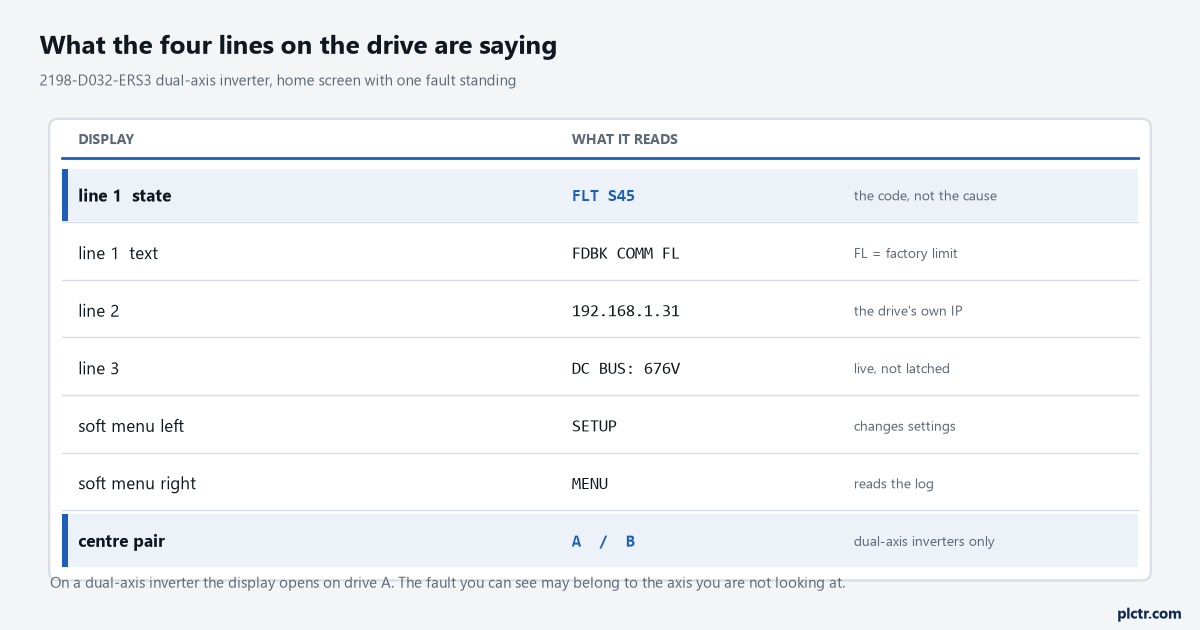
The home screen of a dual-axis inverter with one fault standing. The centre pair of buttons toggles between drive A and drive B, and the display opens on A whether or not A is the axis that faulted.
What a Kinetix 5700 fault text actually says
The text on the screen is built from three parts and every part is load-bearing. The prefix tells you the class of the exception and therefore which tab of the fault-code spreadsheet to open: FLT Sxx is a standard runtime axis exception, FLT Mxx is a manufacturer-specific one, INIT FLT happened during initialisation before the drive was ever enabled, NODE FLT applies to the whole module and takes every axis on it down with it, and INHIBIT Sxx is not a fault at all but a condition that stops the drive being enabled.
The number is the bit position of that exception inside the fault word, and the controller reports the same one.
The suffix at the end is the part people skip. FL means the condition crossed a factory set limit and UL means it crossed a limit somebody typed in, so FLT S07 – MTR OVERLOAD FL and FLT S08 – MTR OVERLOAD UL are two different faults with two different owners.
One of those limits you argue with Rockwell about. The other one is yours.
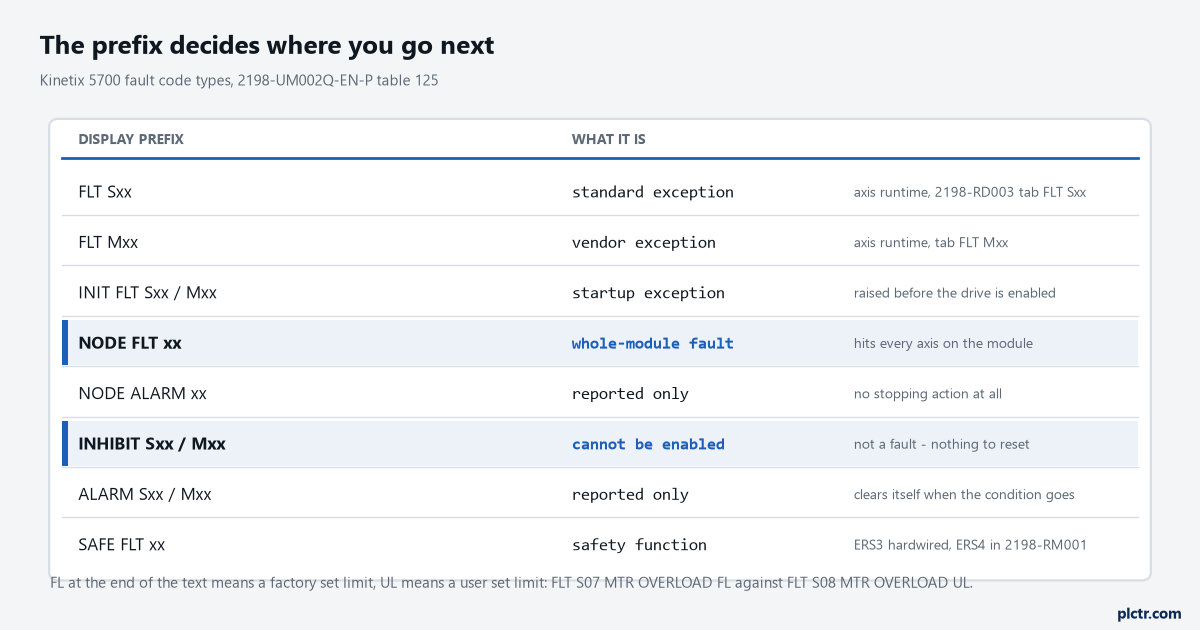
The prefix is the routing instruction. A NODE FLT is a module-wide problem and there is no point examining one axis; an INHIBIT has nothing to reset and no entry to find in the fault log afterwards.
Place one: the screen, and the axis you are not looking at
The home screen shows the drive state, the IP address and a cyclic value — the DC bus voltage by default — and replaces the state line with the fault text when something trips. Press a menu button and you get the list of active fault codes; press again and you get the fault details; press the help key and you get the possible solutions. That is three presses to the same material the spreadsheet holds, without leaving the panel. The trap on a dual-axis inverter is that the display opens on drive A and stays there. If the axis that faulted is B, the screen can be showing you an entirely healthy drive while the machine sits stopped, and the centre pair of navigation buttons is the only thing that will tell you. The other detail worth knowing is the ordering rule the manual states plainly: earlier faults have priority to be displayed.
What is on the screen is the first thing that went wrong, not the loudest of the four.
Toggle to B before you believe a screen telling you the drive is perfectly healthy.
Place two: MOD and NET answer different questions
The two indicators sit directly above the LCD and they divide the problem in half. MOD is the drive’s opinion of itself — flashing green for standby or precharge, steady green when it is operational, flashing red for a recoverable fault such as an inconsistent configuration, steady red for one that is not recoverable. NET is the drive’s opinion of the network — flashing green when it has an IP address but no motion or safety connection, steady green when the connection is up, flashing red when a connection for which this drive is the target has timed out, and steady red for a duplicate IP address. It usually arrives alongside NODE FLT 06 – LOST CTRL CONN, which says the same thing in words.
Green on MOD with red on NET is a cable and a switch, never a drive.
If you have not already sorted out how the drive is connected, the groundwork is in EtherNet/IP setup, RPI and the faults that follow.
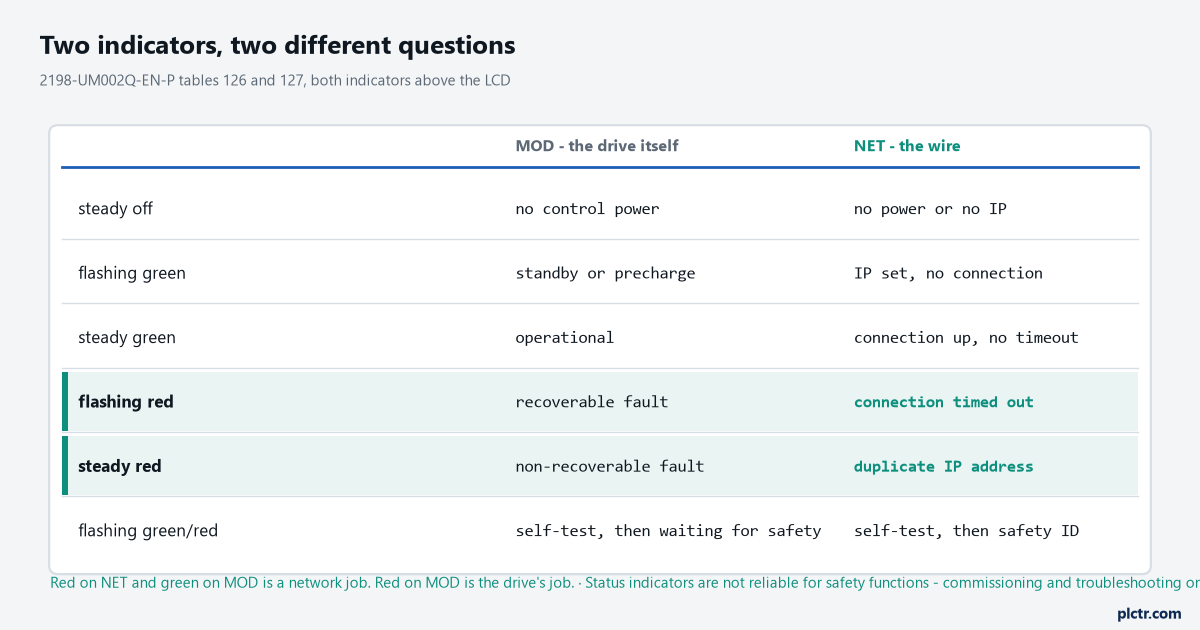
Same six conditions, two different subjects. Flashing green/red after self-test is worth recognising: the drive has finished testing itself and is waiting for a safety configuration in integrated STO mode, or for the safety inputs in hardwired mode.
Place three: the fault log, and the 128 entries nobody opens
Main Menu, then Fault Log, and the drive gives you its own history. The DC-bus power supply, the regenerative bus supply and both the single-axis and dual-axis inverters each keep the last 128 faults with time stamps, held in persistent memory, and the log cannot be cleared from the module. That last clause reads like a limitation and is the opposite. Nobody has tidied it, nobody has reset it to make a shift report look better, and the entry from three weeks ago is still there. The reason to open it on an intermittent fault is the sequence: a bus undervoltage at 06:14:02 followed by four inverter faults at 06:14:02 is one event with one cause, while the same four inverter faults with nothing in front of them is four separate problems. For the controller-side version of the same argument, the approach in a method that finds real faults rather than symptoms applies unchanged here — you are looking for the first event, not the biggest one.
The log is also the only place that proves somebody has been resetting this every shift for a fortnight.
A fault log with one entry in it is a different machine from a fault log with sixty.
Place four: Diagnostics, where the drive keeps its own measurements
This is the screen that earns the walk to the panel, because most of what is on it never reaches the controller. Under Diagnostics the inverter offers drive diagnostics (bus volts, bus current, inverter utilisation and inverter temperature), motor diagnostics (speed, current, utilisation, temperature) and encoder diagnostics, and the encoder page is the one worth memorising. It reports the feedback device’s serial number, its resolution, the number of turns, the encoder temperature and its supply voltage, and then four numbers that exist nowhere else: LINK QUAL, which must always read 100 %; RSSI, the same link quality measured at the motor end by the encoder itself, which should sit between 80 and 100 %; and POS ERRORS and CHNL ERRORS, running counts of errors on the primary and secondary DSL feedback channels. The manual is blunt about what a low reading means, and it is not what most people guess.
Persistent values below those limits indicate a poor feedback ground connection, not a failing encoder.
That one screen has saved more motors than any other on the drive.
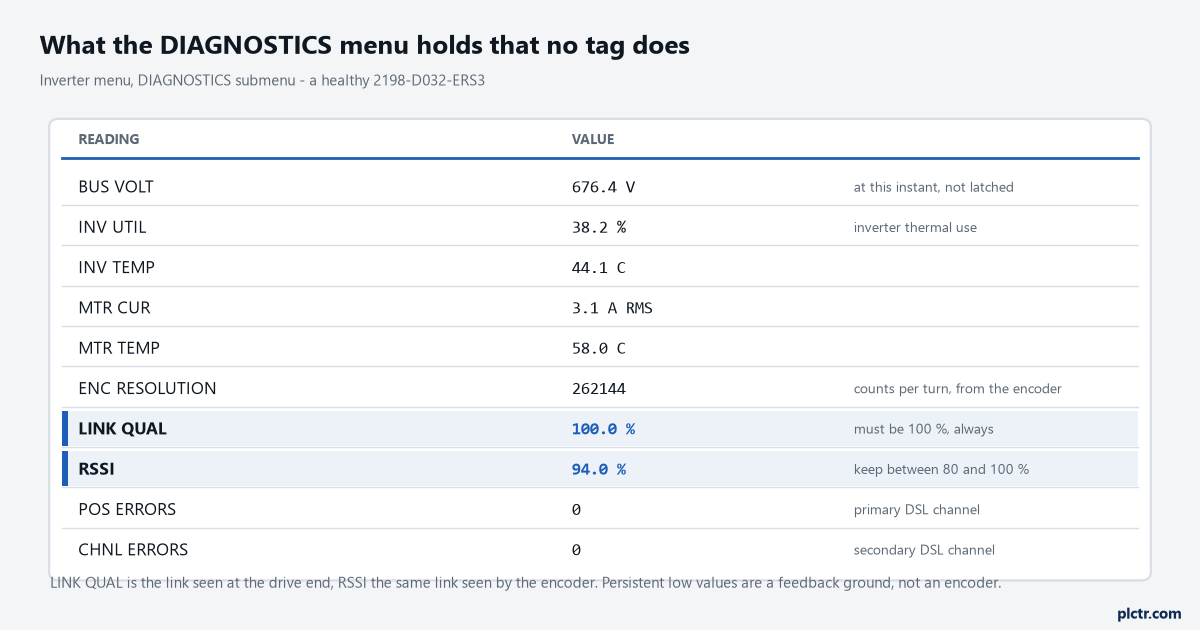
A healthy set. LINK QUAL below 100 % or RSSI below 80 % is a grounding answer, not an encoder answer, and the drive worked it out before anybody arrived.
The code table is not in the manual any more
If you go looking through 2198-UM002 for the sentence that explains FLT S45, you will not find it. The user manual now carries the fault code summary, the behaviour tables that say what stopping action each exception produces, and a pointer — the descriptions and the possible solutions live in the Kinetix 5700 Servo Drive Fault Codes spreadsheet, publication 2198-RD003, which is a download in its own right. The spreadsheet’s first two columns are the fault type and the fault code, and those are the two numbers the controller reports as well, which is what makes the two views of a fault line up. The same habit of reading the type and the code rather than the label is what Allen-Bradley faults and solutions argues for on the controller side.
Put 2198-RD003 on the maintenance laptop now, not while a machine is standing and somebody is watching.
What everybody tries first, and why it wastes the morning
The reflex is a control power cycle. It clears the display, it clears the active fault list, and roughly a third of the time the machine runs again, which is exactly what makes it expensive. You have thrown away the live diagnostics — the bus voltage at the moment it tripped, the inverter utilisation, the link quality — and the drive comes back reporting a system that looks fine because it has not been asked to do any work yet. The fault log survives, so you have not lost everything, but the log holds the code and the time stamp, not the measurements. Cycle power once you have written the display string down and read the Diagnostics page.
Doing it the other way round throws away four of the five numbers that decide this.
What the drive does not know
The drive knows its own hardware and the motor on the end of the cable. It does not know what the motion planner was doing, whether the move was still running, whether a soft travel limit was involved, or what your program did in the scan after the fault. That view belongs to the controller, and the axis tag carries a different set of words for the same event — AxisFault, MotionFault, AxisState and the attributes behind them. That is tomorrow’s article, and the two are meant to be read together: this one owns what the drive can tell you, that one owns what Logix makes of it. If the axis in question is on a machine you are still configuring rather than repairing, Kinetix 5700 and Logix MAM moves covers the setup side.
Before you reset anything, write down the whole display string, including the FL or UL suffix and any two-digit sub-code, then open Diagnostics and note LINK QUAL, RSSI and the bus voltage. Those five values decide almost every Kinetix 5700 fault, and four of them are gone the moment the drive restarts.