Scaling a Kinetix Axis in Real Units: Position Units, the Conversion Constant and the Gearbox
A new Kinetix axis is scaled one Position Unit per motor rev, at 1,000,000 Motion Counts per rev, and on Unlimited travel that axis rolls its position accumulator over after 2,147 revolutions. The motion runs through the rollover perfectly smoothly. The number on the HMI flips sign.
Scaling an axis in real units means setting three factors — Motion Resolution, the Conversion Constant and Position Unwind — and in almost every case you do not set them directly. You pick the Load Type that matches the mechanics, type in the gearbox ratio and the screw lead, say what a Position Unit is, and the scaling calculator produces the three factors. The useful knowledge is what it produced and why, because two of those factors carry consequences that show up months later.
The gearbox goes in the scaling page. Not in the move distance.
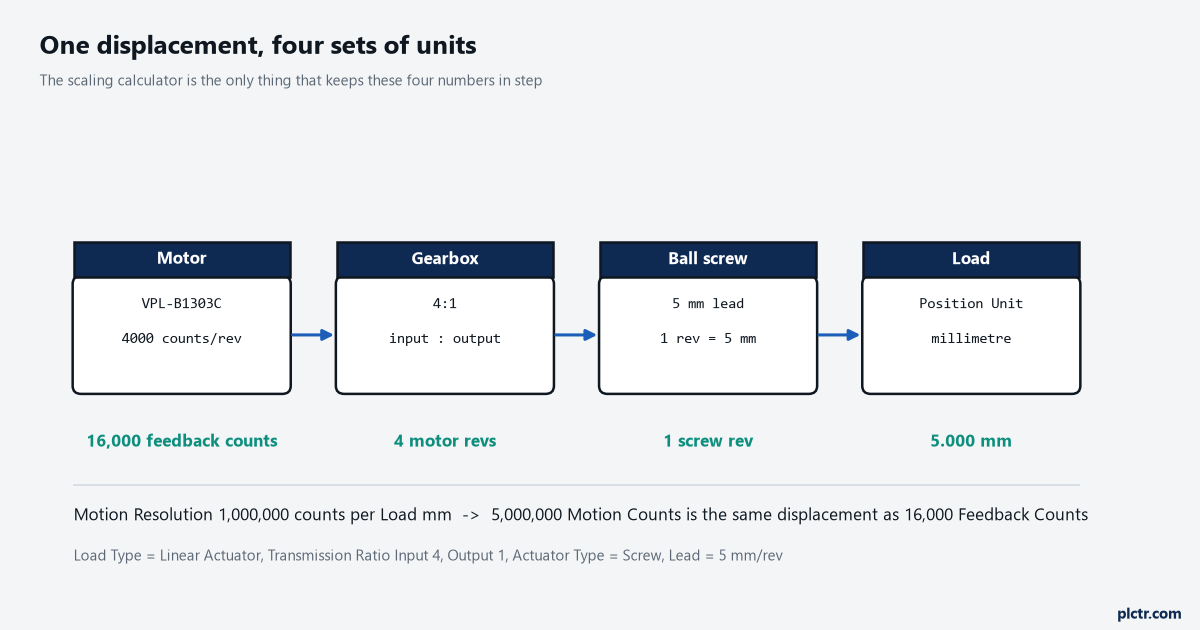
The manual’s own worked example, drawn out. One displacement, four sets of units, and the count-scaling feature is what keeps them in step.
What the three factors actually are
Motion Resolution is the number of Motion Counts in one Motion Unit, and a Motion Count is the smallest displacement the motion planner deals in. The Conversion Constant is the number of planner counts in one of your Position Units. Divide one by the other and you get the relationship you actually care about: Conversion Constant over Motion Resolution is the number of Motion Units per Position Unit, and Motion Resolution over Conversion Constant is Position Units per Motion Unit. Position Unwind is the third, needed only on Cyclic travel, and it is expressed as an integer number of counts per machine cycle specifically to stop round-off accumulating on an axis that unwinds thousands of times a shift. What a Motion Unit is for your axis is not your choice — it falls out of the Feedback Configuration and the Load Type together. Motor feedback on a Direct Coupled Rotary load gives Motor Rev. Motor feedback through a Rotary Transmission gives Load Rev. Motor feedback on a Linear Actuator with a millimetre lead gives Load mm. That is why a gearbox does not change the Motion Resolution arithmetic at all: the Motion Unit moved to the load side the moment you picked Rotary Transmission.
Position Unit is a text string. Typing “mm” into it scales nothing.
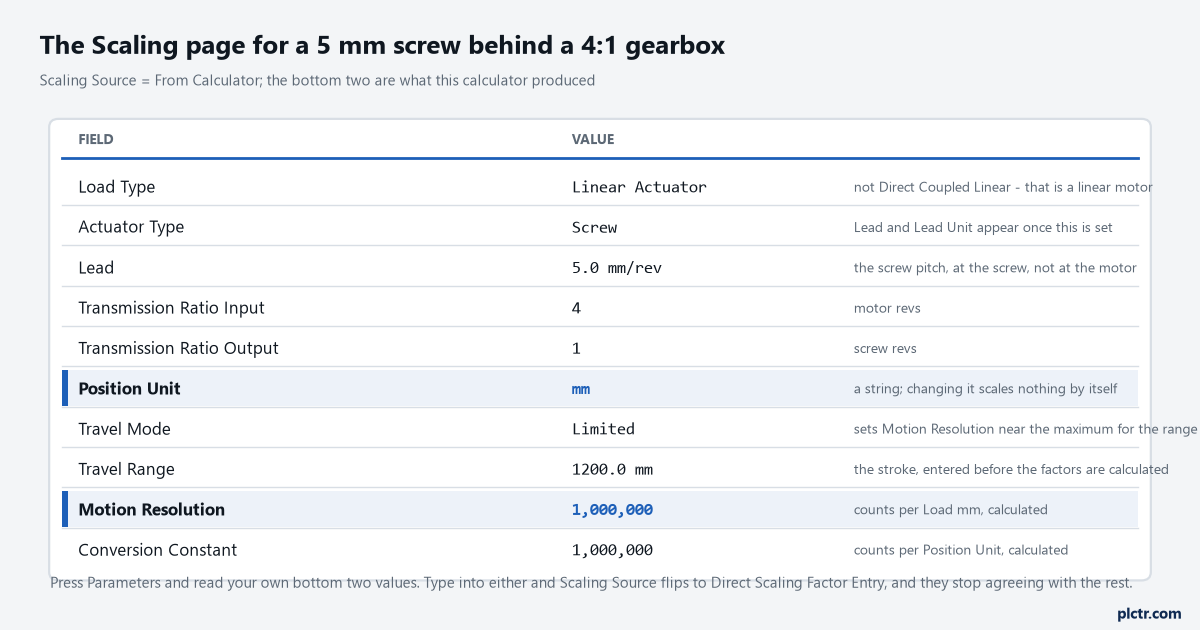
Everything above the last two rows is what you type. The last two are what the calculator produced, and they are worth reading rather than assuming.
The gearbox goes in the scaling, not in the move
Take the manual’s own machine: a rotary motor driving a 5 mm pitch ball screw through a 4:1 gearbox, with a 4000-count optical encoder on the motor. Five millimetres of screw travel is four motor revolutions, which is 16,000 feedback counts. You tell the software this by choosing Linear Actuator as the Load Type, setting Transmission Ratio Input to 4 and Output to 1, setting Actuator Type to Screw and Lead to 5 mm/rev — and from then on 5,000,000 Motion Counts, which is 5 mm of screw displacement, is scaled to exactly 16,000 motor feedback counts by the control system’s count-scaling feature, without you doing arithmetic anywhere. The alternative, which people reach for when the scaling page looks intimidating, is to leave the axis scaled in motor revs and multiply inside the MAM. It works on day one. It stops working the first time somebody changes the gearbox, or homes the axis and expects the home offset to be in millimetres, or puts the position on an HMI faceplate, or writes a soft travel limit — because every one of those reads the axis in Position Units and none of them know about your multiplier. The rotary version is the same idea. A motor driving a shear drum through a 3:1 gearbox, Rotary Transmission as the Load Type with ratio input 3 and output 1, and 300,000 Motion Counts per Load Rev scales to 12,000 motor feedback counts, or three motor revolutions, automatically. The ratio fields are input over output — motor side over load side — and reversing them gives an axis that moves sixteen times too far on a 4:1 box, which is the kind of mistake that gets found by the hard stop rather than by a review.
Input is the motor side. Output is the load side. Get that backwards and the tape measure tells you.
The dead end: a conversion constant that will not divide
Here is the trap the manual spends a page on, and it is not obvious until it has cost you a shift. A shear drum with three knives cuts three products per revolution. Set the Position Unit to Products with the default Motion Resolution of 1,000,000 counts per motor rev, and the Conversion Constant comes out as 1,000,000 divided by 3, which is not an integer. On a limited-travel axis you would probably never notice. On an axis configured to unwind every product cut, a one-third count error accumulates on every single cycle, and the registration mark that was dead centre at eight o’clock is a millimetre out by lunchtime. The fix is to move the resolution rather than fight the constant: set Motion Resolution to 300,000 Motion Counts per motor rev, and the Conversion Constant becomes a clean 100,000 counts per product with an unwind of 100,000 counts per cycle. Nothing about the mechanics changed and nothing about the precision was lost — 300,000 Motion Counts still scales to the same 4000 feedback counts. The calculator will do this for you if you set Travel Mode to Cyclic and enter the scaling as three products per motor rev, which is the whole reason the Fractional Unwind note exists.
Set Cyclic first, then enter the scaling. The order matters.
Where the numbers run out
Position is internally limited to a signed 32-bit value in places, so the usable travel range in Motion Units is 2,147,483,647 divided by Motion Resolution. At the default 1,000,000 that is 2,147 Motion Units, and the manual is calm about it — motion continues smoothly through the rollover, the position values simply are not contiguous, and this is nominal operation in Unlimited Travel Mode. For a point-to-point machine it never comes up. For an unwind stand, a takeaway belt or anything else that counts in one direction all day, 2,147 units is not many, and the remedy is to lower Motion Resolution, at the cost of passing position data with lower resolution and possibly rougher motion. Selecting Limited Travel Mode does this automatically: the calculator works out the maximum resolution that fits your Travel Range, takes whichever is smaller of that and the default, and rounds down to a power of ten. Enter a 5000 mm travel range and it will hand you 100,000 counts per millimetre rather than a million.
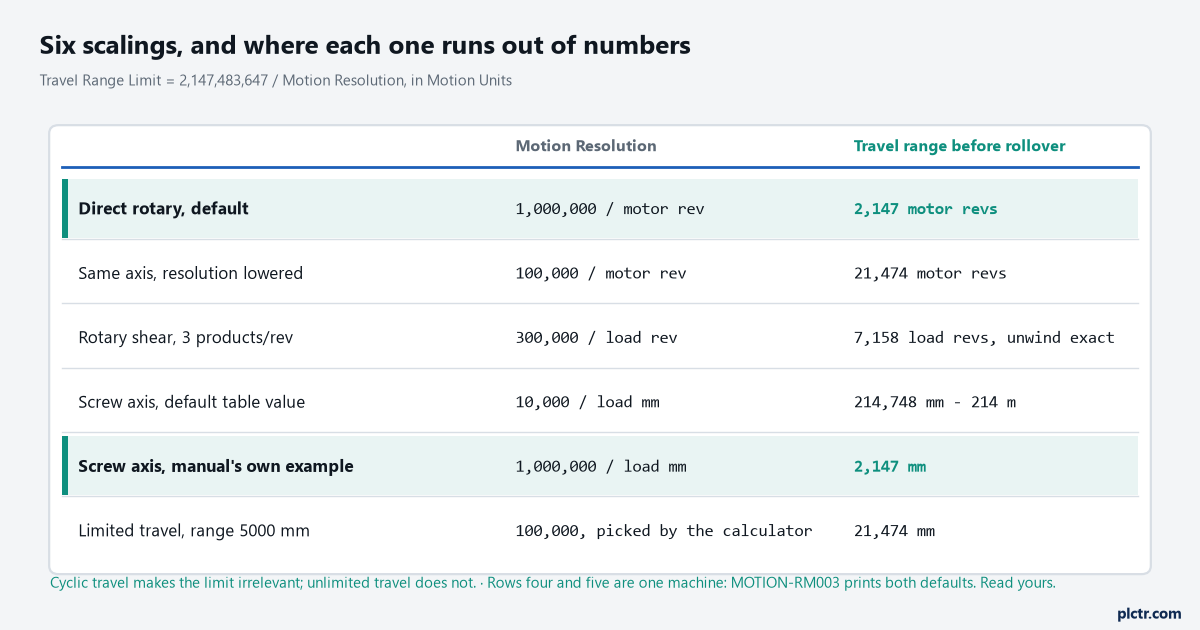
Rows four and five are the same machine. MOTION-RM003 lists 10,000 as the default Motion Resolution for millimetre Motion Units and then works an example at 1,000,000 counts per millimetre, so read the Parameters button rather than trusting either number.
Which of those two a given firmware and Logix Designer version actually produces for a millimetre axis, I have not found stated anywhere in the manuals, and it is not a difference you can guess your way through — a factor of a hundred in Motion Resolution is a factor of a hundred in usable travel. Press Parameters on the Scaling page and write down what your own calculator produced before you size anything against it.
What a scaling change costs later
Changing scaling on a commissioned machine has a price that is not obvious from the dialog. Several of these attributes feed the Scaling Signature, and a signature that no longer matches the saved one generates an Absolute Position Recovery fault on the next download — Standard APR Fault value 5, Scaling Configuration Changed — and clears the Axis Homed status bit, so the machine has to be rehomed — and homing a Kinetix axis on a night shift is not a five-minute job. The attributes that do this are Transmission, Linear Actuator, Motion Resolution and Motion Unit. The attributes that do not are Conversion Constant, Position Unwind and Travel Mode. That split is deliberate and it is the mechanism behind product recipe changes: the manual’s example is wrapping regular candy bars and then king size, where you change the conversion constant and keep your machine reference. Change Motion Resolution for the same recipe and you have bought a rehome on every changeover.
Recipe changes belong in the Conversion Constant. Never in Motion Resolution.
What to check next
Jog the axis a known distance with a Motion Direct Command and measure it with a tape or a dial gauge, before any logic exists — the same first-move discipline as driving a motor from a ControlLogix. Ten units commanded should be ten units measured, and if it is off by exactly the gearbox ratio then the transmission fields are empty. After that, check Motion Scaling Configuration: Control Scaling has the controller do the arithmetic and talk to the drive in feedback counts, Drive Scaling pushes it into the drive, and the difference matters when you start reading raw counts for diagnostics or wiring a second device to the same encoder feedback. And keep the two scaling jobs separate in your head: this one converts planner counts into millimetres, while converting a 4-20 mA signal into engineering units is a different mechanism with different traps, covered in scaling an analogue output to a valve. Tuning comes after all of it, because a gain set computed against the wrong conversion constant describes a machine that does not exist — see tuning a Kinetix 5700 axis.