Tuning a Kinetix 5700 Axis: Load Ratio, Bandwidth and the Autotune That Lies
Loop Response on the General page of a Kinetix axis is a three-item dropdown, and on a drive with the default 1.5 ms model time constant it moves the position loop between 8.2 Hz and 101.7 Hz. That is a factor of twelve, chosen by a word, before anybody touches a slider.
The arithmetic is printed and it is short. Loop Response picks a damping factor Z — 1.5 for Low, 1.0 for Medium, 0.8 for High — and for a position-loop axis the System Bandwidth is 1 divided by (16 × Z⁴ × the Drive Model Time Constant). Every other gain on the axis is then derived from that one number. So tuning a Kinetix 5700 axis is mostly a matter of knowing what those derivations are, and knowing which of the things you can type into the Autotune page actually reach them.
Three of them do not.
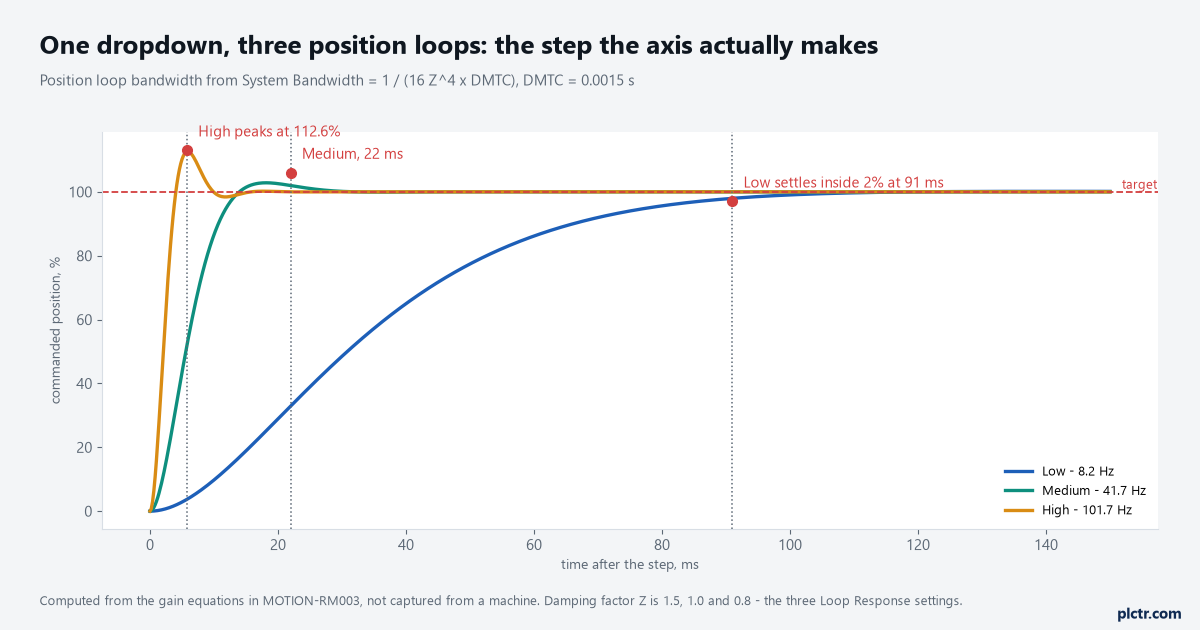
One dropdown, three machines. The overshoot on the High trace is the reason the manual ties High to rigid mechanics with a Load Ratio under 3.
One number, and everything it writes
Set System Bandwidth and the software immediately recalculates the position loop bandwidth to match it, the velocity loop bandwidth to four times Z² times it, the position integrator bandwidth to a quarter of Z² times it, and the velocity integrator bandwidth to the same value again. At Z = 1.0 and a 1.5 ms model time constant that is 41.7 Hz position, 166.7 Hz velocity, 10.4 Hz position integrator. The torque low pass filter follows at five times the velocity loop bandwidth, which puts it at 833 Hz, and if the load observer is enabled its bandwidth is set equal to the velocity loop as well. Which of those integrators get written at all is not a bandwidth question, it is the Application Type: Basic writes velocity feedforward and nothing else, Tracking adds the velocity integrator and acceleration feedforward, Point-to-Point writes the position integrator and integrator hold and no feedforward at all, Constant Speed writes the velocity integrator and velocity feedforward. Those combinations live in the Gain Tuning Configuration Bits attribute, and bits 4 through 7 cannot be changed by an SSV unless Application Type is set to Custom — which is a useful thing to know before you write code that tries. The Drive Model Time Constant in that arithmetic is not a number you invent either. It is a lumped constant the software sets from the drive and the feedback device you picked: the current loop time constant, the feedback sample period, the calculation delay and the time constant of the velocity feedback filter, added together. High-resolution feedback makes it smaller, which is why a motor with a DSL encoder tunes higher than the same frame with a low-line-count device and nothing else changed.
Two dropdowns write nine numbers. That is the whole of the default tuning.
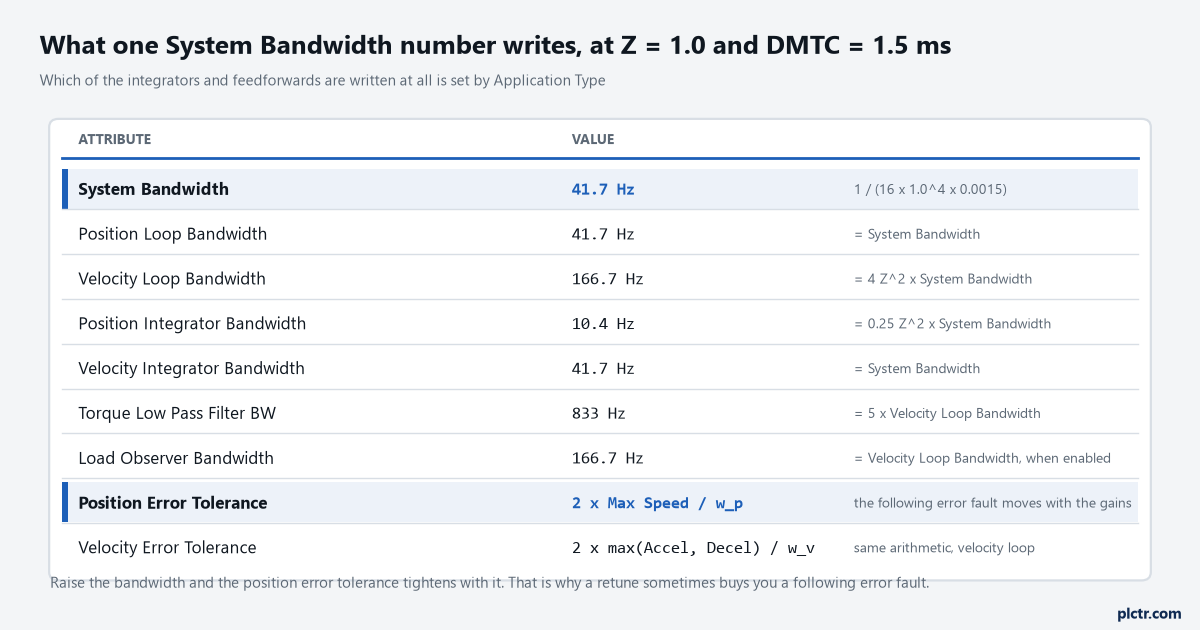
The bottom two rows are the ones that surprise people. Both error tolerances are derived from the loop bandwidths, so a retune moves your fault thresholds without asking.
What the Autotune actually measured
The Autotune page asks for a Travel Limit, a Speed, a Torque and a Direction, and it has one checkbox above them that decides whether the run means anything mechanically. If “motor coupled to load” is ticked, the profile runs and inertia is measured. If it is cleared, the manual says plainly that gain and filter bandwidth calculations are still made but the inertia is not measured — so the run completes, the status says Success, the grid fills with prospective values, and none of those values came from your machine. Direction matters the same way: a unidirectional tune profile measures inertia and friction, and a bidirectional one adds the measurement of active torque loading. A vertical axis tuned unidirectionally hands you a friction figure with gravity folded into it, and gravity does not reverse when the axis does. Tuning Torque is the third: the default of 100% rated gives the most accurate measure of the acceleration and deceleration the system can do, and a lower value has the capability extrapolated from the ratio, with the manual noting that the extrapolation error grows as the tuning torque falls. There is a fourth thing worth knowing before the button is pressed, which is that the axis moves during a tune even with the controller in Remote Program mode, so nothing you wrote is holding it.
Clear the machine before you tune it. The tune does not know your interlocks exist.
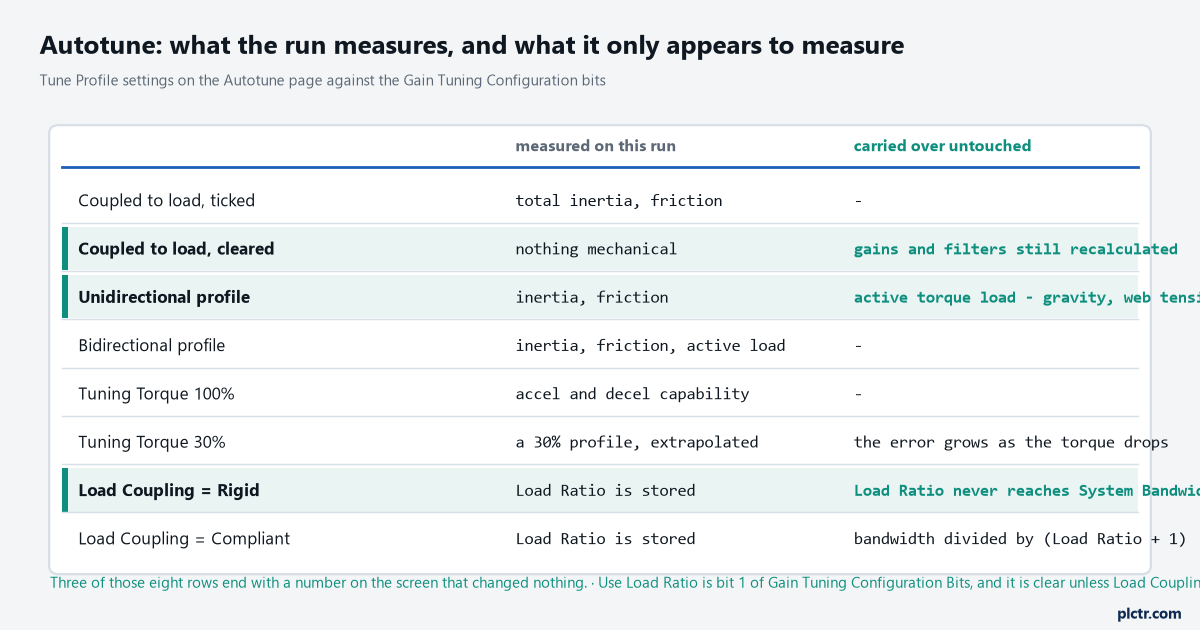
Three of those eight rows end with a number on the screen that changed nothing downstream of it. The Load Coupling rows are the ones that cost the most time.
Load Ratio, and the two places where it does nothing
Load Ratio has an exact definition: total inertia divided by motor inertia, minus one. A load with four times the motor’s inertia gives a Load Ratio of 3, not 4, and people enter 4 by hand often enough that it is worth checking any figure somebody typed rather than measured. What matters more is that entering it correctly still may not do anything. The Use Load Ratio bit — bit 1 of Gain Tuning Configuration Bits — decides whether Load Ratio is used in the Total Inertia and System Bandwidth calculations at all, and if the bit is clear, the attribute description is unambiguous that Load Ratio has no impact on either. That bit follows Load Coupling, which defaults to Rigid, and derating only happens on the Compliant selection, where the nominal loop bandwidth is divided by (Load Ratio + 1). So on a default axis you can measure a Load Ratio of 12, watch it land in the Load dialog, and find the position loop bandwidth exactly where it was.
The right response to a heavy load on a default axis is the Loop Response dropdown rather than the Load Ratio field, and the manual gives the bands: High suits rigid mechanics with a Load Ratio under 3, Medium suits general applications with modest loading under 10, Low suits heavy inertia over 10 because those systems need lower position and velocity loop bandwidths to stay stable and to keep the motor from heating. Set Loop Response to Low on that 12:1 load and the position loop drops to 8.2 Hz, which is the 91 ms settle in the first figure and usually the correct answer for a machine that is going to run for ten years.
Nothing is broken when Load Ratio does nothing. The number is being stored, not used.
The dead end: more bandwidth, then a following error fault
The first instinct on a sluggish axis is to drag System Bandwidth up, and the first result is often an Excessive Position Error fault that was not there before. It looks like the higher gains made the axis worse. They did not. Position Error Tolerance is derived as two times Max Speed divided by the position loop bandwidth in radians per second, and Velocity Error Tolerance as two times the larger of Max Accel and Max Decel divided by the velocity loop bandwidth. Raise the bandwidth and both tolerances shrink in proportion, so the same following error that was inside the window at 41.7 Hz is outside it at 101.7 Hz. The axis is tracking better and failing sooner. That is worth a trend rather than a guess: put ActualPosition, CommandPosition and PositionError on a chart and look at whether the peak error moved at all, in the same way you would catch an intermittent fault with a trend in the controller rather than by watching a fault bit.
If the peak error did not change, the gains are not the problem.
What to reach for before any of this
The configuration and startup manual’s own advice is to tune as little as possible. Once the drive is selected and the Motion Database is the motor data source, the defaults usually give adequate performance; where they do not, the recommended next step on a Kinetix 5300, 5500 or 5700 is to configure the drive for tuning-less operation rather than to run an Autotune — and for tuning-less operation the recommendation is to set Load Ratio to zero, which is the opposite of what everybody’s instinct says. Underneath that sits the Load Observer, a loop inside the drive that estimates the mechanical load and compensates for it, so the control loops can treat the motor as unloaded. For positioning work the configuration to pick is Load Observer with Velocity Estimate, and the integral bandwidth Koi is typically left at zero. One number there is worth checking against your firmware: gains are limited to 500 Hz in drive firmware revision 2.160 and earlier, and to 10,430 Hz in 2.170 and later. An axis that refuses to accept the bandwidth you type may simply be on old firmware. Adaptive Tuning is the layer above that, and it runs in the background whether or not you ever tune. Its configuration attribute has four settings — Disabled, Tracking Notch, Gain Stabilization, and both together — and in the notch modes it tracks up to four torque notch filters onto resonances it has identified, while rejecting dominant command frequencies so that a repeating move does not get mistaken for a resonance and notched out.
Tuning-less first, load observer second, and the sliders only when both have been tried.
What to check next
Run the machine’s real cycle, not a test move, and trend PositionError against ActualVelocity for a full sequence. Error that rises with velocity points at velocity feedforward, which Point-to-Point does not write at all. Error that rises with acceleration points at acceleration feedforward, which only Tracking writes. Error that appears at one particular speed and not either side of it is a resonance, and that is the Torque Notch Filters tab rather than the bandwidth slider. If the moves themselves are still being shaped — profile, jerk, endpoint — that is a different question from gains, and it sits with MAM against MAJ rather than with the tuning page. Before any of that, make sure the axis is scaled in units that mean something, because a gain set computed against the wrong conversion constant is a gain set for a different machine — and the same discipline of measuring before adjusting applies to a PIDE loop’s first bump test as it does here. If the axis has never turned, the order of operations is in driving a motor from a ControlLogix, and tuning comes after all of it.