MOVE_BLK with COUNT := 20 aimed at an ARRAY[1..10] of Real on a CPU 1516-3 PN/DP does not put the CPU in STOP and does not hand you an error in the diagnostics buffer. The enable output drops to 0, and on a box inserted with the editor’s default settings there is no ENO pin to read that from.
So the short answer first. MOVE copies a whole array in one go when the element type on both sides matches exactly, and it will carry a STRUCT or a PLC data type the same way. MOVE_BLK copies a run of elements out of the middle of one array into the middle of another, and it wants an array element written at IN and at OUT, not the array name, which is the single thing that sends most people to a search engine. MOVE_BLK_VARIANT is for the case where the array type is not known until the block is called, and it is the only one of the four that hands back an error code you can read. UMOVE_BLK is the one you reach for when a communication partner must never see half a copy, and it is also the one that will lengthen your interrupt response if you point it at something large.
Four instructions, one job, and the difference between them is what happens when the copy does not fit.
Everything below is checked against the STEP 7 system manual, the same text the TIA Portal information system prints. Where a sentence is what I get on V17 rather than what the manual promises, the sentence says so.
What MOVE will carry, and what it quietly truncates
The “Move value” instruction is not only for a single Int. The manual’s data-type table for the S7-1500 lists STRUCT, ARRAY, TIMER, COUNTER, the IEC data types and PLC data types at both IN and OUT1, with one footnote that decides most arguments about it: an entire array transfers only when the array components at IN and at OUT1 are of the same data type. An ARRAY[1..10] of Real copies into an ARRAY[0..9] of Real because the element type is what is compared, and it refuses an ARRAY[1..10] of LReal because Real and LReal are two types, not two sizes of one. The box also loses its ability to grow: you can add OUT2, OUT3 and so on for scalar moves, and the manual says the box cannot be extended when a structured type or a character of a string is being transferred.
One output, and one only. A structured MOVE does not get the extra pins a scalar one does.
Where the two sides are scalars of different widths, MOVE does not complain. A wider source into a narrower destination loses the high-order bits; a narrower source into a wider destination gets the high-order bits of the destination written with zeros. Strings are the exception that has its own instruction, S_MOVE, and single characters of a string can be addressed with a subscript such as MyString[2].
Nothing in that truncation is reported anywhere, which is why a Word into a Byte is a bug you find on a trend.
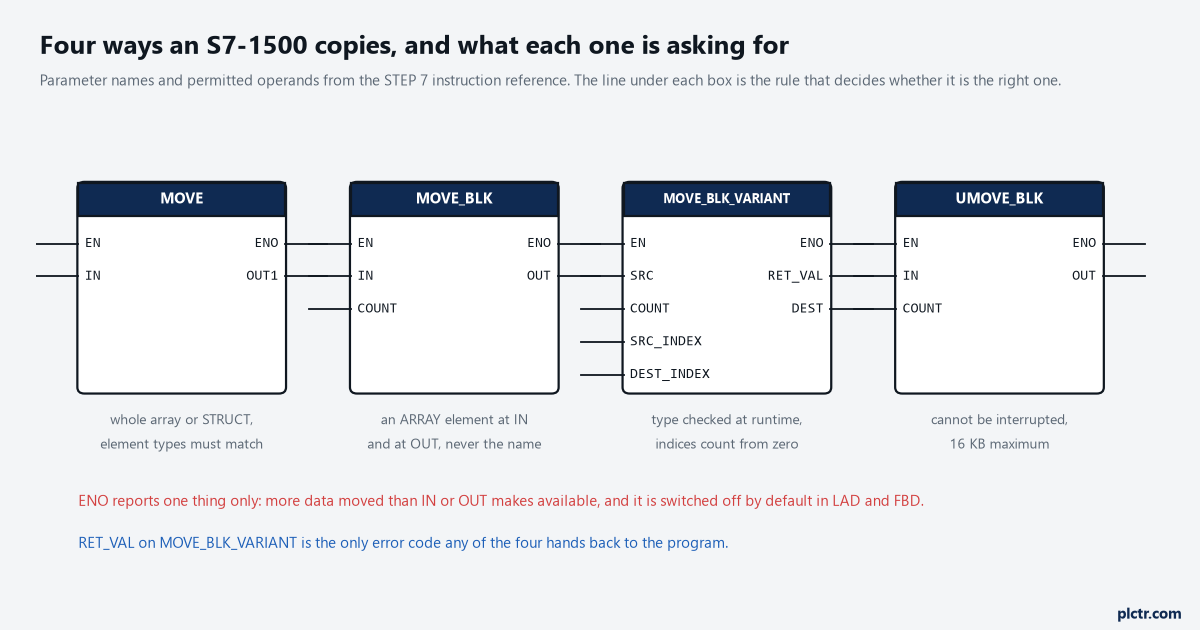
The four instructions with their real parameter lists. Note what changes: MOVE names the whole operand, MOVE_BLK names an element, MOVE_BLK_VARIANT carries the type at runtime and returns RET_VAL.
MOVE_BLK counts elements, not array limits
Here is the worked example the manual prints, because the numbers in it are the whole lesson. a_array is declared ARRAY[0..5] of Int, six elements. b_array is ARRAY[0..6] of Int, seven elements. IN is written as a_array[2], OUT as b_array[1], COUNT as 3. Three Int elements starting at the third element of the source land in the target starting at its second element. The width of an element is taken from whatever sits at IN, so a MOVE_BLK over an array of a PLC data type moves that many structures, not that many bytes, and the manual is explicit that the listed data types at IN and OUT are permitted only as elements of an ARRAY. Write the bare array name at IN and the editor will not let you compile it. Source and target must have the same data type or the instruction does not execute at all. That single rule catches more recipe bugs than any amount of watch-table staring, because an ARRAY[1..20] of Real and an ARRAY[1..20] of LReal look identical in the project tree, occupy different amounts of work memory, and fail the type test without ever writing a byte into the target.
COUNT is a number of elements and never a number of bytes, which is the first thing to re-read when a copy lands short.
ARRAY of Bool behaves differently enough to be worth its own sentence, and it is the one I have to look up every time: the manual says ENO stays at 1 for an overflow until the byte limit of the array structure is passed, and only when COUNT pushes past that byte limit does ENO go to 0.
There is also a change that bit anyone who upgraded past V15. Up to and including V15, (U)MOVE_BLK and (U)FILL_BLK reached the process image when the operand was a direct I/O access; the readme records that as corrected, and the same program now produces a runtime error, because direct I/O access is not allowed for the block instructions.
Check that one on any block that copies an input word straight out of the periphery.
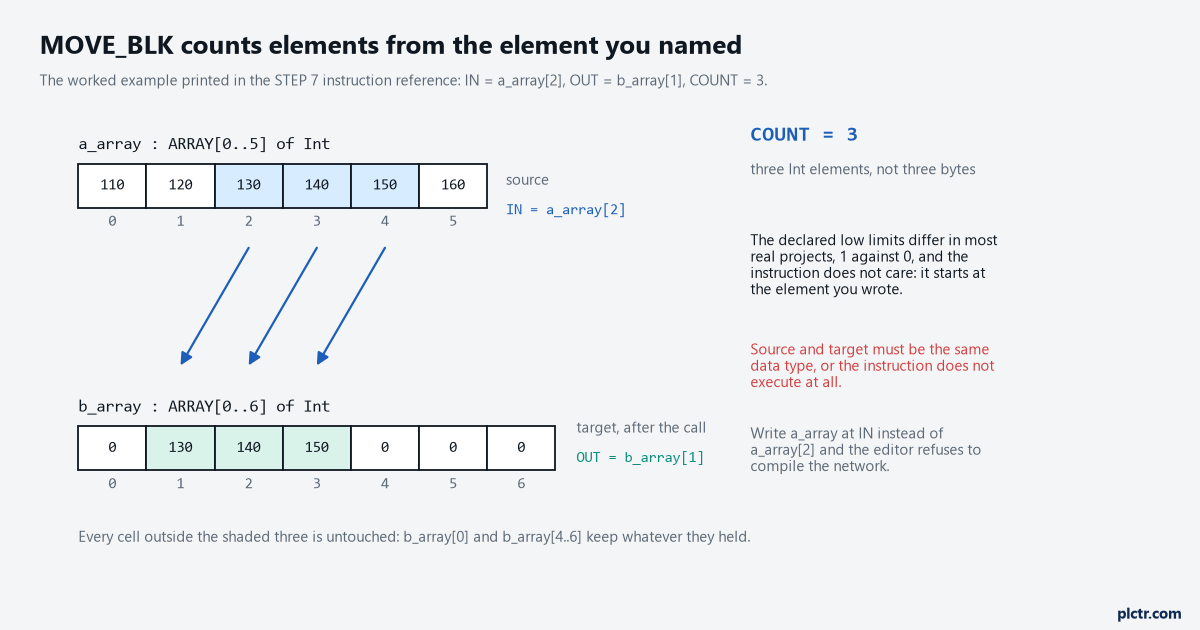
IN is a_array[2], OUT is b_array[1], COUNT is 3. The shaded cells are what moves. The declared low limits differ and the instruction does not care.
The ENO nobody generated
This is the part that turns a clean-looking copy into a two-hour hunt, and it is not a bug in anything. ENO on a MOVE_BLK reports exactly two conditions: EN was 0, or more data was moved than IN or OUT makes available. That is the overflow signal, and it is the only one the instruction gives you. The catch is in the LAD and FBD chapter of the same manual: to increase CPU performance the EN/ENO mechanism is switched off by default for instructions, so a freshly dropped MOVE_BLK has no ENO to evaluate and the overflow passes without a mark. Right-click the instruction and pick “Generate ENO” and the box gets its enable output back, and from then on every instruction you insert arrives with the mechanism switched on until you turn it off again with “Do not generate ENO”. The setting is per instruction and it is sticky, which produces the odd situation of one copy in a block reporting its overflow while the copy three networks down says nothing, on the same CPU, in the same scan, written by the same person a week apart.
Look at the box before you look at the data: no ENO pin means no overflow report exists.
The manual adds one line worth keeping: a runtime error will not stop the CPU once the enable output is generated.
The dead end almost everyone walks into first is the array limits. ARRAY[1..10] against ARRAY[0..9] looks like the obvious suspect and it is not the problem, because MOVE_BLK starts from the element you named and counts forward. The limits only become an argument on the VARIANT version, which is the next section. Checking the declared limits costs ten minutes and finds nothing; checking COUNT against the remaining elements from the named element finds it.
And programming errors are outside ENO altogether. The manual points you at the OBs or at GET_ERROR and GET_ERR_ID for those, which is where an over-run copy shows up as fault_ID B#16#23, write access outside the area. That is the same family of fault the S7-1500 area length error article works through from the diagnostics buffer end.
When the array type is only known at runtime
MOVE_BLK_VARIANT exists for library blocks, for a copy routine that serves four recipe structures, for anything where the block is written before the data type is decided. SRC and DEST are VARIANT, the type test happens at runtime, and both ends may be arrays of different lengths so long as the element types match. Then comes the trap that costs a shift: SRC_INDEX and DEST_INDEX are counted from zero regardless of how the array was declared. An ARRAY[10..20] handed to DEST with DEST_INDEX 3 is written from its fourth element, not from element 13. The manual states it twice, once in the parameter description and once in the worked example, which tells you how often people get it wrong.
Zero-based, always, whatever the declaration says, and the compiler will not warn you about the difference.
There is a second declaration quirk on the same instruction. DEST is drawn as an Output because that is where the data flows, and the tag itself has to be declared as InOut in the block interface. COUNT gets the value 1 when neither SRC nor DEST is an array, and SRC will not accept Bool or an array of Bool at all.
That InOut declaration catches people once, and the compiler message about it is not obvious.
RET_VAL is the reason to use this one. W#16#0000 is a clean copy; 8383 and 8483 mean a start index outside the high limit of the source or destination array; 8281 is an invalid COUNT; 80B4 says the data types do not match and tells you to use an array of a PLC data type instead of an array of Struct; 8534 is a write-protected destination; 8154 and 8554 mean somebody wired a Bool to SRC or DEST. Those codes are worth a word in a diagnostics DB rather than a temporary you never look at again, because the index errors and the type error need completely different fixes and the symptom on the machine is the same missing recipe either way. The manual’s own SCL template guards the call before it runs it, and it is worth copying verbatim in shape:
IF IS_ARRAY(#SourceArray)
   AND TypeOfElements(#SourceArray) = TypeOfElements(#DestinationArray) THEN
  #Error := MOVE_BLK_VARIANT(COUNT := #Count,
                             SRC := #SourceArray, SRC_INDEX := #SourceIndex,
                             DEST => #DestinationArray, DEST_INDEX := #DestinationIndex);
END_IF;
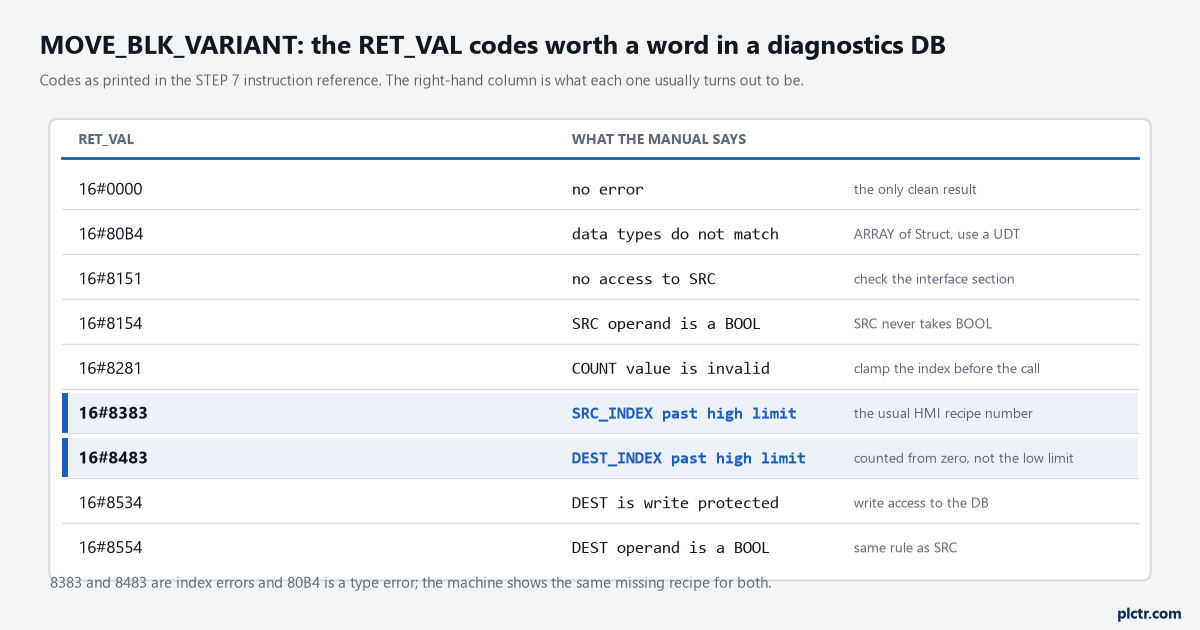
The codes worth wiring to an HMI word. 8383 and 8483 are the index errors, 8281 the count, 80B4 the type mismatch that an ARRAY of Struct causes.
UMOVE_BLK, 16 KB, and the interrupt you just delayed
UMOVE_BLK takes the same parameters as MOVE_BLK and cannot be interrupted, which is the entire point and also the entire cost. The manual’s note is blunt about the cost: the interrupt reaction times of the CPU rise while the instruction runs, and the maximum it will move is 16 KB with CPU-specific limits on top. The reason to accept that is in the communications chapter. When a send buffer is shared with the cyclic program, the manual’s advice is to copy the data into a separate global DB with an uninterruptible instruction and let the communication instruction transfer the copy, and it puts the consistency those instructions give at up to 16 KB. For an S7-1500 acting as the server end of PUT/GET there is no instruction that can coordinate the transfer from the user program at all, and the manual asks you to keep the transferred area under 512 bytes.
16 KB is the ceiling. 512 bytes is the PUT/GET advice.
A 20-element array of Real is 80 bytes and costs nothing to move uninterruptibly. A 4000-element recipe buffer is a different conversation, and that one belongs next to the scan time measurement rather than in the copy instruction’s data sheet.
Measure the cycle before and after the change, because an uninterruptible copy is paid for in interrupt latency.
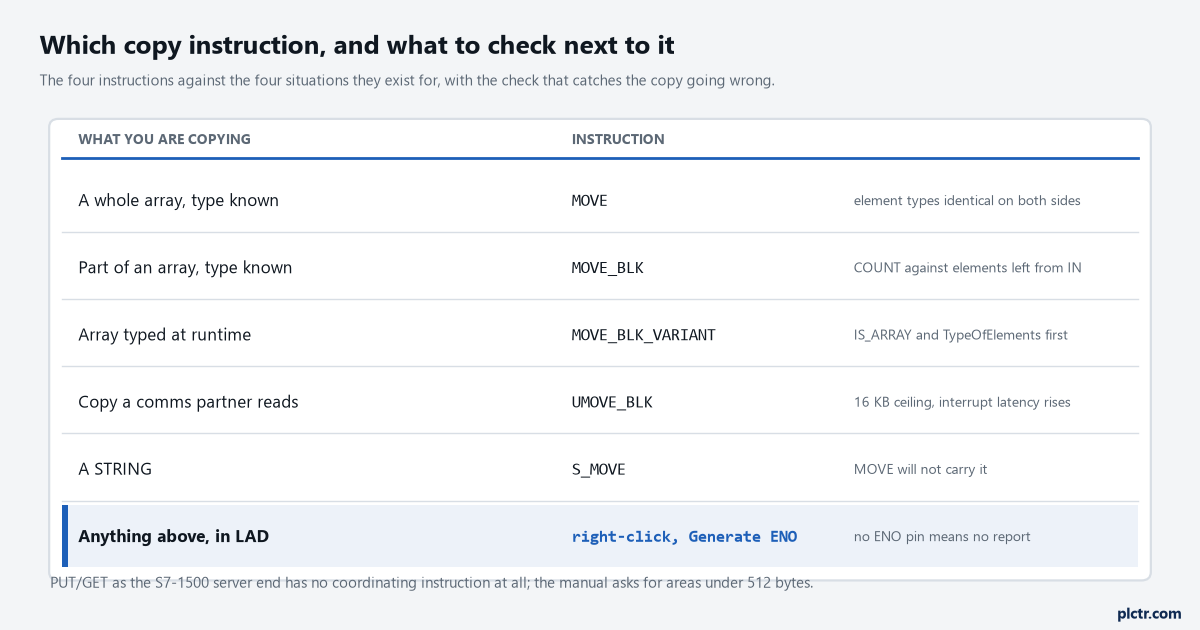
The four cases and the instruction each one wants, with the check that belongs beside it. The right-hand column is what to look at when the copy comes out wrong.
What to check before the next copy
Open the block, right-click the copy instruction, pick “Generate ENO”, and put the enable output somewhere a person will see it. That one change turns a silent over-run into a visible bit, and it costs a fraction of a microsecond per scan. If the copy is indexed from an HMI entry or a recipe number, clamp the index in the rung before the copy rather than trusting the instruction to reject it, the way you would clamp any indirect address. And when the copy is already in production and behaving strangely, read the diagnostics buffer before the code: a genuine area error is recorded there with a fault ID, and the S7 error code list is faster to search than the block is to read.
The copy that goes wrong quietly is the one that costs a shift, so make it noisy first.