A CPU 315-2 PN/DP with 6ES7315-2EH14-0AB0 on the label maps to a CPU 1515-2 PN, 6ES7515-2AM01-0AB0, in the Siemens migration guide’s CPU table, and the S7-1500 migration does not happen in one move. It happens in two, the second of which is a right-click on the old CPU in the device view called Migrate to S7-1500, and what that command hands back is a new device next to the old one, a log under Common data with four classes of message in it, and a program that will compile straight away only if nobody ever wrote STL that leans on the address registers.
How much rewriting it is depends on one question: how much of the program passes values through registers, the status word or absolute local data. LAD and FBD written on symbols goes across and compiles. STL written the way STL was written on a 315 in 2008 comes back with comments in it.
This was written against the migration chapter of the STEP 7 Professional V14 SP1 system manual and the Siemens migration guide for S7-300/400 to S7-1500, V1.1. The dialog names and the rules are the manual’s, and where a behaviour is described below it is the manual’s description rather than something watched on a bench.
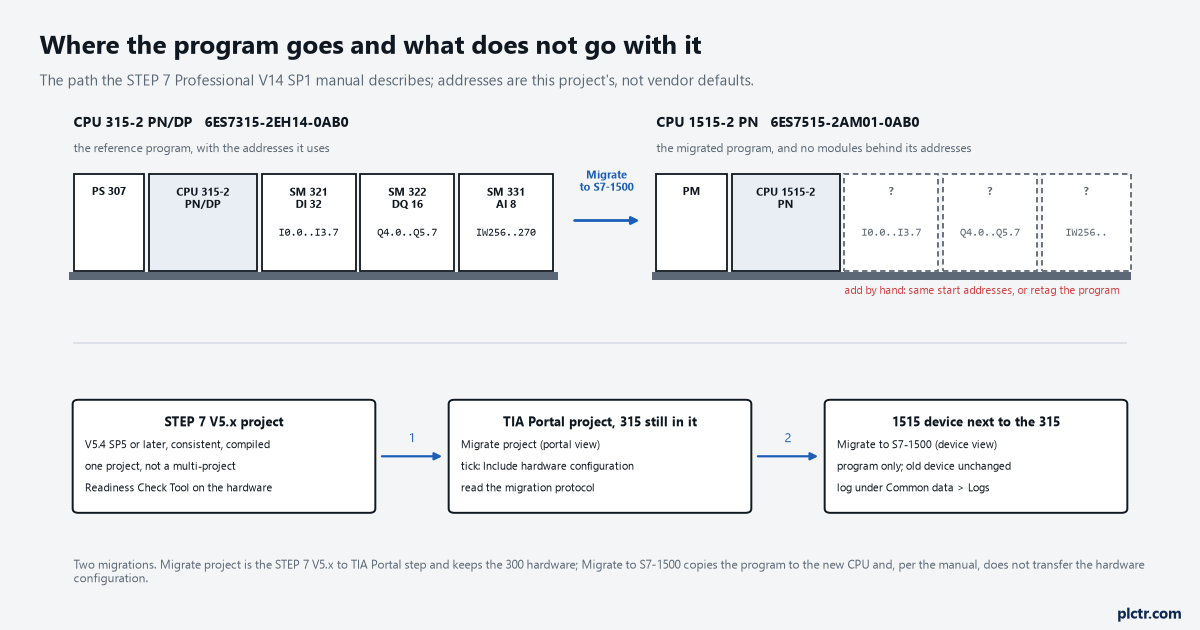
Two migrations. The first makes a TIA Portal project with the 315 still in it; the second copies the program to a 1515 and leaves the rack for you to rebuild.
Two migrations, not one
Migrate project is not the command that gets you to an S7-1500.
Migrate project, in the portal view, takes a STEP 7 V5.x project and makes a TIA Portal project out of it, with the same S7-300 hardware in it and the program on the same CPU; the migration guide says this needs STEP 7 V5.4 SP5 or later on the source side, that multi-projects have to be split and migrated one project at a time, that a project set to project-wide alarm numbering stops the migration outright, and that the hardware should be run through the Readiness Check Tool first because anything not released by 1 October 2007 is not in the TIA catalogue. If the two STEP 7 versions are not on the same machine, the migration tool on the TIA Portal DVD produces an intermediate file with the extension .am13 that Migrate project reads instead. Either way the tick that matters is Include hardware configuration, and the output is a migration protocol you read before you compile. What you have at the end of it is a 315 in a TIA Portal project. The S7-1500 does not exist yet.
The second step is PLC migration. Open the device configuration, select the CPU 315 in the device or network view, and take Migrate to S7-1500 from the shortcut menu. The dialog asks for the new device, warns you that the program will be changed, then asks one more question that has to be answered even when it does not apply: whether point-to-point communication should use the new instructions for the S7-1500’s own CM modules or keep the CP 340/341-style blocks. Then it runs, and the manual is exact about what it produces: a new device created next to the original in the project tree with the migrated program on it, the original left unchanged, and an alarm with a link to the migration log.
The hardware configuration is not transferred. Not partly. The manual says it twice, and the migration guide says the same thing in its own words: when changing to the S7-1500 only the CPU is adjusted, and modules in the central configuration have to be added by hand. So the 1515 arrives with the program’s I0.0 to I3.7 and IW256 to IW270 in it and no module behind any of them, and the first job on the new device is building a rack whose start addresses match the program, or retagging the program to match the rack.
Migrate project, then Migrate to S7-1500. The first is the project; the second is the CPU.
What the log says, in four classes
The log lives under Common data, Logs, one per migration, and it does two things: it lists what the migration changed, and it lists what you now have to change.
Messages that point at a place in the program carry an arrow in the Go to column, and messages with more behind them carry a question mark in the ? column. What decides how much reading you have ahead of you is the class of each instruction the migration met, and the manual gives four.
Four classes, and only the fourth one stops the compiler from finishing.
Class 1 is an instruction that exists identically on both CPUs: migrated, nothing to do. Class 2 is an instruction that no longer exists but has a compatible replacement: swapped, sometimes with an extra instruction or two inserted to preserve the meaning, reported in the log, compiles, nothing to do. Class 3 is an instruction replaced by something similar rather than compatible: swapped, the location marked in the program, a comment left at the spot or an error at compile time, and the program is yours to check, because the new instruction may have extra formal parameters, renamed parameters, a hardware identifier at LADDR that now has to be a system constant, or different error codes. Class 4 is an instruction with no replacement at all: it stays in the program in red and the block will not compile until you have rewritten it.
The red ones are the visible work. They are not the dangerous ones.
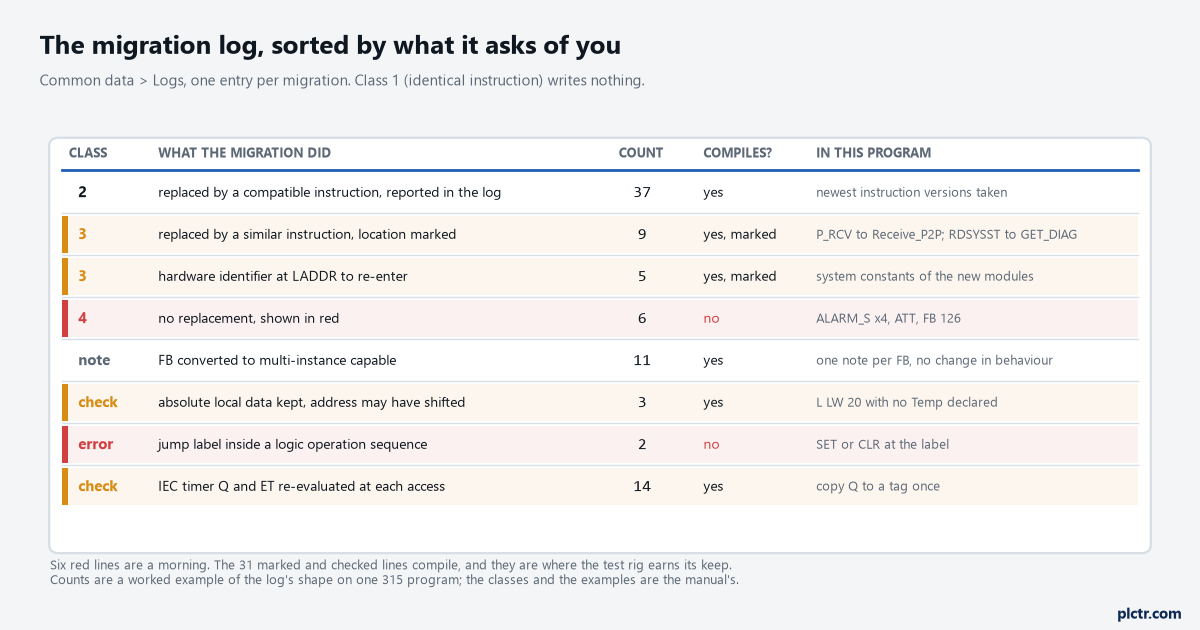
A worked example of the shape of the log, not a copy of one. Six red instructions is a morning; the nine class-3 replacements that compile with a marker are the ones that need a test rig.
Class 4 is a short list and the manual prints it: the table instructions ATT, FIFO, LIFO and their relations, which were built on pure absolute addressing and have to be written again as an FC over an ARRAY, and the manual gives the SCL for all three; the whole alarm family, ALARM_S, ALARM_SQ, ALARM_D, NOTIFY, ALARM_8 and the rest, replaced by Program_Alarm; SETP and RESETP and the other bit-array instructions, which have SET_BF and RESET_BF as suggested substitutes; the DRUM_X and TONR_X pair; COMPRESS, which you delete because a 1500 does not compress memory; PROTECT, which becomes a setting on the CPU. FB 126 is not migrated either. The alarms are the one that costs time, and the manual’s procedure for them is worth following in the order it gives: before migrating, move the block parameter that carries the alarm data type into the Static section and compile, and after migrating swap that parameter’s type to Program_Alarm, drop the Program_Alarm instruction into the network, pick the tag, and the alarm text from the old program comes back in the Alarm tab. Leave the parameter where it was and the text does not come with it.
The STL that comes back
Everything the migration cannot fix by itself is in the STL, and the reason is a sentence the manual repeats in three places: on an S7-1500, values are only passed between blocks through the block interface, global data blocks or PLC tags. The registers do not travel.
Within one STL network everything works as it did. The accumulators, AR1 and AR2, the DB and DI registers and the status word are all there, and a program that loads a pointer into AR1 and walks a data block with L DBW [AR1,P#0.0] and +AR1 still runs; the comparison list prints LAR1, TAR1, +AR1, L STW, T STW, CC and UC in grey for the S7-1500, which its legend defines as available but not recommended because they do not suit symbolic addressing or multi-instances. What stops working is everything that crosses a boundary. Cross from an STL network into a LAD or FBD network and the register contents are not visible there; they are visible again in the next STL network, except the RLO, which the manual says is set to undefined at every language change and is simply gone. Cross into a called block and nothing in the registers, the accumulators or the status word goes with you, with one exception: a block called by UC or CC can receive register contents if the option Parameter passing via registers is set in its properties, and that option is only offered on an STL block with standard access and no formal parameters. The migration turns UC FC 20 into CALL FC 20, turns CC FC 20 into CALL FC 20 with a jump around it, and leaves UC FC [#temp0] and every UC or CC of an FB exactly as it was with a note that the called block needs the option. Coming back out of a block is harder than going in: the manual’s answer for returning a result is to SAVE it into the BR bit inside the called block and read A BR after the CALL, because reading a register that the called block set is reported as an error.
Then there is the DB register, which is the one that catches people who never used AR1 in their lives.
A fully qualified access, “Global_DB”.DBW2 or %DB10.DBW10, sets the DB register to zero on an S7-1500. On a 315 it loaded the DB into the register as a side effect, and a lot of old code counted on that: OPN one DB, do some fully qualified reads from another, then carry on with partially qualified L DBW 4 and expect the second DB to be open. The migration knows this pattern and inserts an OPN after the fully qualified access to reload the register, which is the one repair in this section it does for you. What it cannot repair is a DB opened in one block and addressed partially qualified in a subordinate block, because the register is also zeroed on a block call now, and the manual’s rule is that partially qualified addressing is only allowed when the DB register was set explicitly in the current block. And OPN itself, with OPNI, is only for blocks with standard access, so every one of these blocks stays non-optimised for as long as it is written this way.
Every OPN the migration inserts is a partially qualified access it found for you.
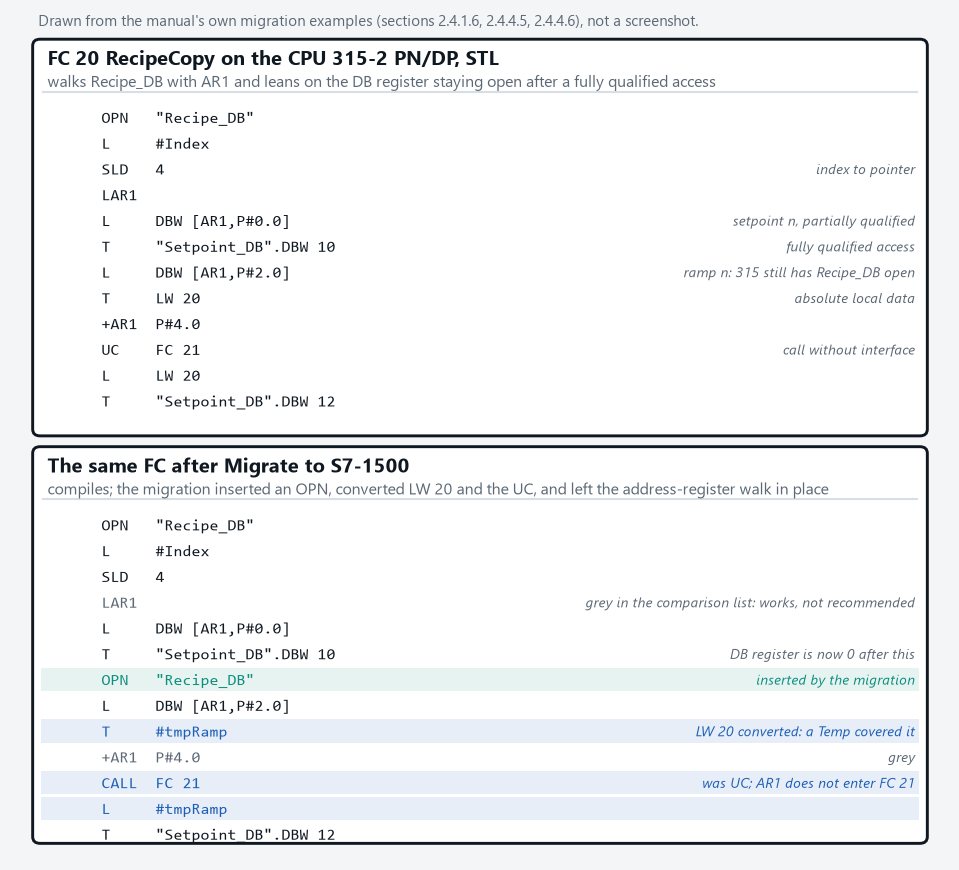
Drawn from the manual’s own examples, not a screenshot. The block compiles. It still walks the DB with AR1, and every partially qualified access in it depends on an OPN in the same block.
Absolute local data is the last of the register-shaped problems. L LW 20 with no symbol behind it was normal on a 315; on an S7-1500 the manual says pure absolute access is no longer supported, and the migration handles it in two ways depending on the block interface. If a temporary tag was declared covering that area, the absolute address is converted to the symbolic one. If not, the address is kept as it was, and here the manual adds the line that matters: because the migration may create additional local tags, addresses within the local data can shift, so an LW 20 that survives unconverted might not be pointing at what it pointed at on the 315. The fix it suggests is to declare the tag in Temp and use it, or overlay with AT.
An unconverted LW 20 is a shifted address until you have proved otherwise.
Two smaller ones from the same chapter. LEAVE and ENT are errors, because a 1500 has two accumulators and not four, and the manual’s advice is a temporary tag for the intermediate result. And a jump label that lands in the middle of a logic operation sequence, which a 315 tolerated because its first-scan behaviour after a label depended on the instructions before it, is reported at compile time on the 1500 with the instruction to put a SET or CLR at the label so the first input bit scan is defined.
LAD and FBD have their own two
The LAD side is short, and both items come from the same rule about registers.
Nothing passes through the status word any more, in any language but STL.
Status bit queries, the –| |– contact on OV, OS, A1 or A0 after a maths box, are not available in LAD or FBD on an S7-1500 at all. If the query sits directly after the maths instruction in the same network, the migration replaces it with a comparator on the result; anywhere else the network is faulty after migration and the manual’s suggested rewrite is a query of the ENO output, with several negated ENOs ORed together standing in for OS. The master control relay is gone with no substitute in any language, reported as an error, and the manual’s suggestion is temporary tags or block parameters for whatever the MCR range was conditioning.
The other item is the partially qualified DB address in LAD. Where the DB can be determined the migration writes the full address in. Where the DB came from the register, it adds an in/out parameter of type DB_Any to the block interface and rewrites every access as #parameter.%DBW4. That compiles, and the manual then adds a warning that is easy to read past: converting a partially qualified block parameter to a fully qualified one can change how the parameter is passed, from direct access to a copy made at the call, so a block that used to see the caller’s data live may now be working on a snapshot. If that matters for the block, the manual’s alternative is a PLC data type as the formal parameter and a DB derived from it.
The S7-1500 migration changes that compile clean
The manual’s own warning at the top of the chapter is that the program is changed in some cases and has to be reviewed in a test environment before it runs anything, and the items below are why.
IEC timers first. On a 315, TON’s Q and ET were computed at the moment the timer executed and held for the rest of the scan, so three reads of the same Q in one cycle gave the same answer; on an S7-1500 the manual says Q and ET are re-evaluated at every access, so the three reads can disagree if the time expired between them. A program that reads a timer output in two places to make two decisions can take one decision on each side of the edge. The manual’s fix is to copy Q to a tag once and use the tag. IEC counters lose their Q for a QU and a QD, and any code reading Q has to be pointed at the right one by hand. IEC timers and counters that were driven through EN, with logic in front of the box, are reported as errors, because on the 1500 they hang off the current path at IN and have no EN or ENO; the manual’s repair is a JMP or JMPN around the box carrying the RLO.
Copy Q to a tag once, and read the tag everywhere else in the scan.
Three more, each one line. An invalid floating-point number compared with <> 1.0 gave FALSE on a 315 and gives TRUE on a 1500. Writing a character into a STRING past its actual length was allowed on a 315; on the 1500 it is dropped, unless it lands exactly one character after the end. And FCs now enforce that inputs are only read and outputs only written, with a compile warning for a parameter used both ways and the instruction to make it in/out, which also removes the old trick of using an input as an edge memory bit: only an in/out, or a slice of one, can hold an edge across scans in an FC.
Some OBs go across and some do not. OB1 and the cyclic interrupts do, with priorities unchanged and any new parameters at defaults. OB81, OB84 and OB87 have no direct equivalent and the manual points each at the diagnostic interrupt OB; OB85 at pull/plug or rack error; OB88 at the programming error OB; OB102 at the startup OB; OB90 and OB101 at nothing, because there is no background cycle and no hot restart on a 1500. Report System Errors is replaced by the CPU’s built-in system diagnostics, and the instruction is to switch it off in the 315 project and recompile before migrating, which deletes its blocks cleanly instead of leaving them behind. RDSYSST does not migrate, and the SZL table it read is handed out to GET_DIAG, ModuleStates, DeviceStates, LED and RDREC, with several entries marked as not available on a 1500 at all. Every LADDR in the program, on a diagnostic instruction or a communication block, is a 315 address and has to be replaced with the new module’s hardware identifier from Properties, System constants.
Every LADDR in the old program is a 315 address, and the 1515 has none of them.
None of that is red. All of it changes what the program does.
The thing everyone does first, and the setting nobody does
Open the new device, see the red, start rewriting.
The manual’s order is different, and it is right. Process every line of the log, then compile, and treat the class-3 markers and the timer behaviour as the work, because the class-4 items announce themselves and the others do not. And there is one setting the migration deliberately does not touch. The programming guideline says block access is not automatically reset when a block is migrated from a 300; every migrated block arrives with standard access, which is why the OPN and the AR1 walk still work, and it stays that way until you tick Optimized block access on the block and recompile, at which point the instance DBs follow the FB automatically and the partially qualified STL in that block stops compiling. Migrate first with everything standard, get it to compile, get it to run, and then convert one block at a time, starting with the LAD and the SCL and leaving the pointer-walking STL for a rewrite rather than a tick. The migration guide’s own recommendation for the data handling and copy functions is to write them again in SCL, and after a morning with a block full of +AR1 that is the cheaper option.
Standard access is the migration’s default. Optimised is your decision, one block at a time.
Next step
Before the first migration, open the STEP 7 V5.x project and make a list: every block with UC or CC in it, every LAR1, every L STW, every OPN followed by a partially qualified access, every ALARM_S, every LADDR. That list is the estimate. Run the Readiness Check Tool over the hardware, pick the CPU from the migration guide’s table 7.1.1, and strip the know-how protection off any block that has it, because protected blocks are not migrated at all and the _LF library blocks under System blocks are dropped for the same reason. After the second migration and the first clean compile, go online and watch the migrated blocks before anything is wired, and if an area length error appears in the diagnostics buffer on the new CPU, the absolute access that caused it is almost certainly one of the local-data addresses that shifted. The habits that change with the new CPU, loading in RUN without losing values among them, are the reason to convert the blocks to optimised access afterwards rather than never; and the blocks you rewrite instead of converting are a good first use of SCL if you have only ever written ladder and STL.