A pycomm3 write of 95.0 to Line4_SP on a CompactLogix comes back to the Raspberry Pi with no error, and the line is now running at 95 % because nothing between the driver and the tag asked whether it should. A read-only logger becomes a control path the first time somebody puts a slider on the dashboard, and the monitoring article is right that the network should be the first place that write is stopped. This page is the second place, the one that has to exist regardless: a setpoint to the PLC arrives as a request the machine is free to refuse, and the controller-side interlock is what makes that true.
The answer is seven tags and two rungs. The Pi writes a request value and a sequence number, never the working setpoint. The controller accepts the request only when the sequence is new, a hard-wired selector on the panel says remote is allowed, the Pi’s heartbeat is fresh, and the value is inside limits that live in the controller. Then it acknowledges the sequence, or counts a reject and says why. The working setpoint is Read Only from outside, and nothing on this path is a safety tag, because on a GuardLogix it cannot be.
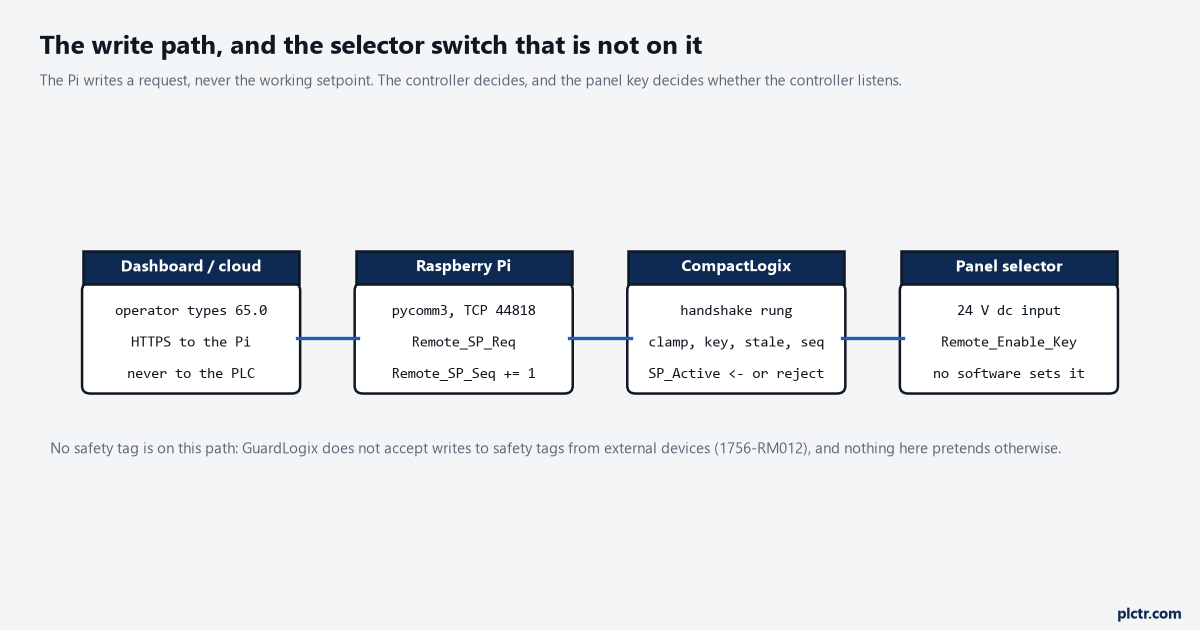
The Pi writes a request. The controller decides. The selector switch is the one input on the drawing that no software, on the Pi or the cloud or the HMI, can set.
What “safety problem” means here, in the manual’s words
A setpoint is not a safety function, and the handshake is not safety logic.
The problem is what a setpoint can reach, and the manual is precise about it.
The GuardLogix 5580 Safety Reference Manual, 1756-RM012, draws the line for you. The controller does not allow writes to safety tag data from external HMI devices or via message instructions from peer controllers; HMI devices can have read-only access to safety tags depending on the External Access setting. Controller-scoped safety tags can be read, but not written, by standard routines. So a Pi cannot write a safety tag, full stop, and a Pi writing a standard tag cannot have that tag consumed by a safety routine except through the safety tag-mapping feature, which copies standard tags into safety memory at the start of the safety task and needs a download to change. Then the manual’s attention box, on the mapped-tag page: standard data in a safety tag is not safety data, do not directly control a SIL 2 or SIL 3 safety output by using standard data. And for the case where a value from outside genuinely must reach the safety loop – a muting speed, a safe-speed limit – it prints a six-step procedure: send the value twice to two different standard tags, not in one command; map both into two safety tags; have safety code check them for equivalence and range; read both back to the operator; have a trained operator visually confirm; have that operator manually acknowledge on the HMI before the safety logic uses the values. That is what “a setpoint from outside becomes a safety problem” costs when it is allowed to. The whole point of this article’s handshake is to keep the Pi’s setpoint on the standard side of that line, where the cost is two rungs, and the interlock stays where it was: on the safety task, unreachable from a browser. On a plain CompactLogix with no safety task the tag rule does not apply, and the discipline is the same for a different reason: the speed reference to a PowerFlex 525 is a standard REAL, and 95 % into a line rated for 80 is a mechanical problem before anyone gets to argue about whether it was a safety one.
Seven tags, two rungs, one setpoint to the PLC
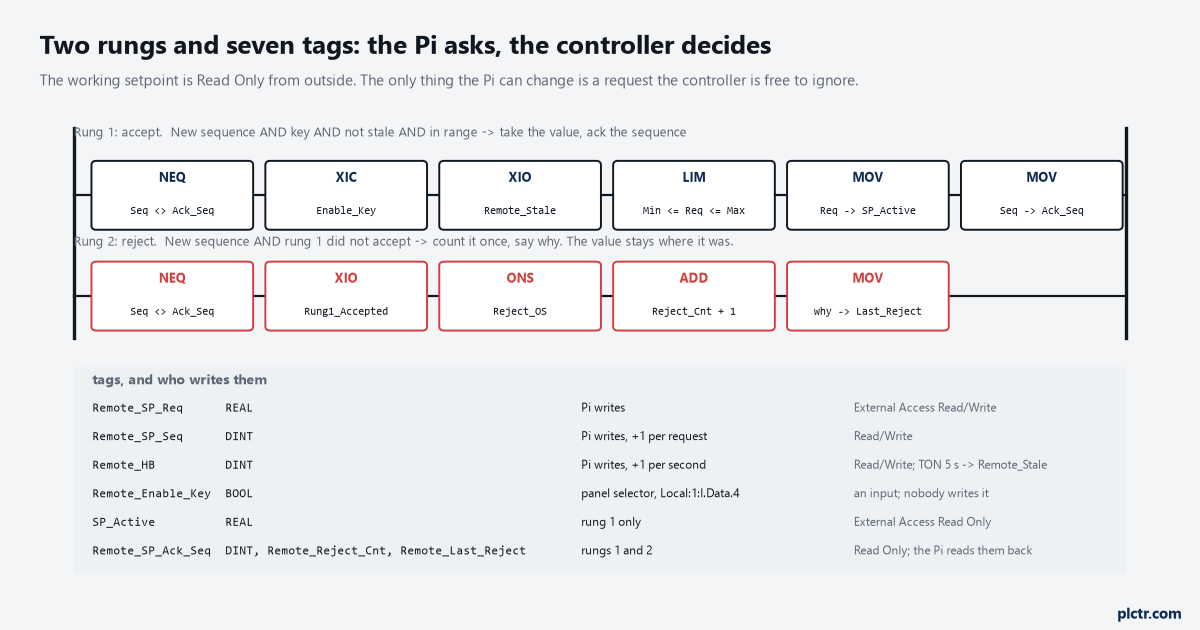
The only tags the Pi can write are the request, the sequence and the heartbeat. SP_Active and the three answer tags are Read Only from outside, so the Pi reads its own result back from the controller rather than assuming it.
Rung 1 is four conditions in series and two MOVs, and every one of the four is a different way of saying no.
NEQ Remote_SP_Seq Remote_SP_Ack_Seq is the “new request” condition: the Pi increments the sequence with every request and the controller remembers the last one it acknowledged, so a request is processed once, a repeated write of the same sequence does nothing, and a Pi that restarts and writes the same value again does not re-apply it. XIC Remote_Enable_Key is a physical input – a selector switch on the panel door, Local:1:I.Data.4 or whatever your first input card’s address is – and it is the reason the figure draws the switch outside the software. A key that is off means the controller is not listening, and nothing on the Pi, the dashboard or the HMI can turn it on. XIO Remote_Stale is a TON: the Pi increments Remote_HB once a second, the timer restarts on every change, and if it reaches 5 s the Pi is presumed gone and its requests are refused, which is what stops a request written just before the Pi lost its network from being applied a minute later when the controller finally sees the sequence change. LIM SP_Min Remote_SP_Req SP_Max is the range check, and the limits are controller tags, set in the recipe or the HMI, never sent from the Pi. Then MOV Remote_SP_Req SP_Active and MOV Remote_SP_Seq Remote_SP_Ack_Seq. Rung 2 is the reject: a new sequence that rung 1 did not accept, a one-shot so it counts once per request, ADD on Remote_Reject_Cnt and a MOV of the reason into Remote_Last_Reject – 1 for range, 2 for key, 3 for stale – so the Pi can tell the operator which one it was. The clamp is deliberately a reject, not a clamp. Clamping 95 to 80 and applying 80 looks helpful and produces a machine running at a value nobody asked for; refusing 95 and leaving the setpoint where it was produces a dashboard that says “rejected: out of range 40-80”, which is the message the person who typed 95 needed. External Access does the rest: SP_Active
Remote_SP_Ack_Seq, Remote_Reject_Cnt and Remote_Last_Reject are Read Only; the three request tags are Read/Write; the limits are Read Only. A Pi with the wrong tag name gets an error from pycomm3 rather than a silent write to something it should not have reached.One rule that is not in the rungs: the Pi never writes SP_Active, even if it could. The local HMI writes it, the recipe writes it, and if the Pi wants to know what the machine is running on it reads it back, which is how a remote change and a local change stop fighting each other.
The Pi side, and why the write’s return value proves nothing
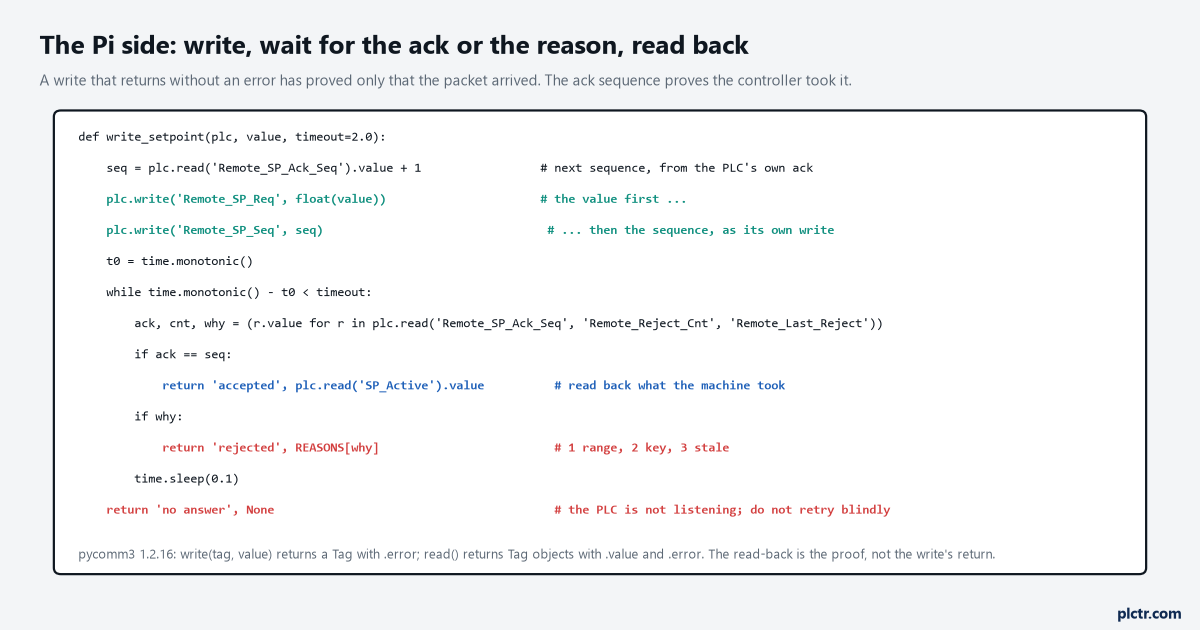
The read-back is the proof. A pycomm3 write that returns without an error has proved that the packet arrived and the tag was writable, and nothing else.
Value first, then the sequence, as two writes, and never both in one packet.
The rung acts on the sequence changing, so the value has to already be in Remote_SP_Req when the controller sees the new sequence; two writes in that order guarantee it, and a single structure write into a UDT that holds both is the atomic version if you would rather not think about it. Then the Pi waits for one of two things: Remote_SP_Ack_Seq equal to the sequence it sent, or Remote_Last_Reject non-zero, polling every 100 ms for two seconds, and reads SP_Active back when it is acknowledged so the dashboard shows what the machine took rather than what the user typed. The third outcome, no answer inside two seconds, is the one to handle properly: the key is off, or the controller is in Program mode, or the heartbeat was already stale, and the wrong response is to write again. Report “no answer”, leave the request where it is, and let the next request carry a new sequence when the person tries again. The dead end is trusting the write. plc.write('Remote_SP_Req', 95.0) returns a Tag whose .error is None, and every tutorial stops there. It means the CIP write succeeded: the tag exists, it was writable, the bytes landed. It says nothing about whether the controller did anything with the value, and in this design it is supposed to say nothing, because the controller may well have refused it a scan later. The pycomm3 article covers the driver; the sentence to carry over from it is that a Tag with no error is a transport result, not a process one.
What the two rungs do with seven writes
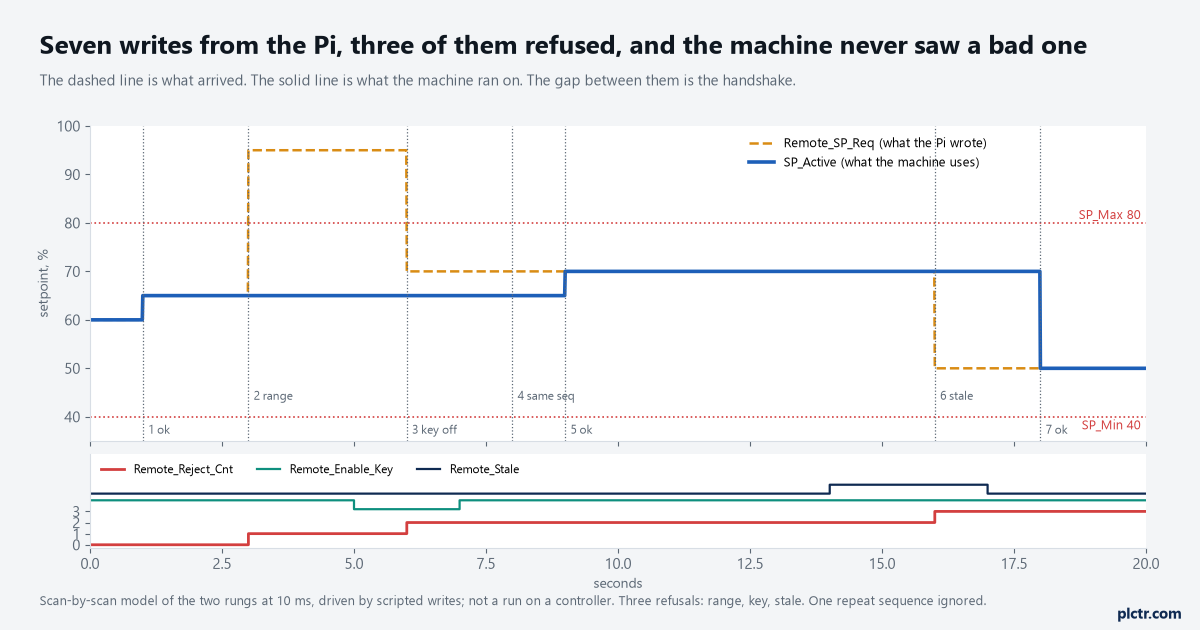
A scan-by-scan model of the two rungs at 10 ms, driven by scripted writes; not a run on a controller. The dashed line is what arrived from the Pi, the solid line is what the machine ran on, and the three steps in the red counter are the three writes that never became a setpoint.
Seven writes in twenty seconds, and three of them never became a setpoint.
At 1 s the Pi asks for 65 with sequence 1: key on, heartbeat fresh, in range, SP_Active goes to 65 and Remote_SP_Ack_Seq to 1 on the next scan. At 3 s it asks for 95 with sequence 2: LIM is false, rung 2 counts the first reject with reason 1, and SP_Active stays at 65 – the request tag still reads 95, which is fine, because nothing reads it but rung 1. At 5 s the operator turns the selector to local; at 6 s a request for 70 with sequence 3 arrives and is refused with reason 2, key. At 7 s the key comes back, and at 8 s the Pi, having got no acknowledgement, writes 70 with sequence 3 again: nothing happens, because 3 is not new, and that is the sequence rule doing its job – a retry of a refused request is not a new request. At 9 s it writes 70 with sequence 4 and that is accepted. At 10 s the Pi’s heartbeat stops – the process hung, or the cable went – and five seconds later Remote_Stale sets; at 16 s a request for 50 with sequence 5 is refused with reason 3, and at 17 s the heartbeat resumes and clears the flag, and at 18 s sequence 6 for 50 is accepted. Three writes refused, four accepted, and at no scan did the machine run on a value the controller had not checked.
The one thing the model cannot show is timing on a real controller.
A CIP write lands asynchronously to the scan, so the value and the sequence written as two packets can be separated by a scan, which is why the order is value-then-sequence and not the reverse. Test that on the bench by writing them the wrong way round once and watching SP_Active take the previous value.
Next step
Build the seven tags and the two rungs in a test routine, set External Access on each one the way the figure says, and prove the four refusals from the Pi before the dashboard exists: write 95, turn the key, unplug the Pi’s cable for six seconds, and repeat a sequence number. Each one should show up in Remote_Reject_Cnt with the right reason and leave SP_Active alone. Then walk the drawing with whoever owns the safety assessment and show them that nothing on it touches the safety task; if they want the setpoint to influence a safety function, the price is the six-step HMI procedure in 1756-RM012 and it is theirs to sign. The OPC UA client article is the same design on an S7-1500, where “Writable from HMI/OPC UA” on three tags and nothing else is the External Access column.