A first SCL block is two statements long – FC10, for a CPU 1516-3 PN/DP – and the first compile of it comes back with four errors and a warning. Every one of them is a ladder habit typed into a language that reads like Pascal, and the compiler is describing each habit accurately, in words nobody who came from contacts and coils would choose.
So this is the block, the interface it needs before a line is typed, the two lines themselves, and then the same block broken five ways on purpose so the error list means something the first time you see it for real.
STEP 7 Professional V17 on the laptop, the block set to optimised access.
The rules quoted below are from the STEP 7 system manual, which is the same text as the TIA Portal information system. Where something is what I see on screen rather than what the manual promises, the sentence says so.
The interface of a first SCL block, because an FC has nowhere to keep anything
A function has no instance data block. The manual puts it in one line: functions have no data memory in which values of block parameters can be stored, so when a function is called, all formal parameters must be assigned actual parameters. That sentence decides the whole interface, and it is worth reading twice before the declaration table is filled in, because the sections are not interchangeable the way they look. An Input is read once before the call; write to it inside the block and only the formal parameter changes. An Output is read once after the call, which is why the manual says outputs should not be read inside the block, and if you do read one you get the formal parameter, not whatever the caller had. And an Output you never write is not left alone: it is handed back at the type default, FALSE for a Bool, unless it is a structure, which is not pre-assigned at all. An InOut is the different one. It is read before the call and written after, and when the block does not write it, the value the caller passed in is what comes back out.
That last rule is the seal-in.
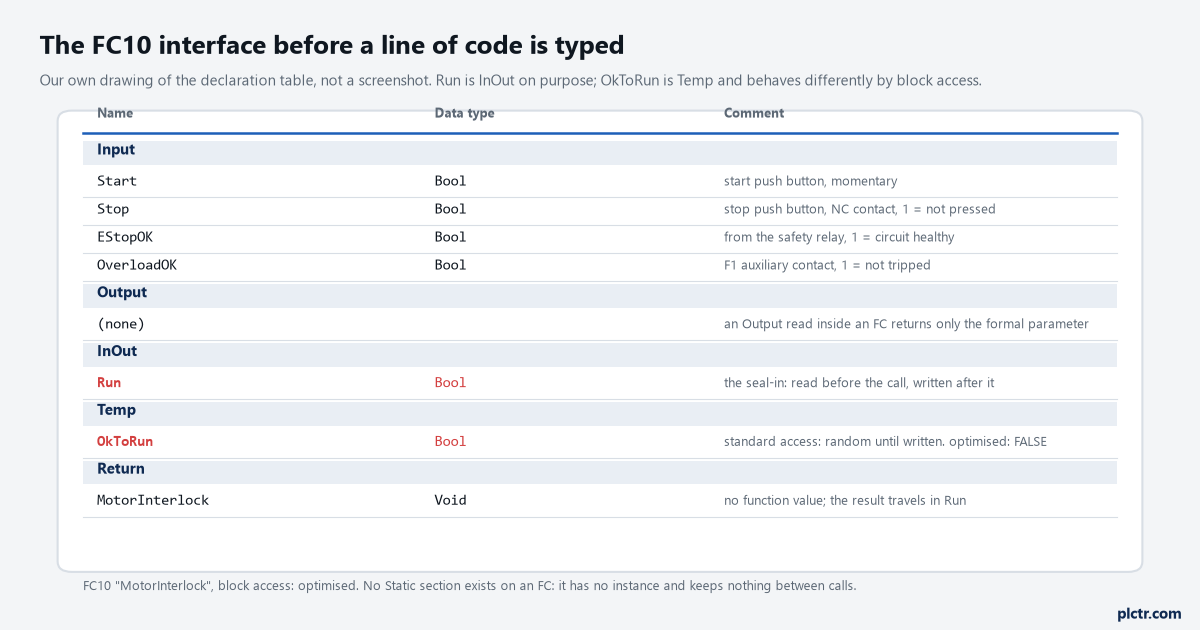
Our drawing of the declaration table, not a screenshot. Four inputs, no outputs, one InOut carrying the result, one Temp doing the interlock arithmetic.
A motor interlock with a maintained Run needs Run on both sides of its own logic, exactly the way the rung has a Run contact in parallel with Start. Declare Run as an Output and the block sees only its own formal parameter, which starts each call at FALSE, so the motor runs for one scan and drops. Declare it as InOut and the caller’s bit comes in, gets ORed with Start, and goes back out. The Temp section is for scratch, and it has its own trap, which gets a section of its own below. Return is the function value: RET_VAL, always the first output, any type except ARRAY, STRUCT, TIMER and COUNTER. FC10 does not need one. It is set to Void, and the result travels in Run.
There is no Static section on an FC.
If the block needs to remember something between calls without the caller holding it, it is an FB, and why a second FB instance behaves like the first is the page for that.
The rung, typed
The ladder network is Start in parallel with Run, then Stop, EStopOK and OverloadOK in series, then the Run coil. Stop is a normally-closed push button, so it is examined for 1: the wire is live while nobody is pressing it. In SCL that network is two statements.
// FC10 MotorInterlock
#OkToRun := #EStopOK AND #OverloadOK AND #Stop;
#Run := (#Start OR #Run) AND #OkToRun;
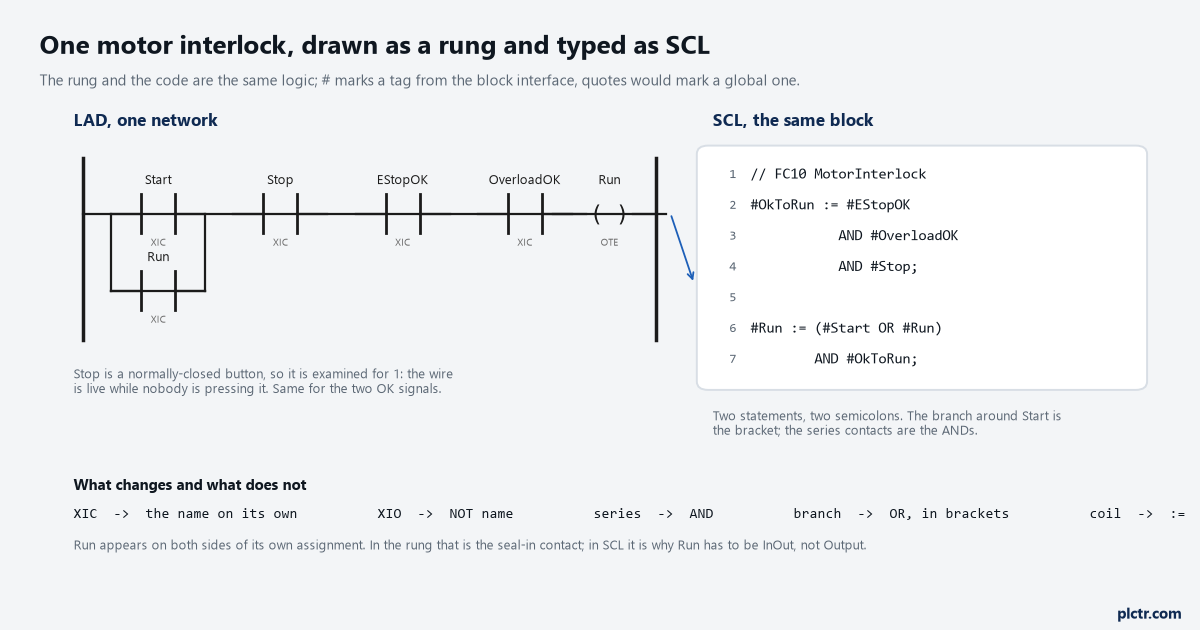
Series contacts become AND, the parallel branch becomes OR inside brackets, the coil becomes an assignment. Nothing else changed.
The mapping is mechanical once you have seen it. A contact examined for 1 is the tag on its own; examined for 0 is NOT tag; series is AND; a branch is OR in brackets, because the manual’s evaluation order is operator priority, then left to right, then brackets, and AND binds tighter than OR; the coil is :=. The hash marks a tag from the block interface and double quotes mark a global tag, so #Run is the InOut and "Run" would be something in a PLC tag table. Every statement ends with a semicolon, and the manual lets a statement span several lines, which is why the second statement can be broken after the bracket without doing anything special. Case does not matter. Comments start with two slashes and run to the end of the line. Since V14 the code can be folded into named REGION blocks, which the programming guideline recommends and which nobody needs on a two-line FC.
Two statements, two semicolons, compile clean.
If the mental translation from rungs to text is the part that is still slow, Structured Text for ladder people works through the six constructs on their own before any Siemens specifics.
Five errors, on purpose
Now break it. The same FC10, with five mistakes typed in that I have watched people make in the first hour, and what each entry in the compilation list is actually telling you.
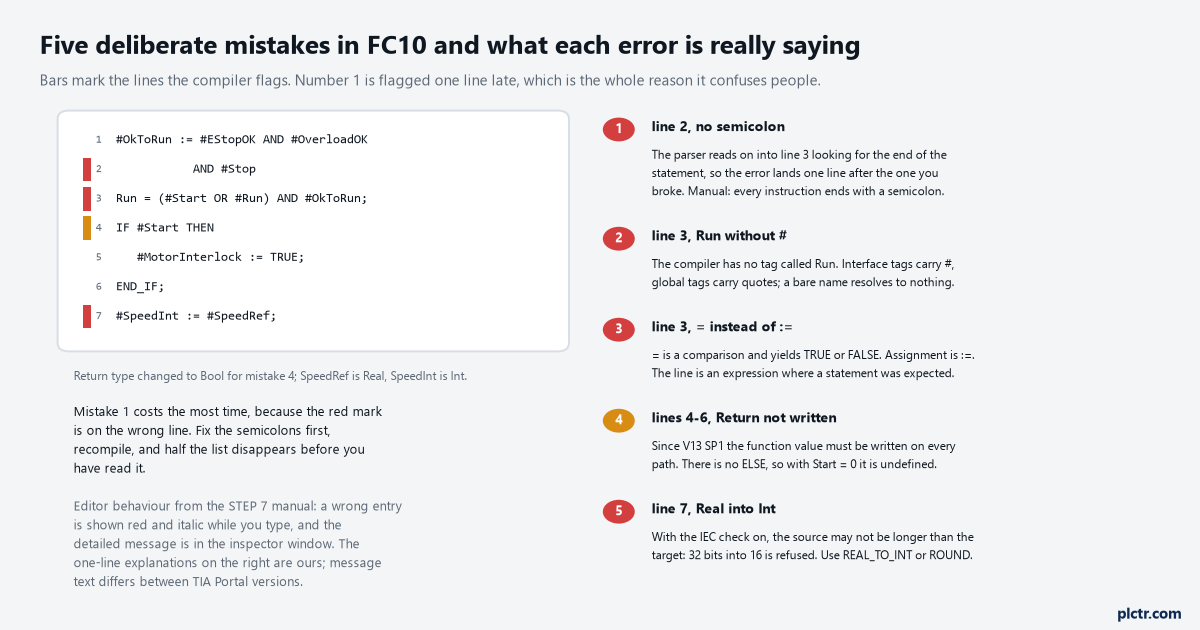
The bars mark where the compiler flags each line. The one-line readings are ours; the message wording changes between TIA Portal versions, the meaning does not.
The first is the semicolon left off the end of statement one. The manual’s rule is that each instruction ends with a semicolon, and the consequence of leaving one off is that the parser keeps reading, into the next line, looking for the end of the statement it is still inside. So the error is reported against the line after the one you broke, and the second statement, which is perfectly fine, is the one shown in red. That the mark lands a line late is what I see on V17; the manual only promises that a wrong entry is shown in red italics while you type and that the detailed message goes to the inspector window. Either way, the fix for an error you cannot see on the flagged line is to look at the line above it. Then the bare name: Run
#Run, and there might be a global called "Run", and a name with neither prefix resolves to nothing, so the compiler reports it as unknown. Third, = where := belongs. In SCL = is a comparison, one of the relational operators that yields TRUE or FALSE, and a line reading Run = (#Start OR #Run) AND #OkToRun; is a Boolean expression sitting where a statement was expected. It is not an assignment and the compiler will not treat it as one. Fourth, a function value written on one path only. Give FC10 a Bool return type and write #MotorInterlock := TRUE; inside an IF with no ELSE, and the compile fails: as of V13 SP1 it is checked that the function value is written in every possible program path, so that the value can never be left undefined at runtime. The manual’s own readme carries exactly this example and the fix, which is an assignment before the IF. Fifth, #SpeedInt := #SpeedRef; with SpeedRef a Real and SpeedInt an Int, which is refused for a reason that gets its own section next.Fix the semicolons first and recompile.
Half the list disappears before you have read it, because one missing terminator can produce a cascade of complaints about lines that are fine.
The dead end worth naming is the block that compiles clean and still does not hold in. Everybody reads the two statements again, and the two statements are right. The mistake is in the interface: Run declared as an Output, so every call starts from the type default and the seal-in has nothing to seal to. The compiler cannot see that, because reading an output inside a block is allowed, it is only pointless. Check the section header before you check the logic.
The IEC check, and the Real that will not go into the Int
Implicit conversion is what lets you write one type into another without an instruction, and on an S7-1500 it runs under the IEC check by default. With the check on, the manual gives the rules in three lines: BOOL cannot be implicitly converted to anything; only REAL, BYTE, WORD, DWORD, DINT, INT, SINT, UDINT, UINT, USINT, TIME, LDT, DTL, DT, TOD, WCHAR and CHAR take part at all; and the bit length of the source may not exceed the bit length of the target. REAL is 32 bits, INT is 16. Refused. So a speed reference arriving as a Real and needed as an Int for a drive telegram has to be converted on purpose, with REAL_TO_INT or ROUND, and the choice between them is yours to make about rounding, not the compiler’s. Without the check the list gets longer, LREAL and LINT and the strings join it, but the length rule stays, and the editor marks each implicit conversion with a grey rectangle: dark grey when no accuracy is lost, light grey when it can overflow at runtime and drop ENO to 0.
Leave the check on for a first block.
An error at compile time is cheaper than an ENO you were not watching.
Standard access, optimised access, and the Temp that lies
#OkToRun is a Temp, and Temp is only alive while the block is executing. What it holds when the block starts depends on the block access setting, and the manual is direct about both cases. Standard access: if you use temporary local data you must make sure the values are initialised before use, otherwise they are random, with STRING and WSTRING the one exception, pre-set to length 0. Optimised access: a Temp not written in a function takes the type default, FALSE for Bool, 0 for Int, 0.0 for Real. FC10 writes OkToRun in its first statement, so on this block the setting cannot bite. Make the first statement conditional one day, or add a second Temp that is only written inside an IF, and on a standard-access block the random value will show up about once a shift and never on the bench.
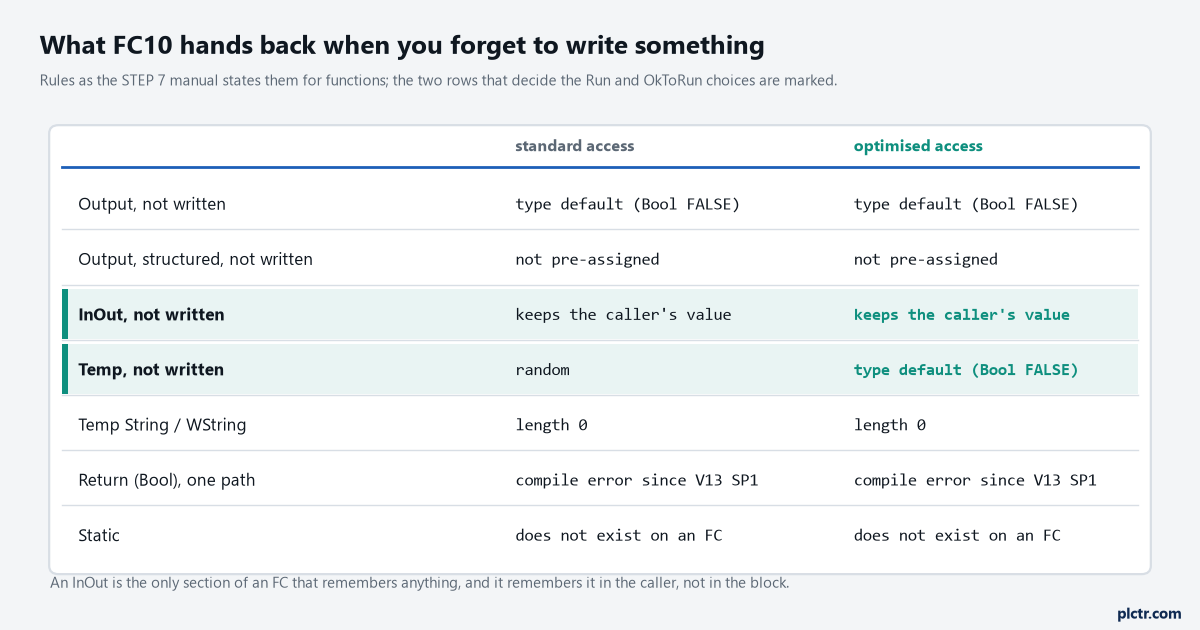
Rules as the STEP 7 manual states them for functions. The InOut and Temp rows are the two that decided how FC10 was declared.
Optimised is the default a new S7-1500 block arrives with, and it is the one to keep unless something absolute-addressed forces your hand. Changing it later on a block that already has an instance is a job with its own consequences, and changing an interface on a running S7-1500 without losing values covers what that download does to the data.
Call it, then watch it
FC10 is called from OB1 like any block: drag it into a network, wire Start, Stop, EStopOK and OverloadOK to the inputs, and wire one bit, a memory bit or a DB tag, to Run. Because Run is an InOut, that actual parameter has to be a real address, not a constant, and the compiler says so if you try. Then download, go online, and put program status on the FC while you press the button. If the values that come back make no sense, the watch table and program status page is where the stuck-value causes are listed, and the first one to check is whether the online CPU is even running the block you are looking at.
Once it works, there is a temptation to protect it.
Do not, yet. A know-how protected block that you wrote in your first week is a block you will need to open in your second, and the password is the thing that gets lost.