TIA Portal know-how protection is what stops you opening the function block a machine builder shipped, and it arrives on your desk on the day somebody asks for one more alarm. The panic that follows is usually misplaced. A protected block can be called, wired, downloaded and uploaded without any password at all, and the compile error that appears after a change is nearly always in your own network rather than inside their code. Here is what the protection actually covers, how to clear the interface mismatch, and where to put your change so it survives the next software update from the builder.
The example is a CPU 1512SP-1 PN with TIA Portal V16 and a bought-in labelling unit whose logic sits in one protected FB.
What you need
| Item | Notes |
|---|---|
| The project as delivered | Archived before you touch it. This matters more than usual when part of it cannot be rebuilt |
| Block numbers you may use | A block and DB number range that belongs to the plant, not to the builder |
| The exact compile error | Full text including the block names and the network number |
| Contact at the machine builder | For the password or for a change request, in writing either way |
| Password, if the site has one | Kept with the project archive, not in somebody’s notebook |
What the protection locks, and what it leaves open
Know-how protection is applied per block, to code blocks and global data blocks, from the block’s shortcut menu or from the Protection section of its properties. It hides the body. It does not isolate the block from the rest of the program.
| You can do this without the password | You cannot do this without the password |
|---|---|
| Call the block and wire its existing parameters | Open the block and read or edit its code |
| See its name, number, language and interface | See its internal declarations and networks |
| Compile, download and upload the block | Add, remove or rename a parameter on its interface |
| Copy it into another project | Remove the protection |
| Monitor your own logic around the call | Monitor what happens inside the block |
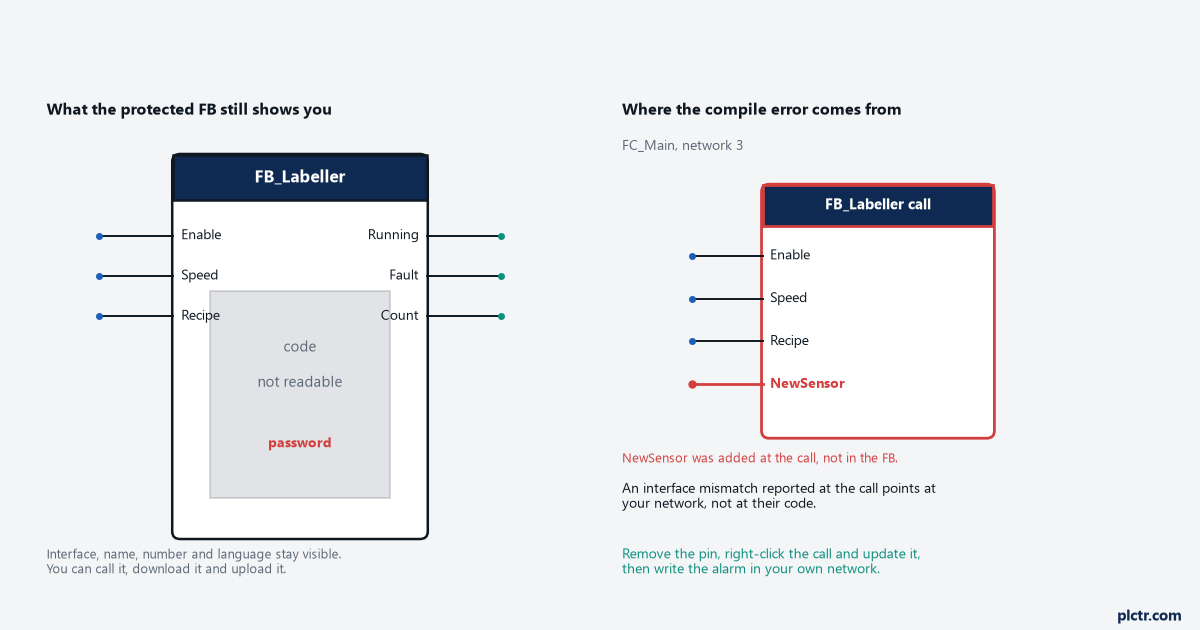
The interface is the important half of that list. Every input, output and in/out parameter stays visible with its data type and its comment, which is enough to use the block properly in almost every case.
Cross-references are the part to check rather than assume. What a protected block reveals about the tags it touches internally is limited, and the exact behaviour differs between versions. Open the cross-reference list on a tag you know the block uses and see what your version gives you before you plan a change around it.
One more distinction. Know-how protection controls who can read a block. Copy protection, set in the same Protection area, binds a block to the serial number of a memory card or a CPU so it will not run on other hardware. They are separate settings and a block can carry either, both or neither. The difference matters the day you have to move a program to a spare CPU, which is one of the scenarios worth planning for alongside the access controls in implementing cybersecurity measures for PLC systems.
The compile error is in your call, not in their block
The message reads along the lines of: the interface of the called block does not match the call in the calling block, with a network number. It sounds like the protected block is broken. It is not. The compiler is saying that the parameter list at the call site no longer agrees with the block’s interface, and the call site is yours.
Adding a pin to a call box does not add a parameter to the block. On an unprotected FB, TIA would let you open the block and declare the parameter, and the call and the block would agree again. On a protected FB you cannot do the second half, so the call is left describing an interface that does not exist.
- Read the full error and note both block names and the network number. The error names the calling block, which is where you are going.
- Open that network. The call box is flagged as inconsistent.
- Remove the parameter you added. Delete the pin, not the call.
- Right-click the call and use the update command so the call re-reads the interface from the block. There is also a project-wide command for updating inconsistent block calls, which is quicker when a builder update has changed several interfaces at once.
- Compile the calling block on its own first. A clean compile there tells you the call is right before you compile the whole program.
- Download and check the machine behaves as it did before your change.
Two things not to do. Do not delete the protected block and create a new one with the same name, whatever anybody suggests: the name is not the logic, and once their FB is gone only the builder can give it back. Do not go looking for software that claims to open protected blocks. It is a breach of the supply agreement on most machines, and it puts a block of unknown provenance into a running production program.
Put your change outside the block
The labelling case needed an alarm bit for a new sensor. That does not need to live inside the protected FB.
Write it in your own block, using your sensor input and whatever the builder’s FB already publishes as outputs. A typical alarm is the sensor state qualified by the machine actually running, with a delay so a momentary state does not raise it:
// plant alarm block, FB 900, outside the builder's number range
// #DelayOn is a TON declared as a multi-instance in the Static area
#SensorFault := "Labeller".Running AND NOT "LabelSensor_OK";

#DelayOn(IN := #SensorFault, PT := T#2S);

"HMI_Alarms".LabelSensorFault := #DelayOn.Q;
Give plant additions their own block number band and write that band on the project cover sheet. Builder software updates replace the builder’s blocks. Anything of yours inside their numbering disappears in that update with no error message and no warning, which is a far worse failure than a compile error. The same reasoning is behind the numbering and commenting conventions in best practices for PLC program documentation.
If the change genuinely has to be inside the FB, because the behaviour it needs is not exposed on any output, that is a change request to the builder. Send the requirement, not a request for the password, and let them decide which one they would rather give you.
Settle the password question at handover
The afternoon described above is a purchasing problem that arrived two years late. Protected blocks on a bought-in machine are normal and defensible, and the time to agree what comes with them is while the order is still open. Three lines in the specification cover it: which blocks will be protected, whether the site gets the password or a change request route instead, and how long the builder has to answer a request for a change to protected logic. Where a password is handed over, it belongs in the same store as the project archive, the firmware versions and the support package list, not in the notebook of whoever commissioned the line.
The protection also travels with the block. Copy it into another project and it is still protected. Upload the program off the CPU after a spare swap and the block comes back protected, so a recovery from the controller hands you a running machine and still no way in. Worth knowing before an emergency rather than during one.
What we see in the field
The block that got deleted. On a cartoner, somebody took the advice to delete the FB and make a new one with the same name. The compile went green, the machine did nothing, and the shift was lost waiting for the builder to send the original block. The name compiled. The logic was gone.
The password that was in the manual. A labelling machine where nobody had the password, three emails to the builder, and the password was in an appendix of the operation and maintenance manual that had never been scanned into the plant system. Look there first, then ask.
The alarm that vanished. An integrator put plant alarm logic into an FC inside the builder’s number range. Eighteen months later the builder shipped a software update, the FC was replaced, and the alarm stopped existing. Nothing faulted. Nobody noticed until the fault it covered happened again.
Frequently asked
Can I monitor a know-how protected block online? You can monitor the call and every parameter on it from your own network, which tells you what goes in and what comes out. You cannot open the block and watch values inside it.
Can Siemens recover a lost block password? No. There is no recovery path, which is why a lost password means the block can only come back from whoever wrote it. Store it with the project archive and the firmware versions, in the same place and with the same discipline.
Does know-how protection stop somebody copying the machine program? No. Anyone with the project can copy a protected block into another project and run it. Stopping that is copy protection, which binds the block to a memory card or CPU serial number and is a separate setting on the same properties page.
Next step
Undo the change at the call, compile the calling block on its own, and move your logic into a block that carries a plant number. Then email the builder for the password and file it properly, so the next person does not repeat the afternoon you just had. If the machine is still misbehaving after a clean compile, the problem is no longer the protection, and the sequence to follow is in advanced troubleshooting techniques for PLC systems.