A Docker Raspberry Pi that stopped logging on a Sunday had /var/lib/docker/containers/3f9a.../3f9a...-json.log at 22 GB when du got to it, and the file belongs to a container whose only job was to reconnect to a broker that had been down since Thursday. Docker’s default log driver is json-file, its default max-size is unlimited, and a Python client that prints “connection refused” and a traceback once a second writes about 300 MB a day until the card is full and SQLite’s INSERT starts failing too. Nothing crashed. Every container was Up.
The fix is four lines in compose.yaml and one file in /etc/docker, and this page is those lines, what each of them costs, and the six commands that find the file when somebody else’s Pi has already filled up. The SQLite queue and the OPC UA client are the kind of process that ends up in the container; this is the part of the job that keeps them running when nobody is looking at the Pi for a year.
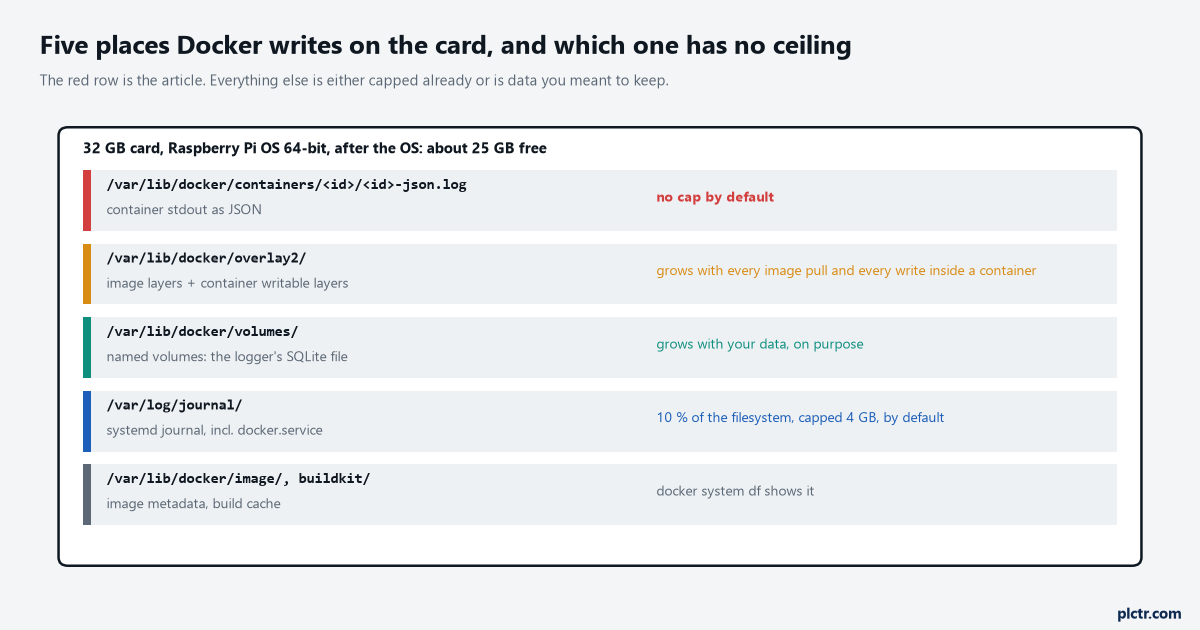
Five places Docker writes. Only one of them has no ceiling by default, and it is the one that fills a card while every container shows as healthy.
What a Docker Raspberry Pi is for, and what it is not
A container on a Pi in a panel buys you one thing: the logger, its Python version and its libraries move as a unit, and the next Pi gets the same unit.
That is worth having. pip install python-snap7 on a Pi 4 that has been running for two years is not the same install as on a fresh card, and a container built from python:3.12-slim-bookworm with python-snap7 3.1.2, pycomm3 1.2.16 and paho-mqtt 2.1.0 pinned in its requirements.txt is the same stack on every Pi it is pulled to. What it does not buy is reliability by itself. The engine is a daemon under systemd, the container is a process under the engine, and if either of those is misconfigured the Pi is less reliable than a plain systemd unit running the script directly, because there are now two places for it to go wrong. The install itself is uneventful on a 64-bit Raspberry Pi OS: Docker’s own Raspberry Pi OS page covers the 32-bit armhf case and sends 64-bit installs to the Debian instructions, the packages are docker-ce, docker-ce-cli, containerd.io, docker-buildx-plugin and docker-compose-plugin, and the docker group exists afterwards with nobody in it, so every command needs sudo until you add the user. The compose plugin is the one to use; the older standalone docker-compose binary reads a different generation of file. Then the decision that matters more than any setting: the card. A container’s writable layer lives under /var/lib/docker/overlay2, and everything the process writes that is not on a volume lands there, on the card, through the overlay filesystem. The logger’s SQLite file goes on a named volume, or on a bind mount to a USB stick, and the container’s root filesystem is declared read_only: true with tmpfs for the two paths software writes anyway. That is the same rule as running without Docker; the container makes it enforceable.
Host network, not bridge
The container has to reach the PLC, and Docker’s default network is the wrong one for that.
A container on the default bridge network sits behind NAT on the Pi. Outbound TCP works – pycomm3 to a CompactLogix on 44818, snap7 to an S7-1200 on 102, asyncua to an S7-1500 on 4840, paho to a broker on 1883 – so the first test passes and the design looks fine. What does not work is anything that needs the Pi’s own address on the wire: the broadcast discovery pycomm3 uses to list controllers on the subnet, a Modbus device that answers to the requester’s address, an NTP client on the S7 pointed at the Pi, the chrony server itself if it were containerised. network_mode: host gives the container the Pi’s network stack, no NAT, no port mapping, and it is the right default for a box whose job is to talk to a controller. The cost is that the container’s ports are the Pi’s ports; on a single-purpose Pi there is nothing to collide with.
The compose file
services:
  logger:
    image: plctr/logger:1.4            # your image, with the tag pinned; never :latest on a Pi
    network_mode: host                 # the Pi's own stack: 44818, 102, 4840, 1883 without NAT
    restart: unless-stopped
    init: true
    read_only: true
    tmpfs:
      - /tmp
      - /run
    volumes:
      - logger-data:/var/lib/plctr     # the one path that is allowed to grow
    logging:
      driver: json-file
      options:
        max-size: "10m"
        max-file: "3"
    healthcheck:
      test: ["CMD", "python3", "-c", "import plctr_logger; plctr_logger.check()"]
      interval: 30s
      timeout: 5s
      retries: 3
      start_period: 20s
    mem_limit: 256m

volumes:
  logger-data:
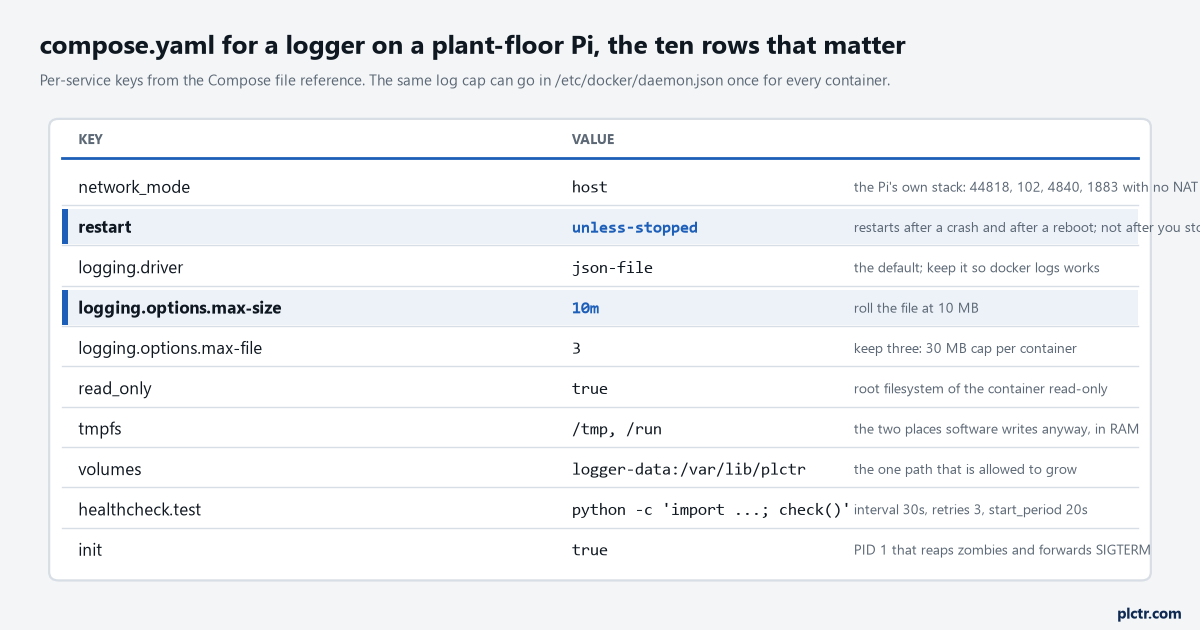
Ten keys from the Compose services reference. The two highlighted are the ones the card and the operator will notice; the rest are the ones the next engineer will thank you for.
restart: unless-stopped is the policy, and the reference’s four options are worth reading as a set: no is the default and never restarts; on-failure[:max-retries] restarts only on a non-zero exit; always restarts whatever the exit code; unless-stopped is always except that a container you stopped by hand stays stopped even after the daemon restarts. That last clause is the reason to prefer it on a Pi: docker stop logger while you swap a cable should not be undone by the next reboot. Two things the engine’s own page says that people find out the hard way. A restart policy only takes effect once the container has been up for at least ten seconds, so a process that crashes on line six at its first start is not restarted at all – Docker treats a container that dies inside ten seconds of starting as a failed start rather than a crash, which is correct, and which means the PUT/GET-off kind of fault, where the client raises immediately, has to be caught inside the script and retried there. And the same page says not to combine restart policies with a host-level process manager, which on a Pi means: do not also write a systemd unit that restarts the container. The engine’s unit is enabled by the install; that is enough. init: true puts a small PID 1 in the container that forwards SIGTERM and reaps zombies, and without it a Python script that ignores signals is killed after the stop timeout rather than shut down, which for a script with an open SQLite file is exactly the difference the panel-power article went to the trouble of buying with a buffer module. mem_limit: 256m is the line for a logger that leaks; on a 4 GB Pi it is generous, and it means a leak ends with the container being killed and restarted rather than the Pi swapping to the card for a week.
The healthcheck is the one that does less than it looks like it does.
The engine runs the command every 30 s, marks the container unhealthy after three failures, and then does nothing. The restart policy watches the process exit, not the health status, so an unhealthy-but-running container sits there. Make the check kill the process when it fails – plctr_logger.check() can raise SystemExit through PID 1 – or have the script watch its own last successful read and exit when it is stale, which is the same thing with fewer moving parts.
The log driver, and the two places to set it
{
  "log-driver": "json-file",
  "log-opts": { "max-size": "10m", "max-file": "3" }
}
That is /etc/docker/daemon.json, and it covers the containers somebody else starts on this Pi next year.
The configure-logging page is where the whole article comes from: json-file is the default driver, it “can cause a significant amount of disk space to be used” because it performs no rotation by default, and Docker’s own recommendation is the local driver, which rotates by default at 20 MB times 5 files with compression on, about 100 MB a container. The json-file options page gives the numbers the other way: max-size defaults to -1, unlimited, and max-file defaults to 1, and the second only means anything once the first is set. So a container with no logging: block on a stock engine has one log file that grows forever. Set it in daemon.json for the engine, restart the engine, and recreate the containers, because a container keeps the log configuration it was created with. Set it again in the compose file for the logger, because the compose file travels with the project and the daemon.json does not. Ten megabytes times three is 30 MB, and 30 MB of the last few hours of log is more than anyone reads.
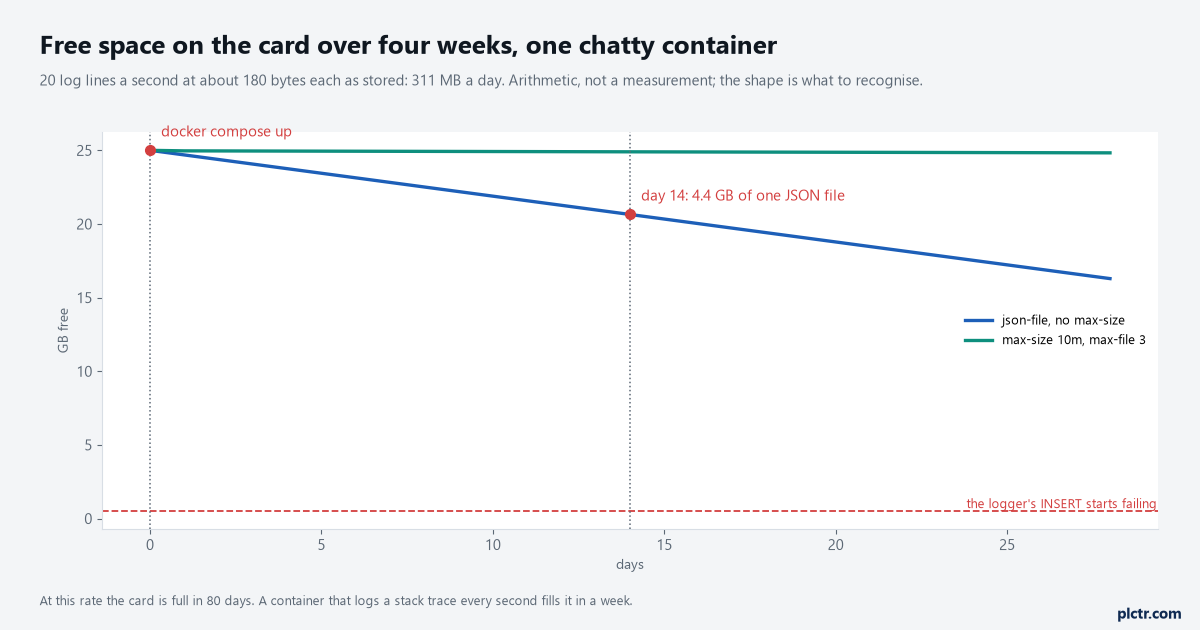
Arithmetic, not a measurement: 20 lines a second at about 180 bytes stored is 311 MB a day. The shape is what to recognise – a card that empties at a constant rate with no data growth to explain it is a log.
Twenty lines a second is not a chatty container; it is a reconnect loop with a traceback.
A paho-mqtt 2.1.0 client with reconnect_delay_set(min_delay=1, max_delay=60) backs off, but one written with connect() in a while True loop and a bare except that prints the traceback tries again immediately, and against a broker that is down that is ten lines a second before anything else goes wrong. Add a stack trace and it is twenty. At 180 bytes a line as stored – the driver wraps every line in a JSON object with the stream and a timestamp, which I have not measured but is on the order of sixty bytes on top of the text – that is 311 MB a day and a 25 GB card in 80 days, and if the traceback is longer, a week. The line above the axis in the figure is the one to notice: SQLite starts failing before the card is completely full, because the WAL and the checkpoint need room to write, so the logger dies with disk I/O error or database or disk is full while df still shows a few hundred megabytes. Two more things that grow. The systemd journal, which holds the engine’s own log, is capped by default at ten per cent of the filesystem or 4 GB, whichever is smaller, with fifteen per cent kept free – journalctl --disk-usage prints it – and on a Pi where /var/log/journal does not exist it is not persistent at all and lives in RAM, which is usually what you want on a card. If it has to persist, cap it yourself in /etc/systemd/journald.conf:
[Journal]
Storage=persistent
SystemMaxUse=200M
SystemMaxFileSize=25M
MaxRetentionSec=1month
Those four lines hold the journal at 200 MB and eight files, and drop anything older than a month, on a card where the default would have let it reach 2.5 GB. And overlay2, which grows with every docker pull of a new image tag and keeps the old layers until docker image prune removes them. A Pi that has been upgraded through twelve image versions is carrying eleven of them.
Finding the file that filled the card
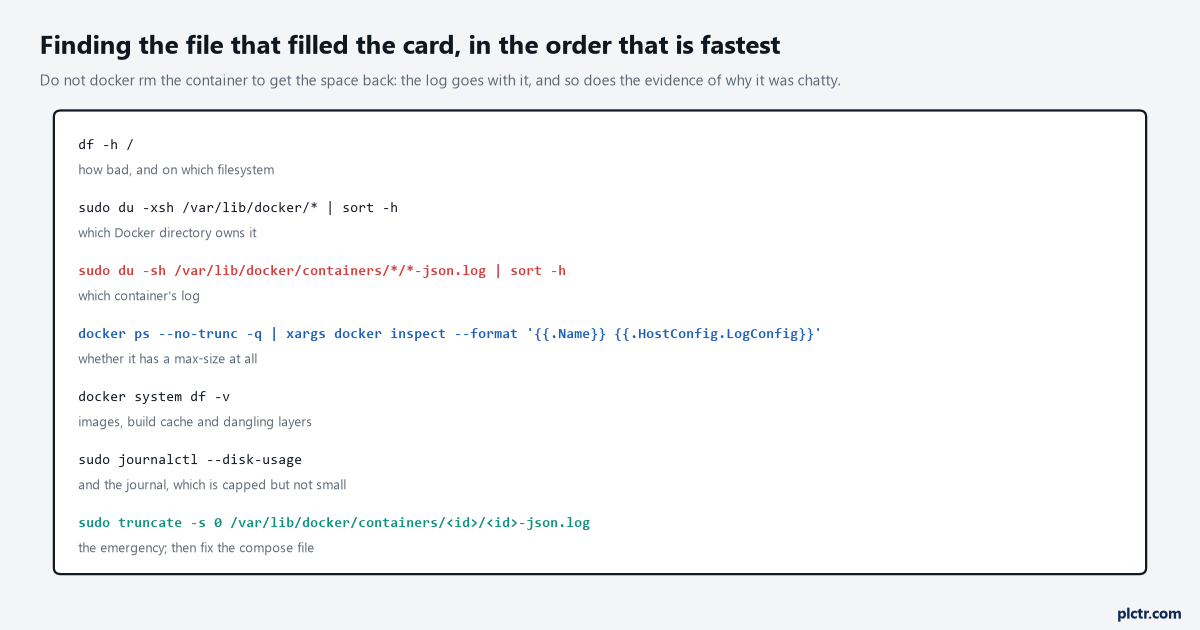
In the order that is fastest. The last one is the emergency, and it is truncate, not rm, for a reason.
df -h / says how bad. sudo du -xsh /var/lib/docker/* | sort -h says which Docker directory, and it is containers when it is a log and overlay2 when it is images or a container writing to its own root. sudo du -sh /var/lib/docker/containers/*/*-json.log | sort -h names the container, and docker inspect --format '{{.Name}} {{.HostConfig.LogConfig}}' over docker ps -q shows whether it was ever given a max-size, which is the line that goes in the incident report. docker system df -v covers images, volumes and build cache. Then the emergency: sudo truncate -s 0 on the log file, not rm. The daemon holds the file open, and a deleted open file keeps its blocks until the last handle closes, so rm gives back nothing until the container is restarted and leaves you staring at a df that has not moved. truncate gives the space back immediately, the container keeps writing to the same inode, and nothing restarts. Then fix the compose file and recreate the container, because a truncated log with no max-size is the same problem three months from now.
The dead end is docker system prune -a, and it looks exactly like the answer.
It looks like the answer, it frees space, and on a Pi in a panel with no route to a registry it deletes the image the logger is running from, so the next docker compose up after a power cut has nothing to start. Prune images by name when you know which one is old; never -a on a machine that cannot pull.
Next step
Run docker inspect with the LogConfig format over every container on every Pi you own, today, and write down the ones that print an empty map; those are the ones with no cap. Then put the three-line daemon.json on each, restart the engine at a quiet moment, and recreate the containers from a compose file that has the logging: block too. When that is done, fill a test Pi’s card deliberately with fallocate and watch what the logger does when INSERT fails – the queue article caps its table for this reason, and the tag-history arithmetic is how you know the data itself will not be the thing that fills it.