Retentive memory on an S7 is a checkbox: open a data block in TIA Portal and there is a column headed Retain, with one on every row. Open the tag editor in Studio 5000 and look for the same thing, and it is not there — 1756-PM004L documents the attributes a Logix tag has, and Retain is not among them. 1756-UM543T is blunter still when it lists the tag attributes that control access to tag data, and there are two of them: External Access and Constant.
That single difference runs through everything below.
On an S7, retentivity is a property you declare on the data and the CPU honours it across a power cycle. On a Logix controller there is nothing to declare, and what survives is decided by a snapshot mechanism and a dropdown in the controller properties. Neither of those is the general rule for PLCs, and the fastest way to lose a day is to carry one platform’s answer to the other.
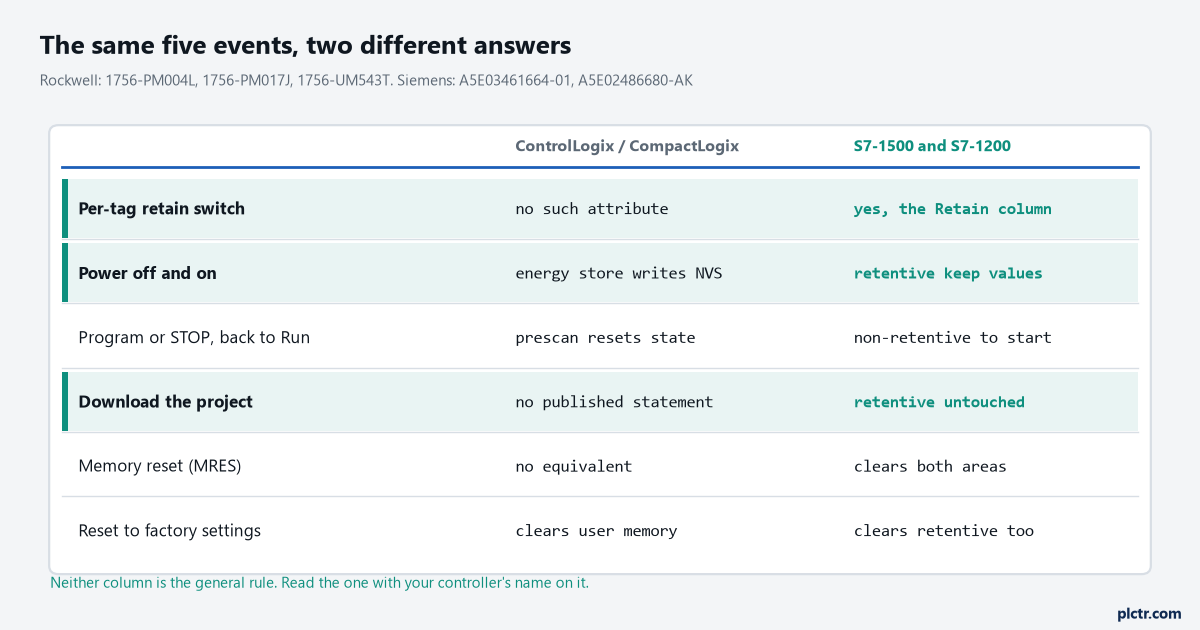
Six questions, two columns, and the columns disagree on five of them. The one they agree on is that a factory reset takes everything.
Siemens retentive memory: a checkbox, a budget, and a rule about how you got there
The Siemens model is the one people find intuitive, because it says what it does.
The memory function manual states the startup behaviour directly: at the operating mode transitions POWER ON to startup, and STOP to startup, tags from global data blocks, instance data blocks and technology objects are initialized with their start values, while retentive tags retain their actual values as saved in the retentive memory. Nothing is retentive by default.
What you declare as retentive comes back, and that is the whole contract.
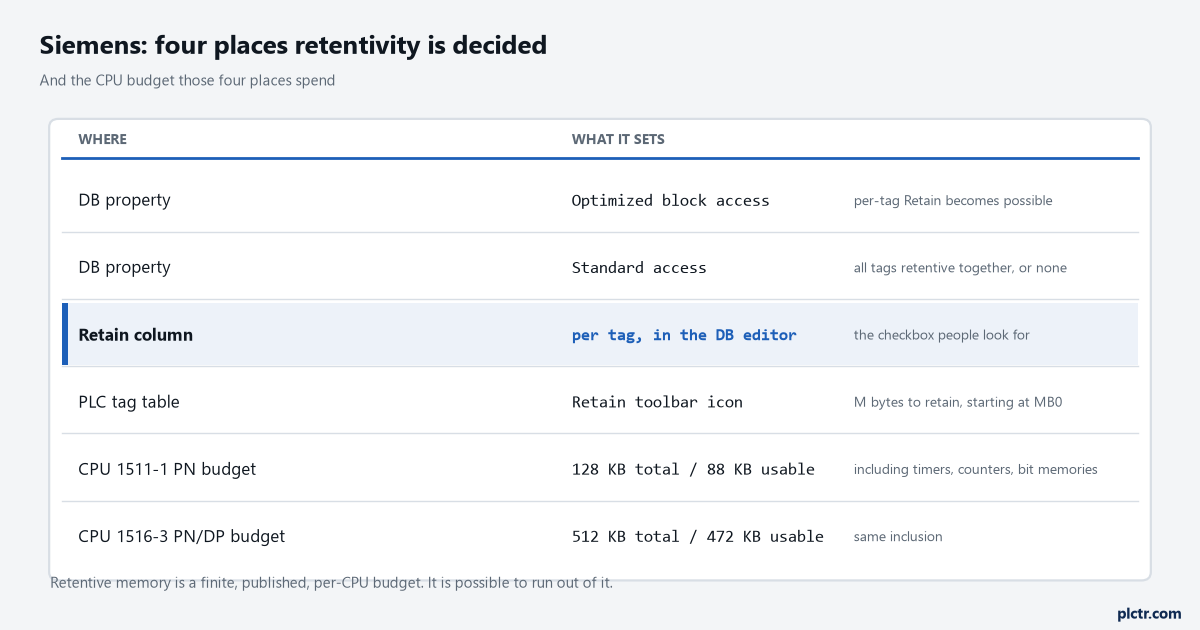
The Retain column is the one everybody knows about. The block access property above it is the one that decides whether that column is usable at all.
Which brings in the detail that catches people moving between projects. Whether you can set retentivity per tag depends on the block’s access property. With optimized block access activated, you can define retentivity for individual tags in a data block or instance data block. With it not activated — standard access — you can only set retentivity for all tags collectively. A legacy block converted from an S7-300 project, or one deliberately left at standard access because something reads it by absolute address, does not give you per-tag control, and the Retain column will not behave the way the last project taught you it behaves. Bit memory is declared somewhere else again, and it is easy to miss. In the PLC tag table or the assignment list there is a Retain toolbar icon, and what it asks for is the number of M bytes to retain starting at MB0. Not a list of addresses. A count, from zero. So retentive bit memory is a contiguous block from the bottom, and a marker at MB300 is retentive only if you retained three hundred and one bytes. Then there is a budget, which is the part that genuinely surprises people the first time they hit it. Retentive memory is finite and published per CPU. A CPU 1511-1 PN gives a total retentive data area, including timers, counters and bit memories, of 128 KB with 88 KB usable. A CPU 1516-3 PN/DP gives 512 KB total and 472 KB usable. Those are real ceilings on real order numbers, and a recipe structure marked retentive without anybody checking the arithmetic will find them.
Two events clear retentive memory. Only two.
A memory reset, and a reset to factory settings. The S7-1200 manual spells out what a memory reset does, and the detail matters because MRES is the thing people reach for when a CPU is misbehaving. A memory reset clears all work memory, clears retentive and non-retentive memory areas, copies load memory to work memory, and sets outputs to the configured reaction to CPU STOP. It does not clear the diagnostics buffer or the permanently saved IP address. Read that list again before pressing it on a commissioned machine, because “clears retentive memory areas” is in it and the operator’s tuned setpoints are in there.
What a download does, which is the question people actually ask
A plain download does not touch retentive data on an S7. Not a byte of it. The S7-1200 system manual says it in one sentence: downloading a program does not clear or make any changes to existing values in retentive memory, and if you want to clear retentive memory before a download you must reset the CPU to factory settings first.
So the fear is misplaced, right up until you change an interface. That is a genuinely different operation, and the memory function manual is precise about it. For a data block without a memory reserve, loading any of these changes reinitializes all actual values in the block: a name change, a data type change, a retentivity change, the addition of new tags, or the deletion of tags. All of them. Add one Bool to the bottom of a structure and every value in that DB goes to its start value, which is the mechanism behind the classic complaint that a download wiped a year of operator tuning. The memory reserve exists for exactly this, and it is worth knowing what it does and does not absorb. With optimized block access and download without reinitialization active, a start value change, a comment change, or the addition of new tags can be loaded without reinitializing. Deactivate it, or attempt a name change, a data type change, a retentivity change, a deletion, or a change to the memory reserve settings, and you are reinitializing again. It is a narrower tool than its reputation, and the whole procedure — including the sizing question and what to do when it is already too late — is worked through in download without reinitialization in TIA Portal.
The thing to take from it here is the ordering. The memory reserve has to be switched on before the change that needs it. It is not a recovery tool.
Rockwell: there is nothing to declare, so something else decides
The Logix answer is shorter, and less comfortable.
It starts with an absence.
There is no retain attribute on a Logix tag. That is not an oversight in the documentation. 1756-PM004L is the manual whose job is tag attributes and it does not mention retentivity anywhere, and neither does 1756-PM018I, the manual whose entire purpose is mapping IEC 61131-3 language features onto Logix — despite IEC 61131-3 itself defining a VAR RETAIN qualifier. Two manuals that would have to mention it, both silent. Treat that as the answer rather than as a gap.
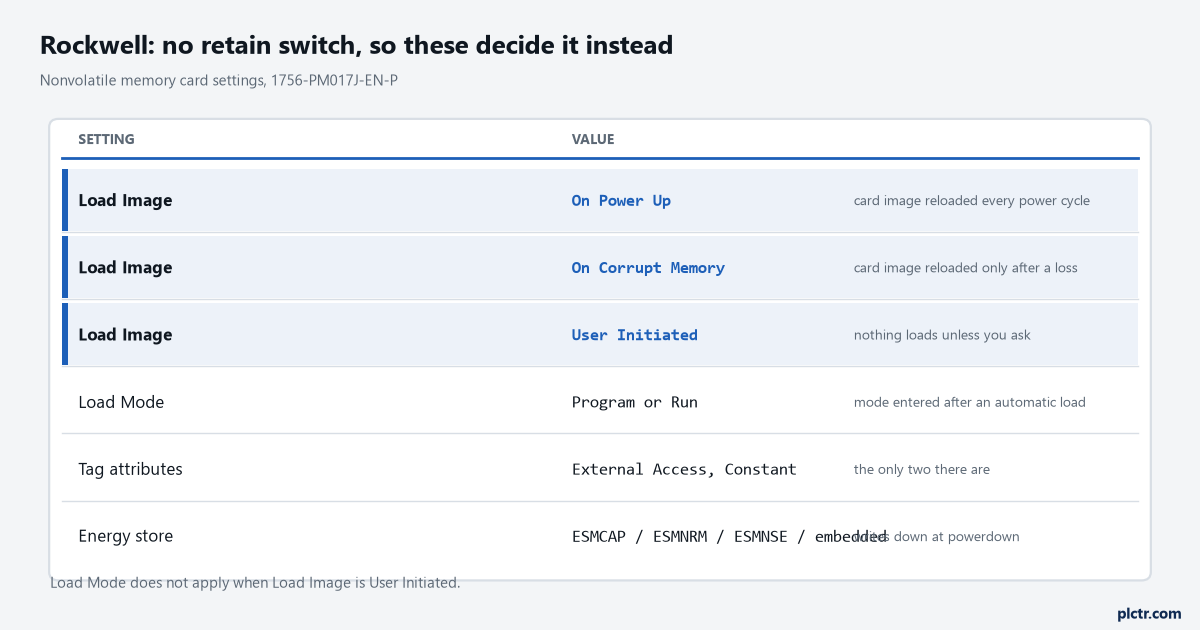
Load Image is highlighted because it is the only one of these that changes what your machine wakes up with, and it is three clicks deep in the controller properties.
What Logix has instead is two mechanisms that get confused with each other constantly.
The first is the energy store. Every current controller has one — a removable module on the 1756-L7x with its own catalogue numbers, 1756-ESMCAP, 1756-ESMNRM and 1756-ESMNSE, and an embedded circuit on the 1756-L8x and the CompactLogix 5380. Its job is to keep the controller alive long enough to write down after the volts go, and here the manuals differ by family in a way that is worth reading carefully rather than generalising. 1756-UM001Q describes the ESM’s role on a 5570 as providing power to save the program to onboard nonvolatile storage, and adds the clarification that doing so is not the same as saving to the SD card. The 5580 manual’s status message uses the same narrow word: the embedded storage circuit does not have sufficient energy to enable the controller to save the program if a powerdown occurs. 1769-UM021K, on CompactLogix 5370, is broader and says the embedded battery-less ESM provides power upon power-down allowing the controller to write customer application and tag data to the onboard nonvolatile memory. Application and tag data. That is a wider promise than the ControlLogix manuals make, on a different controller family, and it is the reason a blanket statement about “Logix retention” is always wrong somewhere.
The clock is a separate promise again, and a modest one. 1756-UM001Q’s own table gives the ESM’s WallClockTime hold-up in days — around twelve for an ESMCAP at 20 degC — which tells you the ESM is sized for a clock and a write-down, not for holding RAM through a shutdown period.
The second mechanism is the memory card.
This is the one that overrules everything else. 1756-PM017J gives three Load Image settings: On Power Up, On Corrupt Memory, and User Initiated. It attaches one sentence that settles most arguments about Logix retention: during a power cycle, online changes, tag values and network schedules that you have not stored on the memory card are lost. There is a companion sentence about the energy side of it too — if a controller loses power and does not have enough energy capacity, it loses the project in user memory.
Set Load Image to On Power Up and the controller reloads the stored project every single time it comes back, tag values included, exactly as they stood when somebody pressed Store. That is a restore point rather than retention, and it fails in the more dangerous direction. A counter that comes back at zero is obviously wrong. A counter that quietly comes back at the value it held during commissioning eighteen months ago is not, and nothing reports it. There is a related setting worth knowing because it is easy to misread. Load Mode selects the controller mode to enter after an automatic load, and it applies to On Power Up and On Corrupt Memory. It does not apply when Load Image is User Initiated, because in that case nothing loads unless a person asks for it.
So if you need a value to survive on Logix, you write it out deliberately. An HMI that owns the value and writes it back on startup, a MSG to a historian on a schedule you chose, a deliberate store before a planned shutdown. None of that is elegant and all of it is explicit, which on this platform is the only kind of retention there is.
Where the setpoints go when somebody changes an interface
Both platforms lose values when the shape of the data changes.
They lose them for different reasons, and only one of the two warns you.
On the S7 the mechanism is published and specific, and it is the interface change itself that does it: a name change, a data type change, a retentivity change, an addition, a deletion. Any of those, on a block with no memory reserve, and every actual value in that DB goes back to its start value. The values are not corrupted and nothing is faulted. They were reinitialized, on purpose, by a documented rule. On Logix the equivalent risk lives in the UDT. Change a User Defined Type that a tag is built from and the tag is rebuilt, and anything downstream that assumed an offset — a produced tag, an HMI addressing by structure, a COP that treats a UDT as bytes — is now reading something else. The UDT usage examples page covers the structure side of that.
Which of those two situations you are in changes what you do next, so establish it before you touch anything.
Checking it, rather than hoping
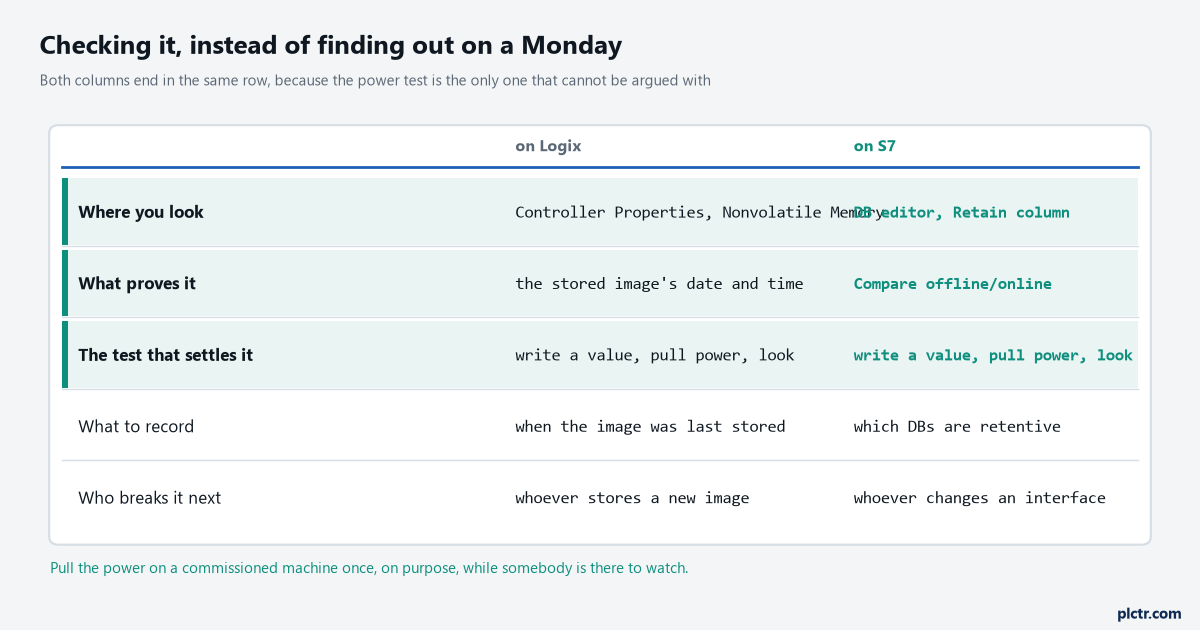
The last row is the same on both sides, which is the honest answer to this whole question.
On the Siemens side there is a documented tool. The online and offline comparison in TIA Portal displays the program blocks, system blocks, technology objects, PLC tags and PLC data types in the project against the ones in the CPU, and lets you open a detailed analysis of the differences including time stamps. Use it before a download, not after one, and pay attention to any DB flagged as different rather than clicking through. Going online properly in the first place is covered in going online on an S7-1500.
On the Rockwell side there is no tag-level equivalent, and pretending otherwise helps nobody. What you can check is the Nonvolatile Memory tab in the controller properties: whether an image is stored, when it was stored, and what Load Image is set to. Those three facts tell you what the machine will wake up with. If the stored image predates the last six months of commissioning and Load Image is On Power Up, you have found a problem that has not happened yet.
Then do the test that cannot be argued with.
Write a recognisable value into whatever matters — a setpoint at 77.7, a counter at 12345 — pull the power on purpose, put it back, and look. Do it once, on a commissioned machine, with somebody standing there who can put it right. It takes four minutes and it is the only method on this page that does not depend on a manual being current or on either of us having read it correctly. Write down what you saw and put the note in the panel, where the documentation that survives a night call lives.
What to check next
Find out which platform question you are actually asking, because the two halves of this page do not transfer. If it is an S7, open the DB properties and confirm the block access setting before you go looking for the Retain column, then add up what you have marked retentive against the CPU’s published budget. If it is Logix, open the Nonvolatile Memory tab and read the date on the stored image.
Either way, the power test settles it in four minutes, and a timer accumulator is a special case worth knowing on its own — that one is in TON, RTO and what survives a power cycle.