An S7-1500 area length error is an access outside the declared length of a data area, and on this family it does not stop the machine. The CPU stays in RUN, the ERROR LED stays on, and the diagnostics buffer fills with the same entry hundreds of times while production carries on. That combination convinces people the CPU is failing. It is not. The entry names the block and the offset, which is more than any hardware fault would give you, and the fix is usually three statements in the wrong order.
The example is a CPU 1516-3 PN/DP on a palletiser with TIA Portal V16, but the reasoning applies to any S7-1500 and to the S7-1200.
What you need
| Item | Notes |
|---|---|
| Online access to the CPU | Ethernet to the PN interface, or the web server if the project is not to hand |
| The matching offline project | Not required to read the buffer, required to jump straight to the failing network |
| Diagnostics buffer | Under the CPU, Online and diagnostics, then Diagnostics, then Diagnostics buffer |
| Cross-reference list | To find every block that touches the DB named in the entry |
| Watch table or trace | To catch the index at the moment it goes out of range |
Read the entry before you touch anything
A typical entry looks like this:
Area length error when reading
Global DB, DB number 120, byte address 4000
Block: FC 45
Programming error
Four facts, all of them useful.
Reading or writing. A read past the end returns nothing useful, a write past the end would have corrupted something if the CPU had allowed it. The two have different error IDs and, more importantly, different urgency.
The area. Global DB 120. It could equally say instance DB, bit memory or process image, and the area tells you where to look at the declaration.
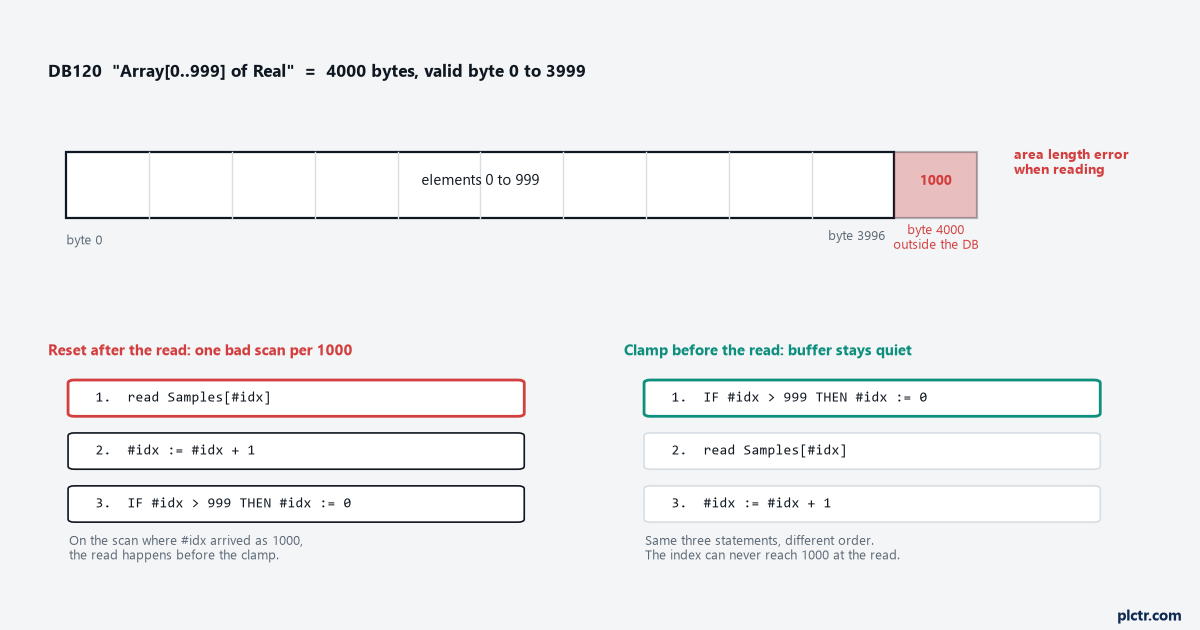
The byte address. 4000. This is the offset the instruction tried to touch, not the size of anything. A DB120 declared as Array[0..999] of Real holds 1000 elements of 4 bytes, so it occupies bytes 0 to 3999. Byte 4000 is the first byte past the end, which means the index was 1000 and the array ends at 999.
The block. FC 45, with a location inside it. Select the entry and use the button that opens the block in the editor: TIA jumps to the failing instruction when the offline project matches what is in the CPU. When it does not match, work from the cross-references on DB120 instead and check every access by hand.
A byte offset in the entry means the DB uses standard access. Optimized DBs have no fixed byte offsets, so expect the entry to identify the block and the operand rather than a byte number, and work from the block and the network.
Why the CPU keeps running, and why OB121 will not help
On an S7-300 or S7-400, a programming error with no OB121 in the project sends the CPU to STOP. That behaviour trained a generation of us, and it is not what the S7-1500 does. Here the default system reaction to a programming error is to log the event and stay in RUN. The ERROR LED indicates it, the buffer records it, the scan continues.
OB121 does not switch the error off. It gives you a place to decide what happens when one occurs, which on the S7-1500 means you can react rather than let the default reaction stand. Adding an empty OB121 to make the entries go away is not a fix. The bad access is still in the code, and the project now carries a block that suggests to the next person that somebody dealt with it.
The mechanism worth knowing instead is block-local error handling. In a block’s properties there is an attribute that turns on error handling inside that block. With it enabled, GET_ERROR or GET_ERR_ID in the block returns the error to your code and the CPU does not write the diagnostics buffer entry for it. The ID for a read outside the area is 16#2522 and for a write 16#2523. The full table sits in the GET_ERR_ID help and is worth reading once, because the IDs distinguish an out-of-range access from an invalid area and from a bad alignment, and those are three different bugs.
Use it deliberately. Block-local error handling on a block with a real bug in it hides the evidence and leaves the bad access in the code.
Find the access, then fix the order
The bug behind almost every area length error on an array is an index that is allowed to reach the value one past the end.
- Open DB120 and read the array bounds from the declaration. Write down the highest valid index. For
Array[0..999]it is 999. - Find the tag used as the index. It is often an Int counter in another DB, which means it survives a restart and can arrive at any value.
- Use Cross-references on that tag to list every place it is written. Reset logic hiding in a second block is common.
- Put the tag in a watch table and watch it against the array bound. If the excursion is one scan long, use the Trace function with a trigger on the index exceeding the bound, because a watch table will not see a value that exists for a single cycle.
- Look at the order of statements inside the network, not just their content.
That last step is where the palletiser case ended. The reset compare existed and was correct, but it sat after the array read in the same network. The counter arrived at 1000, the read used 1000, and only then did the compare put it back to 0. One bad scan every thousand, forever.
// fails once per thousand scans: the clamp runs after the access
#value := "DB120".Samples[#idx];
#idx := #idx + 1;
IF #idx > 999 THEN
    #idx := 0;
END_IF;

// correct: nothing can reach the access out of range
IF #idx > 999 THEN
    #idx := 0;
END_IF;
#value := "DB120".Samples[#idx];
#idx := #idx + 1;
Same three statements, different order. In ladder or FBD the same rule applies: the compare and the move that bound the index go in a network above the one that does the access, never below it.
Two habits keep this from coming back. Write the loop as a FOR with the bounds taken from the array rather than typed in, and where a block has to work with arrays of different sizes, declare the parameter as Array[*] and read the limits with LOWER_BOUND and UPPER_BOUND inside the block. Then shortening the DB later cannot break the block that reads it.
What we see in the field
The CPU that was going to be replaced. A site electrician had a new 1516 on order because the ERROR LED would not go out. The entry named a block and a byte offset. No hardware fault names a block. Reading the entry out loud to him ended the discussion, and the order was cancelled.
The index that came from the panel. An operator typed a recipe number on the HMI, the number went into an Int tag, and the code used the tag as an array index with no check. Anything the operator could type, the array had to survive. The buffer filled the first time somebody typed a number above the last recipe. Values arriving from outside the controller get clamped at the point they arrive, not at the point they are used.
The array that got shorter. During a cleanup somebody reduced a trend DB from 1000 elements to 500 and downloaded it. The FC that filled it still counted to 999, and nothing in that FC had changed. The fault appeared after a DB download, which sent two people looking at the wrong block for an afternoon. A cross-reference on the DB before the download would have found it in a minute, which is one more argument for the habits in best practices for PLC program documentation.
Frequently asked
Will the CPU eventually go to STOP because of this? Not from the default reaction to a programming error. The real damage is quieter: the buffer wraps, older entries that mattered get pushed out, and the ERROR LED is already on when the next genuine fault arrives. Nobody looks twice at a light that has been on for a month.
How do I clear the ERROR LED? Fix the cause and download first. The indication follows the pending diagnostics, and a STOP then RUN transition clears the display of a logged programming error. The buffer entries stay, which is what you want, because they are the record of what was wrong and when.
Is an area length error ever a hardware problem? No. A failed memory card or a bad module produces its own diagnostics with a hardware identifier, not a block number and a byte offset. Treat this entry as a pointer into your code, in the same way you would treat any repeatable symptom in advanced troubleshooting techniques for PLC systems.
Next step
Take the block and the offset from the buffer, work out which array the offset falls past, and check the order of the clamp against the access. If the index only misbehaves at a particular load or speed, the scan behaviour behind that is covered in PLC scan time and cycle time, and the language choices that make bounds explicit are in introduction to PLC programming languages.