A CPU 1516-3 PN/DP in RUN on the filler, a SIMATIC memory card behind its front flap, and no project file on any laptop in the building. An S7-1500 upload – online, Upload device as new station (hardware and software) – and about three minutes later an empty project holds the rack, every block with its names and comments, the tag tables, the technology objects and the data block values, and the machine never noticed.
What it cannot hold is anything the CPU never held: the tables, the panel, the passwords.
That is the whole shape of the job: the upload gets you a project you can compile and edit, and the list of what is missing is short and mostly predictable, provided you know where the names come from and take one backup before you touch anything. The procedure and the lists below are from the S7-1500 system manual and the STEP 7 system manual; where a line is what I have seen rather than what either says, it is marked.
Take the backup first, and understand why it needs a STOP
There are two different things you can pull off this CPU and they are not the same. Backup from online device makes a full backup of the CPU into an opened project, and the system manual lists what it takes: actual values of all DBs, the blocks, the PLC tags, the technology objects, the hardware configuration, the actual values of bit memories, timers and counters, the contents of the SIMATIC memory card, and the archives and recipes. It is the thing you would restore from if the card died on Friday, and it is the thing that captures the retentive values as they stand, which the manual says it does only if nothing is writing to retentive data during the backup. But its requirements include one line that decides when you can do it: the CPU must be in STOP. Upload from device, by contrast, works with the CPU in STOP or RUN, and so does Upload device as new station. So on a machine that is running, the upload comes first and the backup is booked for the next planned stop, and the only mistake is doing neither because the stop keeps moving. The other way in, on a CPU whose label is unreadable or whose card you suspect, is the one the S7-1200 manual describes and the S7-1500 shares: create the station as an unspecified CPU and run hardware detection, which brings the rack and modules across without the software. That is the route the first article in this series uses for a CPU you cannot identify, and it is not what you want here, because here the software is the point.
Upload today, in RUN. Backup at the next stop, in STOP.
The S7-1500 upload dialog: the fields and the station it builds
Select the project name in the project tree, then Online, Upload device as new station (hardware and software). The manual’s dialog has the same two dropdowns as every other online dialog, Type of the PG/PC interface and PG/PC interface, a Configure interface button, an option to show all compatible devices, and Start search. Pick the CPU from the accessible devices table, click Load, and the manual notes that depending on the device a further dialog may ask for details such as the position of the module rack. The requirements it lists are worth reading before, not after: the hardware and software on the CPU must be compatible with your STEP 7 version, every module in the rack that came from a GSD, an HSP or a service pack must be installed on the laptop, and a project must be open, empty or existing. Into an existing project there is a trap the manual states outright: if the name of the CPU or an IP address is already in use, change it in the project, compile the affected stations, and start the upload again. A second trap the manual calls out is the version check. When you upload, STEP 7 checks whether the data on the device was created with a different project version than the one open, and the Upload preview dialog tells you whether the upload requirements are met and offers actions in its Action column; data blocks created with a different product version cannot be opened and edited in the current one, so a V15 laptop uploading a V17 CPU is a conversation to have before the search button. What lands in the tree is the manual’s list: the hardware configuration, blocks of the type OB, FC, FB and DB, the PLC tags, the technology objects, and the actual values of all DBs, and if the compile that follows is not clean, the first thing to check is a module whose HSP is missing rather than the code.
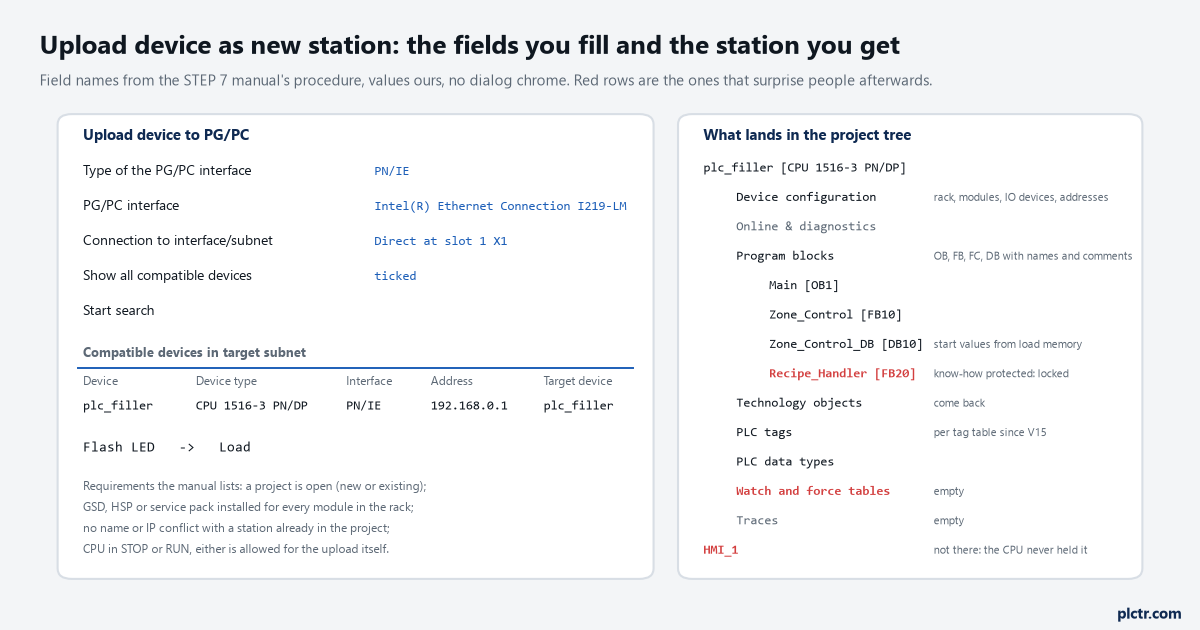
Field names from the manual’s procedure, values ours, no dialog drawn. The red rows on the right are the ones that surprise people the next morning.
Compile it before anything else; a clean upload compiles clean the first time.
Why the names come back on an S7-1500, and why they did not on the 300
The reason an S7-1500 upload is readable is one paragraph in the STEP 7 manual’s loading basics, and it is worth knowing verbatim in spirit: during the download, all information required for the reconstruction of the program, including symbolic information such as the names and comments for code and data blocks, is also downloaded, in up to three configured project languages, and that symbolic information goes to load memory rather than work memory. After the data has been loaded from a device the symbolic information is available again in the program. Load memory is the card, the memory function manual says, and it holds code blocks, data blocks, technology objects and the hardware configuration. So the names were on the card the whole time, in the languages the last person to download had configured, and a CPU whose comments come back in German was downloaded from a project whose project languages were German, which tells you something about who built it. Since V15 the PLC tags come back in the tag tables as they were configured offline rather than in one heap, which is a small mercy on a large machine. The contrast is the S7-300, where the STEP 7 manual says of a memory-card upload that no symbolic information is loaded, and where the editor’s own rule for an address with no symbol is to insert Tag_
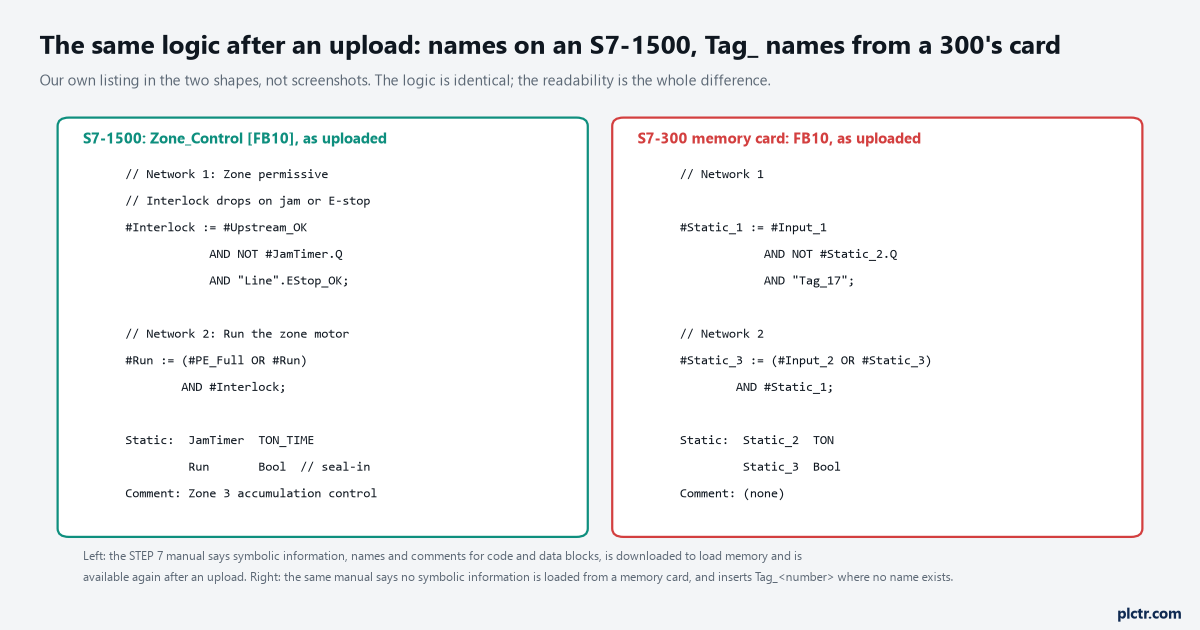
Our own listing in both shapes, not screenshots. Same logic on both sides; the difference is whether the names were ever stored in the controller.
If an S7-1500 upload comes back with Tag_ names, it was downloaded that way.
What is gone, and which of it was never there
The manual’s own sentence is the honest one: loading to and from a device is not a substitute for storing data in an offline project, because watch tables and the multi-language capability of projects cannot be reproduced by loading to and from a device. So the watch tables are gone, all of them, and so are any project languages beyond the ones that were downloaded. Then the block that will not open: after loading from a device you can only display all data from know-how-protected blocks by entering the correct password. The block is there, it compiles, it runs, it is called, and its code is invisible, and what you can and cannot do with a protected block is a page of its own. If a block was also bound to the serial number of a CPU or card, which the S7-1200 manual documents as copy protection and the S7-1500 offers in the same block properties, it will download again only to that CPU or that card, which matters the day a spare is fitted. Then the things that were never in the CPU at all, which is observation rather than a manual sentence: the HMI project, because the panel holds its own; the libraries the blocks were built from; the version history; and every comment somebody typed into a network and then deleted before downloading.
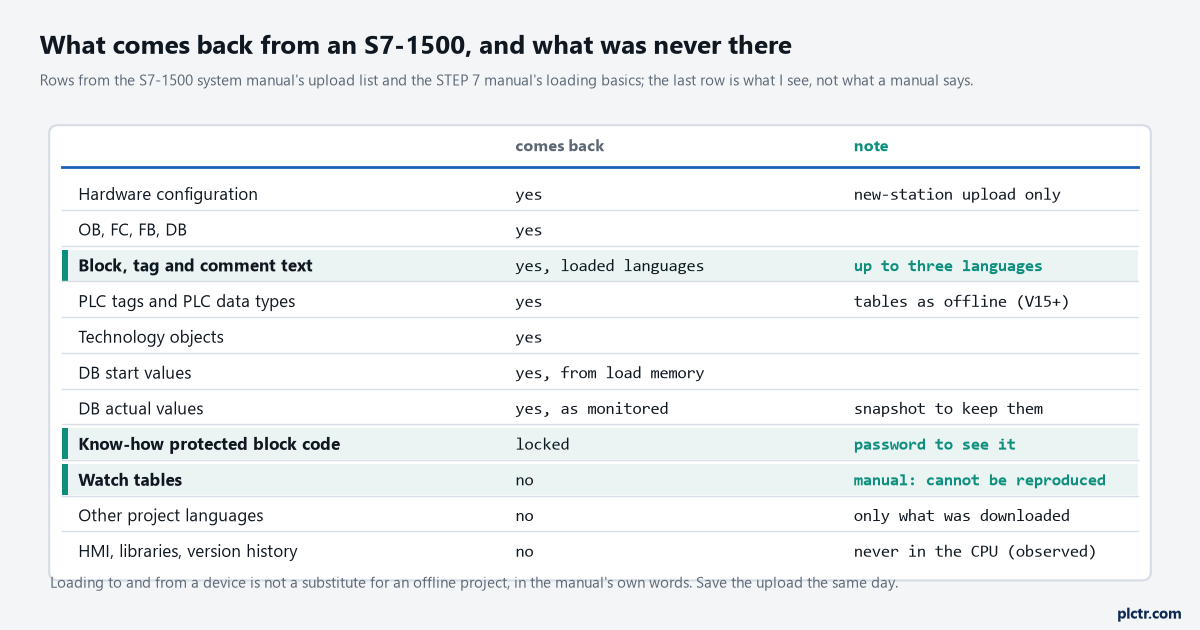
Rows from the manuals’ lists; the last row is observation, not documentation. The three marked rows are the ones to tell the plant manager about before they ask.
None of that is a fault of the upload; it is what a CPU is.
The values: start, actual, and the snapshot
Two different sets of numbers come back and people confuse them for years. When a block is uploaded, the system manual says, the start values from the load memory of the CPU are transferred as the start values in the offline project. Separately, the upload brings the actual values of all DBs, the numbers the machine is running on right now. If the recipe in DB50 has been tuned by hand over six months, it is the actual values you care about, and the tool for keeping them is Snapshot of the monitor values, which overwrites the start values of tags in the offline data block with the actual values from the CPU, all of them or only those marked as setpoints, with the manual’s warning that the values are simply copied and STEP 7 does not check that they all come from the same cycle. Take the snapshot on a quiet machine, apply it as start values, and the next download does not put the machine back to somebody’s commissioning numbers. What a later download does to those values, with and without reinitialisation, is its own subject.
Snapshot first, then apply it as start values, then save the project.
What everybody does first, and what to do instead
Edit. The upload lands, the block opens, the comments are there, and the change that was wanted for six months goes in the same afternoon and gets downloaded. Then the operator mentions the other three things the panel used to do, and there is no way back, because the upload was never saved as a project before it was edited. The compare editor exists for exactly this moment: with the uploaded station open, an online/offline comparison shows every block with a green circle where the two agree, and that screen is the proof that what you saved is what the CPU is running. Save the untouched upload with the date in its name, compare, and only then make the change in a copy.
Save the untouched upload with the date in its name before anything else.
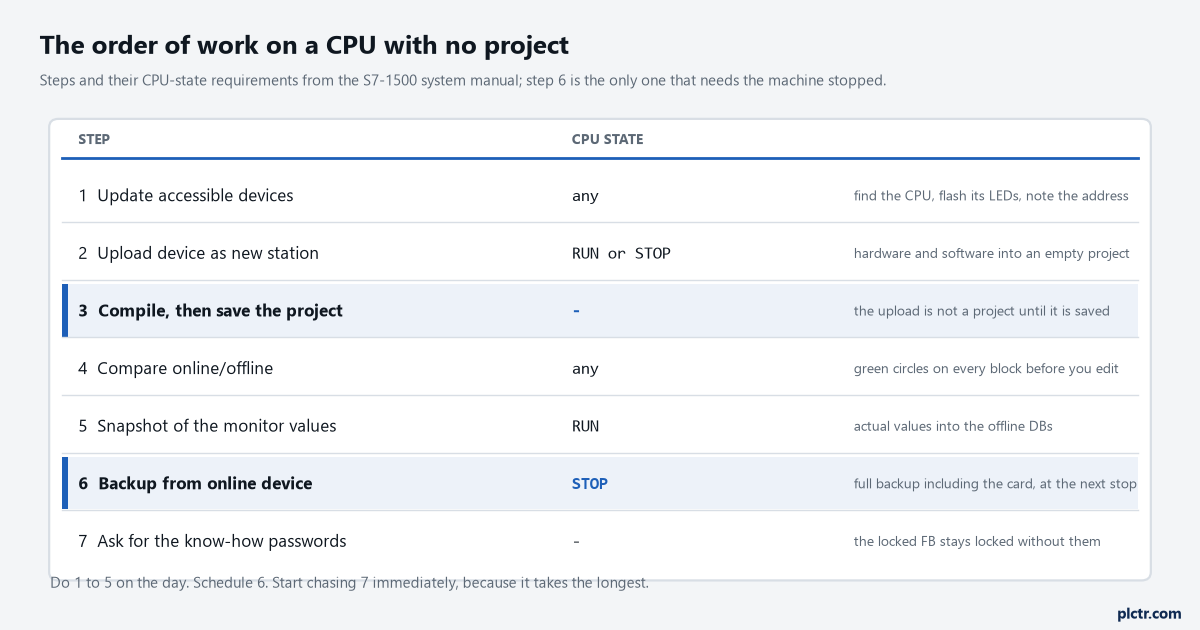
Steps and CPU-state requirements from the system manual. Only the full backup needs the machine stopped.
Then the two things that take longest, started the same day. Ask for the passwords, in writing, from whoever protected the blocks, because a protected FB you cannot open is a machine you cannot modify without rewriting it. And check the firmware and project version against what the laptop can handle, because a spare CPU on a different firmware is the next problem on a machine like this, and the project you just recovered is the one that has to load into it. When you are ready to go online against the recovered project and confirm it really is the running program, the watch table page starts with the comparison circle for that reason.